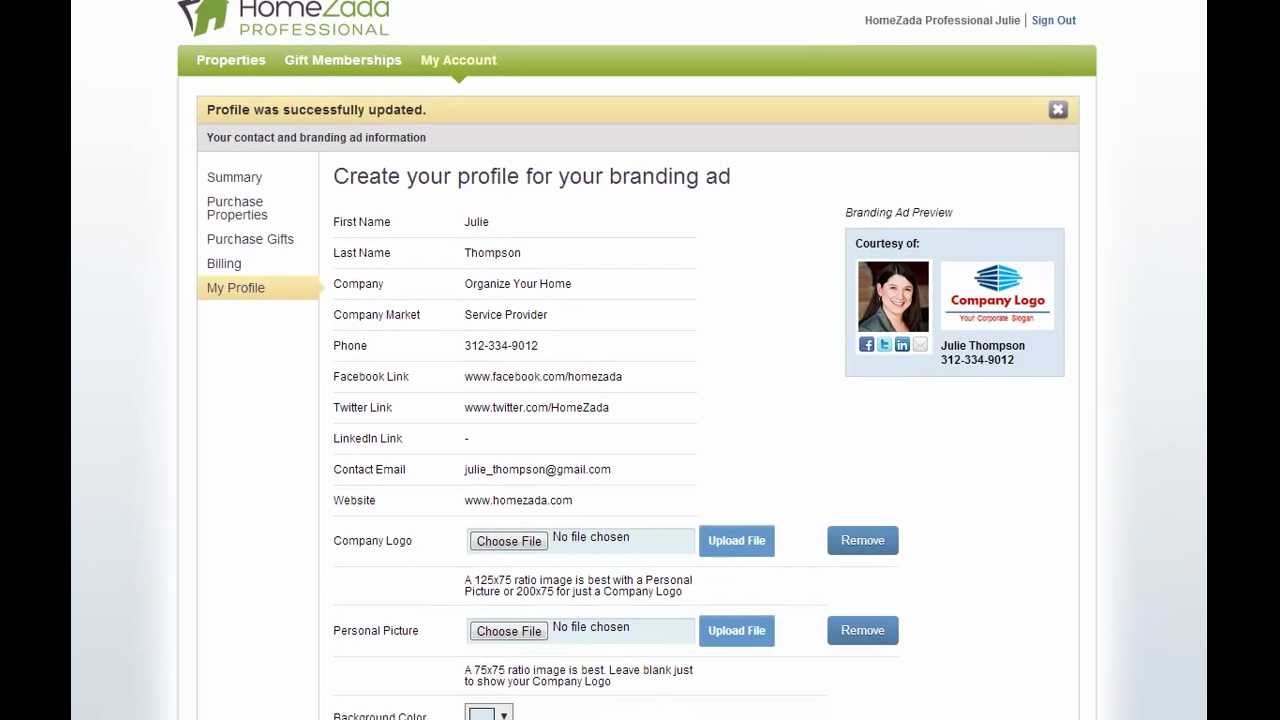
Walk through HomeZada Professional's branding ad builder starting from My Profile. Upload your logo (200 × 75 px or smaller), add a personal photo, customize the background color, and preview or print the finished ad for clients.
Chapters
To create your online branding ad, all you have to do is go to the My Profile page and click on the pencil icon next to each field and enter in your specific information. In the upper right, right-hand side, you can see a preview of that branding ad where each one of these social icons is a clickable link for your customer. So here you can click on and see we're going to be taken to the HomeZada Twitter page. Below that is where you can upload logos. Here I'm gonna choose a logo where I'm choosing to brand just my company name. So you can see here that the logo is 200 by 75 pixels and it takes the full width of the branding ad. But the system is also flexible for you to be able to brand not only a company logo but a personal picture. So here I'm gonna upload a different logo that's sized in the 125 by 75 pixels, and now I'm gonna also upload a personal photo which is 75 by 75. Pixels. And now you can see that the branding ad will change to show the personal picture as well as the logo. If I scroll down below, you can also change the background of the ad if you'd like in terms of a different color. You can also send yourself previews of emails, as well as some professionals have asked for the ability to have a printable brochure or PDF that they can actually print out and give to their customers as an indication of what they're about to receive. See with HomeZada Professional. And that's it for creating your online branding profile ad.