HomeZada Demo Overview with Homeowner AI
HomeZada is a home-management platform with AI that automatically inventories your belongings from photos, estimates their value for insurance, forecasts maintenance costs, and projects your home's future value. It pulls market data to show your total annual ownership cost (around $48k) and calculates 5-year budgets based on your home's age and location.
Chapters
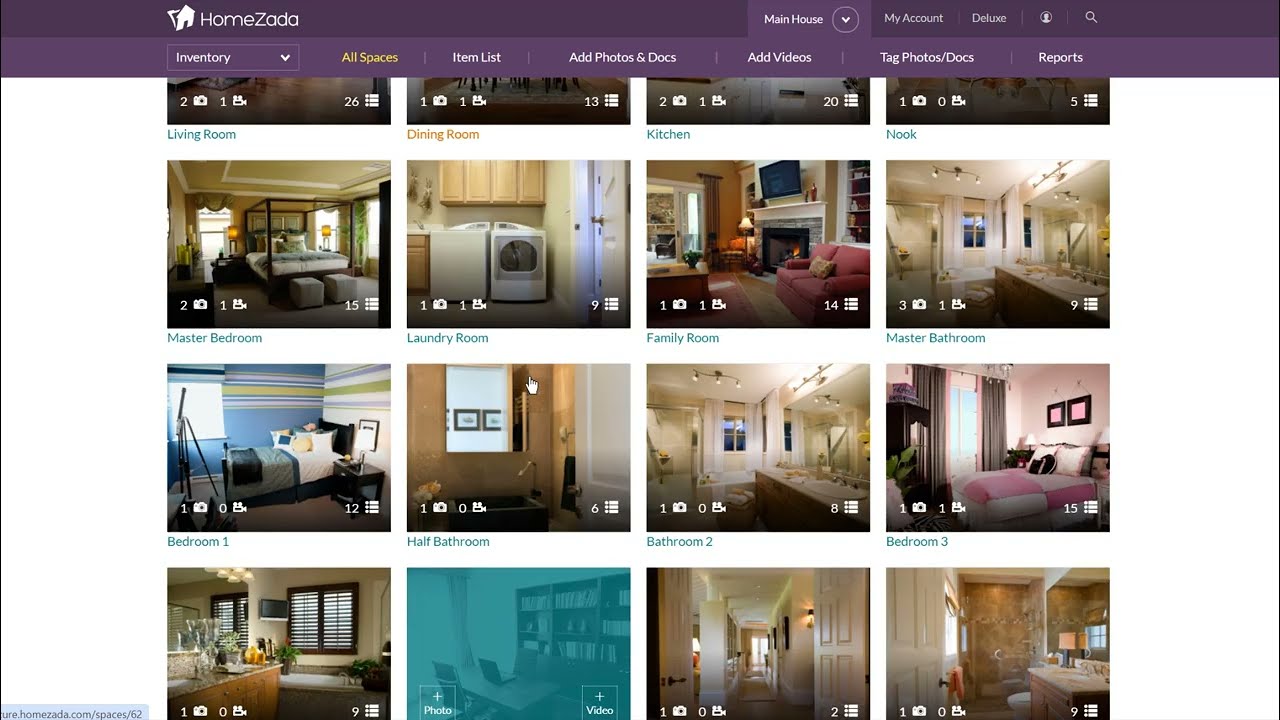
HomeZot is a digital home management platform that helps homeowners save money, improve value, and just get organized around their largest financial asset and biggest expense. It has even now included Homeowner AI, which is a fantastic, amazing new set of features that you'll see here in a second. So here's the main dashboard where you can see the user's home and the navigation icons, the news feed where you're getting maintenance reminders, you're getting updates on the value of your home and how much your loan-to-value ratio is, and all this information also gets pushed to you via push notification and an email. And a little bit about how Homesota is built, you can log into your account with any device you want— mobile, tablet, or desktop. So it's fantastic to be able to switch between devices and get access to all your data. Now if I click here, when you sign up for a Homesota account, we want you to enter in your address. And once you enter in your address, all this data is automatically going to get filled in for you. For example, here the year it was built, the size, the square footage. And this is really important when we start using Homeowner AI because it's going give you advice that's specific to your house and your details and not just generic advice that you find on a simple web search. So now if I go to the home inventory, it's got its own dashboard here. If the— most users will click on all spaces. Here's where Homes Auto at signup is going to predict all the rooms in your house, and then we essentially encourage people to take their mobile phone and take photos and videos of every room, primarily for insurance purposes. So for instance, if I go to the kitchen and click on videos, it's very easy to basically walk through your house and take a 3 to 5 minute video of every single room in your house. Again, for insurance purposes in case your house were to burn down or you had to file a claim to get an insurance reimbursement. Some people will go to the level of effort of taking individual photos of all the things inside their house, whether it's the fixed assets or the personal property. And now if I show you one of the Fantastic features of how Homeowner AI works. I'm going to go down here to this room here called the Great Room. If I click on the Photos tab here, you can see I've got different photos. I come in here and hit Select, pick a photo, and hit Zada AI Recognition. Now you can see that automatically Homeowner AI is taking the photo and it's basically identifying all the objects inside the photo. It's categorizing them as whether it's a personal possession and it's what category it is. It's even estimating the value and giving you a description all within less than 10 seconds. And from here you can actually save all this information and think about going through, you know, the 10 rooms in your home and being able to basically create a fantastic home inventory. Now once you've done this, you can obviously go to the Reports section here and you're going to get on-screen sort of visual dashboards over the value of the items in your home. You can categorize this and And insurance companies like this because you can export this to a PDF, send it to your insurance company to make sure that you're properly insured or not. One other thing on the inventory on the Homeowner AI, if you look at the upper right-hand corner where it says Actions and Discovery, I want to get a risk assessment for my home. So many new homeowners are buying homes all across the country and they've never lived in a certain region before, so they don't even think about, okay, this home is in Wilmington, North Carolina. What is the probability of hurricanes, floodings, tornadoes, coastal erosion? So instantly Homeowner AI has taken your house based on your address and it's given you sort of an assessment over what natural disaster risks are. And it's given you an estimate. Again, a standard home insurance policy may not cover everything. So it's given you the data to make better financial decisions over whether you want to pursue these additional insurance policies. Now let's go over to the maintenance section, which is what we know a lot of homeowners struggle with. This again, if the users click on task list, HomeZada at signup automatically creates 40 to 50 preventative maintenance tasks. This is very useful for first-time homeowners who have no idea about all the preventative maintenance tasks, and all this data got automatically created for the user, which again is going to send you push notifications and To keep you aware of over all the things you need to do to manage your house. Now let's look at Homeowner AI again. This second task here, remove lint from a dryer exhaust duct. Most homeowners don't even realize that the back of your dryer is connected to a duct. You should sort of clean that out. You hit Ask Zada How To. Again, Homeowner AI is basically now giving you a step-by-step list over all the things over how you actually want to do this task. But even look below the table, you can see here it's giving you a DIY estimate of, hey, maybe you need to buy some tools for that. Or what if I was to not want to do this myself and actually want to hire somebody to do this for me? And what's going to be the issue if I don't do this to actually replace it? All in one place in less than 10 seconds, you get amazing homeowner AI as it relates to the, this aspect of managing maintenance and repairs. Also, if I go back to here and you can document all your tasks, especially the ones that maybe have costs associated with in terms of fix it and repair. Again, reports. Now you can come on, on screen here and see how much it costs you to maintain your home. And let's say you've lived in your home for 10 years. You've got an entire history over how much it's cost to maintain and repair your home. But now let's look at even another advanced feature of Homeowner AI. I want to forecast future maintenance costs. Click on that. Homes Auto AI, Homeowner AI knows that we're in the year 2024. It knows the size of your house. So based on age, we know that Typical things start to break down more. So it's automatically giving you again a table that's basically forecasting, hey, this is how much preventative maintenance costs might cost you. This is kind of what Homeowner AI, based on the size and age and location of your home, thinks the repair cost. And now it's given you a 5-year future budget, again, helping you assess whether you want to stay in your current home or potentially move. Now, if I go over to projects, again, home improvement projects is a huge opportunity for people. The system tracks all your different projects so you can track any project that you want. If you want to create a new project, HomeZada has 50 templates over common home improvement projects. So let's say you want to do a bathroom remodel. You want to hit Create Project. You can see that you can give yourself kind of a high, what I call swag-level estimate, and you hit Create Project. Now notice that HomeZada automatically has built in all the typical items that you're going to need to select. Even if you hire a contractor, you're still going to have to pick out all these products. And notice the column here is the budget price is currently blank. But now I can execute Homeowner AI. And now notice the AI chat box is basically saying, hey, I need to know the size of your bathroom remodel. Why is that important? Because of how much quantity of materials are required. So you can have an interaction. You basically say, oh, my bathroom is about 15 feet by 20 feet. And now notice what the AI tool is doing. It's actually taking every single one of those items, estimating a unit quantity, even calculating how much floor tile and floor grout and wall tile, etc. And it's basically set with an assumption. And it's come out with a $17,000 project. Now you might say, rebudget as a high-end bathroom remodel.
Right.
So again, think about the level of detail if you go online to a typical web search about how much a bathroom remodel is going to cost, you're going to get this massive range that really doesn't do any value to you. Now with HomeZada and Homeowner AI, you're basically getting instant sort of level 2 different budgets. And now you can have an ongoing interaction with the AI tool, save your budget. And you're now much in a much better position as it relates to going out and talking to contractors. But also look at this other concept here of what I call Zada AI research, right? I want to get a bathtub, I click on that. Most people have never done a bathroom remodel before. Again, the AI tool automatically is doing research for you because there's so many different product types. Do you want a cast iron bathtub? Do you want a porcelain one? Do you want a stone resin one or an acrylic one? And it's giving you all this different research again in less than 10 seconds about all these different aspects over product research. Now if I go over here and click on finances, again at signup, again based on your address, all this data gets gets filled in for you. You go to property values, it's automatically going to give you updated estimates based on current market conditions over the value of your home as well as the range. You can— it automatically assesses what county you're in and the property tax value and how much you're going to be charged for property tax. It even gives you a 3-year forecast of, hey, based on where you live, how much your home might appreciate. And really the big financial benefit here is how much home equity you have. If I click on home expenses, same thing. Automatically the system has, based on your location, identified all the typical expenses and created a budget for you. So at signup, you can see that it thinks it's about $48,000 a year to own your home. Again, get more Homeowner AI, get homeowner investment analysis. You bought this home 6 years ago for $521,000. The current value is $770,000. Nobody gives you an investment analysis over looking at your home from a pure investment perspective. It's actually appreciated over the last 5 years by 50%, the annualized basis. All this information automatically created for you, giving you way more visibility than you ever thought you had before. And the last one here I'm going to show you is what I call future replacement costs. Again, every piece of material, the big piggy sum items in your home, eventually is going to wear out. Roofs only last 20 or 30 years. Windows, siding, HVAC equipment. Again, Homeowner AI automatically knows how old your home is, where it's located, what its current value is. And it's giving you a table here of, hey, we think there's probably 6 years left on your roof, maybe 10 years on your windows. This is how much it's going to cost you. And now we're giving you again, should you stay in your home financially or should you consider selling and moving somewhere else? All great financial visibility that you never had before at your fingertips.
HomeZada can also be used as a research tool for people looking to buy their first home.
When you create a property, just give it a name like Home Research, but don't give it an address because clearly you may not know which home you're going to end up using.
And then you can use the, uh, Homeowner AI tool to ask it any real estate, finance, or even location type questions. So I'm just going to type in an answer question here. Provide all steps that I need to buy my first home. The Homeowner AI tool gives you a detailed list that you can copy and paste, and it basically, it gives you essentially a whole bunch of advice all consolidated real quick about assess your financial situation, get pre-approved, determine what your needs are, kind of going through that whole process. And it even looks at Providing additional information so you can have that ongoing discussion, like what are typical closing costs when I'm buying a home, right? And so again, you can have an ongoing discussion with all this as it relates to the Homeowner AI tool, so you're getting access to all this advice. The other beautiful part about it is all of that is stored in the history tab, so you can always go back a couple of weeks later and look at all the details over the different things that you've actually researched. Let's give another example here over what else you could ask it, right? Let's talk— let's ask it how much it's going to cost, total cost of ownership, if I bought a home for $400,000. Again, the Homeowner AI tool is going to do a high-level estimate. Hey, 30-year mortgage. Now granted, it's basically estimating it at 4%. Property taxes, home insurance, maintenance, right? But you can say rebudget at 6.5%.
6.5%. Mortgage.
Right, so you're basically doing this on the fly, again having that interactive discussion with the Homeowner AI tool on all kinds of different aspects. You can even ask it about what I call location. What are the pros and cons of certain neighborhoods that you might be considering? So I'm going to put in a question here. I'm looking— I live in Frisco, Texas. What's going on in this neighborhood that I'm interested called Hackberry? Right? It's actually searching, coming up with its own matrix of basically giving you the pros and cons from a location standpoint that brings together housing, community feel, schools, recreation, safety, shopping, all kinds of different stuff on here, right? Even as a renter, you could even go into the inventory if you're renting a home or an apartment. You can still take an inventory of all your personal property For renter's insurance, just like we saw earlier in the demo. You could take all the different photos of your personal items. You can even, as a new potential homeowner, go to the maintenance calendar and look at all the potential maintenance tasks that you're going to have to sort of plan for and think about as it relates to managing the home. And if you're actually thinking about buying a fixer-upper, again, you have access to all the different project templates and you can start playing around just like we saw in the previous in the earlier part of the demo about the different ways to sort of budget for different projects. So that's it. Hopefully you find great benefit in understanding how HomeZada works.
Thank you.










