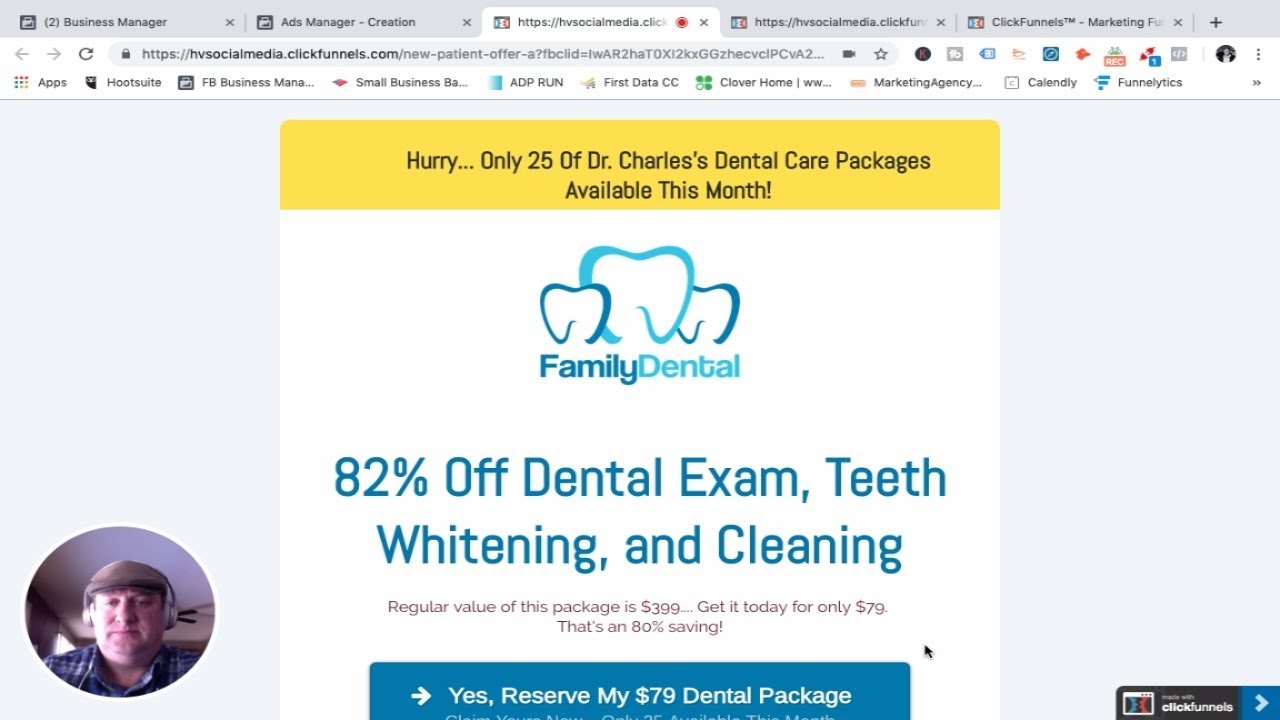
In this tutorial, Ed Weeks Jr., founder of HV Social Media, walks dental practice owners through a step‑by‑step process for generating new patients using Facebook and Instagram ads that drive traffic to a specially designed capture (landing) page. He first creates a mock landing page for a fictional Dr. Charles, featuring an 82% discount on a $399 dental exam, whitening, and cleaning package, priced at $79. He then opens Facebook Ads Manager, selects the ‘Traffic’ objective, and sets up an ad set named “Columbus, Ohio, March 2019 – Driving traffic to the website.” The audience is defined as a 15‑mile radius around Columbus, ages 30‑55, English‑speaking, with interests in dentistry, smiles, and white teeth, yielding roughly 110,000 potential users. Placements are left on automatic with a focus on Facebook feed. A daily budget of $20 (≈$140/week) is recommended, and the campaign is optimized for landing‑page views. Ed creates a single‑image ad using stock photos related to dentistry, pulling ad copy directly from the landing page (e.g., “82% off dental exam, teeth whitening, cleaning – $79”). He adds a pixel, previews the ad, and submits it for approval. The capture page asks for name, email, and phone; after submission, a thank‑you page offers free x‑rays if the prospect calls immediately, reinforcing the call‑to‑action. Ed emphasizes the importance of targeting, budgeting, and follow‑up to convert clicks into appointments, warning that practices not using this method are leaving money on the table.
Chapters
Hey everybody, Ed Weeks Jr. here, the founder of HV Social Media, dropping this video today specifically towards dental practices. What I want to show you today is how to use a capture page, uh, to drive traffic from Facebook to ultimately convert into patients for your practice. So here we go real fast. As you can see here, I created this landing page. It's a made-up doctor, Dr. Charles And basically we have a huge offer. We're offering 82% off dental exams, teeth whitening, and cleaning. Basically a package of $399, you can get it today for $79. We're going to drive traffic from Facebook and Instagram to this capture page. So in the Ads Manager in Facebook, we're going to choose the traffic consideration. We're going have all these different marketing objectives. We're gonna drive traffic. It's our first time doing this. We're driving traffic, and we're driving traffic to Dr. Charles's traffic. We're just gonna call that, that name. We're gonna look to drive it. Dr. Charles is in Columbus, so we're gonna call this ad set Columbus, Ohio, March 2019. Driving traffic to the website. We're going to go down and choose our audience. Our audience is 15-mile radius of Columbus, Ohio. Good. Dr. Charles is centrally located, so we're good. We can use zip code, we could do an address, we could use his address in here, but we're just going to target because we have talked to Dr. Charles and we understand— or you're in Dr. Charles's office, you understand where most of your patients are from. We're going to target people 30 to 55. Both men and women, English speaking only. We do not have bilingual on staff. So this is our choices. Then we get into our detailed targeting. We use keywords. People are interested in the dentist. There's 30 million people across the US. People interested in a smile, 142 million people across the US. And people that are interested in white teeth. This again is all within, uh, the 15-mile radius of Columbus, Ohio. It gives us a solid audience size of 110,000 1,000 people. We're going to scroll down here, placements. We're going to edit placements, and we're just going to go ahead with the Facebook feeds. Instead, we're going to go with most of this. There's things that we don't need— the videos— because we're not doing a video. So that's it. You can just go to, uh, automatic placements and keep it there. Uh, you can do that from the beginning because it's easier. So we'll just do automatic placements. Here's, you know, you can see the people we're reaching, nearly 5,000 people a day, nearly 125 landing page views, because Facebook will optimize it to get to a solid number of landing page views. Our budget, I recommend for any dental practice, really any client I work with, a minimum daily budget of $20 a day to start. So $20 a day, the $140 a week. It's not a lot of money to start driving targeted traffic to your offer. Optimization— we're going to optimize this campaign for landing page views. Again, makes sense, right? We have a landing page, we're going to optimize for landing page views. And we just continue. As you can see on the left side here, everything flows. My picture's in the way, my face is in the way, but this is the creating the ad piece. Excuse me. So we can use an existing post. We don't have one on the Facebook page. We're going to use— we're going to create it right now. Here's our— this is my agency. This is my agency's Instagram. We're going to use a single image or video. We're going to use an image, uh, we've created. We're going to utilize some stock images. I've already used this, but if we're doing this, we could just search stock images for dentist. See that, eventually give me some interest. Stock dentist. I don't know why it's not working, but I've already chosen a few, right? We are interested in white teeth, uh, dentist, and smiles. So we'll use those 3 for our ads. We hit continue and we can actually see our ads being created. Here we go. This is, uh, interesting. So we can go back here and we can see what our ad will look like in the mobile feed. I've done this. Where did all this text come from? It all came from our landing page. So, 82% off dental exam, teeth whitening, cleaning— not bad. Regular value of this package is $300, get it today for $79. Dynamic offer, definitely a great lead magnet. It's 80% savings and, ooh, gotta act now. There's only 25 this month. Where are we driving this traffic to? We're driving this traffic to our page. So our page is right here. So we choose that, we put that in there. We can preview this so we know it's actually going to the right offer and it is. So that's where we're driving that traffic to. This is Facebook 102, but you definitely want to have pixels on there. We can call this March Madness offer. It's March Madness. If you're not a college basketball fan, March Madness is coming up in the next few weeks here. It's March of 2019 as I'm doing this video. So we're just making this March Madness offer simple. This is how the ad's gonna look. And we're basically done. Once we hit confirm, wait for the approval by Facebook, but it will start driving traffic to our landing page. Now what's interesting about this landing page that we've created is once somebody clicks here, it's going to ask for 3 pieces of information. It's going to be their name, their email, and their phone. Once they click submit there, it goes to This page, this page is where it says, "Oh my God, you're almost complete!" But if you call us now, we're going to throw in x-rays. So you're going to get $79 package and you're going to get free x-rays. So boom! Here's the number, and we tell them what our patients are saying. This is a way to get people to call your practice. Ultimately, we want to drive as many new patients predetermined number, so we have an understanding of what good would look like. But this is how you do it through Facebook and Instagram. And if you're not doing this for your dental practice, you're leaving a lot of money on the table. Again, you can get these ad sets created relatively inexpensively and have massive results. Hope it helped you guys. Look forward to the next one.