Learn how to build autonomous AI agents with three core components: skills (step-by-step instructions), connections (integrations to Gmail, Google Calendar, Asana), and identity files that define the agent's role and rules. The speaker walks through file formats and shows a real example: a team of agents including chief of staff Ellie, finance Kevin, and SEO Seth working together.
Chapters
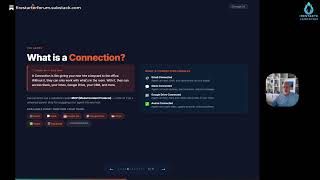
Hi, I want to talk today about, uh, setting up agents and what they mean in, so, in AI. So we're going to talk about what is an agent, then what is a skill, what is a connection, and then how do you put all these things together, uh, to start to build your agent within your, within your platform itself. So what is an agent? An agent is essentially like a new hire. It's a per— you can treat it like an employee. Right? It's essentially a role that you're creating, um, that will perform tasks for you within that environment. So you give it a goal, essentially you give it some sort of objective, not necessarily step-by-step instructions— that'll come later when we talk about skills— but then it's going to figure out those steps, um, and the skills it needs so that I can search, read files, write docs, send messages, give you an update on your, on your, uh, your daily conventions, things like that. So it's basically gonna follow instructions for you. It's kind of like a project on steroids here, essentially. So, um, think about like an agent versus a chatbot. So a chatbot will respond to a question where an agent starts to be autonomous and can complete tasks on an end-to-end basis. Agents are— or chatbots are kind of text in, text out, but agents are text in, action, then an output from what you're doing. Chatbots generally have very little memory, or it learns over time, but sometimes you run out of the memory blocks. This knows everything about you and knows everything that you've given it in terms of context and stays within that context. And finally, chatbots are one at a time. Like one conversation at a time, where agents can trigger workflows and tools and actually build a lot within that environment. So what's a skill then? So a skill is like an SOP, right? So you write the skill once, and then that's exactly how you want things to happen for that client over, over time. So here's like a content brief skill. Your description of what you're trying to do, triggers, brief me on, content brief on, write a brief. Um, these are things that you can type in to the agent to have it run within that environment, and then it gives the step-by-step instructions on how it's going to pull together within that environment. Now, skills and connections kind of work together. Connections are essentially connections to the tools that you use. This could be Gmail, it could be social media, it could be Asana, it could be any tool that you have. And there's hundreds of connections that can be built within either, um, you know, Claude or Gemini or something like that. They all use a standard called MCP, or Model Context Protocol. That's essentially like an API for the model to connect to a downstream application. So you put all these things together, an agent, like an employee, will use skills and the tools that you give it to go ahead and create tasks for you or finish tasks for you. So you think about you talking to your agent who's gonna use a skill connection and your agent MD file to output effort throughout the environment. The agent.md or the Claude.md is the identity of that agent, tells the agent who it is and how you'd like it to behave and also what rules are. So think about this as when you're creating an agent, it's like onboarding a new employee. Everything that you would tell them about the business, about what you would do, you put within that, that agent file, right? Then skills are the things that you hope that they develop over time to do the work that they do. So it's processes that you want them to follow, step-by-step instructions on how that's gonna get done. And then the connections give them access to those tools that you use to get the work done within that environment. So what is an agent.md or a Claude.md file? Claude.md is used with Claude, agent.md is used elsewhere. So essentially you put in a role, like you are a content operations assistant, You put in any business contacts, you put in any rules that you want them to do, any workflow, maybe information about your business and, and what you do. If it's a client, um, piece, you put information about their— about the client that you'd want it to serve, all that kind of stuff within that environment. This is written in a text file, um, save it as a .md file or Markdown file. And then you just feed that into the, the, uh, um, tool that you want to do, right? So a skill, then a .skill file, it's a header and then a body, right? So you name the skill, you give it a description of what you wanted to do, words that you would use to create the— or to trigger the skill within your, within your coworker or your agent, and then a step-by-step instruction of what you want it to do. So write it like you're explaining a process to a sharp new team member in their first week. Clear examples how you want them to operate within that world. Then a connector is simply that. It's an MCP server or Model Context Protocol server connected to an app. So if you want it to, for example, read your calendar every day and tell you what, what's coming up, you want to connect it to your Google Calendar. If you want it to clean up your files on your Google Drive, you want to connect it to your Google Drive, that kind of thing. So once it's connected, now you'll be able to put information and have it interact with those files for you as an agent within that environment. So how do you build this? Very simple. Start with the agent file, tell it its role, and give it the context of what you want to do. Then you connect to it within your, within your tool of choice, and you start asking it to build the skills with you, right? I would like you to do this, I would like you to do that. Then you install the connectors that it's connected to, and then you just test and refine it. It's a real simple step, but this is incredibly powerful. I've actually created a whole team of agents that I work with. My chief of staff, I call her Ellie, and whenever Ellie— I tell Ellie to do something, she can go get Kevin, my finance guy, or Seth, my SEO guy, and they will do work for me, um, autonomously, bring it together. So anything that you'd want to do, one, number one, try writing your first agent file. And go ahead and pause it on that file. You can copy what we did there. Then pick a skill that you wanted to do, connect one tool, and take it forward with everything. It's really a powerful tool for you. I would recommend that you really start using agents in your daily work. It's absolutely changed the game for me and everything that I've done. It's been incredible. So go for it. Have fun.