Moxie's Bulk Post Generator now schedules posts up to 45 days ahead across Meta, LinkedIn, and Google, with AI-generated images that add logos and brand colors. An Edit Assistant rewrites content on command, and a preview shows how each post lands on every network before you schedule.
Chapters
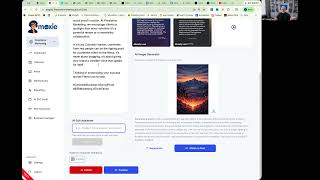
Hi everybody, I wanted to cover something very specific because we've made some pretty major changes to the platform, uh, recently, um, mostly with post generation. So, um, our old post generation tool admittedly probably was a little weak in terms of copy that we created. So we've added in a lot more detail into that post generation, uh, capability, and it's coming, producing much better results. And I want to show you how that kind of works So what we've added, just to be clear, is specific instructions by channel, um, and, and putting in a lot more value into the copy of these posts, uh, for you automatically. So you're getting better posts from the, from the plat— from the platform. So again, to generate bulk social media posts, we go ahead and choose how much time we want to do. You can go up to 45 days. You've got, um, the Meta capability, LinkedIn. We've added Google into that cuz you want to be posting to your Google profile about once per, per week or so. Uh, we're also working on YouTube. YouTube is created. We just need to get it approved by Google. Once that happens, we'll bring YouTube in here as well so you can get your reels and your shorts, which are really, really performing well into the ethers as much as possible. Um, so go ahead and you put in your special instructions, your exclusions that you'd want to do. As always, special instructions would be just for the period that you're choosing here. So like if you want to do an Easter special or something like that during this week, go ahead and do it. And you want to exclude during that time, during this timeframe, you can do, and then you generate the content that's gonna generate all of your posts for that, that week here. Now let's just show you what that kind of looks like inside the post itself. So here, now you're always gonna have a hook, uh, within that, that beginning part of that. Um, and you want to go, uh, into the, you'll have the paragraphs breaking that out, bringing in your local authority into these as Qs as well, which will help your visibility. And we have, of course, the, um, the hashtags and everything in the call to action within that environment. So what's cool here, in addition to being able to add in your additional posts within that environment, so this one's about, um, ratings. So we'll add in maybe another one to make this a carousel here. If you don't have an image in that library, we now can build an image around this specific post copy. So what we're gonna do is we're gonna basically create a prompt that is from this post copy here. We'll change the feed. We can add in our company logo. We can do it in our brand colors. You can even add a text overlay to that if you'd like to. From here, you can generate the image, uh, within that platform. While that's generating, I wanna talk about a couple other things here. You have the AI Edit Assistant, so obviously you can go ahead and delete or add in anything that you want to from here, um, within that within that environment. But if you want to change that or you want to direct that through AI, you can just type in like a prompt here and it'll change that information as well if you want a whole rewrite of that. We also still have the preview button here, so you'll be able to see and view what this looks like across those, those platforms, see what it looks like on Facebook, LinkedIn, Threads, so you make sure that it's going to post properly. Within that environment. And then here's an example of the, of the, the piece that we created here. So I'm going to regenerate that because I didn't really like that one in particular. So we'll see what happens with, with that feed here. We'll do it as a square this time, generate the image, and, and see what that looks like. Mm-hmm. There we go. That one's a little bit better. I'll attach that one to the post, uh, within that environment. So now we have a carousel of 3 images here that, um, we can go ahead and take a look at. That looks good to me. I like how that plays out. Excellent. And now we just go ahead and schedule that to post within that environment whenever you wanna make that happen. It will make that post happen and you're good to go. Through that environment. So that's the new post editor. Vast improvement on the copy that we're creating. You now can create your own images within the posts that are tied to that post, so you don't have to prompt it like you used to and really kind of drive in the value of all this. Again, though, we do believe that you should be using your own imagery in here, not necessarily the, the AI-generated imagery. So you're always going to be much better off. If you're using yours or the client's imagery. But if you need it, I need a boost here and there, you need to add something in, we've got you covered on that as well. Thanks.