Design System Interview - Design System for a kanban board , Fullstack developer, 2024
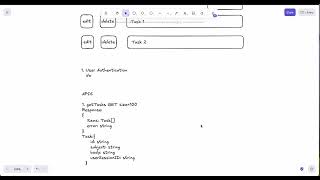
A full-stack design for a Kanban board without authentication, using temporary session IDs. The speaker covers REST APIs with idempotent PUT and DELETE operations, three real-time sync approaches (WebSockets, Server-Sent Events, polling), and a locking protocol that prevents concurrent edits by tracking which user has a task locked.
Chapters
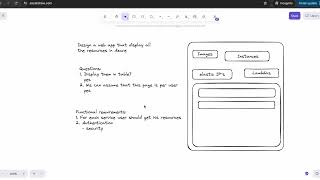
Today we're gonna be doing a design system interview question for a full-stack developer that was asked in 2024 by startup company. Not a big company, but it is a good question. So here's a question: design a Kanban board where you can add tasks and you can display tasks, you can edit every task and you can delete a task. Okay, do we want to have— we need to ask some questions. So do we want to have users, user authentication, authentication. And the answer was no, no user authentication. And so if we're not going to be doing user authentication, how we can do it? We can do it with session users. So every task will be created. It will be created by a session user. For every user that enters the application, there will be created a session user ID, and with this ID, every task will be created. Okay, so we want to define APIs for, for this application. So let's define APIs. APIs. Okay, so first API that we want is get tasks. Get tasks. So we want to fetch all the tasks. It is GET And also, um, we need to ask, so do we want to display— how many we want to display, how many tasks we want to display per page? Do we want to use pagination, or do we want to use virtual scroll, that as long as user scrolling, he will see more and more tasks. And the answer for that, I think, was you can choose. So we can choose. I would, I would implement a virtual scrolling. And but also again, we will fetch tasks by size. So we'll pass size and we will decide what batch of the sites we want dependent on how much can be visible for a user. So let's put just 100. So it will be a GET request and the response will be— response will contain the tasks. Now we just can call it items. Okay, item is a task and it's an array. And in case of error, we will have error. For all the APIs, we will have an, um, in case of error, error string. Okay, so first we want to fetch our tasks. This is one API. Second API is we want to add a task. It will be a POST request. Add task POST, and the request will be— I'm gonna move it a bit up. And the request will be— request will contain obviously a task. It will be task. And, and the task will contain— we need to define what task contains. It will contain subject string. For now, uh, we're saying that our task can contain subject and body, that's it, but it can contain more. It's all strings. Task body, maybe, um, and, um, user session ID we're gonna be passing, which is also a string. We're creating our task, and we didn't define a task here. So, so a task basically has subject, it has ID, it has ID which is also string, subject, body, and user session ID, user that created it. And it is for now, this is all. And when we add in a task, the response will be response. In response, we will receive the task that was added. So it will be the task which will contain full— which will contain also ID that was created for for the task. So it will be these fields, but additionally we will have ID. Now we'll have ID, ID string. Okay, um, add post. So we have get all the tasks, we have add, we can add task. Now we need to be able to do edit. Edit our API will be a third API will be PUT. It will be edit task, and it will receive the, the request will be— it will receive only the fields that need to be updated, and it will receive ID string, but also the fields. So I'm gonna write here fields, updated fields, only updated fields, updated fields. Okay, this is our PUT task. And, and the response is, is very similar here. So the response also will contain error. Every time we have response, in case of an error, we will have an error. And here we also have a response. We will get our updated task and in case of error. So now we can edit task and we need to be able to delete a task. So the fourth one will be— fourth will be delete, delete, delete, delete task. Um, okay, so delete task will just have ID, will pass ID, and, and it will have response and we'll have response of just success, success boolean, um, and the error just in case. Delete task. So what is also important to mention here that our APIs that we define here as as GET, POST, PUT, and DELETE. But this DELETE and PUT are semantics, and on the server we need to implement the idea that when POST is happening, so every POST will create a new, a new element unless there is some validation. So every add task will create new element, but PUT should be only handled once. So if there is same request with same parameters, we need to handle in the server that the PUT or DELETE should be implemented only once. So when we send same PUT request with the same parameter, so same DELETE request, the server need to implement functionality where it says that, uh, if I had already, uh, this request with these parameters, uh, the request should return success, but the server shouldn't, uh, make delete. This means if two delete with same ID were sent, the server should only do the first delete. And the second DELETE would not, would not be executed but will return success. Okay, this is, this is important that these are just PUT semantics. Just creating a PUT request doesn't mean that it has this functionality, but you need to implement this functionality in the server. Okay, so this is our APIs. Um, okay, so, so now when one— so many users can see right now this list, and many users can see this list, and if one user delete a task, all the other users should have their list updated. So how would we do that? So we have a number of options and we're gonna go through a number of them. So the first option is using WebSockets. WebSockets. Okay, so what is happening with WebSocket? So for every client we're opening a connection, and every time that there is a delete, delete, delete request was sent in the server, or the same we're talking about edit or delete, Also add, we need to notify our users that they should receive updated, updated list. So we will notify, so for example, if delete is happening, so the server will send to all the open connection of the client will send that task 1 was deleted and, and the list, and the list of the user will be updated. Okay, the list of the user will be updated. What other options to do it without it? If is to implement, uh, um, SSE, Server Sent Events. Server Sent Events. So we're sending, um, again, if the delete is happening, we're sending to all the clients that existing right now. We sending to all the clients event that Task 1 was deleted. One thing that can happen with server sent event that server doesn't really know if event failed. So to server sent events we will need to add a polling mechanism, a polling mechanism to check, um, if, if the, if the list is updated in the client, but also, for example, If a server-sent event failed, so the server doesn't know about it, but the client can know about the failure, and the client can, can send to the server, hey, give me updates from this timestamp that I, um, I asked you you before. So for example, the server can have a list for every client. Every client has updates until timestamp, and it's written, for example, so user session ID has update up to this timestamp. So if, if the request failed, then the client can send to server, hey, this is the timestamp, can you give me update up to this timestamp? And the server checks all the updates that the client didn't receive, and it will send the client updates. Plus, just in case if, if the client didn't know that event failed. There can also be a polling mechanism, just checking a heartbeat and telling, hey, this client is alive, and what are my updates? Give me all the updates, like if some tasks are edited or removed or something happened. So and give me updates. And this is the second option. And the third option is, is just completely using only, only polling mechanism if we don't have server-sent event. So we will be using only— I'm sorry, it's a polling only polling mechanism. So every, every couple of milliseconds the server send— the client sent to the server if and ask him if there were any updates. Updates. And it comes, and here comes another part of the question. Now what is happening if we want to create— so because different clients using it, so we want to create a lock mechanism. So while one, while one user edit one task, other users cannot delete it, or, and it will be disabled for them. They cannot edit it or delete it. Okay, so, so how do we implement such a lock mechanism? So we are adding another, another field to our task. So to our task we adding, um, we're adding locking, locking, and here the information will be, the information will be is isLocked. logged will be boolean. And also by who? By user, by user, and it's a string. It's a session ID of the user. As we said, we are working with the user. So let's also show how, how will edit look like, for example. So I'm just gonna, I'm just gonna draw a little page. So this is a page when we click edit. So when we click edit, we have here, um, This is subject and this is body. And here we have two buttons so we can cancel or save. So this one is cancel, this one is save. This is subject. Subject, and this is body. Okay, so when user click edit, this is the page that he see. He see subject and body, and he can edit. So, uh, what we're gonna do is, um, so when user click edit, he still can click cancel but, uh, but we want to lock it. So we can lock once he click edit. It will be as a simple way. We can just for simplicity lock when user click edit, unlock when he click save, or when save is happen. Another way to do is when he start changing this subject field, the body field, we can log. So just for simplicity, we can just say, okay, when the user click edit, onclick, so we adding, we adding another API. So this API is PUT And because we updating, updating the list, and it will be log task, log task with ID and user, with ID and user. So we send input task with ID and user, and the response will be a success or error. So this will be lock task, and we also need unlock. Will also be PUT. It will be unlock task, unlock task also ID and user, because only the same user can unlock the one that locked, or the server due, due to timeout. Okay, so, um, user ID, let's put user ID user so it will be clear. User session ID, user session ID, because we're dealing with user session ID. Okay, um, yes, so we have unlock and lock, they're both PUT. So what is happening is when we click edit— this is for simplicity— we sending lock Okay, and now we will go over through. So for the first, we will assume that we choosing to work with WebSockets, but we later go through, uh, other options. Okay, so for example, in this scenario we are choosing to use WebSockets. Okay, so when I click Edit we are sending lock task with— so, uh, um, to our task created field locking or locked and is locked if it's locked, and by user session ID. Okay, in addition to adding those fields, the server send to rest of the users that have now connection to WebSocket. Okay, so he sends to the rest of the users that the task is locked. Okay, what happened when, uh, so the users receive the event that task with this ID is locked and the client makes it disabled. So, and we adding, for example, a tooltip, the task is locked, so the user cannot do delete and the user cannot do edit. And this means that this task is locked. Okay. Okay, how do we, how do we unlock the task is when user click cancel, for example, we send unlock and the server check if it is the same user that locked the task, we unlocking it Or if save happened, if save happened, so on the server the edit task is also checking which user created save. If it's the same user, then the task will be unlocked. Let's check other scenarios. So for example, what can happen in case, in the case that, okay, the user start editing but then he, um, he closed the browser, he closed this tab, okay, he closes tab. So in this case We have event in the client that can be sent to the server that session ended. So we can add another API that from client we gonna be sending, um, It will be, well, it can be PUT or POST because we need to do some updates. Maybe PUT or POST, I just will do PUT, for example, session ended. Okay, and we're sending user session ID. Okay, that, that this user session ID is ended, and the server gonna be checking if there are any tasks that locked right now by this user session ID, he gonna release them and notify all the clients. Okay, this is what we can do on session ended. If for example something happened and the session ended request didn't reach the server the server— the WebSocket connection also will be closed, and the server will, on closed connection, will do the same— will do the same operation. Gonna check, okay, this connection is closed with this user session ID, because this connection related to this user session ID, and And then I need to check if there are, uh, any logs that related to this user session ID. And then we're going to release them and notify all the other clients. Another thing we can also do is to have a heartbeat from the client, uh, that the client periodically sends a heartbeat that a client is existing. And if, um, if the server didn't receive a heartbeat from the client for some time, it will release, uh, the lock. Uh, if this client not, uh, didn't set heartbeat for some time, we will release all the locks that were taken by this user session ID. Okay, this is the part of, of the lock and unlock. And also the same situation can be on delete because when you click delete, you would expect, you would expect the pop-up that tells you, are you sure to delete? Are you sure you want, want to delete this item? Okay, this is Usually you don't delete by one button, and here you will have can, cancel, and save. So the same we can do for delete. We can lock and then unlock. So while user's thinking if he want to delete, this item should be disabled for other users. And all will be just delete. Okay, um, okay, so there will be the same situation here. Um, okay, and in this case we had WebSockets. Okay, if we— important to know that if we don't use WebSockets, we can use server-sent events, but we need to add some polling mechanism and heartbeats to check if, for example, if the event failed, or to check, to check if the client is still alive, or up to which point client receive updates. If it, if, if it— so the client can send a timestamp that I received update until this date, and from this date, uh, fill me in. Okay, this will be the polling mechanism if we want to use WebSocket, and if we don't use the server-sent events. Again, then you can use only polling mechanism. So it will be including of heartbeats from the client to, to update the server if he's still alive, and also check— checking for updates. It can be long polling and short polling. Also make sure that If you're talking about polling, make sure that you, um, you, that you show your understanding about short polling plus long polling. Again, short polling is when the client sends the server periodically requests, so there can be a lot of requests This is why it can be an overhead. Long polling is that when client sends request to the server and the server holds this request until he has updates. There are pros and cons in, in this implementation because the server can run out of resources by holding too many requests until if updates are not frequent. So just make sure that you, um, show your understanding about short polling and long polling. Um, again, um, we were using, um, user session ID in order to implement design for this page. You could also use authentication. For authentication, it would, it would change that you would have user ID instead of user session ID, but again, still also for user authentication, user also can close the tab, and we will still need to implement, implement the case where the session is ended and release all the locks for that this user took. So these were the main, the main points of this Design System interview. So let's recap. I'll make it a bit just to, just to put everything in the same page. So this is the delete and this one is edit. This is our design, our APIs, okay, and the options to use, and the option what to use. So I think it was a good question. You can have a lot of follow-up questions about connections and and logs, and, and UX, how to implement and what to do when, when, when one user edits, edits a task, and understanding of semantics of the APIs: POST, PUT, DELETE. The fact that all of these are semantics and you need to implement it on the server. That POST, every request will, will happen many times. PUT will only happen once with the same parameters. Understanding of WebSocket servers and events. Polling mechanism in general, just thinking about the use cases where, where you can, where you need to handle edge cases for, for these different scenarios and be able to discuss them. Okay, hope you find it useful, and thank you very much.