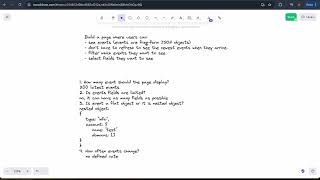
A walkthrough of a FAANG-style frontend design system interview where you build a page displaying live JSON events. The solution covers API design with server push for real-time updates, a queue-based state manager keeping 200 events, virtualized scrolling for performance, and user controls for filtering and column selection.
Chapters
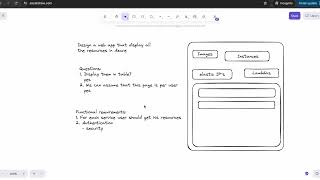
In this tutorial, I want to go over frontend design system interview question that was asked by one of the FAANG companies in 2024. This is design system interview for frontend developer, and this is what we are given in This is all that have been given. So let's dive in and see what are the requirements. Build a page where users can see events. Events are free-form JSON object. Users don't have to refresh to see the newest event when they arrive. User can filter which events they want to see. And users can select the fields they want to see. Okay, this is our requirement, and let's see, um, how we can understand and answer this type of question. So what I had in my experience that Design system interviews for front-end developer or full stack, they can be very different, and it's, it's an open range of a structure and open, and open things that are important for the interviewee. So in this case, we're not given any UI, so it is required from us also to build some kind of mock of the UI that how do we see the page as a frontend engineer. So we need to build the UX to to show how we see the UX of these requirements. This is one aspect. Then we need to ask all the questions if we really understand what, what is this page is about, and are we understanding correctly all the requirements and the usage of, of this page. Okay, so what— let's ask some questions. So one of the questions we want to ask is how many events our page should display. Okay, so we can, we can ask how many events should the page display, page display, and we get an answer: 200 events. And the question is, so we need to show the latest 200 events, correct? Correct. 200 latest events, meaning the newest 200 newest events that are arrived. Okay, now when we say events are a free-form JSON object object? Do they have a limited amount of fields? Do we know, do we know the structure of event, or do we know the limit of, of number of the fields? Um, is event field Fields are limited. And the answer is no, it can have as many fields, it can have as many fields as possible. And we don't and whatever fields are. So we don't know the fields, we don't know the number of fields. And can— another question that we can ask is, is it a flat object? Is event a flat object, object, or Or it is nested object? And the answer is yes, it is a nested object. Nested object, meaning that the object can look like something like that. It can have a type, for example, and the type is Info, for example, and then it can have Account, account, and inside of account it can have more fields, but also the fields can be arrays, which for example domains, domains, and it can contain array— I'm sorry, domain domains. An account can have a name, test. So this is the structure of the object. It can be nested and it can have a lot of fields. Filter— which user can filter which events they want to see from, from the 200 latest events. Which, which can be once they filter, which means when user filters, he can still— he wants to see maximum 200 filtered events. Okay, so this is important to understand. It's not filtering from 200, it's even filtered 200 events. So if I select, for example, events that contain word IP, then I want to see 200 latest events that contain word IP. Okay, so, um, we also can ask, um, how often, how often events change? Okay, how often events change? And the answer to this question, it can be, uh, one, once a second, it can be a couple of times per millisecond. So it can be, we don't know the rate. There can be times where it can come a lot of events, which means there can be some peaks where events are— there's coming a lot of events and we still need to show the user the latest events. How often? There is no defined rate, no defined rate can be slow, it can be fast, and we need to handle all the possible use case here. Okay, so when it says we need to be able to handle all possible use case here, here it implies also some of the UX part because we're not given UX, we're not given any UI how the page should look like. While as a frontend engineer, you usually, you usually don't design pages unless it's maybe some features that you, you are given freestyle to implement this feature. But usually there is UX who design the UX of the feature, and then we we are implementing it. But in this case, it was also implied that we should think as UX, we should think as developer and as UX, and also as a full stack, as we can see. Um, also what was given is that we can assume that we have a backend team that can supply any API we need. So we define API and the backend team will supply any API we will define. Okay, so now after we ask our questions, so we also, um, so we have these requirements, we also need to define, um, non-explicit requirements. So non-explicit requirements, requirements is— so the page should be available, availability, availability. The page should be available, the page should be— we should get all the functionality that is defined here. We need to— which we also want to have events in the order they arrive. So we want, we want persistent, persistent, persistence, persistence. So what do I mean by persistence? I mean that We receive first— if we have event at t1 and then we have event at t2, when t2 is greater than t1, then we should receive first event with t1 and then event with t2. So we want to see them in the correct order. And, and we want to see the event as, as they arrive. Our application should be secured— security, security— which means that event for specific users that have specific user permissions. These events should not be visible to other users because events can contain important information. So we need to have security. Only users with specific permissions can, can see their events. The page should be optimized. We should have— the page should be optimized, loaded as fast as possible, displaying results as fast as possible. Optimized. The page should be optimized. What else is non-explicit requirements? So we also expect our page to have a high accessibility, which means it's readable for screen readers and callers and for people who have disabilities. So we want it to support— it should be accessible. Accessibility. Accessibility. Our page, again, we're assuming that it's a web page, so our web page also should be available on mobile, which means it should be responsive. It should be responsive. It should be supported cross-browser support. Cross-browser support. Optimize— when we said optimize, we mean the performance. Optimized performance. Okay, even if we don't go over, over any of these non-explicit requirements, we want to mention them. We want to show that we are aware of all the things that our application should have implementation for. We, even if we don't go deep dive into every one of these, we want to mention them. We want to show that we are aware and we are thinking about it. So this is, this is non-explicit requirements for our page. If I missed anything, please let me know. Now we also, since we don't have any UI, we want to, we want to see, we want to display some interface how our page will look like. So we're talking about events, filter for events, and user should be able to filter and select the fields they want. So we're gonna draw a page here. It will be a simple implementation of the page. So this is the page. Inside of the page we have a filter section, okay? On the bottom we have the section for our events. Which is a type of a table, but we will just make it— so we'll have a header here, make it green, so it's a header. And here we're gonna have events. I'm just— it's just a simple representation of the events. Okay, this is our events, our header. Here we're gonna have our filter, and for example, here we're gonna have the search. And so, yeah, so we have a search and we have a button which says to filter or not to filter here. Make it red, maybe blue, and maybe blue. Okay, so here it's filter. This is search, so we're gonna have a free search in all the fields, but also we give option for a user to for example, to have, to have, to filter by field. So for example, if here I have type info, so I want to be able to show to user, okay, I want to find all the events where field with name type contains string, specific string, okay? So here, for example, the UI will be a field, operator, and value. So for example, field is error. Okay, and this is search, and here we have a filter button. We can also have a clear button. Okay, so this is the header, and it have, for example, fields. I'm gonna put like field, field 1, field 2. Field 3. This is just the default fields. Okay, so how do we see? Let's explain the page, uh, what the page show. So first we're loading our events. Initially the page is loading, it loads our events and it shows a default number of fields. In our table which we receive from the server, what are the default fields. But then when user can also here in the filter section, so he also can select the table, the table fields. Okay, this is button, but here he can also, he have some kind of section here where he can choose, where he can choose a number of fields, fields to display, fields to display. And maybe it's not Yeah, it can be a part of, a part of the filter. Well, we receive— so about APIs, so we receive our events with— let's, let's, let's move to the API section. So let's say our API Okay, how our page starts. So when we start our page, I'm gonna make it black. So first we, we have APIs. Okay, so first API is getEvents. getEvents. So in this case, we will have the size because Now the requirement is to have 200 events to display on the page, but we can pass the size, and in this case size is 200, but we can change the size. And what it's gonna return, so this is our result. I'm gonna write the result here. Result. This is the result from API. I'm gonna write API result. API result. So we are receiving our events. It is array, and our events will have all the fields because, so later on Later on, we also have a feature— well, during the interviews, feature was added. So when you click on any event in the row— call it event— when you click on any event in the row, you should have a drawer with all the fields. Because you can see in the table only number of fields, but when you click on the event, you get in the drawer event and you can see all the fields of this event. Okay, so we have events, um, it's array of event, and event is a free JSON that can have all the fields. Also, we're receiving, we're receiving, um, We're receiving our filters. We're receiving the— so the filters, this is a decision and it was not given in requirements, but I make decision for this design because I'm designing the space. So I make a decision to store the filters on the server. So every time the server search, put a search, some event, the filters are stored on, on the server. And, and we also know the fields. So, so we know which fields, we know all the filters, and we know the fields that user wants to display. So we're receiving filters, filters, it's gonna be array. We're gonna define the filters after. Filters, and we also receiving the fields, fields. It's not all the— it's not— yeah, so we want to be able here to display in dropdown all the fields, and we don't want to calculate it in the client, so we receive all the fields from the server. So we're receiving the fields. It's all the possible fields here. It's fields. It's also array. And also columns. We're receiving the columns that user— well, it's part of the filter, but this section is where user defines the columns. It can happen in this section. Just— we're returning them as columns. Columns, columns. Define this column. Okay, this is— so event is clear, it's a freeform JSON and it's array, and we're receiving it We're receiving it— this is the, the initial GET events, or every time the page is reload. This is API we're gonna be using. And so fields are strings, but also because we can have fields that are nested. So let's— I'm just gonna define fields. Field, it can be— so fields array is gonna look like this. I'm just gonna show how it can look. So it can have type, for example, it's a string. String, and then it can have also nested paths. So for example, like we saw, account.name— this is also a field. Also we can have account.domain— domains because it's array. So we can have this field, but also we can have accounts/domains and it will be the field inside of the domain. So we can have any nested path. So this will be our fields and then what we're gonna do with it, we're gonna display them here in this dropdown. And so we can show to the user, okay, you want to filter by which field? And here it can be more nested or flat fields. Okay, this is— we're getting this from the server. And this is fields. Now columns, columns are the same as fields. So in addition to this dropdown, we will have fields to display which also have a dropdown here. I'm gonna move a little bit, adjust section. This top section can be collapsible, and maybe it will be more, more convenient if the section will be a little bit collapsible. So, okay, let's say I'm just making it smaller. Okay, so the fields to display the button filter will be— okay, so Sorry, the button will be on top. So here, this is kind of an input, and here we have dropdown. So every time I click on this dropdown, this one is dropdown for field, but this one is— I'm gonna make it blue also— also with field. And here you can add more field to display, and when you apply when you apply these fields. So our table gonna change, which, which I'm thinking, should it be in the filter or should it be separate? Well, maybe it can be a separate section. It can be not related to the filter, but it can be specifically related to the, to the table because we already have all the fields. So maybe we should— okay, I'm, I'm thinking here on the fly. So maybe it's a filter and here And here you can choose more fields, and we will have a button that's gonna apply columns. For example, I don't know, apply— okay, what's a column? So you select the fields and then you click OK, and your table will display all the fields, all the fields that that we have, but also we're updating the server that, that user changed a number of fields. Okay, so if it's just the number of fields, because we're storing them in the server. So columns, so the column is the same as its array It's very similar to fields, so our columns is the same as fields. Okay, this is how our columns look like. And the filter, so the filter, um, our filter will contain a number of fields. So, well, maybe it will be just filters, it will be just object. So our filter object— filters object— put it a little bit up. Our filters object, our filters object gonna contain the free search. Okay, so it will be like a search query. SearchQuery, which is string, and it's gonna also contain— this will be array of the fieldOp. fieldOp, it is an array. I'm just gonna show how it's gonna look like. Because this is— sorry, this is an array, an array of elements, which element consists field, op, and value. Okay, this is our element, and there can be number of them because you can filter by many fields. Okay, um, okay, so this is our filters. So we're receiving everything from the server, and every time we filter, the server stores and updates new filter, and it also updates new fields. Okay, let's let's go to the— okay, so this is the get events. Now we also need an option for user to get new events. Okay, how do we do it? So what are our options? So our options to receive events from the server— server is short polling, long polling, WebSocket, and push events. Okay, so in, in this scenario, we don't want, we don't want to do any of the polling because we're just displaying recent events. It's a type of analytical page, and in this case We don't want to use also WebSockets because there is no interaction from client to the server. It's not like a chat app, it's more of, uh, give me some updates from the server. So we're gonna use push events. And what, uh, push events are good because they don't require to hold connection like long polling that Client sends request to the server and then server holds this connection until the server has some data to update for the client. But, uh, push events just gonna send to the client events, and this is what we're gonna use in, in this case. So we want to create endpoint. So the first one was the API request, second is we want endpoint, endpoint for push events, which the response will be again we're receiving newly updated events. Events. Since we also, we, we know the last time, the server knows the last time that we got the events. So the server know, okay, so the client got events up to this timestamp, and, and now the server sent push events from this specific timestamp. Okay, so then we're receiving events. In the case for push events, um, we're receiving events and also their fields. We don't receive the filter because we got it and every time Every time we update, client update, we send a request to the server and the client have already updated filter. So in this case we only have events but also we have their fields. And why there is option to, to collect the field by themselves, by the client, but I don't want client to do that. I don't want client to go over events, and I just want them to send me, um, the new fields and the fields that event has. And then I'm gonna do the merge on my side because when new fields arrive, um, I also want to display here new fields because if I have a new event that has field that I didn't have before. Events didn't have this field before, so I want to, to see this option also in the client, and I don't want the client to, to go over these events and, and collect the fields. I could, but I'm just choosing not to, that if the server can return it to me I prefer it, but I also, I could iterate over event, but because it's nested, so I don't really want to do it. I just want to receive, and because same events can have the same fields, and I don't want to iterate over, over events. So because we have a magical team, again, you can choose to do it by yourself. I'm choosing to get it from the server, and it's a choice. There is many different options to implement the same page, and you can choose what you, what you think is, is right. Okay, so I'm having fields here. The fields, again, it's array. So, okay, so this is all I'm getting for my push endpoint event. So every time I I receive a new event for endpoint, I'm adding, I'm adding events to the beginning of my list and I'm removing. If I receive 10 new events, I'm adding 10 events to the top of my list because it's the newest event, sorted by date because this is how I want to see them, and I remove old 10 events. Okay, so I have a queue, um, I put on top the new events and I remove from the tail old events. This is our endpoint, the second one. Another API I'm gonna do, um, you can be asked by— what type of API do you choose to use? So is it GraphQL, is it REST? You can choose either way. Usually in case that you need to get data from different tables, then you would use GraphQL. And we can use GraphQL here, it's, it's completely a choice. But also for different case is, can be different technologies that can be used. So we're gonna use GraphQL in this case, but it, uh, you can choose, um, you can choose whatever you, you think is right. So, okay, so this is our endpoint. Also, we have the third endpoint that, um, that we are filtering events. So we have We have initial events, so we're getting all events. We're getting the filter from these events. We're getting the fields to display and all existing fields from these events. And in this case, we have— okay, let's just— I just move it bit up. Sorry. Okay, so the third one is POST /filter/events. Filter events. So in this case, we're sending— this is our POST request, so we're sending in the POST request on our filters, filters. Because we return, we decided to return all the fields, so we don't need to send the fields and we don't need to send the columns. And every, what we're gonna pass is we just pass a size obviously and the filter. So this is, this is what we're gonna pass. Filters, which is filters, filters, and size, which is 200 in this case. Okay, okay, so this way we can filter events and then we receive new data and our server stores the last timestamp that we receive the data, and from that timestamp onward, he will give us only events that are, um, their time is greater than the timestamp that we already received. Okay, so this is the way. And what is also to mention, that the server, when he, the server, uh, sends sends us push events, it's also not sending us events, just any new events, but if the server, if our user selected a filter, which is global text or by field, our server gonna only send us events that match the filter. Okay, so this way we don't need to do it on, on the client, and we don't need to receive events and then filter them on the client. The server knows, the server store by our user, um, we storing our user filters, and the server knows, the server already filters. And if, if arrive event for this user but this event doesn't match the filter, we will not gonna receive this event. And every time the server updates, obviously, the timestamp, so we know from which point onward to send us push events. And every time we get events, it's this, this time also updated on the server. Okay, and also fields to display. This is my choice, and I'm making a choice to send also so the user knows which fields to display, because every time I land on the page, so when I'm closing the app and I'm opening the app, I need to know which fields I selected before. So I'm adding a new API, another API. It's 4, it is POST, it will be update columns. Columns. Okay, this is all it is, and we just send new columns and servers just store, store the columns. Let's take this. So the server stores our columns. Okay, this is our API. Another thing we need to— let's see if we handled everything. Okay, see events freeform. Yes, so user can see. User don't have to refresh to see the newest event when they arrive. So we said that we're gonna, um, yes, so we need to talk a little bit about the state of our application. So like I said, we, uh, let's create here. So in our application, we're gonna have the state, and our state will have events. It will be a queue. Queue events. Events. I think it's queue, do I write like this? Queue. Okay, it will have events. Which will be array, will have events. And then we also receiving new events, new events, and we're gonna merge them eventually. So every time we get new events, we put them here, and then we, we merge new events into events. So we remove number of old events and we put new events on top and then we clear both of them. What is important to talk about— so we said about optimization, how can we optimize this page to see, um, so the page will be optimized because we're fetching 200 events and do we want to display all of them with scroll, with pagination. And it looks like it's up to us, but we ask interviewee what is preferred, but we just show them the options. So one of the options is the virtual window scroll, which means that we only store in the DOM events that are in the user viewport. And so every time user scroll down, we add more events to the top. So for example, if our viewport can contain, for example, I don't know, 10 events, so we store 10 events plus buffer bottom and plus buffer top. So it can be like max 20 events. So when user scroll down, and we, we add to the buffer to the bottom and we remove from the top. So at every point we will have only 20 events in the DOM, which is completely better for performance in this case. So we can suggest to use this. Another important thing is of course you need to talk about what is happening when there is a large amount of events coming. So, so you can, you can imagine that user works with this page. So user search his event and he can be on the page analyzing these events and looking at them and You can imagine that if we have a lot of events coming in, it can— if we, if we're constantly going to be adding new events, the page will be flickering and user won't be able to have a smooth experience. So if there is a large number of events are coming in, we don't want to disturb the user. So this part is tricky because it is expected from a frontend engineer also to think from UX point of view how to make user comfortable with the page in case of large amount of events are coming. So in this case we can suggest Okay, we can put an icon that suggests that new events arrive. Please click here to update your table. Okay, so for example, we can put some— I'm gonna choose this icon and we're gonna make it red. Also maybe this. Yes, and So we're making, we're making some icon for user to know new event available. Available. Click, click to update. So here the user— oh, it will, it can come as a toaster from the top or as a banner that notify user that he has new events. Because in case that we received now, so we have 200 events to show to the user and we received in, in 1 second or less more than 200 events. So we need to update the full page. But user is working right now on the page and he wants to see his event still. Okay, so we show the users this option that events is, uh, sorry, it's available, available. So we show this toaster or banner, it can be, um, It can be any, any notification options that, that we can choose. So when user click, he can— um, still something is available. Okay, sorry. So user can still work on existing events, and when he click our state, our state changes because we update. So we take new events that were pushed and we update with events and users see the new, new table. But of course we don't only have events, we also have fields. So we have fields and the same is happening for the new fields. New fields, new fields. So we're also merging the fields because when new events arrive, we want to add new fields for user to be able to, to select from. Okay, so, so very important note about the most important thing is that you need to talk about overload, that there is too many events are coming, and then how you handle it. So you are expected also to think from UX point of view, and, and just, and just think what will be comfortable for the user and think about the way that if you are a user and how would you use this page. For example, it's not just for the view. You can be working with this page and you can be focused on one event and you don't want this event to disappear without your interaction with the page because it won't be consistent. It will be a bad user experience. So let's see also, did we check select fields they want to see? Yes, so we have the option so they can— we're constantly updating the fields and user can select the fields they want to see and they also can filter by the fields we want to see. So we can also go over our non-explicit requirement. So availability, our page is available. Of course, we can also say if the server is down, we can, we can whether use offline mode. You can mention this, that we can implement offline mode to store in local storage or index DB. If we want to support that, if not, we can display error. Um, if the page is not available. Persistence— our page is persistent, so we're receiving new events arrive on top because our data structure is a queue and we're pushing new events on top and removing old events from the bottom. Our, uh, of course we're using SSL and we're checking the security that only our user can— the API is not allowing for our users to see other users' events and the other way around. Our page is optimized so we don't we don't store in the DOM, um, 200 events. We only— we're using virtual window, um, in this case. Important to implement accessibility for all the elements on the page. We also want to make it responsive for the mobile and of course cross-browser support. So we can also, at this point you can also be asked, so show me how would you make a structure, a high-level structure of a component. So for this case you can, you can just play a high-level structure. So I think I'm gonna do it here. I'm just gonna move the APIs a little bit on the side so we'll have some space. I'm gonna use black here. Okay, so, um, the structure of my page is— I'm gonna be using HTML tags just to show the way my structure will be. So I will have a layout Layout component which will contain two sections. It's kind of pseudo, pseudo code, but just to understand. So on top I will have the filter section, filter sections, and we will also have the table section. And, and this I will connect it to the table because the action, this action is related very much to the table. So I think I will have— it's a list, we can say it's a list, and we can, we can say that I have here, um, column selector, column selector. So we will have column selectors, this will be our filters, and we're gonna have a list. Inside of the list we're gonna have event, event row. Gonna have event row, and, and, and here we're obviously gonna be reusing dropdown. Here we're gonna have operators. This is input. We're gonna be reusing the buttons, but this is a high-level, a high-level structure. And, and here's the second section for a notification. Maybe we can mention, but it's just the high level. Um, I'm not sure if you, um, would be asked here to go deeper into components. This is not the type of interview to go really deep to the input and button, but just the high level. How do you see this? So it can be a notification, notifications, just a high-level structure here just to, just understand that obviously you're going to be reusing everything that is possible and, and your structure should be clean. All the sections should contain separated, separated code for them. Well, that's a high level of the component, but that's basically, that's basically it. So let's make it a bit smaller to show the full— sorry, I'm just gonna move it a little bit here and the API bit here so it can all fit into one place. Okay, okay. So I hope you enjoyed it, and let me know what you think if you have comments or suggestions. Thank you.
More from Happy
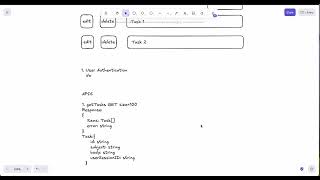
Design System Interview - Design System for a kanban board , Fullstack developer, 2024