021 LinkedIn Live 2024 with Joe Apfelbaum // evyAI.com Tutorial
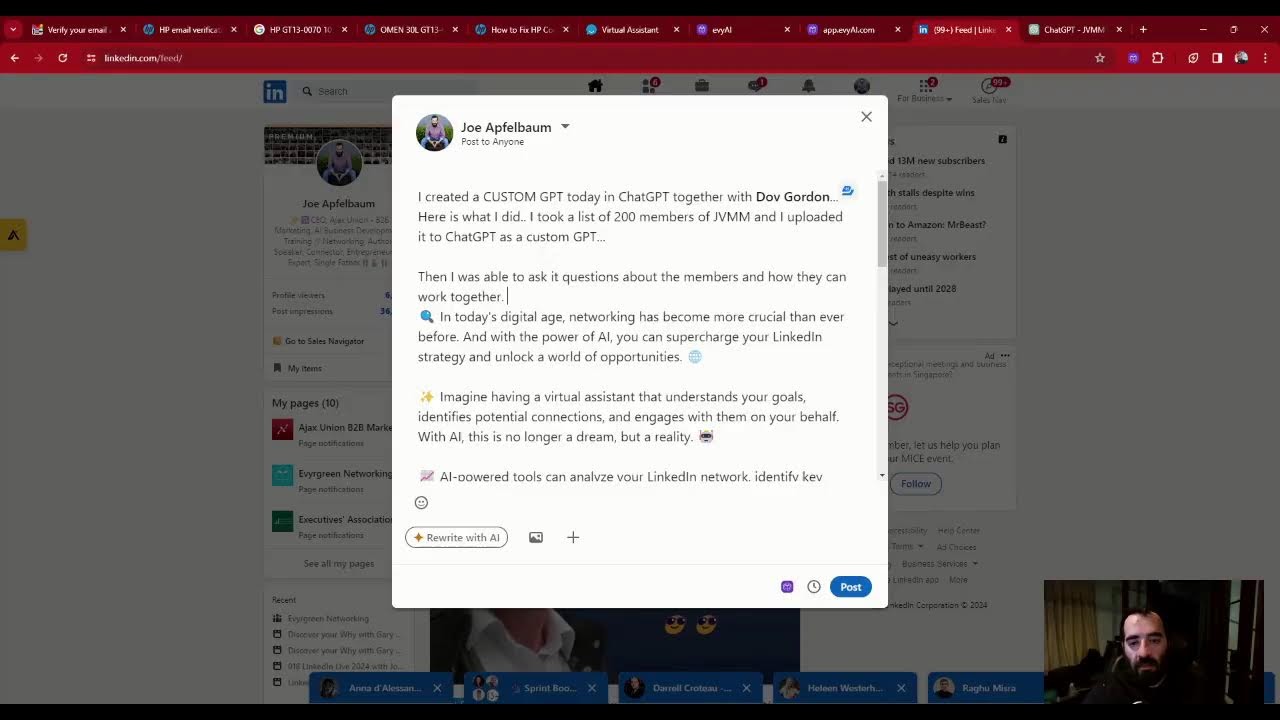
Joe Apfelbaum demos Evvy AI, a suite of tools that auto-generates LinkedIn posts, comment replies, profile optimizations, and connection notes. He shows how the new LinkedIn Windows app works and uses live chat participants to test features like post ideas and analytics tracking.
Chapters
of time troubleshooting my computer to find out that my memory is faulty. I have faulty memory on my computer. That is annoying, very annoying. I'm gonna try to fix it, but it's telling me now that Windows is not working correctly and I can't fix it, and it's giving me all these stop codes and blue screens of death. And I run a diagnostic test on HP and it says the memory is bad and the computer is no longer in warranty. And I'm creating like these OS disks and these rescue disks to try to boot up from them. And it's just not working. I thought maybe if I install Ubuntu, it would work. I tried to install Ubuntu. I installed Ubuntu on this computer. You know, you go down the rabbit hole. I went down the rabbit hole. That's what I did. I went down the rabbit hole. And I became an IT guy. And I don't know if you know this about me, but I used to be an IT guy. I used to do IT for companies. Like, first I did it for fun, but then I started doing it for companies, and people were hiring me to do IT for them, like to build networks and to set up computers and troubleshoot issues and install software. And I absolutely loved it while I did it, but I didn't want to be in the emergency business because people would call me in the middle of the night, Joe, my server's down, everything's down, I don't know what to do. And I'll be like, all right, I'm coming over. I come over, meanwhile the thing got unplugged and I just had to plug it in. And they're like, you're a genius, how'd you fix it? You're a genius. Are you tech savvy? Are you not tech savvy? Let me know in the comments below. Give this a like. Today I want to talk about this application called Evvy AI. I'm not sure if you're familiar with it, but I built this tool specifically for LinkedIn to allow people to be able to leave comments, write posts, and so on using LinkedIn. And what I've also noticed is that LinkedIn now has something called a Windows app. Would you like to see the new LinkedIn Windows app? I don't even know how it works. I'm going to test it out now for the first time. Maybe I'll share my screen and kind of walk you through it. Let's see. Let me go into my Restream, share my screen here. Let me know if you're tech savvy or if you're not so tech savvy. I'm going to share my screen here. All right. Hopefully you can see my screen. It says LinkedIn is better with the new Windows app. Never miss a reaction or a comment. So I'm going to press open the app. I'm gonna open up the Microsoft Store. It's gonna take me to the LinkedIn app here. Let's see if it actually works. I don't know if it's gonna work or not, but there's only one way to tell, to try it out. Okay, look at this. More details. Microsoft Store. It has 991 ratings. Interesting. All right, well, let's get it because This is brand new and I gotta test it out. Now I gotta put in my password. I don't even know what my password is. I'll check my password later. All right, we'll do this later. All right, back to here. So let's say somebody leaves me a comment. For example, Robin left me a comment over here and I want to reply to this comment. What do I do? I just click on Evie AI, I click generate a reply. And it'll simply just generate a reply for me just like that. I don't have to think about what to say. It just does it. The AI just does it for me. There's so much that I can do with the AI. It's so powerful. It's really important to acknowledge the people that leave you comments on LinkedIn. Think about that for a second. Are you acknowledging your connections when they leave you a comment? If you're not acknowledging them when they leave you a comment, why would they want to leave you a comment in the future? And for me, I want to make sure that I respond to every single comment. Ever see those influencers? They don't respond to anybody. I don't like that. I want to respond to everyone and I want to respond in a professional way, but I don't want to have to sit here and type up a response for each person. Because if I have to type up a response for each person, I'm going to be here all day and I have things to do. I have places to go. I have conversations to be had, so I use this amazing tool called Evie AI that helps me out to be able to leave these comments just like that. I'm curious to know what AI tools you've been using. Let me know in the comments below which ones you have been using in your business. I'm going to tag Jim. Just put the@ sign there, just like that. See that? I replied to all these comments here, just a click of a button. Makes my life so much easier. Oh, Thomas Hinckley said, hey Joe. Hey Thomas, welcome to my LinkedIn Live. Thomas, may I make a recommendation for you for your LinkedIn? I recommend optimizing your About section. How do you do that? With Evvy AI, it's really easy to optimize your About section. You just go to View Profile and then you scroll down to this section where it says About. Check this out, you go down to this section here called About. You press the little pencil sign, then you click the Evie AI icon here, and you press generate, and that'll generate an amazing about section for you just like that. It doesn't take much time to do that. Guys, tell me what you do for a living in the chat. I'm curious to know what you do for a living. What business are you in? Put it in the comments below. I'm going to take a look at who's commenting in a minute, but this takes about 30 seconds. And look at this, it gives you a nice headline, background information, what you do, how you do it, your next step. Call to action, additional information. Really powerful stuff. And you can command it with prompts to be however you want it to be. So that is pretty significant. Now, if you want to be able to see all my recent posts, you just go to my profile. And this works on anybody's profile. You can totally stalk someone. You go to their profile, you click on Show All Posts. And then you can see all their posts. Now I'm going to give myself a like, like that. Jeffrey said financial advisor. Thank you, Jeffrey. I'm going to give myself a different type of like over here. Look, you can change the color of the like. So I gave myself a heart. So I got the red, the yellow, and the blue. ChatGPT mostly, Jeffrey said. Thank you, Jeffrey. So I'm going to check out Jeffrey's profile here. Jeffrey works for a company in Silicon Valley called Capital Runway. You see this little, this little gold icon here? See, there's a gold icon. That gold icon right there means that he is paying for LinkedIn. He has LinkedIn Premium. It's helpful to see what people are doing on LinkedIn and learn about them by inspecting. So we have one mutual group, we have a bunch of mutual connections. Let's see who the mutual connections are. These are our mutual connections, you see. So we can look at each mutual connection and identify how we both know these people. And if I want an introduction, say, to Rhonda, which I don't need because Rhonda is a client. I can ask him for an introduction to Rhonda because he probably knows Rhonda, or if he wants an introduction to Rhonda, I can introduce him to Rhonda. So that's pretty cool if you ask me. I think it's really cool to kind of inspect that. There's something else on your profile that I want you to look at, which is who viewed your profile. So So as you can see, I have 6,013 people who viewed my profile. And you can see the most recent people that looked at my profile, you can see who they are. Look at this guy here. This guy looked at my profile, he's from Miami. You see that? I could tell him thanks for checking out my profile, but I'm not so interested in his profile right now. I'm gonna take out Jason. Jason, I'm more interested. You see, he has 10,000 here. He has a top voice and he's paying for LinkedIn. That's good. Take a look at what he does for a living. See that? He's the VP of digital strategy for this company in Scottsdale, Arizona. I'm actually going to be in Arizona, so I'm going to send them a connection request. I'm going to go here, I'm going to click on connect, I'm going to click on add a note, click on Evvy AI. I'm going to tell it to generate the note for me so I don't have to sit here and write a note for what to say. Now once it generates a note, I just press insert. I'm gonna say, by the way, I'll be in AZ. Okay, I just connected him just like that. Boom. I sent him a custom connection note. Isn't that interesting? You can do that. You see, Jim liked my comment. Love that. Now, if you want to get Evvy AI, all you got to do is go to evyai.com. Improve your credibility and engagement on LinkedIn. What do we offer? We offer a comment generator, a post writer, a recommendation creator, a messaging helper, a profile optimizer, and a connection customizer. Now I'm going on LinkedIn every single day. I'm going to click on login just to kind of show you what the login looks like. These are all the things that I did today. Look at that. Look at all my activity for the day. You see that? Look how many comments I dropped today, how many replies I did, how many invitations, how many How many things I accomplished in one day? I accomplished a lot today. Now, if I want an idea for a post, I can just tell it to give me an idea for a post. So I can tell it to give me a post idea about networking for beginners. I can select my persona, Joe Applebaum, generate ideas. It's going to come up with idea for the concept called networking for beginners. And let's see what ideas it comes up with. Now I'm going to take one of those ideas, I'm going to turn that idea into a post. You see that? Navigating the relationship landscape, the role of AI in networking. I'm going to use that, generate a post. And I'm going to wait for it to generate a post. Now, as you can see, in just 8 seconds, a post was created. I'm going to copy this post. And I'm going to go directly into LinkedIn. Then I'm going to press Start a Post. And I'm going to paste it. Are you ready to take your strategy to the next level? In today's digital age, networking is more crucial than ever. Imagine having a virtual assistant that understands your goals, identifies potential connections. Okay, now I'm going to go into ChatGPT, chat.openai.com. I'm going to click on my custom GPT here, click on this. I'm gonna do EditGPT. Confirm. And I am going to talk over here. This is— you see the way I'm writing a post over here? Okay, now what I'm gonna do is I'm gonna go to clips.opuspro, and I'm gonna find a clip that I recently did here, one of these clips over here. So I'm going to add that video that came from my LinkedIn Live. I just downloaded the video. P.S., the video is how I have— Okay, I just posted a video and I posted a, um, a thingamabob. If you want to succeed in today's day and age, you need to learn how to use artificial intelligence. Because if you don't use AI, you're really missing out. I highly recommend you learn how to use AI to become more successful. Thank you very much for watching this LinkedIn Live. Let me know what you thought in the comments below, and I'll see you on the next one. I'm going on LinkedIn Live 244 times this year, and although it's late and I want to go to sleep, I still went on LinkedIn Live just to get it out of the way, to show you how to use AI, and to support you on your journey. If you got value, write value in the chat, and I'll see you tomorrow. Boom.
More from Joe


How to Beat the Algorithm: Remove Hidden Watermarks & Scale Content with evyAI









AEO & GEO: SEO's Future Explained! Master Answer & Generative Engines! #shorts