20 ways to post on LinkedIn to get exposure - 161 LinkedIn Live with Joe Apfelbaum
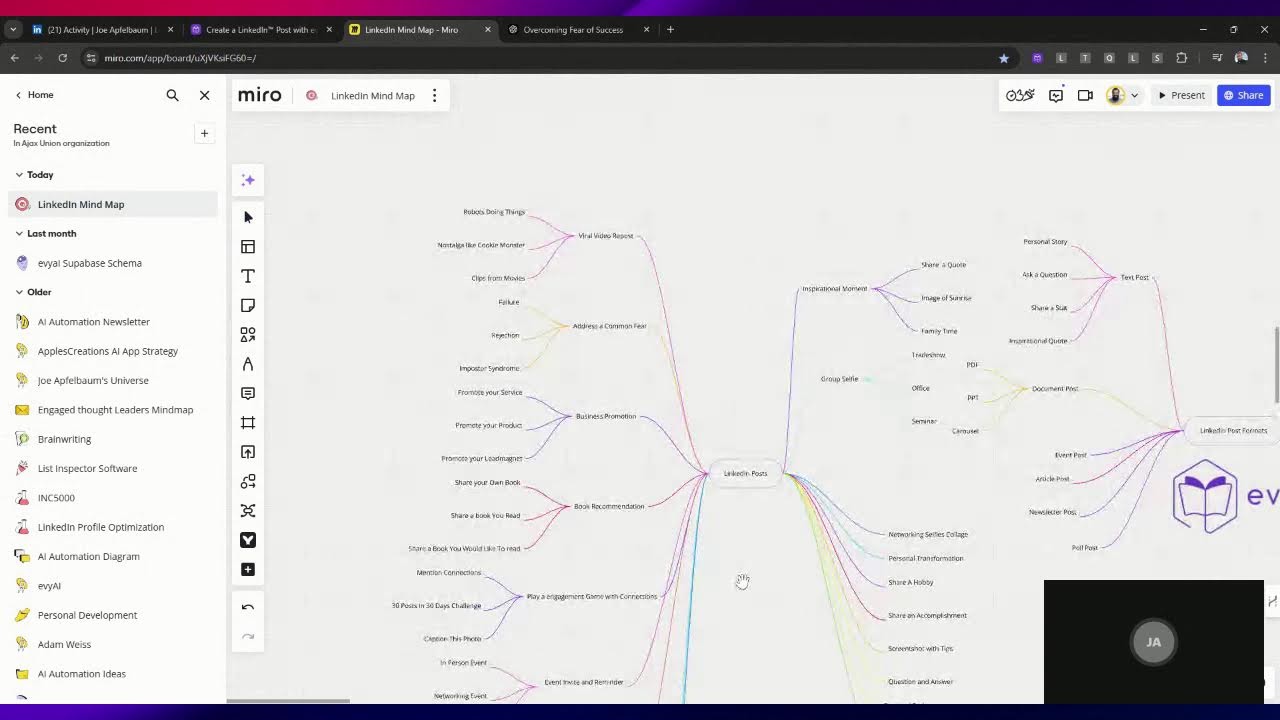
Joe Apfelbaum walks through 20 LinkedIn post formats to boost visibility, from activity shares and 10-year transition stories to viral videos and long-form articles. He shows how to use AI tools like Evy AI's Post Writer to generate copy fast and organize ideas in a content calendar.
Chapters
20 different ways to post on LinkedIn with AI. So first of all, you can post yourself doing an activity. So right now, I'm live doing an activity. Maybe I'll be posting, engaging, and messaging, you know, I'll be doing things like that. So if you're on LinkedIn, I was playing Fortnite and I was doing an activity. See, look, I'm gonna press play. So that's me playing with my connection Barry and showing people how I'm doing things on LinkedIn. So that's an activity, sharing an activity. That'd be number 1. Number 2 is share a presentation. So let's say you get up and do a presentation. You share a presentation and then you give insightful tips about your expertise. So I'm sharing tips, the 5 things you need to do on LinkedIn, and I'm sharing a short video presentation here. See that? This is me presenting. I'm showing my authority. So here it shows me doing an activity. Here it shows me doing a presentation while adding value. Share photos of you and people in your network. So So I call them networking selfies. These are networking selfies. And this is actually also like a game that we're playing. So we're actually playing a game here as well. I'm telling people, play a game, tag 5 people who add value to you on LinkedIn or who value being on LinkedIn. And look at the amount of people that have commented and tagged other people as well. So as you can see, I have all these other engaged LinkedIn users that I'm gonna be building a relationship with. You see that? That people are tagging other people's names. Adrian tagged all these people. Tina tagged all these people. Terry tagged all these people. Jake tagged these people here. I'm gonna go in here and I'm gonna say, thank you for tagging all these great people. I'm gonna press reply and I just replied. And when I replied, it also notified all these people that I replied as well. So now what I'm going to do is I'm going to right-click on this person here. I'm going to hit open a new window just to kind of see— I'm actually going to do it in the same tab just to kind of see this guy's profile here. So this is a, a really, really great guy for me to notice and see what he's up to here because he's very active then, which is wonderful. I see he posted this a day ago. He didn't get any comments, so I'm going to go ahead and leave him a comment using Abby AI. So you could ask your network to help you build those relationships. So I just left him a little comment over here, and now boom, I have a new exposure to a new relationship on LinkedIn just like that. See that? And now what I'm gonna do is I'm going to check this out over here just to kind of see if I have any activity. I'm gonna give myself a little heart, a little light bulb. See that? I just gave myself a light bulb. Let's go back to check out more different types of posts. Okay, so we said an activity, we said some tips and a presentation, we shared to play a game and networking selfies. That's 5. Um, transition 10 years ago versus now. A lot of people do these transitions, but these do particularly well, especially if you combine it with like solid tips. So this is a very, very solid post that has solid tips that I can do over and over and over, but there's also a 10-year transition of where I was 10 years ago and where I am now. And you can apply it in many, many parts of your personal life And also many parts of your business life to show progress. This is, this is you, this is me doing like a networking video, like a 30-second video. Check this out. And I finished off with a nice call to action there as well. So this is me getting in front of the camera, talking to the audience, and having a crowd join me in the room just like that. This is a group selfie. It's a nice little group selfie. This is an inspirational post. So it's okay to post inspirational posts. This is kind of like a book recommendation. So I would say this is a great book recommendation post. This is a LinkedIn Live I'm doing right now, but this is more half the screen me, half the screen me sharing some insights. This is called a short here. So this was taken from the LinkedIn Live. So I do a LinkedIn Live and then I take it and make it into a short. So it's called a short. These do really well with the video tab on LinkedIn. Um, this one here is an event reminder. This one here is— let's see what this is. This is Um, this is kind of like a motivational post. Now let's go into Evie AI real quick. Let's go into Evie AI and go into the web app. I want to show you something in the web app. This is actually really interesting. If you click on Post Writer here on the left, you see it says Post Writer, and in Post Writer you see I have a goal. I have tone and I have persona. You see that? Goal, tone, persona. If I click on goal, you see over here it says encourage engagement, that's 1. Highlight author, 2. Provide value, 3. Encourage debate, 4. Share stories, 5. Offer support, 6. Provide resources, 7. Ask questions, 8. Showcase values, 9. Respond to criticism, 10. And then we also have show empathy, share opinion, encourage action, Share anecdotes, use inclusive language, that's 15. Build relationships, reinforce branding, provide feedback, promote product, establish expertise, that's 20. And then we have share news, build rapport, offer tips, showcase voice, address misconception. And then we have, um, Encourage sharing, address concerns, highlight partnerships, and spark curiosity. So this is about 30 different types of goals you can have when you're creating your post. For example, if I'm going to bust myths in my PostWriter, I'm going to find the Mythbuster. Let's see, addressing misconceptions. You see that? I could address a misconception. Is there a Mythbuster? We address misconceptions. Mythbuster. I thought there was a Mythbuster here somewhere. Okay, I'm gonna press authoritative. We're gonna change this from authoritative to persuasive, and then the persona, we're gonna do the Joe Apfelbaum persona. Okay, I'm gonna press generate and it's gonna write a post and let's see what it does. Now what's interesting is that I was going for a run today and I asked ChatGPT a question. Thinking posting on LinkedIn is just about sharing your resume? Think again. Many professionals still hold misconceptions about what it means to engage on the platform. Here's the truth: your post can be a catalyst for meaningful conversations and opportunities. I've seen firsthand how a simple post can lead to blah blah blah. Don't be afraid to share your journey. Let's address the common myths. Don't be hesitant to post. What's stopping you from sharing your voice? Okay, so if we go back to my activity, you'll notice I have lots of different types of posts. This is a viral video. So let's break this down in a meaningful way. Let's open up a Miro. And let's kind of like think this through together. I'm going to go in here. Actually, it's a sign up. I'm going to sign in. I'm going to click on Google. Let's sign in together and let's open up the LinkedIn mind map. It's a bit slow here today. By the way, if you're watching this live, say I'm watching it live so I can see who's watching this live. Let me know in the chat. Say I am watching this live. This way I can notice you and say hello to you. That'd be pretty cool if you guys took the time to say hello in the chat. Let me know where you're dialing in from. All right, let's zoom out just a little bit and let's press the spacebar and then drag around and see if we have anything related to— this is job content, this is LinkedIn connections dashboard, 10 connection requests. Let's see what this is over here. The ultimate mega LinkedIn prompt book, LinkedIn posts. That's a, that's a mega, mega prompt for posting on LinkedIn. Thought leadership, banners, articles. Okay, I'll look at this mind map over here. Strategy. Let's see if we have a posting one here. LinkedIn posting. All right, posting types. All right, let's see if we can find more, more things related to posting. Okay, so we can't find anything related to posting there. So what we're going to do is we're just gonna— let's see what we have there. LinkedIn post formats. Ooh, right, so we have a few here. We have the text post, the document post, event post, article post, newsletter post. Poll. We have short video, long video, live video, image post, and then we have all these here. Okay, so we kind of have this already. So let's kind of, let's kind of look at what we built already and kind of connect it with this. I knew I did this in the past, and so I love that I have this here. Let's go back and analyze. So we have a viral video post. So let's go in here and see under video if we have viral video, short video, 1-minute format for mobile. I'm just going to insert a new mind map here. We're going to press plus mind map. We're going to insert a new one here and we're just going to use this. LinkedIn posts. I'm going to call this one a viral video. Okay, so we have a viral video post. What we're going to do— let's see what else we have over here. Let's see, we have this one over here is address a fear. Address a common fear. Okay, so this is a viral video. This is addressing a fear because these are, these are, these are going to motivate people. That's what's going to happen. You want people to be motivated. This one here is, um, self-promotion. Okay, so we need, we need some promotion. I want to say self-promotion. I'm going to call it a business promotion. Okay, because you got to do those sometimes. You can't just never do it, you know. You can just never— somebody will be like, oh no, you never, never, never. No, it's not true. You got to tell people what you do for a living. People need to learn what you do. You just can't do it often. All right, let's go back here. Um, book recommendation, a popular one. Book recommendation. All right, let's see what else we got. Um, groups, inspirational Inspirational moment. I'm gonna say, we're gonna say group selfie, networking selfies, collage. All right, let's just see what else we got here. Um, let's see, transformation. I'll say personal, personal transformation. Okay, so, so here are some, some post ideas. Let's see what else we have here. We have straight up, straight up tips. Oh, play. Let's see. Play a game. And we're gonna have different types of games, different types of viral videos, different types of fears. We can get into it. Okay, let's see what else we have. Um, share an activity. Share an activity. Share a hobby. Let's go share a hobby. That's a good one. I think hobby is spelled with a Y. Am I right? This is good, guys. If you're enjoying this, if you're enjoying watching me do this, say I'm enjoying this so that I know you're enjoying it. So we're going to go for 20 here because that was the promise of the video. But do you see the way I'm thinking about this here? All right, let's— so now that we have these, we're gonna go down. Um, let's go down, let's go down, down, down. Um, okay, so hosting a party event reminder, event reminder, event invite and reminder. Okay, let's see what else we have going on. We have a fear, we have viral video, accomplishment, sharing accomplishment. Can we press enter here? Share an accomplishment. These do particularly well. Sharing an accomplishment, people really like when you share accomplishments on LinkedIn. Okay, this would be an article, like a long-form article. So we're going to be long-form article with Long-form SEO article. That's it. That's a good one to do. Well, at least once in a while. You don't have to do it every day. A screenshot. A screenshot with tips. Screenshot with tips. Let's see what else we got. We got more Shorts, more LinkedIn Lives. This would be question and answer. That's a good one. Question and answer. Okay, so it's, it's almost like an FAQ, but it's a Q&A. So we have 1, 2, 3, 4, 5, 6, 7, 8, 9. Let's see what the next one is. Question and answer. Um, we have an event page. Let's see what else loading over here. LinkedIn loads so slow for me. I don't know if it loads slow for you as well. All right, let's see what we have going on here. We have a, a podcast, podcast replay, podcast promo. What are we going to call this? Podcast clip. I would say podcast. You know that you were featured on a podcast. Featured podcast. If you were featured on a podcast, you should probably share about it. All right, would you agree with that? All right, next we're gonna do the final one on this side, then we're gonna do a couple more on that side. All right, let's see. A feature on a podcast. Ooh, this is a survey. Tired of holding back on LinkedIn? Interested? Survey. Survey audience. So there's many different ways to survey an audience. So we have 1, 2, 3, 4, 5, 6, 7, 8, 9, 10. Okay, so we have 10 LinkedIn posts. Viral video. Um, That I got. I got it from somewhere else. Repost. Viral video repost. So 1, 2, 3, 4, 5, 6, 7. So we got 3 more types. We're gonna go here. Oh, infographic. That's a good one. Interesting infographic. Infographic with tips. That's a good one. Let's see what else we have here. More LinkedIn Lives, more viral videos. Oh, I like this one. Animated GIF, animated GIF. With ideas. We have 1, 2, 3, 4, 5, 6, 7, 8, 9, and we got the last one. We got 20. A presentation. Definitely a presentation. Value presentation. All right, so there you go. These are your 20 LinkedIn posts. All right, so if you think about it, well, if you think about it, you can literally take these posts and create a couple of each, put it in memory, and then you will have it forever. Play a game with your connections. Okay, let's, let's do example 1. Robots doing things. Nostalgia. And these are 3 examples. We should probably do 3 examples for each one of these. These are 3 examples. Address, comma. Common fear. Common. Let's go into ChatGPT because we already— I already had a conversation with ChatGPT about this. All right, I had a whole conversation about ChatGPT here. Let's see what we said. Fear of failure. Fear of competition, fear of imposter syndrome, work-life balance, scaling issues, customer rejection. So I'd say failure, imposter syndrome, and rejection. Let's do those 3 as examples of fears. Rejection. These are kind of like things that everybody, everybody's afraid of, you know, like that's, these are such common fears. Business promotion. Promote your service. Promote your product. Promote your Lead magnet. Okay, these are very simple. Service product lead magnet. Okay, book recommendation. Share your own book. Share a book you read. Share a book you would like to read. Now, I didn't mention to share quotes anywhere, but I really like the idea of sharing quotes. Maybe for under inspiration, inspirational moment. Share a quote image of sunrise, um, family time. Okay, so that's what we got. Group selfie. Trade show, office, speaking engagement, seminar. I would say seminar, like you went to a seminar. Those are examples. Let's see what we got here. Playing a game with your customers mentioning connections. Um, 30 posts in 30 days challenge and Caption this photo. Those are all really great games you can play to get engagement. That's a good one. Let's see if anybody's here. Is anybody watching this? You'll probably watch the replay after. Okay, event invite and reminder. In-person event, webinar, workshop, virtual workshop. Networking event, long-form SEO article. Let me say article with tips, article with Story article with resources. That's a good one. Things that people would want to save, you know, infographics. That's good. This is so good, by the way. I'm actually pretty tired. I don't know why I'm tired right now. Yeah, I did go for a 5-mile run. Um, maybe I'll continue this tomorrow. Anyway, thank you for watching. I appreciate this. If you enjoyed this, leave me a comment, let me know what you think, and I'll talk to you guys tomorrow. If you haven't checked out Evy AI, I highly recommend you check it out. Check out evyai.com. Evyai.com. It's your LinkedIn AI assistant. Really cool tool to help you write your posts very quickly with a hook, main points, call to action, and hashtags. Just like that.
More from Joe


How to Beat the Algorithm: Remove Hidden Watermarks & Scale Content with evyAI









AEO & GEO: SEO's Future Explained! Master Answer & Generative Engines! #shorts