Friday LinkedIn Lessons by Joe Apfelbaum // evyAI.com Tutorial
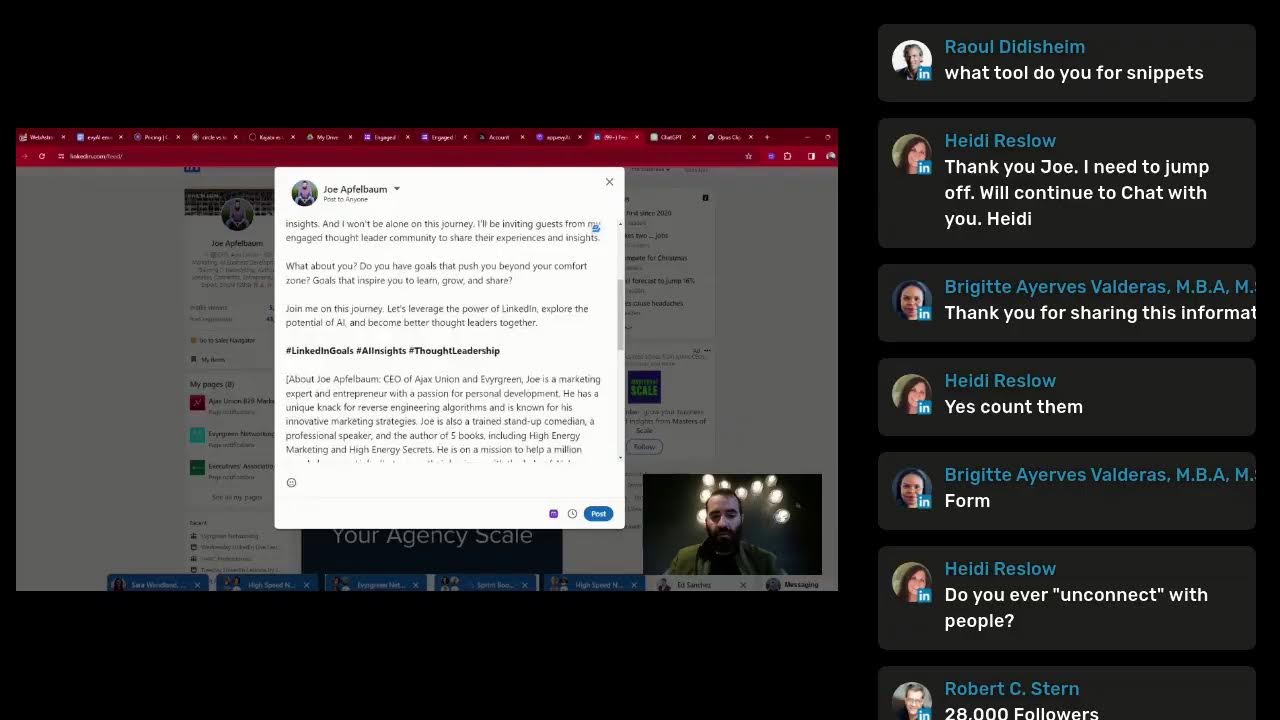
Joe Apfelbaum shows how to run daily LinkedIn Lives using restream.io and his Evy AI platform to automate posts, comments, and outreach. He tracked 244 LinkedIn Lives in 2024 and recommends 10 to 100 comments daily to stay visible. He also launched an Engaged Thought Leaders community with tiered membership levels.
Chapters
I'm so excited today. I want to show you my current little space over here where I'm chilling right now. Can you guys see this? I can. I go on LinkedIn every day now, LinkedIn Live. It's a new strategy that I have to be able to really tap into what LinkedIn has to offer. Why do I go live every single day on LinkedIn? Because LinkedIn is the world's largest professional social network, and I challenged myself to go live Monday through Friday, every day, and start sharing some tips on how to be able to be successful using LinkedIn, how to use artificial intelligence with LinkedIn. What do you guys think of the ambiance over here? Pretty inspiring, right? So I'm going to be going live from different areas doing different things. Check this out, a really retro arcade here. So I have a question for you. What do you do for a living? Who do you help and how do you help them? Check out these guitars right here. All right, let's sit down. Let's share my screen and let's get right into LinkedIn. Let me know if you're live here with me. Let me know where in the world you're dialing in from. I'm curious to know where you're coming in from. I'm gonna be sharing my screen and just sharing with you some insights about how to be more successful on LinkedIn, but you gotta let me know where you're dialing in from. Let me know what you're up to. Let me know that you're with me. Let me see over here. All right. So hopefully you can see my screen now. I'm gonna see who is commenting here. Give a couple people shoutouts. I see Dwight. Love it. Robert is hey hey hey. Welcome Robert. Welcome Dwight. Welcome Penny. I feel like I just spoke to you. Yeah, I don't remember when it was. I am in Europe right now. Wisdom Udam, application support analyst. Okay, cool. So guys, let me know what you're up to. Let me know what you do for a living. I'm gonna turn on the comments. on like the side here so I could see your comments. So I'd appreciate if you guys, uh, drop a comment now and let me know what you do for a living. So this way it shows up on the right side over here next to the live. I don't know if you guys know what tool I'm using. I'm using a tool called restream.io, and I'm also going to put myself side by side so you can see me, and then you can see— you can see me a little bit bigger And then you can see my screen on the left side of me. Let me know what you do for a living and where you're dialing in from right now. So LinkedIn is the world's largest professional social network. A billion people on LinkedIn, 60 million logging in every day, spending more than 17 minutes a day on it. It's extremely impactful platform. And here's why. You can see everybody's first name, last name, company name, what they do, where they work, where they worked before, what school they went to. You can see your mutual connections. There's a lot of power in having this information when you're reaching out to somebody. So whether you're reaching out by calling them, by emailing them, by direct messaging them, by WhatsApping them, by in-mailing them, or all of the above, using LinkedIn can be extremely powerful to do that. So understanding the information that you need to have in order for you to be successful is really, really key. So if I go into the feed and I scroll down just like this, I'm going to start liking certain people's posts. These are my connections that are showing up in the feed, and I'm using artificial intelligence to generate these posts. And literally within just seconds, it reads the post, drops a comment, and then I read the comment, make sure it makes sense, like navigate the complexities of construction is no small feat. Sometimes I empathize. Okay, so I press post, and now I just stay top of mind with this client of mine. Now I don't have millions and millions of clients. I don't need to stay top of mind with millions of people. I just need to stay top of mind with the right people. So my question to you is, who are the right people for you? Who is your target market? So in the chat right now, tell me who your target market is. I'm curious to know your target market. So it looks like Heidi said, business development manager in the process of being hired by a great company, just can't say yet. Thank you, Heidi. That is awesome. Penny said, what a face. Diane said, a realtor in Summit, New Jersey. Are you residential realtor? Or are you a commercial realtor? Make sure to make that very clear in your comment. Because if you're residential, your target market is going to be very different than if you're a commercial real estate broker. So I want to know, who is your target market? Who do you want to meet? Who's the center of influence for you? In healthcare IT. Robert, Um, said, hey Diane. So if you guys see the repost button on the bottom of this video, hit that repost button. Also give me a thumbs up, like this, and you could also like it with a, with a light bulb. So if you go to my profile and you click on view profile and you scroll down just a tiny little bit over here, you'll see that it says see recent activity. And then if you click on show all posts, It shows you all my posts activities. And if you hover over the like button, you'll be able to click the little insightful, the little light bulb, or you can click the little heart. So go ahead and choose one. Now you can also change who you're liking as. So if I want to like, for example, as a company page called Basil the Samoyed, I can give myself a little smiley face and that will give me all the colors of the rainbow. Do you see that? That's really cool. Now you could also click instead of more relevant, you can see most recent comments. And that'll give you all the most recent comments. So Heidi said security industry. Joseph said good morning, traveling adventurously. Yes, I am traveling adventurously. Robert says social media strategist for people and companies that want to grow. Pitch Deck said project management specialist. Cool. All right. So one of the activities, one of the most activity, one of the most important activities that I always tell people to do on LinkedIn is to drop comments. Now, these comments will 100% get seen by the author, and the reason they get seen by the author is because most people are simply not leaving comments. So if you drop 10 comments a day, you will increase your profile views on LinkedIn by 60 to 150%. You're going to get many more people noticing you, remembering you, and referring business to you. Now you need to be strategic. You need to strategically leave well-thought-out comments like the ones that I'm creating with artificial intelligence by properly training the AI. So one of my clients, Greg Andruk, asked a question. I'm going to search up Greg Andruk. See that? I'm going to pull up his profile, give him a little shout out over here on LinkedIn. Greg said the following. He said, Joe, what is the best way— and let me, uh, open up Let me open up the thing so you see it on full screen here. Okay, so hopefully you guys can see it on full screen now. Um, can you guys see it on full screen? Yeah. So hopefully you can see it on first screen. So Greg Andruk asked a really intelligent question. He said, Joe, what is the best way— what is the best way for me to be able to go ahead and train the artificial intelligence tool to be able to really understand who I am? Okay, what's the best way to train the tool? So on the right side here, do you see the little purple icon that said Save to Profile? You see I clicked on it. Now I click on Summarize Profile. And what the AI is gonna do is it's actually gonna go ahead and read all the parts of his profile. Now, if I wanna be able to create a training for his profile, I would go into my personas here. Do you see where it says Save Personas? I can click on See All. And I can actually create a persona for him. So over here on the left side where it says personas, I can create a persona for him. You can see I created personas for all these people because I helped all these people out. So I'm going to click on Add Persona. And then here are the features that you want to add. You want to add the persona's name. So Greg Andruk. You see that? Greg Andruk. You see the way I wrote that? Then I write if he's a person or a company because you can create personas for people or companies. I'm going to click on Person. Industry. I'm going to type in coaching keywords, business coach, CFO, whatever, right? So I can add as many keywords as I want over here. Tone, um, so he is professional, so I'm going to find a professional tone. Okay, and then background and history. So what do I put in background and history? By the way, where are you from originally? What industry did you come from and what industry are you in now? So write from From marketing, now you're in sales. From finance, now you're in real estate. Let me know in the chat what industry you came from and what industry you're in right now. So you want to be able to train the AI to explain it to it what your background is, but it's not just history. It's also your passions and your hobbies and your interests and information about you and your specialties and what you do and how you help people and who you help. And any custom instructions that you want to give the AI for this particular persona, you want to be able to include here. Now you can use other AI tools and we teach people how to use tools like ChatGPT. Have you guys heard of ChatGPT? This tool over here makes it really easy for you to be able to do things. I'm going to right now ask it to create a persona. I'm going to say create a persona for an AI based on the following information. I'm going to say here's a framework: name, industry, title, company, keywords, professional interests, achievements, skills, communication style, tone, preferred phrases, taboos. Can you guys see all this information over here? And if you want this framework, say send me the framework, Joe, in the chat. And what I'm going to do now is I'm just going to copy information from Greg's profile here. Do you see it says his profile summary here? I'm going to copy this profile summary. I'm going to go back. I'm not sure if I copied it. So I'm going to click on Summarize Profile. I'm going to copy the summary. Now it says copied here, so I copied it and I'm just going to paste it into ChatGPT here. Now I'm also going to give ChatGPT a little bit more context about who Greg is by copying some information from his profile here. You can see he has 24,000 followers, which is pretty amazing. Greg is a thought leader for sure in his space. So I'm going to copy some more information from his profile here. I'm also going to go to his About section here. His About section has vital information for ChatGPT to know about him. So I'm going to grab some additional information from his profile here, and I'm also going to paste it into ChatGPT. I'm going to go back to his profile and grab some information from his experience as well. May as well talk about some of his experience that he has. I'm going to paste it in here. So it has that little summary, but it also has additional information that I'm I'm seriously copying and pasting here to make it really easy for me to be able to, um, to be able to just connect with him and be able to understand who, who he is, what he does, what he has learned in the past, like his education. You see how easy it is for me to copy his education and just paste it right into ChatGPT right here? Now I'm going to press go, and what this is going to do is it's simply going to start writing up his entire, his entire persona here that I can then copy and paste into any AI, including Evvy AI. But do you see the way it's just simply typing it up? His keywords, his company, his achievements, his skills, his communication style, his taboos, his personal interests, his hobbies, his educational background. Now I need to specify actual hobbies because I don't necessarily know what his hobbies are. His goals, networking, who he wants to engage with, content, personal info, his general emotion, his formality level, his tone, personality. It's even brainstorming LinkedIn ideas for him. So look at all these different ideas that I'm going to send him. You see these ideas? Really, really powerful. If you want ideas, just write ideas in the chat and I will send you some ways for you to be able to get ideas. Now the key is for me to be able to take some of this information See, I'm going to take some of this information and just pop it into his persona in Evvy AI. So I'm going to go in here, I'm going to grab some of this information including his tone, his preferred phrases, some of his taboos. Okay, I'm going to copy this and I'm going to paste it into his, um, into his, uh, background information over here. You know what, let me just add additional context here, like, um, his personal, his goals, some content tips and insights. See that? Some personal info. Also his general emotion. Look at that. I'm gonna grab some more information over here. Um, I know I have up to 2,000 characters that I can include here, so I included 1,300 characters. I'm going to press Save Persona. And now I saved this persona. So if I want to create a post for him, all I got to do is just grab this, this little idea here that I have, the first idea, then go into Evvy AI and click on Post Writer on the left side. And now I'm able to just tell it, you know, use this Greg persona and create a post. Okay, now I'm going to tell you the value of writing LinkedIn posts. Let me just stop for a second. I want to take a moment to tell you the value of writing posts on LinkedIn. LinkedIn is the world's largest professional social network with over a billion people on it right now. But there's only a million to 3 million posts going up any, any moment on LinkedIn on a daily basis. So if there's only a million posts going up, there's a billion people, there's a lot of attention that is available on LinkedIn. When I post on Facebook, I'll maybe get 100, 200 people to see it. When I post on TikTok, I'm only going to get a few hundred people to see it. But on LinkedIn, often I'll get thousands of people to see what I post on LinkedIn. That's because there's more attention available on LinkedIn, and attention is the new oil. So if you're not posting on LinkedIn on a regular basis, you're missing out on that attention that you could be getting on LinkedIn. I highly recommend you use artificial intelligence to help you draft those posts for you so you don't have to waste time trying to figure out, okay, What's the first draft? What should I write? Writer's block is a big problem for people on LinkedIn, and Evy AI solves that problem. Just go to evyai.com/upgrade and get the upgraded version because ChatGPT-4 inside Evy AI is much more powerful than the 3, the version 3. So I'm going to share my screen and just kind of show you exactly what that post looks like. Looks like in just a moment right over here. So it only took just a few seconds to write this post. And it says, are you a small business owner struggling to maintain your healthy cash flow? As a seasoned business coach and CFO, I've seen firsthand how cash flow management tips break— can make or break a business. Here are a few tips. Do you see that? It broke down all the different tips. I'd love to hear your thoughts and included a call to action and hashtags. So I'm going to tell you a couple things that I want you to think about when you're posting on LinkedIn. So you want to have a hook. You want to have main points, you want to have a call to action, and you want to have hashtags. Those are the things that we teach our students inside Evergreen Networking to include. But with Evie AI, it does it all for you. All you got to do is train the persona so it knows who you are. And you can also customize the prompt. I just put an idea for a post inside the prompt, but you can tell it, write it in first person, write it in third person, include these ideas, include these, my experience, and tell it about your experience. Really, really powerful. So if you guys want more of this and more training on how to use AI, we teach 2 dozen different AI tools from video editing to, to how to create images, to how to create text and press releases and marketing and blogs and courses and everything you could imagine inside our AI Business Development Circle. So if you want to join the AI Business Development Circle, just write mastermind in the chat. It's a monthly mastermind. We meet 3 hours a month. If you spend a year with me, I'll teach you over 36 hours over the course of 2024. We'll work together and make you a master of how to use artificial intelligence for business development. We have so many incredible people there that are getting incredible value. And if you join now, you also get the 9 hours of training that we've already had this year. So you'll be able to go in there, watch those trainings, and I'll also throw in a course that has 28 different modules and over 2 dozen tutorials. So go ahead and write mastermind in the chat. And after this, I will look through all the people that wrote mastermind, and I'm going to give you guys a special early bird special to join the mastermind for next year. Okay, let me take a look to see what you guys have been commenting here. And let me do some— let me give you a couple more tips on how to use LinkedIn. And by the way, if you're getting value from this, Just write value in the chat and give it a like and hit the repost button so a few more people see this. Okay, so I'm here on LinkedIn right now. I'm going to go to my profile really simply, just click view profile. As you can see, I'm going to scroll down to the section over here called see all activity, show all posts. And this is the best way to be able to see comments on a live. So if you go to posts and then you click on the comments under the video, You can scroll down and you can actually see all the comments. Now I'm gonna see most relevant, most recent. So I can see all the most recent comments. Okay, Wisdom, you done? Diane Goodwin, Matthew Ship, pitch deck. See, agree, Diane, Wisdom, Robert, and Heidi. Okay, cool. I love what you guys are writing over here. Really appreciate you guys leaving comments. Hit that repost button so more people join. My goal is to teach you some LinkedIn skills to help you be able to be more successful on LinkedIn. I'm going to click on my notifications just to see what's been going on here in my notifications. I see lots of different things cooking in notifications, especially this live is really taking up a lot of space. Heidi said yes, but how do I join? Very simple. Click on my profile. Click on my profile. And you can see it as a background banner playing right now. Okay, I'm gonna tag Heidi so she knows. So this is how you join people's LinkedIn Live. Sound good? Keep up with the exercise. Proud of you. I'm gonna write boom. Thank you so much. Okay, so I had 3 comments on this post right over here. I replied to all of them. I had 157 impressions on this post where I literally just wrote, gonna go live at 9 AM, who wants to join me? Let me know what your questions are. You see that? Keeps it very, very clean, very, very simple. I'm not sure if you guys are able to see what I'm doing, but this is, this is the post that I posted right over here just an hour ago. Now, post Do posts get exposure over the course of a day? So over the course of 24 hours, you're going to see lots of people interacting with my posts, with my content over the course of time. Now, some posts get thousands of views, some posts get hundreds of views. I'm going to scroll down and kind of show you some of this. So I posted this last night, in the middle of the night, 12 hours ago. And this is a cute little video. You guys can check the video after. 500 people saw it. If I click on the comments, you're going to see the things people are saying about this AI tool, Evvy AI. So if you guys haven't tried the tool, I highly recommend it. And I have the AI help me reply to all these amazing comments. So let's take a look at this one right over here. This post I posted 19 hours ago, and, and I created an analogy between a minion and LinkedIn engagement groups. And you see 2,700 impressions on this group right here, 48 likes, and 31 comments. And I can easily go through these comments and, and see that I'm actually building real relationships with people that— these are my clients. These are people that have invested in coaching, in marketing services, in training, in software, in referrals. You know, they sent me referrals, they built relationships with me. I mean, these are, these are real people with real money that I have joint venture partnerships with, that I invest in their products and services as well. You see that? Like real people, real human beings, some of them that I've known for decades. And they're showing up on my, on my post, and they're commenting on my posts. And I'm replying to them using artificial intelligence. And it's helping me be able to stay top of mind with these people and reward them for engaging with me. You see, I don't have to sit here and type up his name here because the AI will simply type up his name for me and write a very well-thought-out comment in my voice. Because remember, training your persona to understand your voice is really going to be the key for the AI to really know who you are. If you don't train the persona, it's not really going to know who you are. So do you see the way the AI basically typed up Tina's name? I just click and then I say, together we're not just building networks, but we're fostering meaningful relationships. Beautiful. Okay, so I go through each post that I post and then I, I take a moment to just reply to those comments. And of course, if I wanted to do it myself, um, it would really take me a long time. So now these people— so I made an offer over here. I said, are you ready to take your step into the spotlight and lead with your thoughts? Now you might be wondering, Joe, where did you get that post? You wrote a very nice post over here. Where did I get this post? So let me show you where I got the post. I'm going to click on my homepage of Evy AI. I'm going to see all my activity over the past day. You see, are you ready to step into the spotlight and lead with your thoughts? Are you eager to be part of an exclusive community of thought leaders? Let's go back to LinkedIn. Are you ready to— are you eager to be a part of a community of thought leaders who are not afraid to share their insights and Do you see the way that I'm using this technology to help me build relationships with people? And, and this image right over here, you know where this image came from? This image came from one of the tools that I teach my students how to use that will automatically take my LinkedIn Lives and turn them into little clips, which is extremely, extremely beneficial for me. So if I go down to my dashboard over here, you're gonna see that I simply just upload my LinkedIn Live. And it turns it into all these cute little clips for me that I later go ahead and put into LinkedIn. And I don't have to actually edit these videos, the AI will just edit the video for me. So it just literally in a few seconds, I have all these different clips, you see clips like this about thought leadership. And then I just post it right over here and boom, I have to sit here and spend a ton of time, you know, doing, doing these activities because the AI will help me do it. And I can spend a ton of time instead actually fostering relationships with these real influencers. I'm talking about people that have hundreds of thousands of followers that have become my clients As a result of me being active on LinkedIn, and then are willing to build a relationship and start leaving comments on my posts. So like, for example, if I look at this profile right over here, 616,000 followers. Wow. By the way, how many followers do you have on LinkedIn right now? Curious to know how many followers you have on LinkedIn. Go ahead, share with me. And I want to tell you the benefits of having followers on LinkedIn. I have 40,000, 46,000 followers on LinkedIn. I'm going to stop sharing my screen for just a moment. I want to impress something upon you right now. LinkedIn is a very powerful platform, but it's not going to be powerful for you if you don't have followers. The average user on LinkedIn has 440 40 followers. It's not hard to get 10,000 followers on LinkedIn because every connection becomes a follower. I want to teach you how to get 10,000+ connections on LinkedIn in a matter of months instead of taking you decades. On Instagram, it's not predictable. On LinkedIn, it's actually predictable. But I don't just want you to have any followers. I want you to have strategic followers, followers that make sense for your business. So that you can turn those followers into connections and into conversations and into conversions and into cash. So if you want 10,000+ followers, write 10K+. Also, let me know in the comments, how many followers do you currently have right now? I want to show you how to get past 10,000 followers and become a thought leader on LinkedIn. So there are different levels. There's a supporter that has between 1,000 and 10,000 Then there's the thought leader, which has 10,000 to 100,000 followers. And then there's the mega influencer, which has 100,000 to 5 million followers on LinkedIn. So my question to you is, where are you? Are you thought leader? Are you supporter? Are you mega influencer? So if you want to get past 10K, just write 10K+. I see Heidi wants to get past 10K. LinkedIn is extremely powerful. Even if you only have 1,000 followers, you can turn it into money. But if you had 10,000 followers, Not only can you turn it into money, you can turn it into thought leadership, authority, and so much more, especially if those 10,000 people are in a particular niche. I'm going to share my screen and just show you who my 10,000 people are. Okay, so I have 10,000— over 10,000 followers on LinkedIn. Let me just take a moment and just break down who they are. And I'm curious to know who your followers are. Who are your most ideal followers? So if I type in CEO on LinkedIn, I'm going to show you who my top followers are. I'm going to click on People. Okay, so I'm going to search CEO. I'm going to click on People. There's 9 million CEOs. You see that? 9.3 million people that have the word CEO on LinkedIn. Now I'm going to click on Connections. I'm going to click on First Degree. I'm going to hit Show Results, and I'm going to show you how many results I have for CEOs that are first-degree connections. Can you guys see that on the top left? It says there are 15 15,000 first-degree CEOs in my network. Do you see that? Now you might be asking me, so what, Joe? So you have 15,000 CEOs in your network. What do you think makes the decisions at companies? These are people that I actually have a relationship with, people that I actually have conversations set up in 2024 to do business with, people that I've met in person and that are doing tens of millions of dollars in revenue, like real revenue, people that I can really help. I can take their profiles to the next level and I can educate them and inspire them and connect with them and go deeper with them. And if you're not doing that, if you, if you don't have the right followers, then you're not going to be able to do that. If you, if you're not sure who's, who's, who you're following and who's following you, then that's not the best way to be able to be successful on LinkedIn. So look at how many people are waiting to connect with me on LinkedIn. You can see that there are over 1,000 people that are currently waiting to connect with me on LinkedIn. And I don't just allow anybody to enter my network. I want to make sure that the people are real. Like, for example, Lucas, he says, I heard you on several podcasts and I just found some time to check out Evvii AI. How do you generate posts in German? That's a good one. So I'm going to press accept. I'm going to press accept. I'm going to go to Lucas's profile right now. As you can see, I'm on Lucas's profile, and what I'm going to do is I'm going to message him. Do you see that? I'm going to click on message, and I'm going to say in the prompt box, you can tell the AI to in any language. For example, say reply in German. I'll do that now in this DM. Okay, I'm going to press Ctrl+C, copy. I'm going to press send. I'm going to press Evi AI. I'm going to say reply in German. And say this. Okay, so do you see that? Do you see the way I'm telling the AI to do that? I'm going to press GPT-4 so it's a bit smarter. I'm going to press generate, and it's going to read the context of the message, and it's going to generate a reply in German. Hopefully, hopefully this will work. This has worked for me many times in the past. Hi Lucas, the generated post in German. Remember, every AI— okay, I'm gonna say reply in German. I'm gonna go back over here. I'm gonna say reply in German and say thank you and give instructions in German. Okay, let me just see if it does it in German. And I messed up the word instructions, but that's okay. The AI knows. And I also wrote goal wishes. Hi, Lucas. Okay, I'm gonna press insert. Weiling down. I don't even know what I wrote over here. I'm gonna press send. Okay, so I just wrote a whole German DM, and it says thank you so much for your interest in da da da, and explains to him how to do it in German. This is powerful. Write powerful in the chat if you find this to be extremely powerful. Um, I do sometimes unconnect with people, Heidi. Um, so for example, if I send messages to somebody and I keep sending them messages and they don't reply to me, and I also see they're not active on LinkedIn, there's no reason for me to be connected to them, especially if I don't really know them well. So I'll just hit the more unconnect button. Or for example, if somebody's rude to me, or if somebody is disrespectful or somebody crosses my boundaries, I will not only disconnect from them first, but then I will also go ahead and block them on LinkedIn. I have no problem blocking people and disconnecting with people because think about it this way, I have more people that I can handle on LinkedIn. I have 15,000 first-degree CEO LinkedIn connections. You know how much value that is for my business? I can literally start any product, any service, hit up my 15,000 CEOs, and I will get dozens of them that will pay me to use my services because they're connected to me, because I built trust with them, because I am active on LinkedIn, because I have authority, because I'm, I'm a thought leader and I'm constantly posting on LinkedIn and people are seeing me as a thought leader. I'm not the one claiming that I'm a thought leader. People are seeing me as a thought leader in artificial intelligence, as a thought leader on LinkedIn, as a thought leader on marketing and engagement and networking. So my question to you is, what are you— what is your niche? Go ahead, put that in the comment because the riches are in the niches. I love the vibe in this place. makes me want to dance and just have a good time. You know, your surroundings will dictate your vibe, your environment. Are you in an environment of Facebook, of TikTok, of Twitter? Or are you in an environment of LinkedIn? Personally, I want to be in an environment of LinkedIn, a place where people come together to do business with each other, like real Business. If you want to be successful on LinkedIn, you have to— number one is add the right connections. Number two is post on a regular basis. Number three, drop at least 10 comments a day. Some people are dropping 100 comments a day using artificial intelligence. Evy AI, the tool that helps you be able to craft intelligent comments in your voice. So go to evyai.com/upgrade and upgrade today to premium so you can become part of it. And if you want to be a thought leader in our Engaged Thought Leader Community, I actually created a form. I'm going to show you where I created this form right now, share my screen with you. So this is what I'm going to do. I'm going to start a Waitman Google Forms. And I wrote Engaged Thought Leaders LinkedIn Community. Want to join the Engaged thought leaders community with a focus on LinkedIn, join our waitlist by filling out this form and let us know that you're interested in becoming a founding member. Our goal is to start the community with 16 founding members. We're looking to create a community of people who are kind, giving, and love to share. If you are generous and a giver and want to be around other generous givers, apply to our waitlist so that we can understand who wants to be part of this community and create something special. Are you willing and able to invest $97 per month to be a long-term member of the community? Yes or no, you're looking to just join a free community. Are you willing to create a valuable piece of content to post on LinkedIn at least once a week and share it with the members of the community so that they can engage on it? Yes, I am a thought leader and want to contribute to LinkedIn, or no, not sure if I can commit to doing weekly. If you're comfortable doing video and being on a LinkedIn Live presenting about your expertise. Are you comfortable? Yes, I'm comfortable presenting. Or no, I'm not comfortable. Are you willing to be an engaged member of the community and engage on valuable posts at least weekly? Yes, I'm willing to engage in the community and share my opinions. Or no, I'm too busy. Are you willing to be a group leader and host your own meetings monthly in the community on a niche topic you're passionate about? Yes, I want to bring members into the community and host my own sessions for members that I bring. What does it say over here? And members that I bring, and also for people in my community. I'm just going to delete that because it's too long. Okay. Uh, no, I am more of a participant in the group and I don't want to be a group leader. What version of LinkedIn do you have? How many LinkedIn followers do you have? What's your LinkedIn URL? What What's your email address? What's your mobile number? Do you use WhatsApp? What topics do you cover? Why do you want to join the community? And then what else can you tell us about why we should prioritize you on the waitlist? Okay, now I took this and turned it into a, a link right over here. Do you see that? And people can actually fill this out. So if you want the form, just type in form in the chat and I will send you this form so that you can fill it out. I'm going to go in here. I'm going to click on me. I'm going to click on view profile. I'm going to scroll down over here into my comments. I'm going to click on show all posts. I'm going to go into the comments over here. I'm going to say want to join the waitlist of the engaged thought. Leaders community on LinkedIn. Please fill out this form to join the waitlist. See that? So now I'm going to collect a group of people. And when I get enough people that are interested, and that are the right people, then I'm going to launch the community. And if I get enough people before the end of the year, I'll launch it in January. So I want to know if you're interested. If you're interested, just write interested and then like this little comment and just write interested, interested, just like that. You see that? Write interested and boom, we'll know that you're interested. Now if I click on most relevant instead, I click on most recent. See that? Bridget wants the form. So I'm going to go in here. I'm going to copy this like that. I'm going to reply to Bridget. Go in here. I'm going to paste and press go. See the way I just replied to Bridget? She wrote form. Let's see if anybody else writes. Do you ever unconnect with people? I'm going to say yes. 10K plus. All right, let's see. Heidi said 10K plus. Now, William, you messaged me the other day and you said, Joe, how do I connect with you? Very simple. Comment on my posts. The way that you connect with somebody and you build a relationship with them is by commenting on their posts. See that comment on their post? If you comment on their posts, go back and you can see all of my posts and drop comments on all of my posts. Look at that. Click on see all posts. Go back and read my posts. I have many, many posts. I'm going to go back and just kind of show you a few of my posts that I have here. Show you how many posts. So I have this post saying I'm so grateful for hitting 46,000 followers. And I keep track of how many followers I have because followers are very important. Go back. You see this LinkedIn Live here from three days ago? This was Wednesday's LinkedIn Live. See that? This over here is Thursday's LinkedIn Live, and this is Friday's LinkedIn Live. And I'll see you guys back again next week. But do you see the way I'm going on LinkedIn Live every day? Twenty twenty four. I may start counting it like. 1, 2, 3. Should you think I— you guys think I should be counting my LinkedIn Lives? Like LinkedIn Live number 1, LinkedIn Live number 2. I think I should do that. I think I should commit to, um, to going live on LinkedIn. And, and if you want to see all my lives, you just go over here to show all posts, and then you click on events. See where it says more events? See that? It shows you every single live that I've done. So if I just go impromptu live, then it just shows up without a title. I can always go ahead and change that title later. But if you, if you want, you could just kind of go back and see all the times that I went live. And so what I'm gonna do is I'm going to commit now publicly. To going live. Okay, but let me just go in here first and see if I can edit this content. Edit video. Let's see if I can edit this video. Trim. It doesn't allow you to trim. Go back here, see if I can edit this post. See if it allows me to edit the post. It doesn't allow me to edit the post. I'm trying to get to the title of this video. I can repost the video if I want, but it doesn't give me an option here to edit this post here. Let me go back to my posts. I'm going to click on Posts and Activity over here. So I'm constantly learning how to do things on LinkedIn because LinkedIn keeps changing their technology and there's so much to learn. And then when I learn something I teach my community how to do it. That's, that's my thing. That's what I enjoy doing. I enjoy learning things and then teaching them how to do it, teaching people in my community how to do it. Now, if something doesn't work, you just refresh the page and then somehow magically it starts working. See that? I'm going to go in here. I'm going to find that post. From Thursday, from yesterday. You see, I posted a lot of times. I'm going to click on the 3 dots. I try to click on the 3 dots and it's not allowing me to click on it. Okay, now it says save, copy, edit post. Click on edit post. Look at that, I can edit the post. Yeah, that doesn't do anything if I edit the post. It doesn't actually allow me to edit this video, like this event. So I'm gonna go back up to the top, I'm gonna click on Events, and click on this one over here. See how this is different? It has a title there because this is the actual event page. So that's just a LinkedIn Live with no event page, and this one has an event page tied into it because I scheduled it. So there's a difference if you schedule it or if you don't schedule it. If you don't schedule it, you don't get like this events page over here with a networking tab and everything. You see that? So, uh, if I want to schedule an event, I can schedule an event and go live at a particular time. I'm going to drop a comment for Jeff. Right over here. I just dropped a very nice comment for Jeff, and I'm the only one besides him that actually commented here. You see that? And I gave him a little heart. I'm gonna give him a light bulb. That's me supporting my centers of influence. You see, Jeff Goldberg is a center of influence for me. I'm gonna say, love supporting your posts. I love supporting your posts. That's what I told Jeff just now. Okay, thanks, my friend. Thank you for sharing this information. So my goal is to go live. So I'm going to go in here to Evie AI, and I'm going to write a post right now. Select my persona, which is Joe Applebaum. My goal is to go live 240 times in 2024. Why 240? I'm gonna say 244. 244. Okay, so now I can write this on LinkedIn just like this, or I can have Evvy AI kind of rewrite this whole thing for me. See that? I'm gonna copy this so that I have a copy of it. And now Evvy AI is going to take this concept here and kind of rewrite it for me. I'm going to stop this for just a second. I just want to encourage you something. I want to encourage you to set goals. There are no goals that are too big, only timelines that are too small. Most people underestimate what they could achieve in just 10 years. They overestimate what they could achieve in a year, but they underestimate what they could achieve in a decade. If I go back 10 years ago, I was afraid of going live. I was afraid that I wouldn't have the right things to say. I was not an author. I was not a professional speaker. I wasn't getting paid to speak on stages. I didn't have courses and curriculums and frameworks. I didn't have software. I dreamt of having software 10 years ago. I remember dreaming of this moment right now where I have clients in over 15 different countries. In over 25 different states. I have hundreds of paying clients that are currently using Evie AI and giving me 5-star reviews. Why? Why are they giving 5-star reviews? Because they're getting massive value. They're using it every single day. I'm making a difference for people, and I want to make a difference for you. And I want to start making a difference for you by letting you know that you have to set SMART goals— specific, measurable, attainable, relevant, and time-bound. And realize that there's no such thing as a goal that's too big, only a timeline that is too small. Let me know if that resonates with you. Leave a comment and write resonates. That resonates deeply. I want you to go back in this video and realize that there are little snippets of videos that I created in this long video that I'm going to take and make clips out of that I can later share on social media. And every time I do this, I go off sharing my screen and I'm inspired to share something of value. I'm creating an opportunity to be able to inspire more people, to make a difference for more people. So if I inspired you today, just write inspired in the chat or put that light bulb, hit that repost button. I appreciate you being in my life so much and I'm committed to going live. Let's see what that video, what that What Evie AI just created. Okay, do you know that there are 200 working days in the year? What if you could do something productive, something that adds value to your professional growth, more than there are working days? My goal for 2024 is I plan to go live 244 times, and each time sharing insights on how to leverage LinkedIn, how to harness the power of AI, and how to become a better thought leader. Why 244? Because I believe in pushing boundaries. It's going above and beyond the conversational. Each live will be a platform for learning, sharing, and growing together. I'll be counting each live and holding myself accountable. I'm excited to plan these— the first 24 lives, each one packed with actionable insights. I won't be alone on this journey. I'll invite guests from my engaged thought leaders community to share their expertises and insights. What about you? Do you have goals that push beyond your comfort zone? Goals that inspire you to leave— to grow and share? Join me on this journey and let's leverage the power of LinkedIn to explore the potential of AI and become better thought leaders together. Wow. Wow. Look at that. That was written with artificial intelligence. You see that? Now what I'm going to do is I'm going to go in here and I'm going to— I'm actually going to post this on LinkedIn right now. I'm actually going to post this on LinkedIn right now. I'm gonna go— I'm gonna show you how it's done. I'm gonna click on image. I'm gonna find a nice little image of myself. I'm gonna go here and I'm gonna find a nice little image of myself like this one over here. Okay, so I have an image of myself. I'm gonna press next. Then I'm gonna go to Evie AI. I'm gonna copy this perfect post that Evie AI created in my voice. I'm gonna paste it right here just like this. Okay, now I'm going to delete this URL here. Okay. All right, so now I'm going to press post. And I literally just posted on LinkedIn, just like that. Boom. Let's see if it worked. Just like that. Question for you. Do you understand? Do you understand what it takes? In order for you to understand what it takes in order for you to grow your business. If you don't understand what it takes to be successful, to get to your goals, to grow your business, make sure that you follow me, that you hit that bell on my profile, that you like and comment on my posts to stay top of mind with me, because I'm going to be sharing some incredible insights on LinkedIn Live, and then I'm going to turn them into snippets. And I'm going to help you become a thought leader. If you want over 10,000 followers, if you want to become a thought leader in 2024, join me along this journey. I'm not going to accept a lot of people in because I want people that are engaged and committed. And I know a lot of people are dabbling. Most people are not engaged and they're not committed. So I'm looking for a few people that really want to be that thought leader, to be recognized by other people in their industry, in their specific niche. Let me know what your niche is. I'd love to hear from you. I'll see you on LinkedIn.
More from Joe


How to Beat the Algorithm: Remove Hidden Watermarks & Scale Content with evyAI









AEO & GEO: SEO's Future Explained! Master Answer & Generative Engines! #shorts