How to create a list on Linkedin to get more clients in 2026
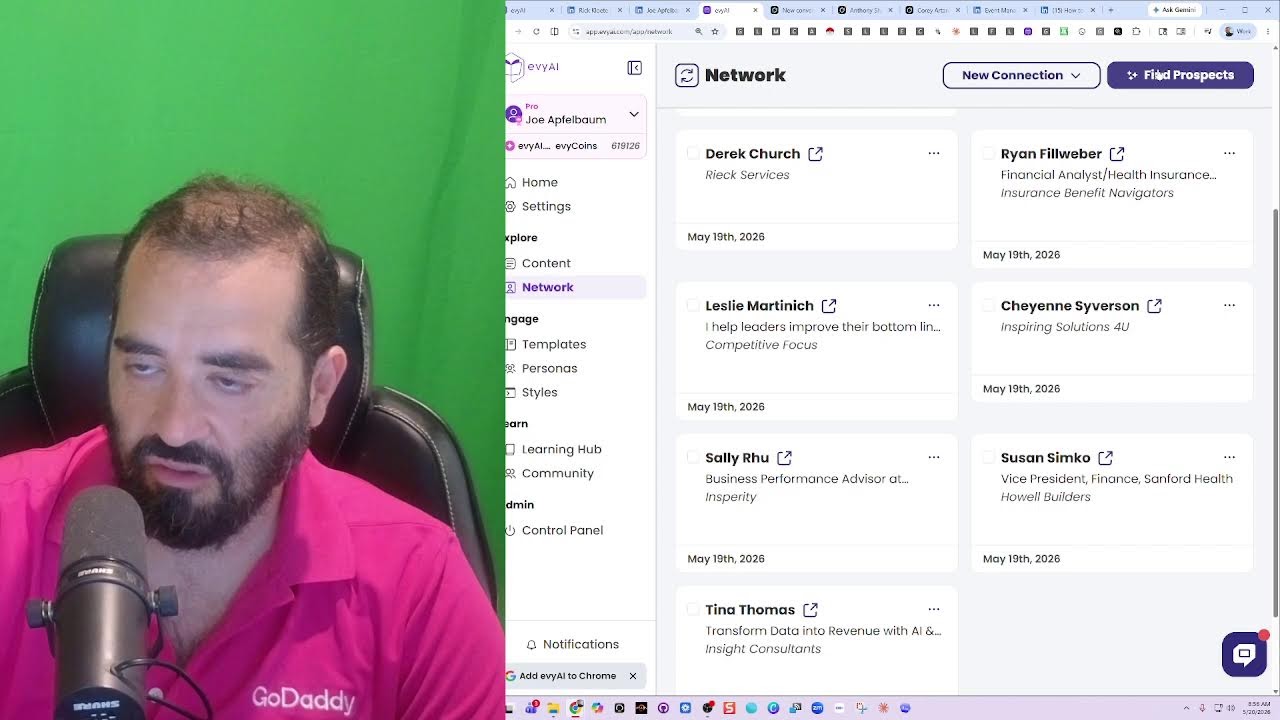
Joe Apfelbaum walks through building a LinkedIn prospect list using Evie AI to filter by domain and job title, then syncing contacts into GoHighLevel CRM for automated outreach. He shows how to save searches, enrich prospect data with AI agents, and export lists under 500 contacts for manageable campaigns.
Chapters
Hey, good morning.
Look at this, we're live.
He starts the spark and he keeps it moving. Joe on LinkedIn, Joe on LinkedIn. He builds the trust, then he books that meeting.
Inbox full, but he stays sharp. Warm follow-ups straight from the heart. Names remembered, goals in sight. He makes people feel seen and right. On the phone, he keeps it clear. No hard push, just growth near. He talks life, He talks business too. Now they see what Joe can do. He don't just post and pray. He builds it day by day. He makes that connection stick. Then the call gets booked real quick.
Joe on LinkedIn. Joe on LinkedIn. He starts the spark and he keeps it moving. Joe on LinkedIn. Joe on LinkedIn. Joe on LinkedIn. Joe on LinkedIn. He builds the Many books that need editing.
From first hello to last knowing, he helps you step right in. Take your life, take your brand to the next level with a steady hand. Joe on LinkedIn.
Joe on LinkedIn. Joe on LinkedIn. Joe on LinkedIn. He starts the spark and he keeps it moving. Joe on LinkedIn. Joe on LinkedIn. Joe on LinkedIn. Joe on LinkedIn. He builds the trust, then he books that meeting.
Yeah, yeah, yeah.
Yeah, yeah, yeah, yeah. Joe logs in, clean slate, fresh post, real value, no bait. He shows up day by day, got a message that can move a tray. He asks why, then he listens, turns strangers into missions. One comment, one reply, now the right doors start to open wide. He don't just post and pray, he builds it day by day. He makes that connection stick, then the call gets booked.
Real I have a question for you. If you're watching this right now on LinkedIn, what do you think— what do you think people think about when you reply to their comment? I'm curious to know, what do you think people think about when you reply to their comment? Most people are not really paying attention to the power of LinkedIn because LinkedIn is the world's largest professional social network. And, you know, when you take a look at someone's profile and you want to build a relationship with them, understanding who they are, what they do, is very, very powerful. So If I pull up someone's profile like Rick, what I can do is I can save his profile into a list, and then I have all his information from here into here, and I know exactly what he's up to. I know exactly what I need to know about him. Now, I can tag him as, let's say, a VIP. I'm gonna go here and type in VIP. Right here. And now he's tagged as VIP, so I can look at all my VIPs if I want. That's powerful. Um, and you know, I love pulling up people's profiles by clicking on this quick link over here. I love syncing it with my GoHighLevel, so all his information goes right into GHL. And then if he posted on LinkedIn, I love commenting on his post. By putting a keyboard shortcut right under the post over here. You see that? And then inspecting to see if I've left comments on his previous posts. And if I haven't, I go back and kind of support those previous posts just like that. See, I'm going to go back, make sure that I supported every one of his posts. If I missed a post, I'll make sure that I support the post. Now the question is, how do you build a list? How do you go ahead and build that list? To help you be able to know exactly the types of clients that you need to be successful? Well, you need a strategy first. Most people don't have a strategy. So if you need help with a strategy, just say, Joe, I need help with a strategy. I'm more than happy to help you with a strategy. And what I always tell people is you can post on LinkedIn very quickly, but you need to know who you're talking to. So for example, I post regularly on LinkedIn. See, I'm going to go down over here and you can see I've— this is a post right over here. It has 3 comments on it already. Let me see if anybody's watching live right now. It looks like Rick is watching. Love the custom Suno song. You're definitely on LinkedIn. He's everywhere. I appreciate the step-by-step approach and the list that anyone can build. All right, so let's talk about this now briefly. So I'm going to go here and I'm going to reply to him. Appreciate the kind words, Rick. And I'm going to reply to Jane as well. LinkedIn completely changed the way that it operates in terms of lives. Now you can reply right to the live here, which is nice. Used to be that you couldn't reply to the live, but now you can. I'm going to go ahead and give myself a light bulb, and then I'm going to switch to Evie AI here, and I'm going to give myself a like from Evie AI. I'm going to give myself a like from Ajax Union. I'm going to give myself a like from Evergreen Networking System. I'm going to give myself a like from the Executives Association. I'm going to give myself a like from Santa. And my goal is to get to 10 likes. I got double-digit likes. Mojo Boom Boom is going to give me a like. I'm going to give myself a like from High Energy Prompting. Okay, so now I have 10 likes. We're going to go for one more. Uh, we're gonna find one more over here. Basil the Samoyed will give me a like right now. Okay, so now I have 11, uh, 12+ likes on this post, and many of the likes I basically gave myself. Do you see that? That's a little hack. Um, in the chat, write more hacks if you want to see more hacks. In the meantime, what I'm going to do is I'm going to go into Evie AI. So before I go into Evie AI, I just want to quickly tell you what Evie AI is. It's a sales assistant that will help you enhance your online presence. It is both a Chrome extension and a web app that supports your sales activities. One of those sales activities that's really important is commenting, writing posts, generating recommendations, messaging, profile customizing, and also building lists. So if you go into Evvii and you click on network and then you click on find prospects, you have the opportunity to put in any domain you want. So for example, maybe I'll put in bp.com. If I know I'm targeting BP as one of the companies, I have my 34,000 people that are right built into here. I can pick the right people in the right states, the right cities, the right locations. That's extremely powerful. So if I click on show filter, I can check contact data and I can check company data. You see that? Now I can remove this bp.com thing here and I can click on contact data and I can say show me anyone that has a specific title like sales manager or sales director. Okay, so I'm going to click sales director and I'm going to say if it contains sales director, I want to see it. So it goes ahead and does a search for anyone that's a sales director. I have 222,000 sales directors. Now I want to pick sales directors in the US, so I'm going to scroll down over here. I'm going to pick country and then I'm going to say United States. I'm going to go here and type in United States. And I'm going to press close. I'm going to press search. So now it's looking for sales directors in the United States. It's 86,204 sales directors in the United States. Now I can go through these one by one and look at who works at those companies, what they do. I can save them into a list that I build. Um, and that helps me be able to really build a relationship with these people. And get them on the phone. And that's the key here. The key is getting these people on the phone. So there's— I'm going to look at 48 at a time. It's going to take me quite some time to get through all 86,000 people. But the cool thing about this is that if I wanted, for example, I see this company over here and I say, I really want to work with Micromax in Miami. And here's the sales director. I can use agents to go off and research this person. Just like this. And it tells me if this person's really a real person or not, and if they're still working there and what their situation is. I'm going to go here and use Grok because Perplexity is having a little bit of a conniption because Grok uses agents that will kind of find everything about the company. You see that? And look for the person, look through the company page. And try to find everything there is to know about that person. Now I can look up multiple people in multiple places. If I find somebody in the Renters Warehouse, for example, or in MasterCheck in Tampa, Florida, I can go ahead and do a little bit more research and go deep into this person. And as you can see, it finds everything there is to know about this person, target audience, key services, how they help clients. I have a phone number. I have a location. I have their LinkedIn URL, conversation starters, potential business opportunities, notable achievements. I looked at 89 sources in about 15 seconds, and that is powerful. Now, Evy.ai has niche directories that are ready to go. So for example, if you say, okay, Joe, make me a directory of the Inc. 5000 fastest growing companies in America. We already have a list of the Inc. 5000 built in and all Evy.ai Pro members get that list. And so I can go in here and do research on any of these people over here and build a real relationship with them because I know a description of their company, their industry, leadership, company information about their Twitter, Facebook, LinkedIn, whatever. I even have the cell phone number and email address of almost every single person here. And so if I don't have any of the information, I can always use an agent that will go off on the internet and find everything there is to know about this person, saving me a ton of time where I don't actually have to go and do this myself. So directories are really useful because again, you go into network, you go into find prospects, and then you'll have domain you can search through. You can search through actual first name, last name, company name, email, phone, LinkedIn URL. If you click on show filter, you can see every single filter that we have available. For example, I want to see everyone that has a mobile phone. So I do has data. And then I want to see everybody that has a LinkedIn URL too in our system, and everybody that has a business email, and everybody that has a specific title, like for example, sales director. And then I want to see everyone in a specific country, city, state, so I'm going to do United States. Let's see. United States, and then I'm going to say— and I can do exact or contains— then I can do the state of, let's say, New Jersey. Close. And then if I press search, it'll show me everyone. I have 452 people in New Jersey that have a verified cell phone number, an email address, a business email, a LinkedIn URL, everything here. And so I can go take these 400 people, put them into a list, and then just start working them one at a time, which is really nice. These are people in my backyard. If I want to select all these people, it's really easy to select all the people, save them into a list. I could even save this search for later. So if I press Save Search, it goes into my saved search history. So if I go back to Network and I click on Prospects, I can see this search of 452 people. If I press on it, it'll load up those 452 people really nicely. You see how quickly I was able to save that search by clicking the save search button? And so essentially I'm building my own little group of directories of things that I can go to later and kind of go back to the well. You want to have lists that are small, that are not like 400,000 people. You want to have maybe 100, 200, under 500 people in each list. And then you want to strategically work through those lists. So for example, if I want to find this information about this person, I just check this off here. I press save connection, and then it takes me back to the main saved connections over here. I open it up and now I know everything about him. I can call him up. I have his phone number. I have his email address. I can use AI to research him. I can take notes on this person by clicking on notes. I can generate insights about him, like write an introduction, a summary, an email. I can send them into my GoHighLevel. I could research him on any social profile. I could actually open up his LinkedIn profile just like this to verify that this is a real person, see if I'm connected to him or not. And I see that he's paying for LinkedIn. So this is a real prospect for me. He posted 4 days ago. So he's active on LinkedIn, which is really nice. Very powerful stuff. So if there's a particular list that you want, feel free to let me know what type of lists you want, who you want to be able to build a relationship with. And that's the situation. Okay. Now I do have a call starting right now. So let me just see if the person's actually on right now. I'm going to head into the call. Let's see if the person's on the call.
I think he is.
See what happens. I'm gonna put on my headphones. Hello, hello. I am letting him in one second because I was on your. Oh, no worries. Go ahead. I can let him in. I think this. I'm gonna let him in. I'm gonna let him in. Hello, is this Babak? Recording in progress.
How are you?
I'm good. How are you doing? Baruch Hashem. Thank you. What's going on with you? Trying to keep up with the daily tasks. Okay, cool. What's stopping you from doing your daily tasks? What's stopping me? distractions mostly, I think. Okay. All right. All right. Well, uh, tell me a little bit more about, um, what you're trying to achieve so I can see if there's a way that I could possibly help you take your life and your business to a whole new level. I know that we've been connected. We've been connected to a link on LinkedIn for a really long time.
Uh, yes.
And we've been going back and forth. We've been you know, doing all types of stuff. And yeah, are you looking for more conversations with your ideal client or like what's your goal? Yeah, basically, I guess to be one thing to be more effective on LinkedIn.
More from Joe


How to Beat the Algorithm: Remove Hidden Watermarks & Scale Content with evyAI









AEO & GEO: SEO's Future Explained! Master Answer & Generative Engines! #shorts