How to find Clients on Linkedin in 2026
Joe Apfelbaum shows how to find clients on LinkedIn using his AI platform Evvy. He walks through the #16 Hashtag-DM hack, auto-generated comments via keyboard shortcuts, and how to segment connections by name or company to send personalized templates. The platform has 100-200 new AI features coming.
Chapters
And today we're going to be discussing LinkedIn hacks for 2026. I built this business called Evvy AI, a LinkedIn AI assistant that helps people be able to be more successful on LinkedIn. The number one thing that people are missing right now is a strategy. And I believe that the right strategy will save you a decade. So I'm going to share with you guys one strategy that I'm using today. that you guys could implement in 2026. And it's one of the 99 LinkedIn hacks actually. So if I send somebody a message, for example, I send Jeff Goldberg a message. Do you see this guy, Jeff Goldberg? He's one of my friends and a client and a center of influence and a person that refers business to me. Do you see that there's a little hashtag here inside the DM that I sent him? Can you guys see that? Why did I include a hashtag here? Can anyone guess? Does anyone remember what hack that is in the 99 LinkedIn Hacks? So let's go to the 99 LinkedIn Hacks and find them just so you guys can see what I'm talking about. I'm going to go home. I'm going to click on join community. I'm going to click on classroom, and then I'm going to go to the 99 LinkedIn Hacks. And I'm going to say Ctrl+F.
DM.
So I have— it's called number 16, hashtag DM hack. Okay, so here's what I do. I send somebody a DM and I say, would love for you to be able to help me with a small project. I would like you to answer one question. If 100 people could hear this message, what would you say to them? Okay, if 100 people could hear a message, what would you say to them? Here is where I'm collecting the responses. And I put a hashtag that is a unique hashtag that doesn't exist on LinkedIn. It is a unique hashtag. I'm the only one that has anything on that hashtag. Now, when you put a hashtag in a DM, what ends up happening is that DM becomes clickable. You get what I'm saying? And when they click on that hashtag, it loads that post. So let's see if it loaded the post and let's see if Jeff Goldberg commented on the post. Can you see Jeff Goldberg commented on the post? He says, you can enroll more clients without being pushy or salesy or sleazy. You can have the confidence to blah, blah, blah. Do you see that? So instead of saying, hey, I posted something on LinkedIn and I want you to comment on it, could you comment on it where it seems like I'm taking, I'm actually asking him to participate in a project that I'm doing where I'm collecting answers to a particular question. Do you understand what I'm saying? Now you might ask me, Joe, how did you even create this image of yourself holding a microphone? So for that, I used a technology called Nano Banana. Have you heard of it?
No.
Nano Banana is Google's latest technology. We built it right into Evie AI. And so with your premium subscription to Evie, to Evie AI, you get the ability to create nano banana images. So I uploaded an image of myself and then I wrote, create a dynamic, engaging street interview scene using the attached image where the subject is positioned directly approaching an interviewee in a fitted bomber jacket, blah, blah, blah, blah, blah. Position them in the center. With a microphone pointed directly at the viewer, as if asking them a question. Their expression should be warm, enthusiastic, blah blah blah. I want to hear your story energy. And then put a big sign behind me that says, "If a thousand people saw your message, what would you want it to say?" In clear, impactful typography, blah blah blah. Navy on a stick. Da da da da. Daylight hours. Everything. Do you see how clear this prompt is here? Now, because I gave it such a clear prompt, and by the way, I used Evie AI to create the prompt. I told Evie AI, I'd like to create an image in Nano Banana. Please create me a prompt that has these characteristics with a sign behind me with me standing on the street. And Evie AI went and created this prompt. And then I took the prompt and I put it inside the image generator right over here. I added my little image and I pressed create. Do you understand what I did there? Does anybody have any questions about that right now? I'm going to stop sharing my screen for a second. Does anybody have any questions about that? Hey, Lindley, good to see you.
Good morning. Thank you for having me. I'm the first time. Uh, quick question on that. Uh, is that a premium program? Is this the Pro? I bought Habit.
Yeah. So if you have Pro, you have everything that's included in Premium plus you get like 100 different things in addition to that, plus you get tons of training and support and so on. So Premium is our very entry level for people who just want to create content. Pro is for people who want to get clients. So most of the people on this call are Pro also. You're not the only one. Some people are Premium. Some people are Premium, but most of the people on this call are Pro. They're really getting the max benefit of it. If someone's on the premium and they want to upgrade to pro, we can give you guys a special deal. Just write deal in the chat and someone will send you a deal to upgrade today. It's Black Friday, blah, blah, blah. But what I want you guys to understand is the strategy is making sure that people are able to want to engage with you in some way. So how many connections do you guys have right now? Let's say you have 1,000 connections, correct? 2,000 connections.
Right.
5,000 connections. If you can identify who the people are that you want to interact with, you need to give them something to interact with. You need to give them some type of message. If you just say, do business with me, they're going to get annoyed. That's why we teach the greeting, feeding, and meeting system inside the Evergreen Networking System. Number 1 is you first greet them. Happy Thanksgiving, happy birthday, great to know you, whatever. And then you feed them. Feeding them could include a bunch of different things, like inviting them to an event, like in asking them who they want to meet and offering to introduce them to somebody, or sending them some type of offer for information that could be helpful to them without them perceiving you as trying to sell them something.
So would you mind to let me ask you, in the training I just used in the Ivy AUI, uh, created the first I just posted on LinkedIn just now. And would you— may you provide some feedback based on your just training as how to engage them?
Yeah, of course I can do that. So if I go to, if I go to Lindley's profile over here and I look at it—
I just created a—
Yep. I see that you just created a post over here 12 minutes ago. So I'm going to take a look at this post. My recommendation is to make your post a little bit longer. Because you want something called— you want something called dwell time on your post. First of all, congratulations on creating a post. That is huge. The fact that you even created a post on LinkedIn is huge. Most people, they don't even create content on LinkedIn, and you went and created a piece of content. So I'm going to give you a heart because you created the content. I'm also going to share the—
Thank you.
I'm going to share the post with everybody else in the comments. Everybody can leave you a comment over here. The way that I'm going to leave you a comment on this post Is by using the artificial intelligence. You see, humility paves the way for unique connections and growth. It's inspiring to see leaders like you, Lindley, and I'm going to tag you by pressing the@ sign and then selecting your name. And then I removed your last name, which is a little bit nicer. Embracing this mindset by being open to— thanks for being a client. and a friend. And I'm going to say, Tina Larson, thanks for the referral. Okay, so I'm going to press comment. Do you see what I did there? 80% of the comment was written by artificial intelligence, but 20% was added by me. And it added so much value because I tagged you, because I brought in Tina, because it was really clear that AI couldn't have known that you were a referral from Tina. Do you get it?
Yeah. But now you get that, uh, sorry, uh, the sign of like, pick up a person name hyperlinked.
Um, so we have something called in our community, we have something called LinkedIn 101 training. I recommend you, you all have access to this LinkedIn 101 training course. If you don't have access, you could let me know. I'll give you access. But this LinkedIn 101 training is a 90-minute course that teaches you all the basics of LinkedIn. One of those things, one of the basics of LinkedIn is called mentioning, mentions. You see right here, commenting best practice, tag the original poster, use an@ symbol. You see it? That's minute 24 to minute 32. I explained that. So I highly recommend you use something called mentions. We have something called the Mention Saver. Have you heard of the Mention Saver?
Hmm.
Mention Saver allows you to copy a lot of people's mentions at one time, and then you can repurpose those mentions under any post. So if I wanted to just tag all these people here, and I said, you should meet all these people, look how many people I just tagged.
Wow.
How crazy is that? Do you see how quickly—
So in your initial response, you click something, you had AI generate. I didn't see that step. How do you get AI to generate that comment right away?
When you, when you click into the comment box, Evie AI can read the post. Only after you click in, Evie AI can read the post. Once Evie AI can read the post, you have the opportunity to go into Evie AI and press generate and then press insert after. Or what you can do is you have 2 additional options. Option number one is use a keyboard shortcut. In Windows, it's Ctrl+Alt+G. And then Evie AI will automatically generate the comment and then insert it no matter where within Evie AI you're in. As long as Evie AI is open, even if you're in the image generator, it'll generate a comment and insert it for you. Even if you're in the profiles or in the templates or wherever you are, Evie AI knows that you want to generate a comment when you press Ctrl+Alt+G at the same time. One time you press it, Evie AI starts spinning on the side. You'll see it spinning, and then it generates a comment and inserts it. It's called generate and insert. The other way to do it—
Mac, it's a different key, right?
So it's Option Command G, or Option G or Command G. Yeah, it's one of those.
Okay.
Okay. So, so the idea behind this, and the other option is you can right-click inside the comment box, you can click on the Evie AI logo and press Generate and Insert, and it'll generate an insert into any any comment on any post on LinkedIn. Okay. The other option is obviously if you go into Evvy AI, you click on content, you click on generate, you select your goal, your tone, your persona, then you select your language and then you press insert and it goes in very quickly.
Right, right, right.
So Shih Tzu says, please send the LinkedIn 101 training. It's inside the school community. You can watch it anytime you like. Thank you, Shih Tzu, for saying that. I put the link in the comments as well for you, Rob. Okay, so here are my thoughts for you guys. Go ahead, Francois.
Thank you. I have a question. Just before this call, it said that my thing needed to be updated. I updated it, and now there's nothing showing up. I'm on her— how do you say— post right now, and there's— I can't initiate a comment. Is it okay if I share my screen?
Um, yeah, so it's 100% okay if you share your screen. Let's take a look at what you're looking at.
Thank you so much.
Okay, so yeah, so go ahead and refresh, refresh the page. You see on top you can refresh? Yeah, go ahead and hit that refresh button. You have, you have something over there. You have some type of— oh, I think your Hedera is getting in the way of stuff, but scroll down a little bit. Do you see my comment is there? And so is Juan.
Yes.
Yes.
Yeah, it looks like you have a conflict with one of your Chrome extensions. It looks like you have a lot of Chrome extensions installed. What I would tell you to do, Francois, is just remove some Chrome extensions that you're no longer using, maybe like Monica or Hedra or some of these other ones. If you're not using it, either remove it or disable it temporarily. The way you disable Chrome extensions is by clicking the little purple button next to Hedera. You see next to— yeah, that— yeah, so scroll down a little bit. You see Hedera AI? If you're not using Hedera, then just click on the button. Click on the button next to it, that little tiny— yeah, click on that. Because that will— that's the one I saw. And then same thing with Monica. If you're not using Monica every day, then just turn it off temporarily. When you need it, it's right there. You can turn it back on. Same thing with anything else that you have here. If you scroll down this list and you see stuff that you're not using, Then just turn it off temporarily because each one of these extensions take up a little bit of extra, like the vision for YouTube or anything like that. If you don't use it regularly, turn it off, and when you need it, you can always turn it back on. Does that make sense?
Yes.
Excellent. I'm going to stop your screen share so that you don't have to keep your screen sharing.
So then I would just need to refresh and then The Evie AI icon would appear, which is not.
Correct. Oh no, there is no Evie AI icon. There's no more the Evie AI icon. The way it works is click on the extension on the top right corner inside the extensions box.
Turn it on.
Yep.
No, it's right there on the left side of it. There's the—
Oh, left of it.
Yeah. Now, now, so now the way it works is instead of clicking on the icon inside the comment box, When you refresh the page, go ahead and refresh the page because you, you had it open before. Yeah, go ahead and refresh the page. Click into the comment box. Now, when you click into the comment box, Evie AI knows you want to write a comment. Do you see Evie AI says comment on the top? So then you press generate. Evie AI will generate a comment. If you like the comment, just press insert. Go ahead and press insert. And it just, and now press comment. If you like this comment, you press comment and you just left a nice thoughtful comment. That's how it works now. There's no more icon inside LinkedIn. LinkedIn changes terms and conditions. They said, we don't want icons inside LinkedIn. So that icon that you see next to the smiley face, that doesn't comply with LinkedIn's terms. Get it? Got it.
Thank you so much.
You are certainly very, very welcome. All right. So I'm going to share my screen. Oh, Yves, you have a question? Yves?
Yeah. Well, when I click the comment box, it gives me a reply on the right side. It doesn't give me comment.
It doesn't? Oh, it doesn't give you comment? Okay. So go ahead and share your screen and let me take a look at that for you. And because it's good, it's good. If you click on the, if you click on the green button.
Yeah.
Okay. And then click on select entire screen and press share.
Okay, so let me get rid of—
Okay, great. So open up your browser. I see it right there. Perfect.
There we are. Okay, so you see I go in the comment box here.
Yep.
And here it says reply.
That's because it's—
if I press—
yep, yep, yep.
Sorry.
Click on her profile. Click on Lynn's name. Okay, and then click into the comment box over there under— instead of clicking on the image of the tree, click into the comment box under the tree. The comment box.
Where is it? Here?
Yeah, click on that.
This one here? Yep.
Now click into the word where it says add a comment on the bottom there under the tree.
Here?
Yep. Now it changed to the word comment. Sometimes when you open up, when you open up a post in preview mode, Evie AI might not read it. However, if you refresh it, Then it'll read it. Sometimes it gets stuck depending on the settings that you have and so on. But yes, if you press, if you press generate now over here, I see your, your, your persona right over here is set to LinkedIn messaging helper. I would change it to a comment reply or, or just comment engage depending on what you want to do.
I want to engage.
Yeah. So you could click on comment engage and you could also create your own personas within Evvy AI.
Yeah, I'm not there yet, so thank you.
Yeah, yeah. And we meet, and we meet every day. We meet every day in office hours at 12 PM where we can help you how to do that. Okay. Yeah, you hit generate and then, and then you'll hit insert and you'll be fine. All right, I'm gonna replace your share with my share so everyone could see my screen. Thank you very much. All right, so the key is for you to engage with people, build relationships with them, But set up a template for how to reach out to people. So for example, I want to reach out to 1,000 people today. So I can go to my connections. You see right here, I can go to my connections and I can find the types of people I want to reach out to. So for example, maybe I want to reach out to people named David today. Okay. So I searched David and now all the Davids show up here. Do you see all my Davids I'm connected to? I'm connected to over 500 different Davids. So what I'm going to do is I'm going to set up a template that says something like, David, would you be able to help me with a small project? You see that? It's the same template as before. And instead of sending it to one David, I can send the same message to all the Davids, and they will all think—
Mm-hmm.
That they're the only David that got the message. Do you see that? Isn't that great?
Yeah.
So I'm now sending a message to 500 Davids, but I'm not using automation because I actually want to read the previous post that I sent the person to make sure this is the type of person that I would actually want to send a message to. You see that? You see the way I'm sending all these Davids a message and I'm sending it one at a time. Now the other thing I can do is if I go into the Evvii dashboard, which is app.eveai.com/dashboard, and I click on templates, I can find this template and I can assign a keyboard shortcut. Say for example, maybe I want to— hang on a second, let me just check what Alt+2 is. Comment reply. Alt+3 is set to happy birthday LinkedIn. Alt+4 is belated birthday. Alt+5 is webinar replay. Alt+6 is set to So I'm going to do Alt+6. So I'm going to uncheck this. And do you see this template over here, this 1,000 Connections template that I saved? I can set Alt+6 to be the shortcut. And I'm going to say reassign it to this one. So now when I press Alt+6, this particular template will automatically go into the box. So you see David Adler? I click on his post here. I'm going to press Alt+6 on my keyboard. And now that comment appears. Do you understand what I just did? I'm going to stop sharing my screen for a second. I want to explain it to you because I showed you. Now I want to explain to you. I created a comment with someone's first name. Now you don't have to include their first name if you don't want, but if you know you have 25 Marthas and you want to send all Marthas the same message, what you can do is you can create a template that says, Martha, I'm just curious to know blah blah blah, can you help me with whatever? And then you can assign a keyboard shortcut to that template. And then you could just open up all the Marthas and just send the same message using that keyboard shortcut to all the Marthas. But the reason I do it one at a time instead of blasting them all at once is number one, is if you blast it, it's against LinkedIn's terms. And number two is you want to see the message you had with the person before so that it makes sense if you're sending them that message. So if you have 1,000 connections and you want to send all your connections a message, you can segment it. by just first names. And you might see that you only have 100 first names to deal with. And over the course of a month, you can deal with all the first names by sorting it by first names. Now you have all your Marthas, your Jessicas, your Davids. And the beauty is that when you sort by first name, often you'll know their gender as well. Not always, but often. Like, for example, most Darins are males, and most Peters are males, and most Samanthas are females. So if you're kind of separating it by gender, that's a way to be able to communicate with people in a different— like, for example, if Lindley's reaching out to female CEOs, she might say, I would love to— I'm researching my female CEOs, and I just wanted to say, you know, kudos to you for being a CEO as a female. Would love to ask you a few questions as a fellow female. If you can help me, that would be lovely. When she's reaching out to male CEOs, She might say something like, as a female trying to aspire, I know that you're very into female empowerment. As a male CEO, maybe there's a way that you can support me by taking my call and giving me some advice. And then all of a sudden you're leveraging the egos and the power play and the thoughts of people to connect with them and build a meaningful relationship based on the things that they care about. Does that make any sense? Put a dollar sign in the chat if you guys agree with that or disagree with that. This is the power of strategy and this is why somebody would A, respond to you or B, ignore you. And we want to get people to respond to you. The way that you get clients in 2026 is simply by getting people to respond to you, pay attention to you, have a conversation with you. And then if you can qualify them and build a relationship with them, you're likely to get referrals and you're likely to get clients. That's the idea. Now, for all of you that are here and are Evie AI Pro users, we're going to make this presentation available as a replay for all of you. If you're premium and you want to learn about Pro, we're more than happy to help, but don't worry about it. Everything will be available as a replay for all Pro members. That's a Pro benefit that we give you guys lots of access of replays and things that you get as a Pro member. We're also in the middle of refactoring Evie AI. which means that the code is gonna be much more robust and we're gonna add 100 to 200 different features over the course of the next year. And many of those features are gonna be agentic features that are gonna support you in growing your business and doing things for you. Like one of the things that I dreamed up was to have Evvy AI just write a post for you every day without you doing anything. Wouldn't that be cool if you had just Evvy AI just write you a post each day? You don't have to prompt it, tell it what to do. It just writes you a post and sends it to you. And if you like it, you can post it. Same thing with images, same thing with ideas, same thing with even suggesting people that you should be connecting with or talking to. Like imagine if Evie AI just delivered those things to you instead of you going in having to do those stuff. So that's the kind of stuff that I'm gonna be adding to Evie AI. And it wasn't possible when we had 5,000 lines of code on one manifest. Now we're separated the whole thing out so we can keep adding more modules and more modules and infinity. And I already have all the ideas mapped out. Just a matter of implementing. And it took 6 months for us to refactor. So now finally, and we still were able to ship new features like Nano Banana and like so many other features that we were able to ship while we're still refactoring. All right. I'm very excited about sharing a new feature that LinkedIn just launched called semantic search. I'm going to show you how it works real quick, because this is a big topic that people are talking about. We're going to do more classes on this, but I just want to show you briefly. It used to be when you wanted to search on LinkedIn that you can search on LinkedIn with a bunch of different filters. For example, if you're in Sales Navigator, do you see how many filters there are within Sales Navigator? Like for example, current job title, that's a filter. So if I want to only search for people that are, for example, CMOs, chief marketing officers, I can do that within Sales Navigator. That used to be a feature within the regular premium option here. There used to be a feature when you did CMO, you'd be able to find all the CMOs by clicking on people and by clicking on all filters. And there used to be a section over here called title. They removed that section, which is an embarrassment to society, but they still did it. They removed that section. So there are workarounds to be able to still do it. One of the workarounds is paying for Sales Navigator now, but there are workarounds if you don't want to pay $100, $150 a month or whatever for Sales Navigator, then there are ways to still get title if title's even important to you. And by the way, I'm curious to know what title you're looking to do business with in the chat. You could let me know what title you're looking to do business with. Would love to know what title is. Here's an idea for a feature. Let you see what connections you have a lot of engagement and interaction with, but you haven't in a while. Love that. Thank you, James. A CPA. Amazing. Okay. So let's look for CPAs. Let's look for CPAs. I'm going to search CPA. I'm going to search CPA. And now when I search CPA on LinkedIn, it shows me CPAs, but it doesn't tell me how many CPAs. It just shows number 1 through 10. Do you see that? 1, page 1, page 2, page 3, page 4, page 5, up to page 10. If I go to page 10 and I try to go to page 11, it still shows me page 11. You see that? And I'm going to go to page 15. And you can see as I'm going to page 19, and it keeps getting more and more pages of CPAs. But there's— it doesn't tell you how many CPAs. It used to have a number on the top. Remember it used to have a number how many there is? If you want that number, now you would need to go into Sales Navigator to get a number. So I'm going to search CPA, press search, and it's going to give me 160,000 CPAs on LinkedIn. You see that? It shows me how many people have the title CPA, 160,000 CPAs on LinkedIn. So over here, it's not going to show me 160,000. It's going to show me 10 at a time. And it's only going to allow me to be able to just click next, next, next till I get to the end of the CPAs. So if I was Lindley and I was targeting CPAs, what I would do is I would first check to see how many CPAs I'm currently connected to. And I would check the current area that they're in. So I'm going to say, I'm looking for CPAs in Brooklyn, New York that are connected to me and post on LinkedIn. Okay?
Hmm.
Do you see the way I wrote that? I'm looking for CPAs in Brooklyn, New York that are connected to me and are posting and post on LinkedIn. I'm going to press enter. And now this LinkedIn is now searching and it's doing a terrible job, but it's supposed to be working. Do you get what I'm saying?
Yeah.
It's doing a terrible job and it's finding me nobody. Um, supposedly this is supposed to work, but it doesn't properly work. Now I'm just going to write CPAs in Brooklyn that are connected to me. And let's see what it finds. CPAs in Brooklyn, New York that are connected to me. And look, it's finding CPAs in New York, but they're not all connected to me. Look, some second degree. You see, first degree means they're connected to me. Second degree means they're not. But you— and they're not all CPAs. This guy is a managing director for CBiz Advisors. I don't know that he's a CPA. You see that? This guy here is a CPA. This guy's a bookkeeper. This person's an accountant and CPA, but they're not connected to me. So how do you guarantee that they're going to be connected to you is if you press first degree up here. Do you see it says first degree? So if you press first degree, that's a filter that allows you to be able to see people that are connected. So now I press the first degree filter and all of a sudden it shows me nobody. So it's kind of broken. So what I would do is I would just put in the title inside the search and then I would select the filters. I would use the search in a very minimal way, not the way that they want to intend for you to do it because it's not going to work. And then I would filter it out with whatever additional filters they still give you access to. Now for you, Lindley, if you're already connected to— I'm connected to over 1,000 CPAs. You see, I have over— if there's 10 pages, 10 times 100, 10 times 10, do you see how many there are? I have over—
Okay.
I have over 1,000. And so what I would recommend that you guys do is if you know somebody with Sales Navigator, you can have them pull a list for you and then try to get that list, or you could use other tools to be able to help you find lists of people to target those people if you're not currently connected to them. But the beauty is that you can also select people that are second-degree connections. So watch this, I'm going to click on second-degree, and now it's showing you people that you're not yet connected to that are CPAs. You see that? And if you want to search location, I'm going to type in Brooklyn, New York. Brooklyn, New York, right over here. Location still works. So second-degree CPAs in Brooklyn, New York, you can see I have over 10 pages of them, of 10 each. And I can add additional filters. For example, people that work at specific companies, people that are connections of a certain connection, people that are followers of, let's say, Tony Robbins. I'm going to say Anthony Robbins, Tony Robbins. I'm going to press—
Tony, they're awake. Is there a way of future CPA have their own firm practice instead of working for a company?
You could figure out if the CPA, um, owns the business by adding additional filters. There are additional filters you can add, but they're not filters that are available in this platform here. So you can go here and you can, um, to Sales Navigator and you can do it in Sales Navigator. You can write by company headcount. You could say 1 to 10. Or title, founder. Yeah. Or self-employed. You see, self-employed CPAs, there's 6,000. Um, you know, there are different ways to be able to do that, but what I would tell you to really think about when you're picking your target market, and this is something we teach inside the Evergreen Networking System, I want you to think about the demographic, Psychographic, geographic, firmographic. These are all things that you need to think about. And we're also going to be covering this in the prospecting bootcamp, because the most important thing that you need to do is understand your target market. Because if you don't understand your target market, you can't tell Richard to refer you that person. For example, my target market is someone who wants to be active on LinkedIn, but that doesn't really help people so much. What helps people is if I say, do you know a sales trainer? I'd love to meet a sales trainer. And you say, why a sales trainer? Because sales trainers work with sales teams and I wanna help sales teams. And sales trainers not only can become my client because sales trainers need my product, they also can get me into their clients. So you, those are, that's the, that's, So you have to get to that level of specificity. And I would say, I want to meet a sales trainer in New York that I could meet and invite to my networking group. And all of a sudden you're like, oh, I know a sales trainer in New York. Now it also narrows it down for you in your mind and it helps you become a better networker. In 2026, we're going to see a lot more semantic search and they're going to probably fix that broken search. But keep in mind that relationships are still going to be relationships. You're still going to have the same— you got to get on a call with somebody and build a relationship with them and get to know them. That's not going to change even if we have robots, even if everything is automated, even if everything is AI. People are still going to trust other people when they get on the phone with them or they meet with them in person. Especially if you're offering them a $180,000 product or a product that's thousands of dollars. If it's a $5 product, people will just buy it online. But if it's a product that's like a consulting thing, a coaching thing, and you're charging thousands of dollars for it or an agency, then you have to have a conversation with the person and build a relationship with them. That's really the idea.
Yeah.
Now I want you guys to realize that the fastest way to get a referral from someone is to get to know them, to build a relationship with them. If I know you, it's much more likely that you would want to refer business to me. And the way people get to know each other most of the time is by having conversations. So that's another reason for you to want to have 5 conversations a day, every single day, no matter what. If you invest in a community, if you're part of a community, then build a relationship with the people in those communities. Like for example, I invest in at least a dozen communities. And when I say I invest means I'm paying a monthly fee or an annual fee to be part of those communities. For example, I'm a member of Entrepreneurs Organizations. Have you guys ever heard of that? Entrepreneurs Organizations are for people that generate over $1 million a year, verified revenue. You're the CEO of the company. You can meet other CEOs that also generate $1 million a year. globally. And there are over 20,000 members of EO, and I've been a member since 2012. And every year they verify that you have the revenue and that you're the right person and blah, blah, blah. And when I meet another EO member, they trust me instantly, implicitly, right away. And there's a rule, no soliciting. You can't sell to each other. But my biggest customers have come from EO in my life, from referrals from EO. I met with the president of EO New York in 2012, and we had a conversation over breakfast, and he ended up introducing me to an account that paid $45,000 a month to my marketing agency for 2 years. That's a 7-figure referral. How did that come about? That was just a relationship that I built. I wrote about it in my book, High Energy Networking.
Wow.
And that also changed my mind because I just had a conversation with David A guy that got referred to me by a guy named John. One of our clients referred me a guy named David. And I had a conversation with David and David's like, why would anybody want to refer business to me? I'm just looking for clients. I'm not looking for referrals. And I was like, let me ask you a question. Would you take my call if John didn't introduce me to you? He's like, no, I would never take your call. I was like, we're on the phone and you're about to become my client because a stranger on the street told you to meet me. A stranger on the street in a parking lot that you met and you mentioned that you want to learn how to use LinkedIn. He's like, I got a guy for you, and he introduced you. But if I called you directly, you wouldn't have trusted me. He's like, you're absolutely right. That's the power of networking. That's the power of LinkedIn. I find a stranger on LinkedIn. I know his first name, last name, company name, where he works, where he worked before, all that stuff. I build a relationship with them because I asked them for a favor. I said, hey, could you do me a favor? I'm interviewing people on the street. I want to know whatever the question is that you have to ask them. And then they answer the question or they don't answer the question, but now they're a friend. Do you get what I'm saying?
Yeah.
Now for 2026, I want you to think about some people that you could remove from LinkedIn. So people that you've been messaging for quite some time, and they're the wrong people, remove them from LinkedIn. And it's very easy to remove somebody. But before you remove somebody, you want to message them and let them know that if they want to get in touch with you, here's my email. But it looks like you're not really using LinkedIn, but that's okay. If you decide to come around, let me know. And then you could remove them from LinkedIn. So I'll show you how to remove somebody from LinkedIn in case you ever want to remove somebody just to clear the clutter. So if I go into my connections on LinkedIn by clicking on my network on the top, And once I click on my network, I click on connections. I can find people by first name and last name, like I found all the Davids over here. But in this case, I'm going to find Chris. I'm just going to click on Chris and I'm going to find a random Chris. I'm going to go down. There's a lot of Chrises. There's Chris, Christine. There's so many Chrises and Christines. I'm going to see this over here, this investor dad rally visionary leader. I'm going to keep scrolling down. Look how many people I have here with the name Chris. You see this? And this one over here clearly has a fake name, a fake, a fake photo. You see, it doesn't have a photo of themselves. I'm going to click message and I'm going to see, I see you don't have a photo of yourself on LinkedIn. Please email me, joe@ajaxunion.com, if you want me to make a photo of you, no charge. It will help you build trust with people.
Hmm.
Okay. All right, now I'm going to press send. Now I don't really trust this guy here. You see this? Because I don't see that he's real. There's no photo there. So what I'm going to do is I'm going to click on the 3 dots over here and I'm going to press remove connection. You see that? I just removed the connection.
Wow.
Now you might ask myself, wow, Joe, why did you just remove a connection just like that? It's because if the guy doesn't have his photo in there, chances are he really doesn't value building relationships with people on LinkedIn. He just wants to promote himself. And I don't have time or the space to be able to have people in my network that just want to promote themselves. That's not why I'm there. I'm not there just to promote myself. I'm there to build relationships. And I have 30,000, which is max connections. So if you're close to max connections, or if you see people that don't have photos or have low quality profiles or are not responding to you, feel free to click those 3 dots next to their name in the My Network tab and remove the connection. Now, if somebody sent you a connection request, you can also see that inside the My Network tab by clicking on invitations and show all. And do you see over here it says there's a selection? I have 950 people that asked to connect with me on LinkedIn. Can you guys see that?
Mm-hmm.
The other hack that I want you guys to see is that I can message people even if they did not connect with me. So these people are all waiting to connect with me, right? They sent me a connection request. By the way, Lindley, I see you're waiting to connect with me. I'm gonna press accept.
Mm-hmm.
But do you see all these people? I'm not gonna accept these because A, I'm at 30,000, so I can't even if I wanted to. But I'm going to remove some other people. But in the meantime, I could still message these people. But if I wanted to message this guy, Gulham, you see this guy over here? I want to message him. I can't just message him. If I click message, I can't just message him. You see, it goes to Sales Navigator. It requires me to use a credit. I don't want to have to, I don't want to have to message him like that. If I want to send him a DM on LinkedIn, what I could do is I can click here at the hack. is to click on the My Network tab. This is the only place that you can have this hack. And this is one of the 99 LinkedIn hacks as well. If you click on My Network, you see I can't message this person. He didn't send me a message. But if I click on Show All Invitations and then I filter by people, suddenly there's a special button that appears under his photo. Do you see it says message there?
Yeah.
So what I'm going to do is I'm gonna create a special template that says, would you be willing to do something for me? Look at this. I just sent him this message. Do you see this message I sent this guy here?
Mm-hmm.
So I'm gonna send it to all these people to see if they're willing to comment on my post because I have 1,000 people I can message today. Do you see? They don't have to be ideal clients of mine. I just want to interview them on the street. So they want something from me. Let's see if they're willing to do what I want them to do. Do you get what I'm saying? So the quick way to do this, instead of going back, back, back, is you press Control-click, Control-click, Control-click, Control-click, and then they open up in a new window with the message ready to be sent. You see? With the message ready to be sent, and then you could use a keyboard shortcut, or you can use the template from the right here by pushing the up arrow. The template goes in. So you see, I'm going to go here, push the up arrow. The template goes into the DM, and I press send. You see that? Is this, by the way, is this helpful to you guys? Give me a thumbs up if this is helpful so far.
It's helpful, but you're going to need a lot more touch up though.
Very good.
Okay, it's helpful, but I'm going a little quick?
For me.
I'm going a little quick. Yeah, but the beauty is the following. I can just teach you one thing and go real slow and repeat it over and over and over. Or I can teach you a series of things, say 5 or 10 things. And then if you want to catch a replay, you can catch a replay later. That's really the thing. You're not going to be able to capture every single thing. And just so you know, all the videos are available inside the 99 Hacks. And also this recording will be available for all EvAI Pro members. And also we meet every single day at noon. So you can ask, you can say, hey, Joe sent a template and I'm not sure how we use the keyboard shortcut, how we made the keyboard shortcut. Write down a note. I want to go to office hours and learn how to use keyboard shortcuts. Write down, I want to be able to learn how to make a template and how to eject a template. I want to learn how to message someone that's waiting to connect with me without me accepting the connection request. I want to learn how to create an image with my face, how to create a prompt that can take an image with my face so I can use it within the Evie AI Nano Banana. I want to be able to learn how to create a hashtag inside a post or how to tag someone or how to use the mention saver and all the different things that I shared with you guys today. I want to learn how to do that. Now, the other thing you guys can do is I share a tremendous amount of coaching within my daily posts.
Do you?
So if you save me into Evie AI, you can see my daily posts by looking at my profile. So I'll show you how to do that. So if you go to anybody's profile, for example, Mike, I wanna see Mike's recent posts. You see it on the right side? It says, you wanna open up Mike's card? I say yes, open up Mike's card. Do you see I have a blue button here that says open up quick link? When I click open up quick link, it opens up all of his recent posts on LinkedIn. And I can see he just posted this post over here and I haven't liked it yet from 2 days ago. So I'm going to click like, and I'm going to use my keyboard shortcut of Alt+Ctrl+G. And I'm going to leave a comment. You saw the way I left a comment. Now the only people that commented on it was Laura.
Laura.
Mike and me, nobody else. And nobody else will ever comment on this until Mike becomes a client of Evie AI and he learns how to— all the best practices on how to get people to actually comment. But that's the idea. The idea is building real relationships with people like Mike by adding him here. So my recommendation is adding me and looking at my posts on a daily basis so you can see what I'm up to. If you want to see your own posts, go to your profile, click on see all posts, and then you'll be able to see everything that's going on. So these are all my recent posts. Do you see this infographic I created yesterday and 591 people saw it? Can you guys see this infographic here? This infographic explains the LinkedIn search shakeup that I talked about, how the job filter was removed, how the AI search is unreliable, and how power users are pushed to upgrade. But you can use something called the Google X-Ray search and the master Boolean operators to make this work. And if you go to my Substack, joeapelbaum.substack.com, you can easily watch this entire thing as a, either a podcast you could listen to as a podcast, or you can go down and watch a video I made that explains this in detail. You see, there's a video that I made with NotebookLM. This video I made using artificial intelligence. Here, watch.
Alright, let's talk about something that's probably been driving you absolutely nuts on LinkedIn lately. You know that feeling? You're trying to find one specific person. Could be a sales lead, a new hire, or hey, maybe just an old colleague you wanted to catch up with. And for some reason lately, it feels impossible, right? Well, let me just tell you right now, you are not crazy. You're not imagining things. Something has fundamentally changed.
By the way, Google made this for me, this entire video for me. And I show how I made the video while I'm on LinkedIn Live. So there's a LinkedIn Live that I have on my profile that you could watch that will explain this whole thing. How cool is that? How cool is that? So there's a lot. I'm giving you a lot and you might feel overwhelmed. So in the next 5 minutes, I want to underwhelm you for a few minutes. I want you to realize that the right strategy will save you a decade. And if you don't have a strategy for 2026, you need to either A, hire a coach that will help you with a strategy, or you can upgrade to EvAI Pro. And if you're already a Pro member, you're going to get a strategy because we meet every single month for 2 hours to build your strategy. And we give you the frameworks on how to build a strategy. But I'm going to break it down for you very simply. There are 3 things that you need. You need a plan, you need the people, and you need the promise. Just to keep it really simple. The plan is your business plan. Your marketing plan, and your LinkedIn plan. The people are who are your ideal clients and who are your referral partners. I call them COIs, centers of influence. And your messaging, which I call the promise, includes the pains, goals, dreams, and fears of your ideal clients. Now all this is in the Evergreen Networking System, and this is what we coach our clients on. We also help you come up with your stories. We also help you optimize your presence. And we also give you everything that you need to be successful. If you guys want access to all this, you can just go to evergreen.com and buy our $10,000 Evergreen Networking System. Or if you're an EvAI member already, if you're a pro member, we throw it in today as a bonus. So Lindley, you already got that as a bonus. You already have access to that. It's the same thing with Peter, same thing with Darren, same thing with Shih Tzu, same thing with Dan Gary. Same thing with all the people that are here that have already gotten access to that. If you need help with that, we meet every single day to discuss that and get you help with that. If you don't have a written strategy, I highly recommend you write down your strategy. And the other thing that I want you guys to consider is having a good offer. It's hard to create an offer if you don't know who your target market is. If you're targeting small business owners, then your offer is not going to be that great. But if you're targeting like sales trainers in New York, then you can have a much better offer. If you're targeting real estate agents that have less than 5 employees, you can have a really good offer because you know who you're talking to. Think about the problems your most ideal clients have and then write some content related to those problems. I do that almost every day. I think about the problems my ideal clients have. And I write content related to their problems. People are constantly thinking about their problems. Am I right about that?
Yeah.
So my ideal clients have problems posting. They have problems commenting. They have problems with time management, right? That's what my ideal client problem— their problems that they have. They need more conversations. So I always talk about those things. So if you need to meet with us about your strategy, you could book a meeting with Juan, with our team. In the comments, we have strategy.eviai.com/meet. That's a booking link. The other thing I want you to think about is your networking versus prospecting versus marketing. What is the approach you're taking to be successful in your business? When I say have a business plan, a marketing plan, and a LinkedIn plan, your business plan is how much revenue do you want to generate? Your marketing plan is how are you going to generate that revenue? And your LinkedIn plan is how are you going to use LinkedIn to generate the revenue? That's kind of like the idea behind it. We give you a framework for it and we have an AI thing that will automatically fill it all out for you. But I want you to think about the following thought in your head. If you're doing networking, that means your objective is to meet with people that want to refer business to you. And that's something everyone should be doing. Super high value. But you want to supplement it with some prospecting as well. I want you to consider that. Don't be scared to add prospecting to your game in 2026. Not a ton of it. Don't add a ton of it and make it your main thing. But try to add a little bit of prospecting. And when I say prospecting, the difference between marketing and prospecting is that marketing is you're looking for people who already decided that they have a problem and they want to reach out to you because they have a problem. So you put up an ad and you're waiting for people that have a— that know that they have a problem. Prospecting is proactively reaching out to people that you know are likely to have this problem, but they themselves Don't even know that they have the problem necessarily, or it's not a priority for them right now. But you're reaching out to them anyway to see if they can get to know you so that when the problem becomes a priority, they know that you exist. The reason why it's called prospecting is because you're reaching out to prospective customers regardless if they're qualified or not, regardless if they're ideal for you or not, because you don't know yet, but you know that they're a prospective customer. So we have a qualification list that we give to all of the members of the Prospecting Bootcamp to walk you through. And I want everyone to have this list, but if you're coming to the Prospecting Bootcamp in March, you're going to get this list. You'll get a list as soon as you sign up. So Lindley, you already have access to the list. But if you guys need a list of how to qualify your customers, This is a very important thing for you to do. Even when I talk to somebody who's a potential client, I'm qualifying them even if they came in as a referral because the second networking gets me a referral, then becomes prospecting. Do you get what I'm saying? It switches from networking to prospecting. Now I'm trying to qualify the person and try to identify if they're ideal. So I have a whole process. There's a 4-step process that I walk people through to identify, is this an ideal client for me? Even if it's a lead that came in from my website, Is this even an ideal client for me? So I want everyone to have a good prospecting playbook in 2026, even if your focus is networking, because I want you to do a little bit of prospecting because it's going to change the game because you're more in control of it. Networking is good and you need to be doing it. You need to be good at it. But if you do a little bit of prospecting, it'll help you get to your goals quicker.
Okay.
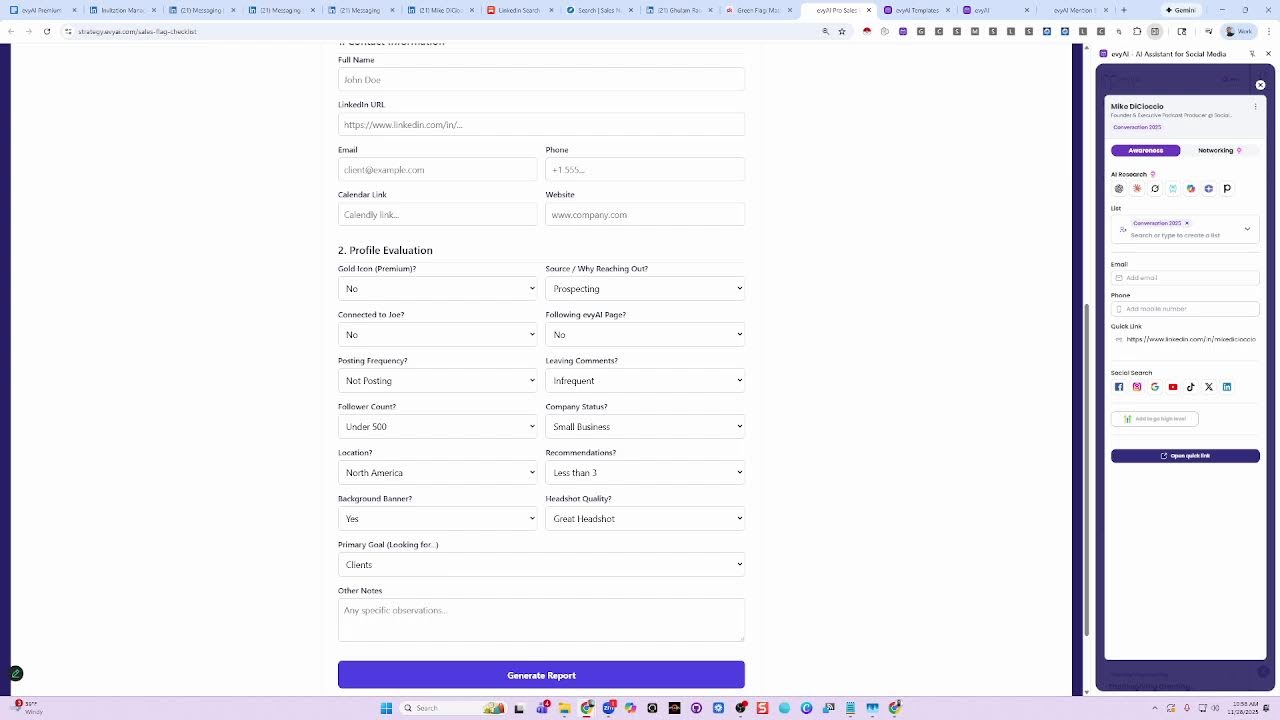
And if you need help with prospecting, we have a whole class that we're gonna be doing in March, and we're gonna be building towards the class by adding additional things to the program. And I can show you where you can find more details about it. But we are, we did send an email that we're allowing, we sold out of the prospecting bootcamp, but we are allowing 10 more people in because of Black Friday. And we're giving all EvAI clients a special deal on it. So it's usually $3,000, but if you're interested in it, We're giving a special deal and it's going to appear right here, the Prospecting Bootcamp. And this is the master lead qualification for LinkedIn. And I built this into a piece of software that allows me to qualify anybody by just entering some information here and then clicking on generate report and it tells me if they're qualified or not. So for me, when I evaluate somebody, I use these evaluation practices to determine when I look at somebody, if they're ideal based on the outside. You know, they say you can't tell a book by its cover. But at the end of the day, you have to look at some things from the outside in to see if they're ideal or not. Like, for example, for my marketing agency, I look at somebody's website and if I see that they don't have a blog and they don't really care about their presence online, they're not the most ideal client for Ajax Union. You know what I mean? But if I see that they have a blog and they haven't updated it in 3 months, they desperately need my help. They have a blog and they're not even updating it. They have Facebook, they have Instagram, they have Twitter, they have all the stuff. They used to pay for ads. They stopped paying for ads. That means they care about their business. They just don't have the bandwidth and they need an agency. And that's $180,000 potential if they have enough revenue, enough employees, if they have a marketing agency person, a marketing director, and so on. So I want you to think about those things in your business. And feel free to reach out to me. I've been running a marketing agency for 17 years. I have a lot of experience in generating millions of dollars in revenue. And I love helping people. And so that's why I'm doing what I'm doing, because I want to make a difference. I want to bring together a— my vision is to bring together 1,000 people that want to be engaged with each other and support each other. And we have 1,500 people in our community. They're not all super engaged. So I want you to be more engaged in 2026 in our community, because if you get more engaged, more people will be encouraged to be engaged as well. So ask questions, reply to other people's questions, set up meetings with people, come to our events. We literally have events every single day and many of them are run by our clients. I don't even run many of the events. Like today at 11:00 AM in 1 minute, Barbara is hosting a posting party in the community. Go there, meet 20 people, build a relationship, comment on other people's posts. That's the idea. So thank you for being here. Thank you, Richard. Thank you, Peter. Thank you, Darren. Thank you, Eves. Thank you, Francois. Thank you, Lindley. Thank you, Jeff. Thank you, everybody, for being here. I appreciate you guys very much. And if you ever have a question or you need anything, we're always here to help. We're always here to support you. Happy Thanksgiving, and I look forward to seeing you guys on the other side. Boom.
Thank you.
More from Joe


How to Beat the Algorithm: Remove Hidden Watermarks & Scale Content with evyAI









AEO & GEO: SEO's Future Explained! Master Answer & Generative Engines! #shorts