How to leverage AI with Sales Automations - 047 LinkedIn Live 2024 with Joe Apfelbaum
Joe Apfelbaum shows how to use AI tools like ChatGPT and Evvy AI to automate LinkedIn outreach and sales follow-up. He demonstrates a Chrome extension for calling prospects directly from LinkedIn, building relationships with decision-makers at companies like JP Morgan Chase, and using AI to draft personalized messages at scale.
Chapters
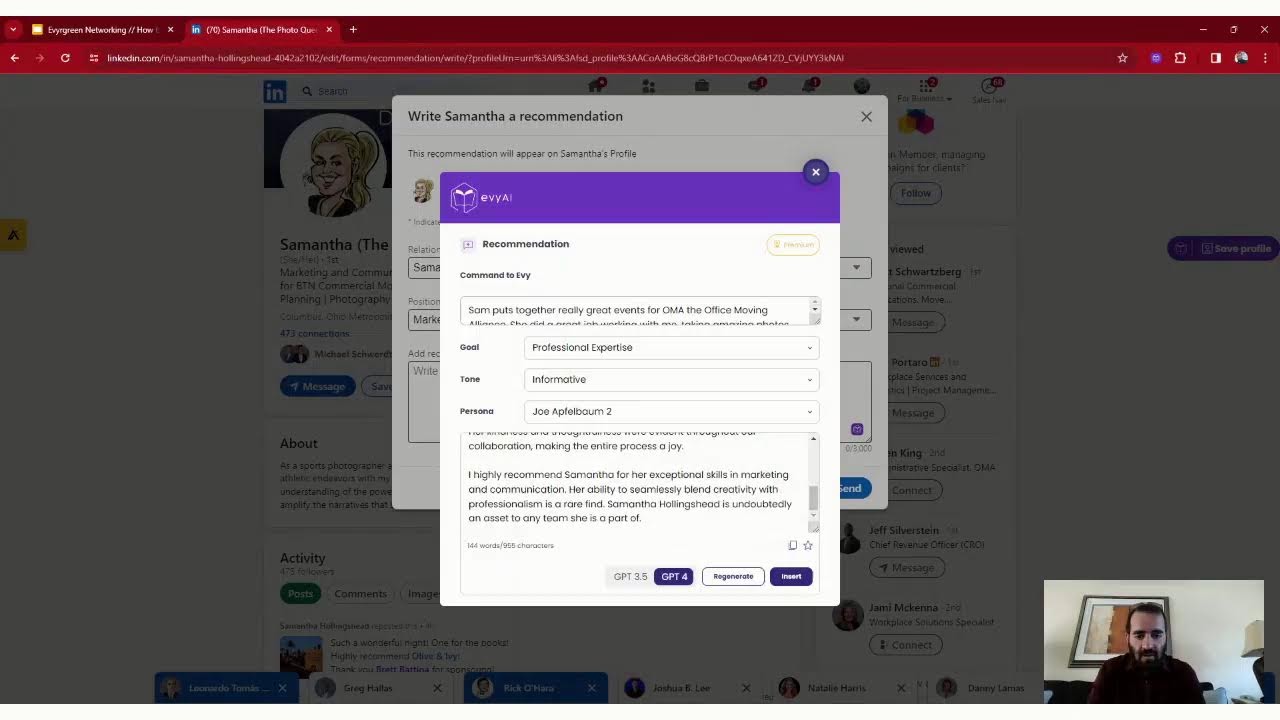
This is episode number 47 of 244 episodes. My name is Joe Apfelbaum, and today I want to talk about some insights related to digital marketing strategies using AI automations and helping you succeed. You see, if you just rely on remembering to follow up, you're never going to follow up. The fortune is in the follow-up, yet most people just show up and throw up. Instead, I want to encourage you to show up and follow up. Are you the type of person who likes to follow up with your connections, follow up with your potential clients? Are you the type of person that just reaches out and then just never follows up? I remember there was a time when I was the type of person that I wouldn't follow up because I didn't have the knowledge, the skills, or the technology to properly follow up. I love following up with people and I love making a difference, and I know that I cannot make a difference with the people in my life if I don't actually take the time to follow up with them. So today I'm going to be discussing some of the ways that you can strategically follow up with your connections to be able to get more business. But first, I want to know where in the world are you right now? I'm in Phoenix, Arizona. So I'm going to write AZ in the chat. Go ahead and let me know where in the world you are. I also want to teach you a strategy to be able to unite LinkedIn connections together and also to be able to get people to join group messages. So if you want to be able to learn this strategy, even if you're not connected to a particular connection, you can create a URL to create a distinct group message for people to join. And then you can build a community, like a mini community with 15, 16, 20 people in that— inside that community and build a relationship. So I want to show you how to do that today in my LinkedIn program, what I love to do is get to know who's watching me live on LinkedIn. So if you want to be able to share with me that you're watching live, just write live in the chat. If you're watching the replay, you're watching the recording of this, go ahead and type in replay in the chat. So I asked Otter, which is my AI assistant that helps me be able to determine what was said during a meeting because it transcribes the entire meeting. And I said, tell me what I spoke about at my recent presentation for the Office Moving Alliance. And it said, I talked about the potential of artificial intelligence to give business a competitive advantage, also sharing my own conversations and my AI conversations. And I also emphasized the importance of asking the right questions to qualify leads and avoid targeting an unsuitable— I shared information about how to understand how to qualify leads and the difference between a prospect and a lead. A lot of people don't know the difference between prospects and leads, and if you're the type of person that is not 100% sure what the difference is between a prospect and a lead, you may end up leading yourself down the wrong path. And if you start reaching out to people who are not qualified, you're going to end up wasting a lot of time. Most people are wasting time online and they're not taking the right actions. And I would love to show you what those right actions are to help you be able to succeed even more. It looks like Rick from Anaheim, California just hit me up on LinkedIn. The photo that he has on LinkedIn is of a child, so I am going to simply ask him if he is a child. Or if he's an adult, and I'm going to get his cell phone number, and I am going to try to call him right now and see if he picks up asking him a question. So let's see if he picks up the phone and if he tells me if he's a child or adult. Let's get right into it. So it's ringing, ringing, ringing. Let's see if he picks up. Hmm. So it looks like I got his voicemail. Now, I did not leave LinkedIn in order for me to call him. I don't know if you know this, but I make phone calls from within the LinkedIn platform. I use a Google Chrome extension that allows me to click a button, capture a phone number, and be able to make a phone call. And I showed the entire team today Uh, the entire sales team that showed up today, over 100 people, how I live called a facilities manager inside JP Morgan Chase. Her name was Heidi, and I first figured out that we had one of our staff members— he was directly connected to her, so I had him pull up her profile. And then try to identify if he has her cell phone number inside her contact info, and he did not. And so I went into my own Chrome extension, I clicked the button, and it gave me a direct phone number to her. I called the direct phone number, I said, hi, is Heidi there? And the person hung up on me. So then I proceeded to call the phone number again, and then the person answered the phone and said, hello, this is not Heidi. And I said, I'm sorry. I thought this was Heidi, and she's like, "I thought you were a telemarketer," and she's like. I said, "No, I don't like telemarketers. I'm not a telemarketer," and we started building a relationship, and she's like, "Let me put you through to Heidi. What's her last name? How do you spell it?" And so I spelled out her last name from LinkedIn, and then she said, "Let me see if I can get through to her." I also gave her my first name, my last name, and my company name so that she can pass that along to Heidi, and then she went off. To go find Heidi and try to get Heidi on the phone with me. And what ended up happening is she didn't end up putting me through to Heidi, um, but now I have Ashley's information and her phone number, and I know that Ashley can get me on the phone with Heidi. And so I have to build a relationship with the gatekeeper Ashley to get to the decision maker. And there are many buyer centers that you need to learn how to do that. And I asked ChatGPT to actually help me with a script for what to say when I eventually do get on the phone with Heidi. So if you want to do business with big companies, you have to learn how to build relationships with the people within those companies because there is no such thing as business to business. Instead of— it's person to person, building a relationship one person at a time, using LinkedIn to help you understand how to build those relationships. Is really going to be key. Now I see Adira Sassoon is commenting. She wrote that she's live here watching me live. Thank you very much, Adira. It's nice to see you coming all the way from Cleveland. It looks like you do have 20 followers on LinkedIn. I don't know if you know this, but you have the capacity to have tens of thousands of followers on LinkedIn. I do see that you speak Hebrew, which is pretty cool. And that you are a person that is a business owner with Stamps Notary Service, and that you're a notary business owner with many responsibilities, including notarial services and so on, like documents and so on. So it's really cool that you're a notary service. I'd recommend connecting with lawyers, with real estate agents, with mortgage brokers that actually need the service of a notary. And building a relationship with them. And with LinkedIn, it's really easy for you to be able to do that, especially if you're using artificial intelligence together with LinkedIn. If you're not using AI together with LinkedIn, you're seriously missing out. I'm going to show you an AI that I specifically use called Evvy AI to be able to use LinkedIn, and I'm going to share my screen right now to show you how that works. So let me go to my windows. Let me open up my activity. I'm gonna go in here right now. Now if I go to the homepage of LinkedIn right now and I see Virginia just posted on LinkedIn, she posted and nobody commented on it. So I'm gonna use my AI to draft a quick comment on her post right here just like this. And I press generate. It shows me that her post comes up and I press Virginia's post right over here. So now what I'm gonna do is I'm gonna press post And I just shared a comment on Virginia's profile, just like that. Now, if you wanna be able to jump into my direct messages, you'll see that Rick says, great to be with you the past 2 days. I look forward to your presentation and motivation on Saturday. Safe travels. And I'm gonna say, looking forward to seeing you this weekend. Cannot wait. Awesome. Okay, and I'm going to press GPT-4. I'm going to press generate, and let's see what it does. Okay, hey Rick, thank you so much for the kind words. It was indeed a pleasure spending the last 2 days with you. I am equally excited about the upcoming presentation. Bring some high energy motivation. See you. Okay, and I'm going to press go and send, and now I just replied to Rick using artificial intelligence to type it up, which saves me a ton of time. So I love doing that. I love building relationships. And I'm going to say, by the way, what is your cell? Okay, I think I have his cell phone number already. Very, very possible, but I'm not 100% sure. If you're watching this live, let me know that you're watching it live. Just write live in the chat. Take a look at all these people that are mentioning me on their posts. So for example, over here, Dave Wiley, he mentioned me 20 hours ago. I wrote boom, loved it very, very much. Now I'm going to go back here, check who else liked it over here. I see this person, Dave Wiley, mentioned me again over here. I'm going to give this a like. And now what I'm going to do is I'm going to go here and drive a comment just like this. See that? I'm going to generate a comment. Thrilled to be part of the OMA event and share insights. It's always a pleasure to connect with leaders like David Wiley. I'm going to tag him here and I'm going to press post. And do you see the way I quickly commented on his post that mentioned me? He posted this 1 hour ago, which I absolutely love very, very much. And I go in here and I take a look at this one over here. This one was posted by Andrew Kummerich, uh, Kummerich. And I go in here and say like. See, all these people are mentioning me here. Which is fantastic. And I press generate and it generates a beautiful comment. It was very tight. It's going to just release it. Oma, kudos to Andrew Kummerich for a well-organized event, for showing up. Thanks to Samantha. And Doug. Okay, so I just went there, tagged a bunch of people. Looks like they went golfing together, the 4 of these people. Look at that. Look at the beautiful— look at these beautiful photos. You see that? Building relationships, doing selfies. Wow, so cool. Thanks for posting. I'm going to say thanks for posting. Okay, so now I just did that. I'm going to go back to my notifications. As you can see, I have more people commenting over here. Let's take a look if anybody else commented on this post. Guys, if you're watching this live right now, let me know that you're here live. I want to be able to add you to— I want to be able to show you something really, really cool. Look at this. I commented here to get a badge. You see that? To get a badge. I want to get a sales badge, like a Top Voice sales badge. So I just commented. I'm going to comment over here. I'm using the AI to help me get a Top Voice badge on LinkedIn. So it's linkedin.com/advice. And then you can use Evvy AI to help you get a Top Voice badge. Write Top Voice if you want me to send you a video on how to get one of those badges on your profile, which will automatically increase your credibility on LinkedIn. Really, really powerful stuff. As you can see, it does it the right— the right— the perfect size. And I'm going to do one more. I'm going to find this one, what else to consider. I'm going to do video conferencing tools for sure. I have something to share about that. Just like that. If you don't have credibility on LinkedIn because you don't have an optimized profile, allow me, Joe Apfelbaum, to help you optimize your LinkedIn profile. I will send you a questionnaire, learn about your business, set up a 1-hour strategy session with you, and completely redo your profile. I'll also create a business networking one-sheet for you to help you be able to be more successful on LinkedIn. I'll also export your connections and put all your LinkedIn connections into a CRM that you can manage those connections to help you be even more successful. And in addition to that, I will also help you be able to create the right messaging, the right direct messages, and all that stuff. That's called our LinkedIn Authority Blueprint. It is a simple blueprint that will help you be able to get more out of life, more out of LinkedIn, and more success. So Greg just sent me a message and he said, let's connect. And then I have Courtney. Courtney sent me a message from Houston, Texas. Let's see. Don't love her profile. I'm not going to accept it. Let's see who else we have here. I'm going to take a look at all the people that have sent me connection requests to see if I know the people or I don't know the people. So many people sent me connection requests, and if I don't know who the person is, I'm not just going to accept a connection request from a stranger. That I don't know if I can even help them. I don't know if I can even make a difference for them. So if there's a bunch of random people sending me connection requests and I have no idea who they are, I don't recommend just accepting every single person's connection request. Instead, I recommend you learn about the person, you see if there's something there, if there's an ability to properly connect with someone and build a real relationship with them. See if there's a way that you can do business with them. There's a guy from Supermove that sent me a connection request just now. Watch Supermove in action. Tell me more. Where are you at? Let's see. So that's the idea. I'm gonna share my screen again and just to kind of show you what I'm doing over here. I see that I'm not sharing my screen, but I want you guys to see what I'm up to. Okay, so huge thank you to Joe Apfelbaum for an exceptional AI educational seminar. I'm gonna go here, I'm gonna hit generate, and I'm going to leave a comment right over here. Thrilled to hear the AI session sparked such positive vibes, Dave. It's all about empowering those curious. What was your biggest takeaway? Send. You see that? Now I'm gonna go to my profile and just kind of show you a couple things. So if you go to my profile and you scroll down to activities and then you click on videos, you'll notice that I have posted some pretty incredible videos like this one over here. Check this out. Yeah, I have such a good time with these people, building real relationships with them. I'm gonna say, what did you think of the presentation, Greg? Okay, now what I'm gonna do is I'm going to leave Sam a recommendation on LinkedIn. So watch this. I'm going to go in here, I'm going to type in Sam Hollickshed. I'm going to click on her face. And now what I'm going to do is I'm going to click on More, I'm going to click on Recommend, and I'm going to say Samantha was a client of mine over here. And I'm going to say Okay, so that's what I wrote. Sam puts together really great events at her OMA, the Moving Alliance. She did a great job working with me, taking amazing photos, and allowing me to seamlessly present to the group of movers and sales professionals in the moving industry about how to leverage AI on LinkedIn. She is kind, thoughtful, and proactive. Highly recommended. So I press generate, and now it's generating a very thoughtful Recommendation. It was a pleasure to work with you as a client during her time as marketing communication specialist. Her attention to detail, proactive. Da da da. I recommend Sam. Okay, so I'm going to press insert. I'm going to press send, and I just sent her a LinkedIn recommendation just like that. And now when she accepts it, it'll show up on her profile, and I will be the only person that had left her a LinkedIn recommendation. On her profile, which I think is going to really make her happy. And also, it'll show people that oh my gosh, this guy Joe really likes to work with Omo. And I do. I really really like to work with Omo. See, I sent her a recommendation. Let's see what Leonardo said. Leonardo said happy birthday. He's like please note my WhatsApp is. Thank you, Leonardo. Happy birthday. And we're gonna say perfect. Okay, I got Rick's cell phone number, so I'm gonna give Rick a buzz later, just tell him thank you. Any tips to start a contribution? Um, are you talking about recommendations? What is your cell? So this is Daniel. Daniel says he wants tips on how to start a contribution. I'm not sure what he's talking about. He's in Romania, so I don't know. We'll build a relationship. I'll get to know him. All right, let's see what else is going on here. My profiles and my posts. So what I'm going to do now is I'm going to write up a post and post it on LinkedIn. And I think I'm going to save that for the next one because I actually have to hop. I have a call coming in. So thank you very much for joining me here today. I really appreciate you being with me on this LinkedIn Live, and I look forward to seeing you on the next one.
More from Joe


How to Beat the Algorithm: Remove Hidden Watermarks & Scale Content with evyAI









AEO & GEO: SEO's Future Explained! Master Answer & Generative Engines! #shorts