How to use AI on LinkedIn to Get Clients 098 LinkedIn Live 2024 with Joe Apfelbaum
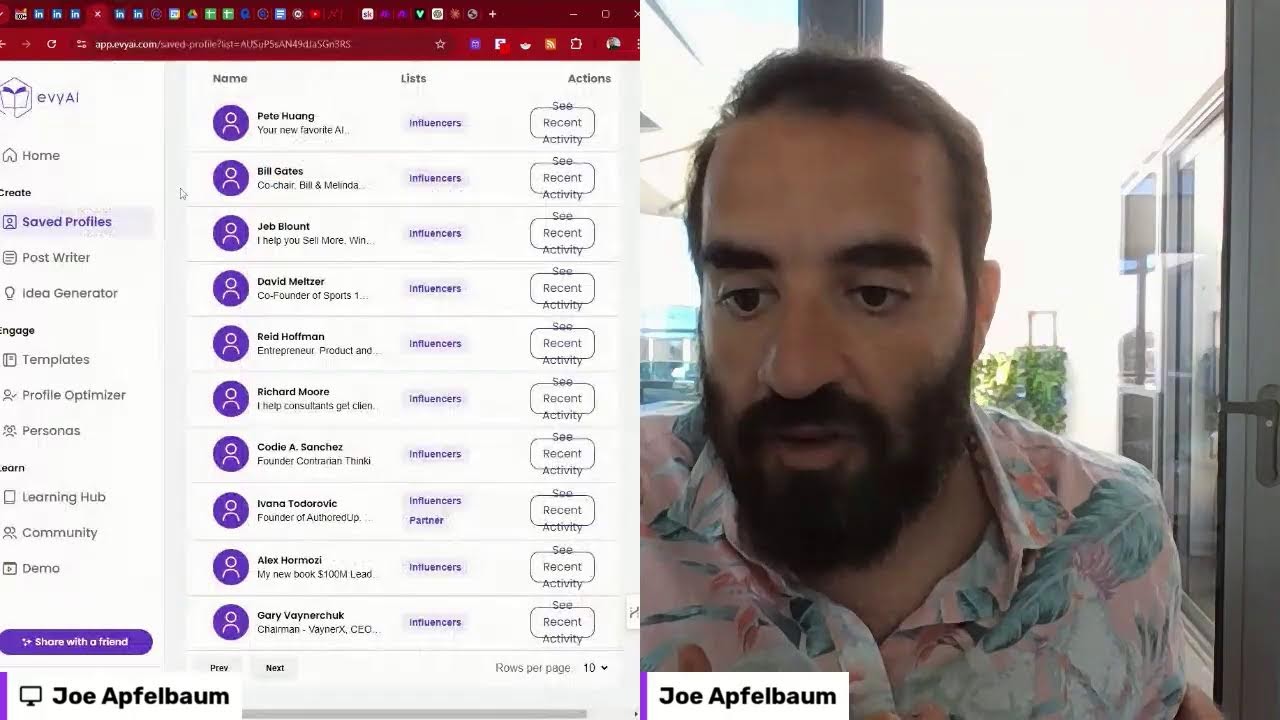
Joe Apfelbaum shows how to use Evy AI and Make.com to automate LinkedIn outreach at scale, generating personalized comments and DMs to find clients. One user saw an 1,800% increase in profile views. He recommends 50-300 DMs daily plus consistent commenting on influencer posts.
Chapters
Joe goes live. I want to share my screen and take you on a journey on how to leverage LinkedIn with artificial intelligence. You might not know this, but you can get clients from LinkedIn. LinkedIn is the world's largest professional social network. There are a billion people on LinkedIn right now, and 60 million people are spending more than 70— 17 minutes a day on LinkedIn every day. 60 million people are spending more than 17 minutes a day on LinkedIn. LinkedIn is growing at a rate of 3 new members every second. And I want to show you how I use LinkedIn every single day and how I use AI together with LinkedIn to sound authentic. to connect with people, to build relationships, and to grow my business. Every single day I am talking to clients, I am talking to prospects, I am talking to leads, I'm talking to referral partners, and you could be doing that too. The problem is you don't have a strategy and you don't have the right technology. So today I'm going to solve both of those problems for you. Let me share my screen right here. I'm going to go into share my window, and now I'm sharing my window. Here we go. So hopefully you see my screen right now. I can see that I can see my screen. And let me see if I could make it like this. This is not great. That's not bad. That's not bad. You kind of see me on the right, see me on the left. Let me see if I can make this a little bit smaller. So you can kind of see me like this. All right, let's see. So this way you see me split screen, and my, uh, my video guy can then take this and make this into a video, which is essentially the whole idea behind why I'm going live to begin with. It's so that my person can turn this into actual I'm gonna turn this off over here and drag this a little more like this. Okay, look at that. Ooh, ooh, it's working, it's working. I think I did too much. I think I went too wide. Here we go. Okay, all right, let's rock and roll. You can see me and you can see LinkedIn. Look at this. All right, so let's start. First of all, I'm going to close this. So when you log into LinkedIn, it says dismiss. Okay, I'll dismiss. When you log into LinkedIn, the first thing that you see is called the feed. This is the LinkedIn feed. So for example, Jeff Goldberg, who's the center of influence for me, posted on LinkedIn. He said, you don't get a decent amount of referrals? If not, ask yourself, am I referable? So I'm going to give him a heart over here, and then I'm going to click on the comment box, and I'm going to stay top of mind with him. Now he only got 2 or 3 comments on this post. I'm gonna hit generate, and within just 3 seconds, Evvy AI is going to generate a well-written, well-thought-out comment that's Customized in my voice. Now the beauty is that Evie AI gets to know who I am because I trained it on who I am. So I just write, being referable is about creating value and trust. Jeff Goldberg's insights remind us. Jeff Goldberg's insights. Goldberg. I'm gonna say your. Insights remind us that every referral is an opportunity to shine in lasting relationships. Let's elevate our referrals. Thanks for being my referral partner. Boom. And I'm gonna just make a little heart emoji here. Now, did you know that if you, if you press— I put a little heart emoji over there— press Windows period, you're able to see all the different emojis inside your keyboard. So I just left a very thoughtful comment for Jeff Goldberg. Now what I'm going to do is I'm going to click on the AI logo on the top right, and then you see where it says Saved Profiles? I'm going to click on View All Saved Profiles, and that's going to open up a new window. And this new window is going to allow me to be able to see all my saved profiles on LinkedIn. This makes it so much easier. But while that's loading, I wanna show you how I am building out this amazing solution here. So please act as a webinar rating guru that understands viral trends and human psychology and as a LinkedIn expert understands what people want to see in webinars if they are business owners. Give a rating for each of these topics from 1 to 10. 1 being bad and 10 being the best, and give a short one-sentence reason for the rating. Put in a numbered table, rating and reason. Here are the ideas to evaluate. And then I evaluate. It's crazy that it's able to build this entire sequence right over here, just like this. And then it gives me the rating and it gives me the reason over here, which is fantastic. I'm gonna close that out. Over here in ChatGPT, I told it to give me ideas for webinars for EvAI related to our feature, but focus on the benefit that people want to use from LinkedIn. Here are a few ideas. Let's go for volume. And then it gave me 30 solid ideas over here. I'm going to close it out as well. Here are the 30 webinar ideas. I also told it to be a webinar rating coach, a webinar rating panel, and have 3 judges. One of them is strategic, one of them is viral, and one of them is branding. If you want to see that prompt, just write show me the prompt in the chat and I will send you guys the prompt for the webinar panel with the 3 judges so that you can use it in your own business. That'll be my little gift for you today. So I'm going to close that over here, um, and I'll also share the different topics that I have going on over here. All right, so let's rock and roll and just see what is cooking right over here. Um, oh, this is me building out a dashboard. You want to see this crazy dashboard that I build out? Do you guys want to see that? Um, I'm happy to show it to you if you want to see it. Say, show me the dashboard. Let me, let me just quickly Let me open up make.com. This is my make.com scenario. I'm going to stop the webhook. I have a webhook that goes to an API that goes to another webhook, and if I hit run, it'll pull company data. Let me just show you what I mean by that. I'm going to pull this here. Let me see if I could find that again. I'm going to double-click on this. This is the little thing that I did and I'm going to type in, for example, AJAX union. Which is a company name. I'm going to hit Fetch Data, and what it's going to do is it's going to pull me a list with everybody's first name, last name, company name, position, location, a LinkedIn search box, a LinkedIn profile, Google search, and then more actions, which basically has their email address and tons of other information. All this was built by me using Claude in just a few And here is how I built it out. I have all the, all the whole prompt over here of what I did to build out this entire thing. This is insane what you can build out these days. So if you wanna learn how to do this type of stuff, let me know. I'm gonna be discussing this in our next Evergreen Business Development Circle. I'm gonna be talking about how to build your own applications. Wow. We have a 3-hour class once a month. So if you wanna join me, just type in AI Circle in the chat. And I'll be happy to share with you exactly how to build that. All right, let's go back into Evy AI and let's take a look at some of the people. So I have a little list here of influencers. I'm gonna type in influencers. These are my list of influencers here. And I have lots of different influencers in many different categories. So for example, let's say I have Bill Gates, I have Reid Hoffman. So if I wanna stay top of mind with these influencers, some of them have millions and millions of followers. For example, Reid Hoffman, the co-founder of LinkedIn, and Inflection AI. He has 2.6 million followers. So if I want to leave a comment on his most recent post, all I got to do is go to Evie AI, check out my recent posts, check out his recent posts within the saved profile, because you can save anybody's profile right into Evie AI. And then I can just draft a comment, and in seconds I'm able to stay top of mind with this person. I don't have to sit down and think about, oh, what should I comment on Reid Hoffman's post? I can just draft the comment, post it, and then move on to the next influencer. And this helps me be able to really stay top of mind with people that have tens of thousands, hundreds of thousands, if not millions of followers. And it allows me to stay top of mind with their own followers. And so this strategy is a strategy that I teach my students to use to get more exposure to their profile. So many times people say, Joe, I see your posts, And they're really, really good. And I see your comments and they're even better. And I love the way that you leave comments on influencers' posts. And I notice you, I notice you under Alex Hormozi. I notice you, Bill Gates. I notice you under all these people that are very popular people, and then you're showing up alongside them. That's a major benefit. So if you're not using Evie AI, to comment on regular people's posts, at least use it to comment on influencers' posts so that you can get that exposure. Now we do have a little box here called templates that you can actually choose a template if you don't want to use AI, you can actually use a template instead. And so for example, I have a pitch fire template, I have copywriting prompts, WhatsApp waitlists, I have a WhatsApp group for engaged LinkedIn users. So for example, I'm going to drop this one over here. It has a call to action. Want to join a WhatsApp group with engaged LinkedIn users? Click here. And then people will click on this link and they'll be able to join the WhatsApp group with engaged LinkedIn users. Gary Vaynerchuk has 5.6 million people in there. And I'm going to like my own comment over here. And then once I'm done commenting, all I got to do is close the window. Cody Sanchez, for example, I want to leave a comment on her post. What do I do? I just click on see recent activity and now her recent posts load up. Now what I'm— what I am going to do in the very near future is I'm going to be building something called Evy AI Pro. So get in now to Evy AI Premium because Evy AI Pro is going to be the next level, which allows you to be able to have a full-on connections dashboard kind of like this where you have everybody's first name, last name, LinkedIn URL, their email address, their company position, when you connected with them, and a full analysis about everything about each individual For example, I wanna pull up their photo, their first name, their email address, their headline, their location, everything about them, their summary, where they went to school, everything about their company, how many employees they have, and tons and tons of other big data. So if this is something that you want, say I want big data, I want big data. You can enter someone's LinkedIn URL, you can enter their email, or you can just upload your connections and we'll automatically enrich them in a way that will make you be able to segment your connections. We'll have smart segmentation where AI will help you segment, or we'll have segmentation in a different way. But right now our features are so great and people are loving it so much. So I hope you can join in with us and start seeing the benefits of using artificial intelligence to be able to get more exposure. We had a user recently reach out and said, Joe, I just got an 1,800% increase in profile views just from using Evvy AI. And you could see, as you can see, Jeff Goldberg already loved my comment over here. And so I highly recommend you start using tools like Evvy AI, which will allow you to be able to properly stay top of mind with your network. Now, Evvy AI will also help you be able to optimize your profile, like your headline. It'll help you optimize your About section, which a lot of people have a terrible About section. So even if you're just logging in to be able to do that, I highly recommend that you go ahead and do that. You update your profile. I'm constantly posting on LinkedIn. My average post gets about 1,000 views. I'm just on this right over here. You see, this is the, this is the LinkedIn Live. I'm gonna give myself a little heart. Give me a light bulb if you're watching this live. And I'm gonna say, do you want the prompts? And if anybody wants the prompts for the panel, let me know that you're interested in the prompts and I'll be happy to give you those prompts. Now I also send out a lot of direct messages to people on a daily basis. As you can see, laying low with the wife. Hope you are well. I'm gonna say thank you. I'm gonna say thanks. People sending me voice messages. People, you know, like all different types of people. That are doing all different types of things and chatting with me about all different types of ways. And I'm sitting here building relationships with those people. So if you're not taking the time to wish people happy birthday using artificial intelligence, to send people happy anniversary, to be able to connect with people and build relationships and run campaigns and really connect, I mean, this is just in one day. 1, 2, 3, 4, 5, 6, 7, 8, 9, 10, 11, 12, 13, 14, 15, 16, 17, 18, 19, 20, 21, 22, 23, 24, 25, 26, 27, 28, 29, 30, 31, 32, 33, 34, 35, 36, 37, 38, 39, 40, 41, 42, 43, 44, 45, 21, 46, 47, 48, 49, 50, 51, 52, 53, 54, 55, 56, 57, 58, 59, 60, 61, 62, 63, 64, 65, 66, 67, 68, 69, 70, 71, 72, 73, 22, 23, 74, 75, 76, 77, 78, 79, 80, 81, 82, 83, 84, 85, 24, 86, 87, 88, 89, 90, 91, 92, 93, 94, 95, 96, 97, 25, 98, 99, 100, 101, 102, 103, 104, 105, 106, 107, 108, 109, 110, 111, 112, 113, 114, 26, 115, 116, 117, 118, 119, 120, 121, 122, 123, 124, 125, 27, 126, 127, 128, 129, 130, 131, 132, 133, 134, 135, 136, 137, 138, 139, 140, 141, 142, 28, 29, 30, 31, 32, 33. As you can see, I will send a minimum of 50 DMs every day, but by the end of the day, sometimes it's 200 to 300 direct messages. And that's just from people messaging me because of my content, people getting messages from me because of a situation, something happened, whether it's their birthday. For example, I wished him a happy birthday and I asked him, what are you doing special? So he replies to me and I say thanks. Whether it's because I post messages inside little groups like this that I'm in with people. These are messaging groups, and I share my content with them, and I build relationships with people. And here's something else that I highly recommend that you do: when you see somebody send you their post, take a moment to just leave a comment. That really helps the person. That can really help a person a lot when you leave a comment for somebody. It really makes a difference for them, especially if they don't have any comments and especially if they have very few comments. And I don't know if you know this, but Sales Navigator also gives you the ability to comment on your leads. And so if you see an alert from a lead, why not leave a comment on their post? I'll give you an example. If you go to Sales Navigator and you just click on lead list, you just click on leads, I should say. And then once you go into Sales Navigator and you click on leads, then you can click on filters. By lead shares, and that means the lead's posts. And now I can see I have 10,000 leads that are saved in Sales Navigator. I can actually see their posts. This is incredible. I see the posts of my leads and I see that nobody commented on their post, and I can just drop a comment with Evie AI. I mean, like, how fantastic is this? Imagine you gave this to your team. And yes, Evie AI has a Teams version that allows you to buy Evvy AI for 10, 15, 20, 30, 100, or even 1,000 people so that your organization can benefit from this functionality. Most of your guys and gals, most of your salespeople are not dropping comments on their leads. They're just not doing it. And most of your leads are not getting any comments at all. And so if you take the time to actually drop a comment on their post, You're the only one in the world that dropped a comment on their post. That the— so first of all, if someone posts once a month and you are on their post the entire month, think about how much exposure that is for your brand. Not just for the individual, but for your brand, because people check out their profile and come to your brand. So I want to encourage you to have your sales team train your sales team to start leaving comments. If you're paying for Sales Navigator and you're not using this feature, you're majorly missing out. Add Evy AI as a plugin to your browser and start dropping 5 to 10 comments a day on your leads and watch the way people start reaching out to you, start responding to your InMails, start building real relationships with you. This is really a game changer that most people are not talking about. There are some gurus out there, they're talking about you know, building groups and things like, dude, do the basics. Do the basics. Leave a comment. Leave a comment on your prospect's post. Look, most of these posts, no one left a comment. Literally nobody. And I'm the only one leaving a comment. And she posted 20 hours ago. You think anyone's going to comment tomorrow? And by the way, the reason that no one's commenting on this post is not because people don't like Jenna. It's because she's doing something that goes directly against the algorithm. Do you want to know what that is? And you want to know all the other algorithm hacks? Just write algorithm in the chat and I'll tell you all the different hacks. But look at her post. She's doing 2 things that will limit her reach on her post by 50%. And I'll tell you what those things are if you write algorithm in the comments. I'll be more than happy to share that. I just need to know that you guys are interested. Otherwise, I'm not going to waste my breath sharing the things that I'm sharing all the time. If you want to learn the algorithm, learn from the people that have been teaching the algorithm every single year. I have a session that I do where I interview the top leaders on LinkedIn. For example, one of the top leaders on LinkedIn that I interviewed recently was Richard Moore. He has almost 100,000 people that are following him on LinkedIn, and he loves helping people get clients on LinkedIn, and he does really well with his content. He gets millions of impressions every single year on his content, and I watch what he says and I find it interesting, and I'm always happy to support him and what he does. And leave comments on his posts, as I do. But I'm not going to sit there and think about, oh, what am I going to say, blah blah blah blah blah. No, what I'm going to do is I'm going to have artificial intelligence do the heavy lifting, and I'm going to just read it, make sure it makes sense, make sure it's branded with my boom and with my little emojis, because that makes me stand out. Make sure that I tag him, make sure that I remove any words that don't make sense. If it's like a weird third person comment, I'll change it. Sometimes AI does that. It's not going to be perfect. But if I want to see a summary of the person, now I can click on Summarize Profile and it'll just summarize his profile just like that. That is really powerful, and it'll save the summary to the Evvy AI website. Now we have many different features here that you can use. We have a post writer where you can write a post in just seconds. We have an idea generator where if you don't have ideas, it'll come up with lots of topic ideas. We have templates where you can save different types of templates. For example, direct messages. For example, comments. For example, prompts. For example, connection notes. You can have all those templates ready to go. So if you don't want to rely on the AI, you can just use templates. Or you can use templates in conjunction with the AI where you prompt it with a template. So you don't have to sit there and write the prompt. You have the profile optimizer, which allows you to optimize your headline and your about section. You have personas where you can create custom personas for all the different things that you do in your business, whether it's a company page, whether it's yourself doing different roles. We have a learning hub with tons of amazing links and resources and courses and information. We have an entire community where we get together on a regular basis and we network and we ask questions about LinkedIn and we build relationships. And then we have a demonstration video right over here. And so if you're not being part of this, if you're not connecting with us, if you're not using these tools, then you're majorly missing out on the exposure that you can get by using a tool that will cost you less than 50 cents a day. So I really want you to think about this. I'm gonna stop sharing my screen now, but I really want you to think about this. If you're taking LinkedIn seriously, you need to start using the right technologies, the right automations, the right strategy, because the right strategy will save you a decade. The right strategies will save you a decade. So hopefully you're in, hopefully you're jumping in with me. I'm going to be building out new tools and new features. One of the most requested features that people have been making is, Joe, I need to analyze and segment my connections so I can make sense out of them and I can enrich them and I can see when they're posting and I can see everything about them. And that's something that we're going to be building out. We're also going to give you suggestions on who you should be connecting to using advanced tools to help you build and nurture lists off LinkedIn and help you bring all your contacts onto LinkedIn so that you can properly connect with people inside your target market, inside your target industry. So for example, if you wanna connect with real estate brokers, we might give you a list of real estate brokers to go after, people that are vetted, people that are engaging on LinkedIn, people that are active. And if we can provide that to you, what would that be worth to you? If we can hand you leads, if we can hand you people that you can comment on on a regular basis and we give you their posts, posts and we tell you, here, here's someone you didn't even notice that you can comment on based on who they are, not just what they talk about, based on who they are. And the fact that they're active on LinkedIn is just mind-blowing. So wait till that starts. I'll see you on the next one. Thank you very much. Have a wonderful day and make sure to repost this if you got value out of it.
More from Joe


How to Beat the Algorithm: Remove Hidden Watermarks & Scale Content with evyAI









AEO & GEO: SEO's Future Explained! Master Answer & Generative Engines! #shorts