How to use AI with LinkedIn - 167 LinkedIn Live - Joe Apfelbaum
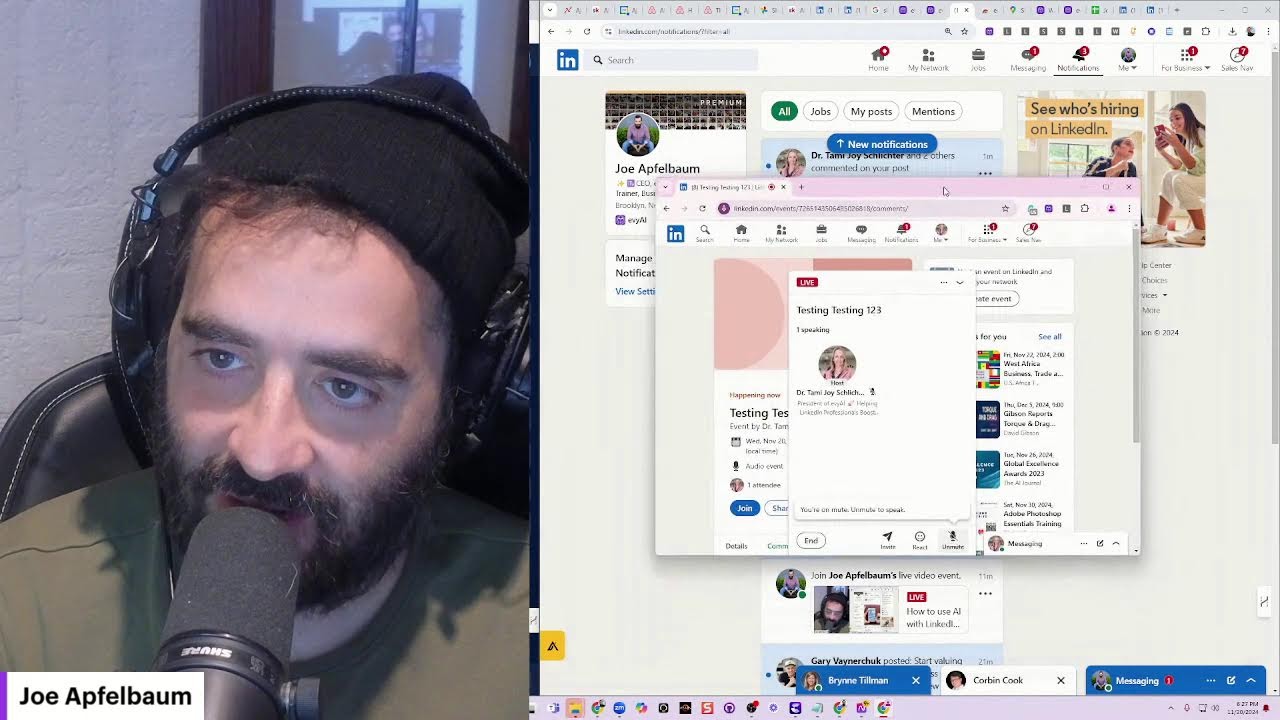
Joe Apfelbaum walks through using Evy AI to automate LinkedIn work: summarizing profiles to extract contact info and personalized intros, generating comments and posts with a voice persona, and tracking metrics on the dashboard. He shows how to scale engagement across groups and demonstrates the upcoming retirement of native audio events.
Chapters
Today I'm going to show you how to use artificial intelligence together with LinkedIn to do some pretty funky stuff. Let's get started. First, I want you to go to someone's profile. For example, we'll go to my profile. We're going to go down to where it says featured activity. You see it says activity here. I'm going to click on show all posts, and then I'm going to try to find the most recent posts from any person. In this case, I'm going to look for my events, see what I have going on over here. You see all these events? Ugh. For some reason, LinkedIn did not load. Isn't that funny? I'm supposed to be on LinkedIn Live right now and I'm not on LinkedIn Live. I don't know why. Let me quickly show you how to use artificial intelligence together with LinkedIn. It says it's streaming to LinkedIn, but it's not showing up. Let me— oh, look at that. It's showing up here, but it's not showing up in my activity. Okay, that's cool. Let me copy this here. Let me go into messaging and let's Um, let's drop this in some of the groups. So I have many, many groups that I'm part of. I'm going to go to Content Library 2024. Then on the bottom, I'm going to click on Messaging Groups. Let me see if I have on the bottom over here, um, ETL Group, Content Library, LinkedIn Comments. All right, so I have this. Let me look at the Posting Party over here. And I'm gonna say, I am live now if you want to join me on LinkedIn Live. I'm gonna paste that. I'm gonna hit Ctrl+A, Ctrl+C. I am live now if you wanna join me on LinkedIn Live. I'm gonna save that. Oh, she didn't see that yet. Let me send this to Wendy. All right, let's just see. David, I mean, I'm gonna send this. I'm sending it to all the people that have little blue dots. You see that? If these people have green dots, I'm sending it to them. LinkedIn Influencer Summit, sending it to all these incredible human beings. So they see that I'm actually live right now. Let's see, LinkedIn told me that she's live. Okay, I'm gonna go to the Link Booster, let them know I'm live, let JVMM know I'm live. So I'm sitting and promoting my actual live. I went live impromptu, and whoever happens to be on LinkedIn, if they happen to see this, they'll see this. Okay, so this is one of the things that I do to promote my lives. While I'm live, I will go ahead and recruit a bunch of people into the lives together with me. So if anybody wants to join me live, they can join me live. And if you're watching this live right now, let me see how it shows up as, let's say, Jennifer. I'm going to go into Jennifer right here. She's going to go into LinkedIn's homepage just to kind of see what that looks like. Okay. And we are going to use Heavy AI to leave a comment. Great insights. Um, then I'm going to go into notifications just to kind of see if It shows anything about Joe being live. Doesn't show anything. I'm going to go in here and I'm going to type in Joe Apfelbaum. Let's see if it shows Joe's live right now. Yep, it looks like Joe's live. I'm going to go ahead and give it a like. I'm going to click on it. Let's see if I can click on it. I'm going to click on comments. Oh, Brynn! Brynn Tillman! Brynn Tillman! Okay, cool. Bren is live with me right now. Let's check out Bren's profile. By the way, Bren, you have to check this out. This is insane. Bren, if you're watching this live, just write that you're live. Say I'm live. Okay, so check this out, Bren. This is insane. Okay, Bren, I saved you here. You see that? I saved you here. I saved you here as— I think you're JVMM, aren't you, JVMM? Okay, saved you here as JVMM. Okay, now what I'm going to do is I'm going to click on Summarize Profile. It's going to review your entire profile and tell me information about your business. It's going to tell me information about conversations that we can have together. Check this out. It tells me your email address, your phone number. It tells me your link of how I can connect with you. Like, your— it tells me all your career highlights, business intelligence. Relationship building. It gives me an introduction template. Brynn Tillman is a leading expert in social selling and LinkedIn strategies. Her work focuses on helping sales professionals start meaningful conversations without being salesy. Connecting with Brynn can provide valuable insights into leveraging LinkedIn for business growth. Meeting prep. Discuss LinkedIn's 5-step framework for LinkedIn mastery. Explore potential collaboration opportunities in digital marketing and social selling. background, and then it just gives me this whole thing over here about her. This is insane that I can do this. Write insane in the chat if you're watching this live now. Let me see if anybody's chatting. Hello, funny. I'm on a YouTube page, not on LinkedIn, switching over. Now I'm on LinkedIn. I'm live and live. Amazing. Brynn, what do you think of this incredible— Um, I'm gonna copy this here for you so that you can have this. I'm gonna give it to you as my little gift here for you. Boom, there you go. I just sent it to you. I sent you this whole thing here. Now I'm going to click on this little Evy AI thing and we put a microphone inside Evy AI. So check this out. I have a little microphone over here. So I'm going to first select my thing. Wendy said it's insane. I'm going to select, I'm going to select my thing. Wendy, it was nice chatting with you today. My optimized persona. Then I'm going to go in here, click on the microphone. Hey, it's so glad. I'm so glad. Not it's so glad. Let me delete all this and start over. Okay, let's start again. Brynn, I'm so glad that you— and it doesn't even know how to spell your name. Okay, I'll let the AI spell your name. I'm so glad that you checked out my LinkedIn Live on YouTube and then you switched over to LinkedIn. I'm so impressed with you and I'm looking forward to catching up with you. I think we have something in the books already. Okay, now I can hit insert and I could just insert it like that. If I wanted to generate from that, I can generate from that as well. Just totally, totally incredible what you can do. Let's go to Wendy's profile over here. I'm going to go to Wendy, Wendy Byford, and let's just see if it can, it can do the same thing for Wendy. This is Wendy's profile over here. Wendy's one of our clients as well. I'm going to click on save profile. It's gonna save her profile into Evvy AI. So if I go into the backend of Evvy AI under login, you'll be able to see— anything urgent? Oh, you look good. If you go into the backend and I go to say save profiles, it's gonna load Wendy's profile right over here. But if you click on the 3 dots here, you're gonna see there's no summary. So now what I'm gonna do is I'm gonna summarize her profile. Summarize profile. And then when I go into the backend and I refresh, that summary that it summarized with everything about her is gonna be right in the backend. So it has her email address, her phone number, her LinkedIn URL, her, um, her website. Everything about her is right over here, and I can easily copy it and put it into my CRM. So I'm gonna press copy, then I'm gonna go into my CRM. This is our conversation. I'm gonna go into the notes of my CRM, press add. I'm going to press enter. And now all this information is right inside my CRM. Dude, this is a game changer, a game changer. Now it's also inside Evy AI as a backup. We put it into Evy AI. So I'm going to, I'm going to X out of this. I'm going to go into here. I'm going to refresh this page. And Wendy's profile is going to show up right over here first. And then I can click on the 3 dots next to her name. It's refreshing all the saved profiles. I have over 1,000 saved profiles, so it does take a hot minute. And we're about to do an update that'll go even faster. But do you see over here it says show profile summary? Now it shows everything in here that we just created. So we took, essentially this assistant is taking all the information and it is organizing it and then putting it into your, into your system to help you be able to make sense out of everything. And you can see all of your activity that you've done. You can see all of your posts, all of your summaries, all of your comments, all of your idea generators. So if you want to, generate ideas, you click on Idea Generator and you can generate ideas to help you be able to be more successful at posting on LinkedIn. So these are just some of the things that we're doing right now. I'm going to go in here and go to Tammy's profile real quick. Tammy's LinkedIn profile. I'm going to go to linkedin.com just to see what comes up on the feed. And as you can see, the live comes up on the feed right here. I'm going to give it a heart, a light bulb, but you guys try to give me a round of applause if you want. I'm going to hit repost. Repost, and now Tammy just reposted this to her profile. You see that? Wendy says, that's impressive. Now I'm on LinkedIn, switching over. Funny. I'm alive. I'm live. Hello, my friend. Insane. Okay, cool. And I'm going to say, the secret to living is giving. And I'm going to hit comment, and now Tammy just commented on this post. You see that? This is epic, epic, epic, epic. Oh, look, Melanie, Melanie liked my comment over here. You see that? Melanie commented. Look at this post over here. This post, I'm going to show you my impressions on my post just now, just from using artificial intelligence today. I'll show you some of the things that I did. So if you go into the backend of Evie AI, you press login, you get to the login screen, which is this. Then on the left side, you click on learning hub. Then you and you click on Quick Links and you scroll down to the LinkedIn dashboard here, you see it says LinkedIn dashboard and you click this little up arrow, it takes you into the LinkedIn dashboard. I did 220 comments since Monday. I did 13 posts, 1 contribution. I'm going to contribute right now to LinkedIn. I'm going to add, add contribution. I'm going to do it in sales. You see sales on the right side. I click sales. Then I'm going to do it in social selling. And then what I'm going to do is I'm going to pick one that doesn't have a lot of contributions. For example, this one, It looks like I already left a contribution here, so I'm going to go back. I'm going to find one that I did not leave a contribution for that doesn't have a ton of contributions. This one over here has 5 contributions. Now I'm going to do share my perspective. I'm going to change the Evie AI persona to one that's related to a collaborative article. So this one here, because it's programmed to talk about the collaborative article, and then I press insert. And it puts 724 characters in there. You see that? A viral negative review can indeed feel overwhelming, but it presents a unique opportunity to demonstrate your commitment to customer service. Damn, son, that's a good contribution to this collaborative article. So if I go back into Evie AI and I click on dashboard again and it loads the dashboard, you're going to see now it says 2 contributions. You see that? It really wants you to do 3 actions a day, but I did 235 this week. I only want you to do 3 actions per week, but I did 235, so I'm totally rocking out. That, my friends, is epic. Now what I'm going to try to do is— oh my God, I just thought of an idea. Why don't I, on Tammy's profile, go live? Can I do that? Can I go live on Tammy's profile while I'm live on this profile? Oh, should I try that? Oh my God, that would be such an epic Cool thing to do. Let me try that. Let me go in here and let me go to events. Let's see if we can go on a LinkedIn event. Let's see if we can go do a LinkedIn Live event right now. Let's go to LinkedIn. Why is it not giving me the option to start an event? Events, events. Create an event. Online. We're going to do next. Does it not let me do next? Tammy. Tammy's fine. Event format, audio event. Event name, Testing Testing 123. Okay, I'm going to call the event Testing Testing 123. We're going to do it at 8 PM. 8 PM. Oh, can I start it now? Can I do it at 6:30? Can I put it at 6:25? It only lets me 6:30. Audio events cannot have a start time. Oh, that's past, that's PM. All right, so let's go to 6:30 PM. 6:30 PM, and we'll do it to 9:30 PM. Let's just see. Oh, 9:30 PM. 6:30 to 7, but I have a call coming up, so I'm not gonna be able to do this. Um, but let's just do it from 6:30 to 6:30. Let's just see what happens. Ah, has to be 6:30 to 7. Okay, I can't do 6:30 to 6:30. 6:30 to 7. Let's test out this feature on LinkedIn, and I'm gonna invite Joe Apfelbaum. Okay, I'm inviting Joe Apfelbaum and I'm gonna press next. Let's test out an audio event on LinkedIn to see if this works. Okay, I'm gonna press post. Okay, I just posted an audio event on Tammy's profile. Now what I'm going to do is I'm going to go to view profile, go to the actual event, testing, testing, 1, 2, 3, and I'm going to hit join. And let's see what happens. Oh my God, pre-live. Okay, unmute your mic when you're ready to speak. LinkedIn records live audio for safety purposes. Okay, let's just see that. Let's just see how that works. All right, so Tammy's live here. I'm going to say go live. Okay, go live now. All right, so Tammy's gonna go live now. All right, Tammy's live. Let's see if anybody joins Tammy's live. That's gonna be so epic if people start joining now. It says something went wrong, please try again soon. It says you're on mute. Hello, hello everybody, and welcome to Tammy's LinkedIn Live. I'm so excited to be here. My name is Joe Apfelbaum. Hi, Joe. And I'm talking through Tammy's account just to test it out. Oh my God. Let's see if anybody joins us. That would be epic if somebody joined us. I'm going to put this on the side over here. Audio events are being retired. Oh no, we better start using them more before they get retired completely. Brynn, when are they getting retired? Oh my God. I can't believe audio events are getting retired. Let's Google that. LinkedIn audio events getting retired. Ah, let's see. Retired, retired, retired. As of December 2nd, we will updating our event experience. Moving forward, you'll need to use LinkedIn Live to host an audio-only event. See here for more changes. Ooh, look at that. On December 2nd, the creation of native audio events will no longer be available. If you have an audio event scheduled for December 31st, you can host it as As usual. Oh my God. If you have an audio event scheduled after that day, you must create a new event through the LinkedIn Live on December 15th as an original event will be removed. Oh wow. So I should schedule a daily event now for December, and then this way I can have a bunch of events happening till December 31st and no one's gonna be able to create those events. Only me. Oh my God. That's such a smart idea. Here's, okay, hosting. With LinkedIn Live, you will no longer support audio only natively on LinkedIn. Instead, you will broadcast to your audience from one of the third-party streaming tools. Attendees can comment in real time and ask questions and their perspective at any time. Only invited speakers are going to speak live. The number of event speakers is limited to 16. With LinkedIn Live, the event is recorded automatically and is easy play to share. We recommend using LinkedIn Live overview. Create an event with LinkedIn Live. Okay, so basically telling you go on LinkedIn Live because we're retiring it. Wow, 10 hours ago. Brynn, you're on the cutting edge. Brynn is on the cutting edge. She's on top of her game. She's on top of her game. Why is Brynn on top of her game? She's so— she's such a rock star. Let me see. Brynn sent me a video. I'm gonna put this over here. Wow, you are really on top of your game. Okay, I just entered that. That's beautiful. All right, let's get back into LinkedIn. How do you use artificial intelligence together with LinkedIn to really make an impact? Well, for me, I love using artificial intelligence to leave comments, but the comments that I'll— that I'm going to write are going to be comments based on my voice because I programmed this tool to use my voice. So I can use a specific goal, build relationships, a specific tone, motivational. And then what I can do is I can either talk, hey, I really appreciate you sharing this. And then I can generate off what I said. You see that? What an incredible journey, Gunner. And then I can tag Gunner just like this, press the@ sign and tag him. Now, one of the things that I like to do with Evie AI is I'd like to reply to comments very quickly. And by the way, guys, I have to hop at 6:30, which is now. So I'm going to be wrapping this up in about 1 minute, but I want to show you something quickly in terms of replying to comments. One of the most important things that you can do online is reply to comments. I'm going to give myself a round of applause because what the heck, she wrote, hello my friend. I'm going to use my comment reply persona. You don't need to use a separate persona for everything, but I like doing that. Comment reply, generate, and it's going to generate a comment reply. And in a second I can reply properly. So you see she said, hello my friend. I said, excited to connect and explore more strategies. She said she's live. I'm going to go ahead and give her a response. Instead of me typing, it's easier for me to click. Embrace that strategy. Let's turn it into action. Boom. Okay, these are things that I would typically say. And so I can go here and acknowledge all the people that have left comments for me in seconds and build a relationship. Okay, so that is incredible that you can do that. So If you start using Evvy AI right now, you're gonna, it's gonna change the game for you. It'll blow your mind what it can do. So I just wanna say thank you for watching this video. Thank you for being with me, and I will see you guys on the next video. I'm gonna be going on live probably another
More from Joe


How to Beat the Algorithm: Remove Hidden Watermarks & Scale Content with evyAI









AEO & GEO: SEO's Future Explained! Master Answer & Generative Engines! #shorts