How to use LinkedIn to grow your business
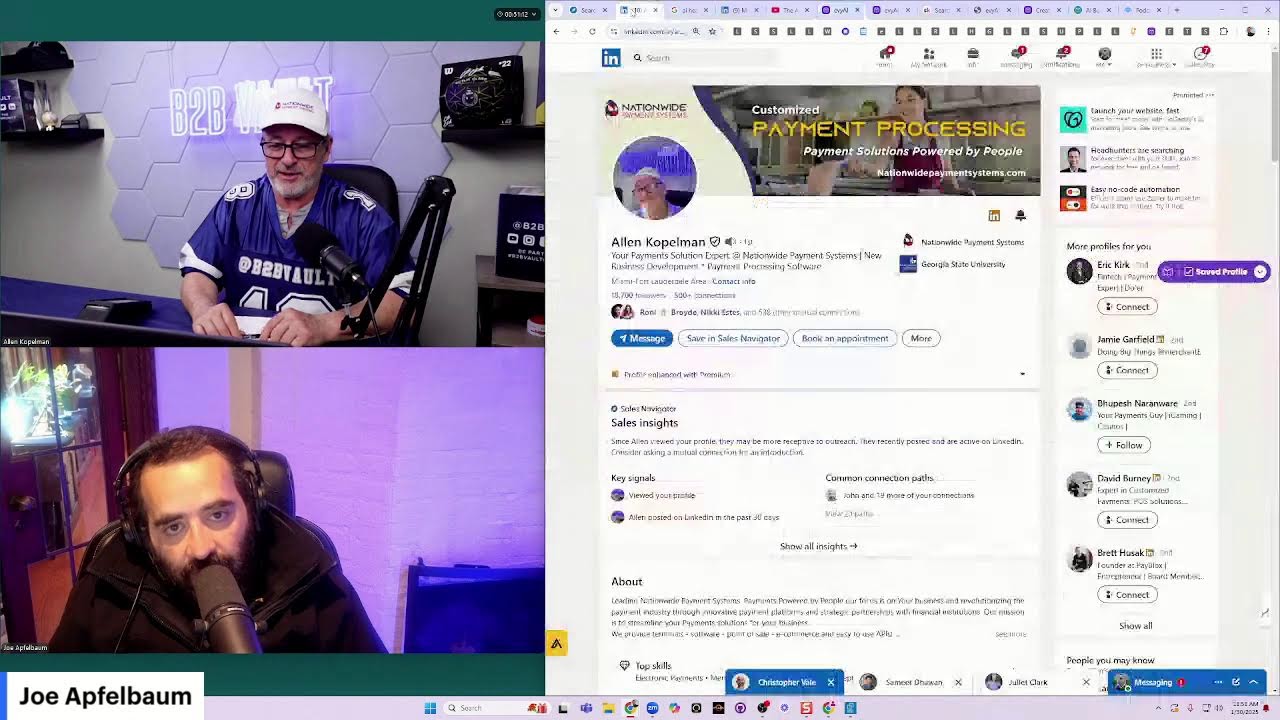
Joe Apfelbaum, CEO of Evvy AI, shows how to use LinkedIn for B2B lead generation through daily posts, comments, and direct messages. He demonstrates Evvy AI, a ChatGPT tool that drafts LinkedIn content in seconds, and shares his routine: five comments daily, twenty DMs, and twenty to one hundred connection requests. He emphasizes that your net worth equals the people around you.
Chapters
How, how do you use LinkedIn to grow your business? My name is Joe Apfelbaum, CEO of Evy AI, and I want to introduce you to a method of growing your business by podcasting. You see, I'm on LinkedIn Live, Facebook Live, YouTube Live, like all the lives right now. And there could be a lot of people watching me. There could be nobody watching me. This was totally impromptu. But the thing is, I have relationships on LinkedIn that schedule me every single day to be able to book me on things like podcasts, LinkedIn Lives, and so on. So if you take a look at some of the posts that I've been posting, you'll notice in the comments, I have relationships and these relationships leave comments on my posts and I respond to them and we go back and forth and have conversations and get to know each other. Now, most people are not leaving comments on posts, but because I have a real relationship with a lot of these people, like Matthew, for example, he goes and leaves a comment on my post when I post something. And then I respond to his comment. We're having these micro interactions. So when it's time for me to get on the phone with him, it's— I'm not out of the blue getting on the phone with this guy. We already have a relationship. Now you can also find people that are podcast hosts On LinkedIn. And these podcast hosts are looking for guests that they can introduce to their audience. And you could be one of those guests, but you're not doing the work to get onto those podcasts by reaching out to those podcast hosts. So my question to you today is, how many podcasts do you want to get on in 2025? My goal is to get on one podcast every single week, which means I need to be booking podcasts way in advance because people don't just book last minute a podcast interview. If you want to get on, let's say, 10 podcasts in 2025 or 25 podcasts in 2025, who are the podcast hosts? So let me teach you how to find those podcast hosts. I'm going to search the word podcast host right here. Podcast host. I'm going to press enter. And then I'm going to click on first-degree people. So I'm going to click on people on the top left. Then I'm going to click on first-degree. And that's how you can find podcasts. Oh, so I have 984. I only want 100 podcasts to be on. And so you see someone's a podcast host, you can message them, click on message. And I'm going to say something like, are you still taking guests? On your podcast. Curious to know who your ideal guests are. Okay. And I'm going to press copy. And I literally just send this message. Now, this message is not me self-promoting myself, but it's building a relationship with these people that are podcast hosts. Hoping that they might say, actually, I'm looking for a podcast guest, and are you interested in being a guest on my podcast? Or they might say, I'm looking for someone to talk about artificial intelligence. Or they might say, I'm looking for someone that does PR, and maybe I'll introduce them to one of my clients that does PR. You just ended the meeting, Jen. Jen just ended the meeting. That's okay. But do you see what I'm saying? This is one of the most powerful things. Now I'm gonna get on a podcast right now with one of my LinkedIn connections. And I was thinking to myself, maybe I should do the podcast while I'm on live. Now, I don't know if, um, if he's even gonna show up because sometimes people don't show up to things. That's how things happen. But I'm gonna go ahead, click on the link that he sent me. And I'm gonna see if it works. So you see, I'm waiting in the waiting room here. You see that? Oh, and now he's letting me into the waiting room.
And— Yes, I'm just here to make sure Joe joins.
I love it. And I joined the podcast.
Yes, he's here.
And I am here on the podcast. Are we doing video or are we doing video and audio, sir?
Both.
Video and audio. That's amazing.
Yes, we do video and audio.
Video and audio. And would it be really weird if I was live while we were doing the podcast? Is that a weird thing or are you totally fine? No one— people might want to—
You can be live, I guess, if it works. No problem. Yeah.
Who cares? Right. So I'm going to go ahead and turn off my, um, my webcam so that I can make my webcam available to you. And then what I'm going to do is I'm going to turn on my video. Oh, look at that. My video works.
Okay.
And you are in the B2B vault.
Yeah.
The B2B. So you're like, is that like an actual vault in like a bank?
No, but it's the B2B vault here at Nationwide Payment Systems.
Oh my God, I love it! And are you an Eagles fan? Is that why you're wearing that shirt?
No, just make it's football season. So, and I like eighteen. That's hi. Hi.
Hi. Hi. Hi. I'm Israel. Hi. I'm Israel. Hi. I'm Israel. I'm Israel. I'm Israel. I tell everybody before you get on a podcast, you gotta pump yourself up. You gotta pump yourself up. So I love that you're all ready to go. So I'm ready to go if you're ready to go.
So I'm ready to go. So what we're gonna do is, is I'm gonna hit the record button here in a second. Okay. And then I'm gonna, uh, like intro the show, and then I'm gonna introduce you, and then you can give yourself an introduction as to like What? Rocky, stop it. What?
You know, you have Rocky under your table?
Yeah, Rocky's here. He's here. He's over here, right here. Come here, Rocky. Come.
What's Rocky doing?
Oh, he wants a treat.
He wants a treat. Oh, Rocky's a big boy. Come here. How much does Rocky weigh? Like 80 pounds?
About 40 pounds.
Okay.
Okay.
That's awesome.
Okay. So you ready?
I am ready. I'm ready to go. I'm ready to get started. Recording in progress.
Hey everybody, welcome to B2B Vault, the biz-to-biz podcast. And today we're gonna be talking about LinkedIn with somebody that I've known for quite a while, Joe Apfelbaum. Did I correct— did I say your name correctly?
You said it correctly. You got it right. You're so good at what you do.
All right, awesome. And Joe is broadcasting this live on LinkedIn right now, which is pretty cool. And so if you see some comments, Joe, Make sure you shout them out so we can talk about it.
100%.
Joe is the CEO of Evy AI, so E-V-Y-A-I, and he has like some cool software that can help you with your LinkedIn profile, making it look better, sound better, message people using his AI tool. It does all kinds of cool stuff, and that's what we're going to talk about today. We're going to think about LinkedIn. You know, LinkedIn is a great um, place to be if you're doing, you know, business, you know, doing business with other business people. It's one of my favorite platforms. I use it every day, um, post all my blogs there. We post info, we post podcast episodes and other videos on LinkedIn. So Joe, introduce yourself to the B2B Vault.
All right, thank you. Uh, hey, hey, B2B Vault members, thank you so much for having me here, and, uh, thank you for bringing me on the show, Alan. My name is Joe Apfelbaum and I'm the CEO of Evvy AI. We are an AI built specifically for people who want to generate more sales. We help our clients generate $100,000 in new revenue in their business. And how do we do that? We do that by helping them get exposure, get more credibility, and at the end of the day, have more conversations. And Alan, we're having a conversation right here. Now I started off as a web designer, designing websites for people. And you may have heard this saying before, you know, the famous saying, if you build it, what's the saying? If you build it, they will—
They will come.
They will come. I built it, nobody came. Literally nobody came. And what I realized very quickly from my clients that came to me initially, they were really happy 'cause I built a beautiful website, but then they were getting upset because they're like, you built me this website, but what am I gonna do with it? What am I gonna do with the website? So I realized that I have to market the website. And so I used B2B marketing techniques like search engine optimization, and I got really, really good at it. And I got so good, in fact, that I was able to build one of the fastest growing companies in America. We were number 178 on the Inc. 500. Now, back then it was the Inc. 500.
Wow, nice.
Now it's the Inc. 5,000. But one of the things that I realized is that you get a certain type of client depending on the type of marketing that you do. So for example, if you're doing like SEO or cold calling, then you're gonna get clients that are more transactional. Right.
Right.
But if you're doing—
Yeah, we're more, we're looking for businesses, you know, we process credit cards so we can help any business, whether you're retail, restaurant, online, a SaaS company, a coach, whatever you're doing, we can help you with your payment processing.
Amazing. So if you help people with payment processing, the type of person that you would cold call to get in the door is the type of person that would switch to you, but then they would switch to somebody else right after. after when they get a lower point, a little, a lower point?
Well, what we try to do is provide them with more solutions that can help them, like technology solutions, so that they have a better technology stack for their business. And then we also help them with like identifying, like let's say they have a problem with chargebacks, so we can make sure that their contracts that they have and their signup process, whether it's a signup process through DocuSign or it's sign-up process on their website, that that's a compliant sign-up process and that they're going to be protected if somebody tries to do a chargeback. And today, one of the biggest things that's going on is— and I just did a podcast about this— is the new click-to-cancel rule.
100%.
So the new, the new click-to-cancel rule is very important for anybody doing recurring payments, whether you're a gym or a SaaS company or you're a service provider and you have a recurring payment. You are now required by the FTC, as easy as it was for somebody to sign up for your service, it has to be that easy to cancel the service.
100%.
And if you're not complying with the new click-to-cancel rule, one, you could get fines from the FTC. And then on top of that, if they're— if your customers are in California, you can be in trouble with the state of California because they actually passed a law About, they actually passed a law in relation to, uh, in relation, in relation, in relation to click to cancel.
And I see that you posted about it on LinkedIn today.
Yes.
Uh, yesterday actually you posted about it and I already commented on your post. And the way that I was able to comment so quickly on your post is that, um, I used artificial intelligence and I'm showing my audience as I'm doing the artificial intelligence on your posts. I'm actually commenting on your posts in real time as we are talking. I am building a relationship with you by going through your posts, and I'm noticing that most of your posts don't have comments on them, which is fine, but they have my comments on them now. And so one of the things that I realized very quickly is that using artificial intelligence to help you build relationships could— is like almost like a shortcut to be able to do that. And so now I went from having a marketing agency where we do marketing for clients to training people. When COVID came, I lost 75% of my recurring revenue in my agency, but I was able to maintain my business over the million-dollar revenue mark because of my relationships that I've built both on LinkedIn and off LinkedIn, but around LinkedIn. And people started asking me, Joe, can you teach us how to use LinkedIn? And so I built another company called the Evergreen Networking System. And with Evergreen, we were able to teach over 1,000 companies how to properly leverage LinkedIn to get clients, to get comments, to get conversations, to go from a lurker to an influencer. So Alan, one of the biggest problems my clients had at that point was we taught them how to use it, but they didn't have the time to actually do all this work.
Right.
So what did we do, Alan? We decided to create an artificial intelligence assistant that helps people be able to do all the work for them. So if you wanna write a post, instead of you writing the post, our AI will simply write the post for you in about 3 seconds. And it'll include a hook, main points, a call to action, and hashtags, literally in just seconds. If you're not sure what to post about, our AI will help you identify exactly what to post about because we have something called an idea generator. So you go in there and you type in click to cancel for CC processing, and then you just hit generate ideas, and within 3 seconds it'll generate ideas related To click to cancel for CC processing, how businesses can simplify their process by, uh, or, or the key challenges by implementing a seamless click to cancel feature in credit card processing. I hit generate post and then it creates a post in about 3 seconds. And so you can be posting things that are compliant with LinkedIn's algorithm because what you did in your last post doesn't comply with LinkedIn's algorithm. And Alan, as a result of that, you're not gonna get people to see the post. And I can tell you exactly what mistake you made, but let's get into that in just a minute. But, but isn't it interesting that you can use AI to be able to write a hook, main points, a call to action, and hashtags in about 3 seconds?
Yeah, it's really cool. I mean, I think that AI— I mean, I can tell you this, LinkedIn has removed a bunch of AI softwares for whatever reasons. Most of it was they were spamming people, so Yeah.
So there's a difference between having an automation and having an assistant, and I want everyone to know about this. Evvy AI is not an automation tool. It's like ChatGPT for LinkedIn integrated into LinkedIn. So we don't do anything on your behalf. We don't do anything automatically. We're not an agent, we're an assistant, which means we comply with LinkedIn's terms and conditions because we're essentially doing all the stuff off LinkedIn, but integrated into LinkedIn, and we're not doing anything automatically. The last thing that you would want, Alan, is to have somebody leave a comment on your behalf without you even knowing that you left a comment on the person. And then it leaves this terrible comment. Someone says like, oh, I got this diagnosis. And then you say, congratulations. You know, like that's the last thing that you would want. I post—
Let me ask you a question. Does your, does your AI, let's say you want to search for specific type of business, right?
Give me an example.
SaaS companies. Would go look for people commenting about SaaS, or how can you— would help you search through LinkedIn to find that?
Our training, we offer training and now we're offering a bundle where we bundle our training and our, our technology. Our training will teach you how to find people that are posting things related to SaaS, and we will even teach you how to find people that are posting things related to SaaS that haven't received any comments yet. And those are the best people to leave comments on. They're never gonna get comments on their posts. So you're essentially getting shelf life under their post. So if I find somebody right now, most of the posts that you look for have comments, but I'll find people that are in SaaS that are posting about SaaS that have not received any comments on their posts. And then I'll use my technology. So you'll use my strategy on how to find those people, and then you'll use my technology to drop a comment on their post strategically. And then you'll use my technology that will do a full analysis on that person to help you understand how to best call them, reach out to them, and build an actual relationship with them. Yesterday I did a webinar, Alan, and on my webinar someone said, Joe, can you show us how we can find our ideal clients with Sales Navigator? Do you use Sales Navigator?
No, I stopped using it.
Okay, great. So this is what I did. I'll tell you exactly what I did for your audience to listen to this and hear this. I said, I want to find sales managers in North Carolina. That's what I did. Okay. Because North Carolina, the people are a little softer. They're a little kinder. They're a little nicer than in New York. And so I went to North Carolina and I was looking. You're in Miami. So Miami's basically New York.
But anyway, well, we do business all over the United States.
But I wanted to find North Carolina because I thought if I called someone in North Carolina, they'll be a nice person. They'll take my call. They'll be, you know, they'll at least be gracious. You know, they say fake nice, South nice. Anyway, so I decided I'm gonna search for sales managers and salespeople.
Southern hospitality.
Thank you. Thank you. You hit the nail on the head. Anyway, so I search and I send one message to one sales manager just to show as an example how my AI can do this, but manually, right? It just, but it'll type up everything I say. So I just said it, and this is on camera. It's on my LinkedIn. If you go to youtube.com/joeapelbaum or you go to linkedin.com, you click on events and you see the event, you'll be able to watch. It's a 90-minute video, so it's a little bit long anyway. The guy answers me during the webinar, and I was like, "Oh my God, guys! Should we keep the conversation going?" And everyone's like, "Yes, yes, yes, yes." So I asked him for his cell phone number, and he responds with his cell phone number. Now I'd asked the everyone. I was like, "Should I call him now, or should we keep learning?" Like, "Call him now. Call him now." Okay. So I call the guy in real time. His name is Chuck. I call the guy in real time. He picks up, and we have a ten-minute conversation. Turns out he's from Staten Island. He's originally from Brooklyn. So we're having this like sprach. I don't know if you know what what sprach is. It's like we're having this like connected conversation where we're really in tune, and he decides he wants to become a client. And everyone is like, "Is this like? Is this really happening right now?" Like this guy wants to learn more about your services. You literally called him out of the blue. He never knew who you were. You never knew who he was. You're not connected to him on LinkedIn. But I was able to use, and I show how I use this, I was able to use specific technology in my AI. On the side panel, we have something called networking, and we have a summary that when you click on that summary, it tells you everything you need to say to build a relationship with the person. And in seconds, while I'm talking to you, as I'm building rapport with you, and he's telling me about his family's from Brooklyn and blah, blah, blah, blah, blah, blah, blah. And then I turn the conversation Into talking about the nonprofit that he has, into talking about how he's doing the environment. If I was talking to you, I would talk to you about how you extended the company to serve over 1,000 clients across the United States. I would talk to you about electronic payments, merchant services, e-commerce. I would talk to you about the nationwide payment system that aims to streamline payment solutions with a focus on technology-centric, client-centric services. I would talk to you about the conversation starters that I would use that Evvii is giving me right now for you is to discuss the evolution of payment processing technologies. To explore strategies for business development in fintech industry, specifically in SaaS, and your experience in the culinary arts and hospitality management, which I would've never known by just looking at your profile. But my AI goes deep into your profile, finds all the right things to say, and helps me understand that you are an expert, that you have been in Georgia State University in 1979, the day I was born, you already were in the university. So, Do you get what I'm saying? And that you're a board member at the Chai Center in Coral Springs. That's amazing. Since 2013. That's unbelievable. So for me to know this information and to leverage this during a conversation is completely and totally mind-blowing in my opinion, which is worth the price of admission. And what we're doing is we're giving away not only the software with unlimited AI, unlimited summaries, unlimited posts, unlimited comments, unlimited message, unlimited everything for less than $1,000 a year. We're also giving you $10,000 worth of training to teach you how to do it. So your question was very specific. Does your AI do this for you? I said, no, we teach you how to do it, but then we give you the tools to as— to align with you. Because if you try to use those automations that do it by themselves, A, doesn't get it right. B, LinkedIn bans you. So you don't want to get banned from LinkedIn. You work so hard to build your 18,000 followers.
Yeah, I'll get like, I'll get messages, right? And they're, they're all pretty similar in their nature. I'll go pull one up right now. Okay, let me pull up a message. This is just for, just so like you understand.
As they say, for shits and giggles. Are we allowed to say shits and giggles?
Yeah, we can say whatever we want. I don't know why, but this is like a new thing. I get invited to these roundtables. People want to have like a roundtable meeting, but they don't tell you what they want to talk about. Here's a guy inviting me to go to Miami to learn how to sell my business. I mean, it's going to get deleted. Here's another person. They want to host a meeting on Zoom. Do you want to secure your spot to talk to other executives? That's like a new thing, like started happening. I get hit up by people training you, like for physical fitness and dieting and stuff. all the time. Oh, do you want to have better focus and be in better shape?
You know what I tell them?
I get hit on for these people that say they can put my article in like USA Today and all this other stuff.
I got the same one.
Charge you money.
I got the same one. And the guy throws in his Calendly link there.
And then, yeah. And then they want to, then they want to also sell me some kind of AI. They want to sell me software. They, they say things like, oh, I want to connect with you because I'm expanding my network and I want to meet interesting people. And your profile is very impressive. So I know that that's, you know, like some automation. And then like, I'll go back and look at some of these messages later and they'll be like the message, the picture, like here's one, the guy's picture is deleted. Oh my goodness. The picture's gone because the guy probably signed up for Sales Navigator, plowed through a whole bunch of messages on the free, you know, because you get it free for like a short period of time. Right. Yeah. Sales Navigator.
Yeah. Yeah. Yeah.
He blasts you a bunch of messages. And then you guys' picture is— yeah, the guy's picture is gone because he got kicked off LinkedIn.
Exactly. He got kicked off LinkedIn. But let me tell you something. How many of these do you get per day? Really? How many of them per day?
Probably about between 20 and 30 a day. Sometimes more.
You get 30 per day?
Yeah. And I get probably, um, about 10 to 15 requests to connect. On top of that.
Okay. Amazing. So you're getting a lot of, you're getting a lot of people to reach out to you. And the reason why you're in all these automation traps is because your profile's very optimized for these automation traps, just FYI. So you're turning up in a lot of searches for people looking for people to sell to. That's good. That's good. What I would tell you to do is to become an affiliate of Evvy AI.
Okay.
And then as an affiliate of Evvy AI, all you have to do is respond with your affiliate link. When these 20 messages come in, you respond with the 20 messages and our AI can write the message for you, but you send them the link to Evie AI. And when they will register, cuz they probably will, and they pay for Evie AI, you will earn 20% for 3 years. And this be— could become your full-time gig because you're getting so many inbound leads. And our clients are doing this and they are making money off responding to this, the people who often, many times, someone sets up the campaign for them, but they're just a legit person behind there that somebody set up a campaign and they have to deal with the responses. So when you're responding, you're actually breaking their automation and stopping the automation. 'Cause anytime they get a response, it breaks the automation. And so now you're giving them work to do and you're basically, uh, turning the ship for them and that stops their automation. So you're never gonna get a message from them again. But the last message that they got from you—
Yeah.
was them getting a tool that will actually help them be able to actually be authentic instead of spamming. Because no one ever makes money spamming.
And I also get a lot of messages from like overseas, a lot, like tons of them. They're from some of the countries I never even heard of. Guyana. I get messages from all over Europe.
You never heard of Guyana?
No, I have. I'm just saying like weird places.
LinkedIn is in 200 countries around the world. But there's something that you can do called turning off your open profile. You have right now, you have a pro open profile. Your profile is currently open, which means anybody can message you. So if you, if it bothers you, you can actually turn off that only—
No, I've actually, what's cool is, is like I've gone to a couple of these roundtables, right?
Yeah.
And some of them, all of a sudden the person's talking about like mental health or whatever, and I just click off. I just say, no, not for me. Yeah. But a couple of them I've I've actually met people that I was able— one guy I was able to do business with, and another one is a lead that I'm working on right now. So some of the, you know, you never know who you're going to meet when you go do different things. You have to put yourself out there. It's just a matter of, do I have time on my schedule to do this or not do that?
100%.
And if something else comes up, you know, I'll get rid of that meeting and go do something that's productive.
100%.
For my business.
100%.
But I'm just saying, like, you, you know, you get invited to these things, you don't know what they're about or who you're gonna meet, but sometimes, you know, you have to put yourself out there and just roll the dice and take a chance. Obviously, if you get into a meeting and it's completely uninteresting to you, right? You're gonna leave. You just bail.
Yeah.
I mean, it's a little rude, but you just say, hey, sorry, I got a phone call, gotta go.
If you, 100%, if you click on, uh, settings on LinkedIn and then you click on data privacy, Right. There's a, there's a section in data privacy called messages you receive. And then there are 4 different buttons that you can turn on of whether or not people can send you messages if they're not connected to you, or if it's an open message, it's a free message. If you wanna reduce the amount of in-mails that you're getting from people through Sales Navigator, then you turn the open profile messages thing off, and then you will get fewer messages inbound to you. And, but I don't mind the inbound messages because I often, like you, turn those people around and turn them into clients. And so, right. And, and often relationships. There's a woman that sent me a message, uh, it was about 2 years ago. Her name is Sarah. She sent me a message asking me if I'm looking for coaching for my intimacy on LinkedIn. And I responded to her and said, I, I, I would love to help you be able to find more CEOs that need intimacy coaching. Would you be open to a conversation with me? And she said yes. And we got on the phone. I showed her how she was doing it all wrong because she told me, she confessed that she wasn't getting any results. And I taught her how to do it. And in the first 6 months after using our strategies, she generated $500,000 in revenue. Her name is Sarah. We have her case study on our homepage. And so doing things the right way is the difference between generating revenue or annoying the crap outta people. Now the thing about—
Oh, exactly.
The thing about LinkedIn is you might be getting 20 of these a day, but on email you might be getting 100 or 200 spam Well, I delete about 300, 400 emails a day, get just deleted.
So I don't have time to read them. I'll look at the title or I'll look who sent it. And I might read, you know, some of them while I'm having coffee.
Exactly.
And I might come across something interesting. No, I've met people. They're like, oh, I want to be a guest on your podcast. Okay, cool. You know. And I go look at that, you know, and then I'll talk to them. And then if it works out, let's be on— let's come on the podcast and let's chop it up and talk about, you know, credit card processing. I don't like about— the thing I don't like about LinkedIn is the Sales Navigator. Um, one of the features that they took away from it is that you can't look and see who's posted in the last 30 days. Or who's—
Yeah, you can actually. You can. So I'm sharing my screen. And if you want, I could share my screen on your podcast right now, but there's a filter under recent updates. So they moved it into the lead filters. So we have a bootcamp called the Sales Nav Bootcamp, and we spend an hour going through all the different filters inside Sales Navigator. And so we have a section called company, role, personal, buyer intent, best path in recent updates and workflow. And the one under recent updates, there are 3 sections: posted on LinkedIn, changed jobs, and mentioned in the news. And so the one called posted on LinkedIn, when you tick that one off, you can see all the people that recently posted on LinkedIn. And if you save them to a list, then you'll also get notified in your alerts when they post on LinkedIn. So there's 15. million people that have posted on LinkedIn in the past 30 days.
Yeah, it's crazy. It's just the— no, I'm just saying, like, they don't make it easy for you to figure out how to use Sales Navigator on your own is kind of the problem. And they're— the, the Sales Navigator, whatever, instructional videos are not great.
100%. That's 100%. No, they're not. That's why, that's why we're able to sell our boot camp so much. That's why so many people are able to, um, purchase our bootcamp and our solutions because they don't give you any instructions. You know, Microsoft makes Windows and makes LinkedIn and makes these things very complicated so that you can hire me to teach you how to do it.
Oh, let's not get into Microsoft. I mean, they're starting to put like their AI into all the Microsoft Office products. And you have to be super, super careful when you're like— I was working on a document the other day on a spreadsheet, and all of a sudden I was like, hey, what the heck's going on on this spreadsheet? Because all of a sudden a bunch of the numbers changed, and I was like, there's no way, I didn't ask it to do anything. I had to go turn it off. Wow.
If you don't ask it to do— and they say that DeepSeek is, um, is Is like doing warfare on the United States by getting everybody's information from everyone's computer because they're downloading, you know, people are downloading DeepSeek onto their computer. You know, we're trying to—
Downloading what?
They're downloading this new AI that China came out with that they made available for free to compete with OpenAI called DeepSeek. D-E-E-P-S-E-E-K. DeepSeek.
Okay.
Very good.
I haven't tried it yet.
Yeah, but what I'm saying is people are saying that when you download that extension, when you download that, uh, onto your computer, you have unlimited AI on your computer, but really it's sending the AI to China. It's sending all your information to China.
That's scary. You know, that's the other thing is, you know, that I worry. One thing that I did learn is like, one thing I will say, and I've said this a number of times on my podcast, if you're a business person, um, you need to learn how to use LinkedIn. You need to learn how to get posts up on social media. You need to learn how to use AI because eventually— I don't say AI is going to take away people's jobs, but people who know how to use AI are going to be more employable than people who don't know how to use AI.
That's what I always say. I always say that salespeople are not going to be replaced by AI. Salespeople are going to be replaced by salespeople who know how to use AI.
Exactly. And I think that, you know, and I don't know, nobody's really had like A class. I haven't seen a class like on Coursera or on Google or Microsoft. Like anybody like has a class. You should like bill your class as say AI for salespeople.
Oh my God. That's such a good idea. That is such a good idea. What if, what if there was—
Oh, I should get a discount now on every AI.
Not only that, maybe I should make you an affiliate and pay you a commission, not just a discount. But check this out. We have something called the AI Business Development Circle that we developed.
Okay.
If you go to evergreen.com/aicircle, you'll be able to see that we meet for 3 hours every single month. We meet for 3 hours every single month. Um, and we teach people the step-by-step process to generate sales with AI. Everything from how to use avatars to clone your voice, literally everything. And I'll send you, I'll go ahead and send you the link to our thing. We have a 3-hour video that anybody could watch. It's evyrgreen.com/aicircle.
We'll post it in one of our, we'll post it, we'll post that. So if anybody wants to see this free video, say the website again.
Yeah, it's evyrgreen.com/aicircle. evyrgreen.com/aicircle. And if you do that, you'll be able to watch a 3-hour free video. And if you wanna join us live for 3 hours every month, there's a monthly fee to be part of that. And as soon as you sign up to the monthly circle, then you get 40 hours of AI training access, 1,000 ChatGPT prompts, and step-by-step process on how to use AI to generate sales.
That's pretty awesome. You should rename that, that the Sales AI Training Course, because I think salespeople really need training on how to use AI. It's super. It's super important that you continue. I talk to a lot of people, they own a business or they might even be peers of mine in the payment space, right? And we talk about what can we do better? How can I make more sales? And I talk to a lot of frustrated salespeople, right? Because COVID kind of like changed things where now businesses are understaffed, so you can't just go door to door. Plus, there's thousands and thousands of businesses that are home-based, so you can't like walk through your neighborhood and knock on your neighbor's door. Hey, do you own a business? Hey, do you own a business? Where are you going to find all these business people, right?
Yeah.
And people don't go out to like the Chamber of Commerce as much anymore or to networking events like they used to. Now all the networking is like online. Right. Online networking, right?
Yeah.
So where are you going to network and how are you going to use AI to further your sales career, whether you're selling kitchen equipment, credit card processing widgets, you know, coffee, whatever it is that you sell, right? I think people need to figure out how to use these, how to use AI better in their business. That should be the new thing, 2025, learn how to use AI. But when I talk to people, they're like, well, I don't want to spend time on that. Or they say, oh, you know, there's— why should I, you know, why should I do that? It's just simple. You have to invest. I talk about this all the time to people. If you have a business, you need to invest in your business, right?
Yeah.
And one of the most annoying things— you tell me if you think this is annoying— someone wants to do business with me and their email address is, uh, rockyprocessing@gmail.com, or their business is dentalsuppliemyami@gmail.com, or Hotmail or something like that. You know, you have to invest. For your business or have your own personal website. Like I have allankopelman.com, right? Yeah.
Yeah.
Because people search—
if I search Alan Kopelman, what do you think will happen? What do you think will come up when I search Alan Kopelman?
On Google?
Yeah. Like for example, if I go to your profile right now on LinkedIn, yeah, I'm gonna go to your profile.
You're gonna find a lot of posts.
I'm gonna find a ton of posts on LinkedIn. But if I click on Evie AI and I click on search profile, and I click on Google or Instagram or Facebook or X or YouTube or TikTok, it'll automatically do the search for me and search for you.
Right.
So I just searched for you on Google and I see that the first thing that comes up is your LinkedIn. The second thing comes up is your personal page, allankopelman.com. The third thing that comes up is your Forbes articles, then more LinkedIn, then your X, then your podcast on, on Apple. Then your B2B Vault on X Raised, then more podcasts on Crunchbase, on, uh, and then npsbank.com/alan. So what's crazy is that you own the first page of Google for the word Alan Kopelman, and you're not the only old Alan Kopelman in the world. You're just the only one that's foundable. You're the only one that's findable.
Okay, that's good to know.
So good point.
Alan Kopelman is a great search term.
It's a great search term. Now I can easily find you also on Instagram. I could find you on Facebook. You use Facebook for it, but on Facebook there are other Alan Kopelmans, but you're the one that went to University of Oxford, right? Or no, that's a different Alan Kopelman. It kind of looks like you, this guy here.
Huh, that's weird.
Looks exactly like you, and it says you went to the— you're from Los Angeles. Are you from Los Angeles?
Yeah, that's some fake profile. I can't get Facebook to remove it.
Oh my God, it's a fake because it says PM me as an old trusted old money collector. PM me. Oh my God.
No, I've tried to get it removed. For whatever reason, And, you know, this is one thing that I don't understand is like Facebook, Microsoft. Well, LinkedIn now has where you can get a checkmark. So if you have Clear, you can link that to your LinkedIn profile and you have a verified profile.
Yeah, yeah, yeah. If you go to linkedin.com/verify, anyone can verify their profile by going to linkedin.com/verify. So if you guys—
I think it's important to have a verified profile. What do you think?
I think it's important, but I also think it's important to have a verified Meta account as well. So Meta has verification as well. I pay $14.99 per month to verify my Instagram and my Facebook account. So I do recommend getting a verified Facebook and a verified Instagram account as well. And you verify with your ID. LinkedIn does it for free, which I love. That's one of my favorite things about LinkedIn is most of the stuff you can do on LinkedIn is free.
Rocky, no.
And then your Twitter account also, you can now verify. I would definitely recommend at the least verifying your LinkedIn account for sure.
Hold on a second. Rocky, Rocky, stop it. Okay.
And I see you have, I see you have 16 subscribers on your YouTube channel. My recommendation is to try to get 1,000.
Yeah, we've tried the YouTube for some reason. We get a lot of views on our YouTube videos, but most of them are on like LinkedIn. So I don't think it records over there for some reason. Well, you gotta sync it.
Yeah, you gotta sync your videos together. So I have something called restream.io. So when I'm— right now I'm on Facebook Live, I'm on LinkedIn Live, and I'm on YouTube Live, and they're all synced together. So if you Google my name, you're gonna see all the different things synced up. And then I have an AI agent that's automatically updating Twitter because Twitter doesn't care if you use AI to automatically update it. So my Twitter is literally being updated as we speak, and I'm not even doing it.
Well, that's why, I don't know. We've never done very well with Twitter. Most of the leads that we get that come in come off of, uh, quality leads come in from LinkedIn.
I agree. 80%.
A little bit from Facebook.
80. Here's a stat. 80% of B2B leads come from LinkedIn. Everything else is a waste of time for most people. There's a lot of social going on, but commerce is happening on LinkedIn, especially for the B2B space. And this is the B2B Vault. With Alan Kopelman. And so right over here is the place where you guys wanna spend most of your time with. And if you use a tool like Evie AI, it'll help save you a ton of time. It'll help make you more money, and it'll help you be able to grow your business.
So let's, so let's give people, if, if, well, you can follow Joe on LinkedIn, but let's give people 3 to 5 things that they can do on LinkedIn that would That, that would help their profile look better on LinkedIn? Give us 3 to 5 tips.
I'll give you, I'll give you 3 to 5 tips right now. By the way, if you go to Evvy AI and you log into the free account on the left side of the— Okay.
Besides the Evvy AI—
Oh no, lemme show you. Let me tell you.
Okay.
You log into the free account, you click on the learning hub. We have something called quick links, and then we have a daily Evvy AI workflow that basically gives you a bunch of tips and we give you 5 tips there. So here are the 5 tips that we give. Number 1. The morning routine is come up with an idea for what to post about and write a post every day, but don't make the mistake that Alan makes on his profile and include a link in your post. Because if you include a link in your post, LinkedIn will not show that to anybody. So don't include a link in your post. If you're going to include a link, include it in the comments of your post. Okay. So that's tip number 1. Okay. Is that a good tip? Say good tip or bad tip.
Good tip.
Tip number 2, leave 5 comments a day, preferably on my posts, but you can leave them on Alan's posts as well. But 5 comments every day. If you don't have the time to do it yourself, find a good technology, hint, hint, hint, that will help you do it very quickly. But leave 5 comments a day. Make it a practice to leave 5 comments every day, even if you're doing it manually. If you need a tutorial, we have tutorials on how to do that. Number 3, the third thing you want to do is if you're like me and Alan, you have tens of thousands of people following you on, on LinkedIn. That's great. But you need to add more followers. So how, what's the shortcut to adding more followers is simply adding more connections. LinkedIn allows you for free to add up to 20 connections per day, which is about 100 a week. If you send out 100 connection requests a week, you're well under LinkedIn's radar and you'll be adding thousands of connections every single year, which by the next 2 or 3 years, as LinkedIn keeps adding new members, you're gonna add your target market in there. They're gonna follow you because you're posting and engaging. You're gonna be popular. There's a billion people on LinkedIn, Alan. And in the past 30 days, we just established that only 15 million people posted. And of the billion people, only 15 million posted. The opportunity is huge. It's a blue ocean. So add more followers by adding more connections. LinkedIn is the only platform.
One of the things I always do is when somebody connects with me, I'll go to their profile and I'll endorse them for a couple of skills.
That's incredible. I like endorsing people for one skill at a time because when they get a notification, they only get one notification.
Right.
So this is the hack, bro. This is the hack, Alan. I'll endorse you for a skill today, but then I'll come back to you in a month or in 3 weeks and I'll endorse you for another skill. So I'm gonna kind of like give you drip endorsements, and then you'll get a notification every time I do it. So you'll thank me each time. So sometimes I'll go through the process of somebody has 50 skills and I really want to get in front of them. Every week I'll endorse them for another skill for 50 weeks. And they will get it.
I found that that's a great conversation starter.
I agree. I just endorsed you for fintech. How do you like that?
Thank you.
My pleasure. And by the way, you're such a great podcast host that I'm gonna give you a LinkedIn recommendation on your profile. I'm gonna recommend you. Oh, I already left you one. Okay.
Yes.
Let me check. Let me check. Oh, look at that. I already left you one. Amazing. December 23rd. I, I was the last recommendation in 2024 that you got.
Yeah, I made— that's when we made the plan for you to come on the podcast.
Oh, and you didn't even get one for 10 years. I was the first person in 10 years to re-wake up your recommendations.
Yeah, a lot of people just don't like giving recommendations for some reason. It's like, it's— I don't understand.
It's a really well-written recommendation, by the way. I should say so myself. You know what I would recommend that you do as a tip? Take a screenshot of the recommendation that I gave you, because I gave you the best one you've ever had. If you look at all of them, the other guy wrote, Alan is seen as a blah blah blah. No, look at the one I gave you. Screenshot. Do you know how to screenshot on LinkedIn? Do you know how to take a screenshot? Take a screenshot. highlight the things that you want people to see with a highlighter. You can do that with Microsoft. You can use a highlighter and then post it as a post saying, I just had Joe on my podcast. He talked about the importance of leaving recommendations. And look at what he left me last year. In 10 years, no one was willing to leave me a recommendation out of all you 18,000 Fools that are connected with me on LinkedIn. And he left me one and now the floodgates are open. And Mark left me one and Mark left me one. Mark with a C, Mark with a K.
Right.
Um, and so just putting that picture up of the recommendation that I left you, Is a good practice because people—
oh, that's a great idea for a post.
Yeah, exactly.
Okay. So what are the other tips?
Okay. So, so the other tips are that we give away for free in the Evvii workflow is that in the afternoon, make sure to send at least 20 direct messages. Now, there are different types of direct messages you can send out. You can send out birthday messages, you can send anniversary messages, you can send out, uh, congrats on a new job message. You can send out messages for people just connecting with you, and you can send out messages to people that have been connecting with you in a, for a while, and you haven't even been in touch with them. And then finally, the last one I would say is make sure that you organize your profiles into lists. For example, you are a podcast host, right?
Yes.
So what I wanna do is I wanna make sure that I have you in my list of people that are podcast hosts so that I could recommend you to some of my other People that are looking for podcasts. So I have a list called Podcast Hosts that I put you in, and now you're in that list, and I can go through that list every once in a while and support all of the hosts that have hosted me on their podcast. Powerful, right?
And I like to be a guest on podcasts too.
So, so here's another tip.
If you know anybody that needs a guest, there is a website called podcastguests.com, podcastguests.com.
And if you use code Mojo, If you use code Mojo for podcast guests, you get 20% off. I know the CEO of the company. They have, they have many, many dozens of podcasts that are, that podcast hosts that are looking for guests constantly for their podcasts. And you can see I'm an, I'm one of the featured experts there. I only pay $20-something to get to become a featured expert on their page, which ranks on Google, by the way. And I have a link back to my website there. But if anybody's looking for an AI expert or a LinkedIn expert or a ChatGPT hacker, They just go to that website, they look through the list of experts, and there's not that many experts there. They maybe have a few hundred experts there, but I'm on the top of the list, and, um, you can be on the top of the list as well if you pay to be featured on their website. And again, you get 20% off when you use the word— the code word Mojo. But if you want to get on podcasts, just go to podcastguests.com and just put yourself in the directory. And right away when you put yourself in the directory, they email the 10,000 people that are on their list with your information, and many of those people will want you on a podcast. So right in the beginning, even if you're just doing it for a month or two, just to get yourself blasted out to all those people, it's worth the, the $20 or whatever it's gonna cost you to— so that's a little hack for people listening. Get yourself on there, you'll get a landing page on their directory, and then you'll get a blast out to all the people.
That's why I made my personal website, allankopelman.com. So when people wanna go find me, They can see like my resume sort of on there and they can see like I have links to podcasts that I've been on and there's videos, different things so people can get an idea of what I talk about.
Amazing, amazing, amazing. So yeah, so podcastguests.com.
It's important to do, you know, your own, you know, besides taking care of your company is also taking care of making sure you're doing a little self-promotion for yourself.
100%.
The other thing that I see on LinkedIn, and I don't know why, maybe you have some insight to this, on your company pages, they, they added a thing called product. So you can create a product.
You can create a product.
And I created my product and I filled it all out more than once. And it's been super difficult. I don't know. It's like they're saying they're backed up on approving these products.
Yeah, they are backed up to approving products, but they have another feature called the services page. Have you heard of the services page?
Yeah. I go to the services page and you know what? They don't have, um, anything on there for payment processing.
They don't have it for payment processing, but with a hack for you as a consultant, you do call it business consulting. And when you consult with a business, you consult with them to use your pro— your services.
Well, obviously we put, I put that on there, but that's the whole deal.
But your services page is not optimized. You don't have an image, you don't have a proper description, you don't have testimonials on your services page. So go look at my services page when you get a chance, make a note for yourself to look at mine and compare mine to yours. You'll notice that on your services page, it just says leading nationwide payments, blah, blah, blah. And it shows some things, maybe invoice processing, blah, blah, blah, but it doesn't have A, testimonials on it, B, an image, C, a video, D, a process.
We'll have to see how to fix that up.
So yeah, tighten it up. You're, you're really good. You're really, really good at LinkedIn. You're really, really good at LinkedIn. However, there are a few things that you need to tweak in order for you to take things to the next level.
Okay. And what about a tip about like profile pictures?
So profile pictures, I would recommend making sure that you have your face be a little bit bigger in the profile picture if you can, kind of taking up most of the profile picture. It's called a clean headshot and anything you need in the background, have as a background banner. I see you have like the B2B Vault in your photo, so your face is a little small and it's a little back. Um, I would also recommend looking at the, the, the camera straight forward instead of like on an angle when possible. Those are usually the best headshots. And also looking at the person right now, you're kind of like looking away. When someone's looking at their profile, they want to connect with you. And if you're looking into the camera, you're actually building a relationship with the person. So when you're taking a photo, get a professional person. I recommend using a tool, a company called TaskRabbit. Where you can find someone to come to your house for like $40 to take a series of professional photos for you, and then they'll just give you all the photos and then you can use those as headshots. Or there's a headshot generator, an AI headshot generator where you upload 20 of your photos and it'll make you perfect photos of you. Um, I can tell you which one I recommend, so let me just search.
Yeah, I've seen that one before. I've seen those before. I see it advertised on LinkedIn a lot. And then what about the banner on top, on your banner? What do you recommend on people's banners?
So on people's Banners, I recommend. So first of all, I'll, I'll send you a link to the AI headshot generator thing. I have a, a link to it with a code where you get a discount on 120 headshots, just FYI. So I'll go ahead and drop that link to you and you can share the link to the article that explains how to properly do it. Uh, but in terms of the banner, we do have a free community that people can join where we're always giving tips out. And I literally just, people, people asked about the banner thing. So if you just search banner in the community. Um, I dropped a, a, uh, something called the LinkedIn background banner best practices. So here are the best practices for a LinkedIn banner. Number one is use Canva to find the perfect template.
Why?
Because Canva has 100,000 LinkedIn banners you can choose from that match your brand colors and that exactly match exactly what you need. So they're all predesigned already perfectly for LinkedIn. So go to canva.com.
Canva.
Type in LinkedIn banner, you're gonna find 100,000. Number 2, the second—
Wow, that's crazy.
Yeah, the thing, the, the second thing you wanna do is you wanna make sure that it matches the dimensions of 1584 by 396. A lot of people make a mistake and have the wrong dimensions. LinkedIn has static banners, which is PNG, JPEG, and GIF, but right now LinkedIn is rolling out this new thing where you can have 5 banners rotating on your profile. Wow, that's cool. So that's a new thing. Yeah, so check on your profile when you edit your banner to see if they have the slideshow available for you to be able to rotate your banner around. And on Tammy's profile, my business partner, she has it there. So my recommendation is have your business logo, your personal brand elements, have a consistent color scheme, don't make it too messy, have industry-relevant imagery that reflects your field, make sure that you have your professional achievements and certifications on there as logos if, if you have them. And then put in any speaking engagements or published works. Like if you have your book, put your book there or your podcast, put the logos to your podcast. Make sure that you only use sharp images that use clean design, that you have a clear focal point, that it's not too messy where people have to kind of like look around a lot and put your current role or expertise area there as well. You don't want it to be overcrowded. You don't want it to be like low resolution. You don't want to, you don't want it to have things that are illegible. Like if I go to your profile, Everything is really legible. However, the link is a little hard to read because it's white on the person's shirt and on their hand. So that's almost like white on white. So I would probably put like a background thing behind the link so people see the link better. Um, and possibly some icons and maybe like a, a, a logo that indicates that you're a podcast host or something like that. But otherwise, your po— your thing is pretty good. You could just take it to the next level. Is that helpful?
Yeah. Okay. So we're gonna wrap it up now. And hopefully everybody's enjoying the podcast. If you're listening to Joe's live, you can find B2B Vault on Spotify, Apple, YouTube. You can connect with me on LinkedIn. So if you're listening today to the live or the replay, connect to Alan Kopelman. If you need information about payment processing, want to be a guest on the podcast, you have something interesting to talk about like Joe, And I really appreciate Joe coming on the podcast today, and we will post the links to all the things Joe talked about when we post the podcast out so everybody can find all the little, all the different services that he's talking about. So Joe, give us some final words and then we're gonna, then we're off for the, do some business today.
Amazing. So the final words are the following. If you wanna succeed on LinkedIn and you're in sales or you're a coach or a consultant or you're a thought leader, you need to have the right assistant. You can't do everything yourself. Having the right assistant will change your life. An assistant that will help you come up with ideas, an assistant that will help you draft content, draft comments, draft posts, draft images, and support you to be able to organize yourself in a meaningful way. And if you're not sure how to use the platform, you need to get training, not from me only, but from other people. Get the right support, the right training, and have the right network. The right network will improve your net worth. If you want to improve your net worth, you got to improve your network, and you are the average of the 5 people you spend the most time with. So surround yourself with people like Alan, with people like myself, that are thought leaders, that are putting themselves out there, that are making a difference. And if you do that more consistently, you will take your life and your business to a whole new level. Thank you for having me on the podcast. Thank you for being an advocate of what we do. Thank you for being my LinkedIn connection, and thank you very much for being a mensch, as they say in Brooklyn.
And thank you for being on the podcast today. And, and today, if anything, you take anything away from this, 2025 is the year where you need to learn how to use AI for sure.
AI has been transformational for me. Thank you very much. Boom. All right, we did it, ladies and gentlemen. We did it. And my team says I have a call in 10 minutes, so we have to wrap this puppy up. Wrap this puppy up in a little bun. Let me turn on my camera again. All right, here we go. We are still live here. Let me just quickly pull this hair like this. All right, so as you can see, I got on this amazing podcast. I was able to build a meaningful relationship with this person. I was able to connect deeply, and most people are simply not doing that. If you're not doing that and you'd like to start doing it, I'd love to invite you to start getting involved in our community. We have an incredible community. It's Evy AI on School. Just log into your Evy AI account, click on community, and you can join us for free. And once you join us, we'd be more than happy to teach you all the things you need to do to grow your business. And if you want info on the bundle and you're watching me live right now, Just type in the word bundle in the chat. I will find you and I will get you the bundle deal. Once again, thank you for being in my life. Thank you for allowing me to serve you. Thank you for allowing me to help you be able to grow your business. And I appreciate you very much. And remember, the road to success is paved with good intentions.
More from Joe


How to Beat the Algorithm: Remove Hidden Watermarks & Scale Content with evyAI









AEO & GEO: SEO's Future Explained! Master Answer & Generative Engines! #shorts