How to use LinkedIn with AI - evyAI Demo
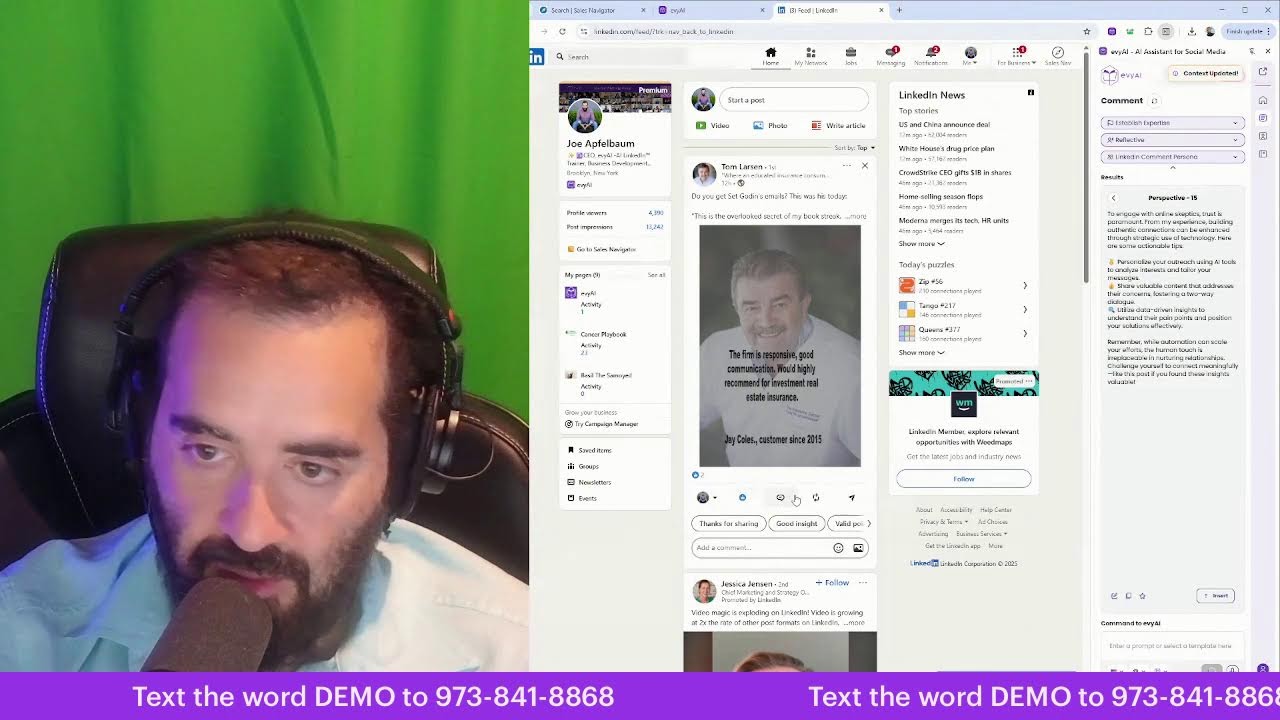
Joe Apfelbaum shows how to use LinkedIn Sales Navigator with evyAI to automate B2B prospecting. The workflow generates personalized messages, writes posts and comments, pulls prospect background info, and converts interactions into calls and meetings. He recommends aiming for 50 comments a day and cleaning up your connection list.
Chapters
I don't know if you recognize this, but this is what they call Sales Navigator. So there are lots of filters you can choose from in order to get clients. A lot of people don't know that you can use artificial intelligence to help you be able to get clients with a tool like Sales Navigator. And today we had an incredible event that we did where we got together and we discussed how to train the artificial intelligence. To be able to really get to know you as a person. So if I want to message this person over here, say I want to message him, I can literally just put a subject line and a message right over here and send this guy a message. And right away it hits him. And he's in Tampa, Florida right now. It's 8:30 PM. And I could just message him in literally just a second and he will get that message. And the same thing is with all these people here. So I don't understand why people are simply not messaging people on a regular basis using artificial intelligence to help them be able to like literally write the full message for you so you don't have to do it yourself. And there are many other things that you can have AI do for you. For example, I can have AI help me write an entire post. What's the best time to post on LinkedIn? Well, the truth is, here's the worst time to post. Never. It's never a bad time to post, especially if people are active in a group that they're connected to. Then I can say, what do you think about posting times on LinkedIn and what time do you— okay, so let's just see what that's going to turn into. So now I'm going to go grab a photo from my archive of photos. I have tons of photos. Okay. So I'm going to go ahead and download, say, a group photo. Let's see where I'm going to get the group photo of. Let's see. I guess I'll use this photo right over here. I have a photo that I found that I really like. I'm going to go here, grab that photo that I just downloaded, and I'm going to upload it. And it's 8:35 PM, and I'm about to post on LinkedIn, and boom, I just posted. Okay. Now, is it possible that this post is gonna go absolutely viral? Yeah, it's possible. Is it possible that 1,000 people are gonna see it? Yeah, it's possible. It's not likely that you're gonna get it to go viral, but it's very likely that I'm gonna get a few people to see it right now. And that, my friends, is extremely, extremely powerful thing to do. If you can take the time to actually build real relationships with people. For example, I commented on Chelsea's post 8 minutes ago and she already noticed me and she already checked out my profile. Shot you a message, looking forward to chatting. Okay, so let's see what message she shot me. I'm gonna go here. I'm gonna click on message. Hey, would you like to tell me when you have some time? Does next week— how does next week look like? I'm actually available right now if you can talk. Next week works well too. All right, so let's see if she's willing to get on the phone with me right now. So this came from literally a message, a, a comment just like this, you see. A simple comment. I left her a comment, she replied, and it turned into an opportunity. And let's just see what happened. I really enjoyed the meeting. Okay, so we're not gonna look at that now. Auto message, of course. Remember the podcast? Uh, he said auto message. Okay, let's see. Thanks, Joe. Nothing special, just made it all about me. That's so nice. Uh, this is my cousin Molly. Thank you. And this person said thank you over here as well. Okay, let me look at that. There's a message in there that I kind of got to look at privately for a second, but while I do that, check out this website. Check out Evie AI. Look at all the features that we have here. Read this for just a second while I go and keep myself busy reading something else. All right, let's just see. My son's calling me. Hello? Yeah, what's up, sweetie? Yeah, yeah, I'm happy to. I told her yes. I told her I'm gonna check it out, and, um, I'm happy. I'm definitely happy to do it. I can't check right now, but I could check soon. Alrighty. Thank you, love you, bye. All right, my son gave me a buzz and he wanted me to sign him up to something and I told him I'm gonna do it soon. All right, so let's chat about how to use LinkedIn effectively to generate sales. So you can see that when I take the time to leave comments on people's posts, that they actually notice. Now I'm gonna go ahead and remove a few people that I've been messaging and they haven't been responding to me. I'm gonna remove a few people here. And the beauty is that I can literally remove anybody I want. And if I wanna add them later, I can re-add them, which I absolutely love doing. So I'm gonna go ahead and just remove a few people that I think are not ideal for me to kind of stay connected with temporarily. And then, um, I can always re-add them if I want to later. So you see this, I'm just going to remove a few people. People that I think are cool, but you know what, I'm not so sure they're the most ideal people for me anymore to stay connected with. Okay, so I just made room for a bunch of more people. So now I can add more connections with people that, um, that are kind of hitting me up, you see. So people are constantly hitting me up to connect with me. Um, so this guy over here is an EO member, wants to connect. So I'm going to press accept, and now I'm going to engage with him just a little bit. So I'm going to do research using artificial intelligence. So I'm going to go ahead and open the side panel here. And then I'm going to click on this, save his profile. Once his profile is saved over here, I think I'm going to add him as a prospect. Eric is a prospect of mine. Okay. I just added Eric as a prospect. Hopefully I'll— we'll close them tomorrow. I'm going to go to Robert here and I'm going to use AI times 3. So I'm going to have 3 separate agents doing research on this guy right over here to kind of learn more about him. I can see he does AI strategy consultant, public speaking and workshops, executive coaching. I love that. And now I see there's more information here about him. I don't see his Um, his phone number here. Let's see if I can pull up his phone number from any of his websites. I do see an email address here. Okay, cool. Slides don't save. Lots more check series. Okay, cool. So it's great that he has all this information, but, um, if I really want to get his cell phone number, I would probably have to use a different directory. I have a private directory of everybody's phone numbers. So I'm definitely gonna go ahead and do that. But in the meantime, I'm first gonna leave a comment here on his post. I'm gonna tag him. Very powerful. Okay, excellent. So I just left a bunch of comments using AI. I posted on LinkedIn, as you can see. And what I want to do is I want to make sure that people that comment on my posts, like for example, this guy over here liked my post here, that I actually acknowledge him for, for liking my post. And I'm going to use AI to do a little bit of research on this guy. Let's see, I'm going to hit save. Okay, so it just saved it. Now I'm going to research him just like I did the other guy. I'm going to research this guy right over here. Look at that, it pulls up a bunch of photos about him. Okay, so he's the founder of Pro Media Authority LLC. He targets PR agencies and communication firms looking to increase without ad spend. And a structured system to help with strategy. Interesting. Let's take a look at his website. Internet traffic control. Okay, very cool. So he has a phone number here. He's in La Jolla, so he's in San Diego. That's nice. Okay, interesting. All right, so I found quite a bit of information on him. Didn't find his phone number to call him. I help PR firms within 60 days land high-value clients without paying ads. Very interesting. So I'm going to go in here and he liked my post. I'm going to go ahead and like his post. And then I am going to drop a thoughtful comment on his post. See, I just dropped a nice comment on his post. All right, let's just see what other people have engaged with me today on LinkedIn. Interesting, right? The way that I do it. Okay, so I got 2 likes on this, 1 like on this over here. I got 19 likes. Let's see who liked this. Michael, Carlos, Murray, Jeff, Liana, Gina, Lisa, Masroor. Let's see, Brad Farmer, Andreas Jaeger. Who's this? This looks familiar. From Idaho. Andreas from Idaho. Okay. He posted this a day ago in Wall Street Journal. Let me see. It looks like we're already connected on LinkedIn. Let's see if we— oh, 22,000 followers. Wow. Okay. I'd be honored to connect and learn more from your posts. Have a good weekend. So this was June 2018. Oh my gosh. Wow. All right. Let's do a little bit of AI research on Mr. Andreas. Here he is. Let's use this to see if we could find some info on him. His scientific background with a passion of process optimization helps build organizations. Interesting. Let's see what his website looks like. Okay. Now look at that. What's this? A cell phone number that I can save right into Evie AI. Please don't hesitate to give me a call, he writes. Okay, he wants me to just give him a call, so let's do that. Let's give him a call. He asked for it, didn't he? Didn't he ask me to give him a call? Let's, uh, let's just see what happens. I just find it so interesting. That people don't take the extra second to build a real relationship with someone and really get to know them. Marine biology to the startup world. Hey Andreas, this is Joe Applebaum. I wanted to thank you for engaging with my post. My number is 917-865-7631. If you can give me a call back, that'd be lovely. I'd love to speak to you more. I have some ideas for things that you can be doing on LinkedIn. I do see that you posted recently and I saw something that you did on your post that might Stop you from getting engagement. So if you do want to chat with me, I'd be more than happy to receive your call. That's 917-865-7631. Talk to you soon. So that's done. That's me trying to hop on a quick call with the man. Yeah, that's what I got for you, ladies and gentlemen. Made my calls, did my research. That's how you use AI to help you be able to build your business. And I hope that you're doing things like that. I hope that you're taking the time to build relationships with people, get to know them, look at who actually engaged on your post, and like work those people. Nice looking library chairs. Don't look too comfortable though. I see your post 3 minutes after you posted it. He's in Las Vegas. Aside from that, I think the posting schedule matters more depending on the interaction intention of the post. If it's targeted to a specific audience, then posting when the audience is most likely to be active on LinkedIn should be part of the equation, but there's nothing wrong with people engaging to a well-written post a week or so later. Thank you so much for your comment, and I appreciate you letting me know that you think the chairs are uncomfortable. They're actually very comfortable. Let's see what he says about that. All right, let's see what else we have going on over here. So Gordon also liked this post. Looks like Scott Smith commented on a post. Which post? Oh, look at that! Scott Smith commented on this post. You see, I don't see the comments here, so I don't know. I have to go here. I have to go here. And look at that, Scott Smith. Joe just joined. The change feels a little frustrating. Did you already walk through and how did you generate a post on a comment? Um, let me give you a call and I'll tell you. Let me see. Arizona. Look at that, there's a phone right here. Let's see if this phone works. How did I generate a post on a comment? I use Avi.ai. But let me, let me give you a buzz, see how you doing. Let's see, I'm gonna save his phone number here. I'll also save his email address here, make it really easy for me. You see that? Hey, hey, what's going on? How are you? Good. Good. I'm on LinkedIn Live. I don't think anybody can hear you, but they can hear me. What's going on? This is Joe. Yeah, I did call you. I picked up the phone. I picked up the phone and called you. Yeah, Andreas didn't pick up. Which is fine. Exactly, winners definitely pick that phone up. Pick up the phone and make the phone calls. So you want to know how I commented on a post? It's the same exact— it's the same exact way. There's literally no different— there's literally no difference except It's much faster now, and you don't have to click the little icon in there. Your comment literally just appears. So right now, I'm gonna double-check something internally just to see. You're using scott.smith@yourwebsite.com? Yes. That's the username, right? Okay, so I do have to make a change on your account real quick. I just made a change on your— okay, so I just made a change on your account. Now refresh LinkedIn, um, with the thing open to the, to the content box, and then click into the comment box and then press Alt+G. Are you on a Mac or on a desktop? Windows. Yeah, so when you click into the comment box and you press Alt+G, it'll automatically start generating a comment. And the comment will automatically get inserted. Try it and tell me if you— if it works for you. Does it— on the— yeah, you have to have the Evi AI side panel open and it needs to say comment on the top. Under the Evvy AI logo, instead of it saying AI Writer, it needs to say the word comment. So right, yeah, where it says AI Writer, when you click into the comment box of LinkedIn, it should change from AI Writer to comment. So now press Alt+G or press generate on the bottom right, either one. If you want to do it automatically, do Alt+G. And then you're going to see the bottom start spinning and then the comment gets generated. It's so much faster because— yeah. And it's so much faster now, Scott, because you don't have to open up the popup box anymore ever. It just stays open on the right. And we have, we have office hours every day in our community. So you can attend, you can attend office hours and then we'll walk you through how to like use all the other features of it. And then tomorrow, and then tomorrow, and we literally have meetings every day. So tomorrow we have our weekly accountability at 5:00 PM Eastern. So you can come to that. I think you'll be pleasantly surprised of how, um, how much connectivity there is in those meetings. How many incredible people go there? And, but yeah, now you have all the features. It's my pleasure. It's my pleasure. I'm really glad that I was able to fix that for you. That's what we do for our clients. We take care of them. All right. Thank you so much. We'll talk again soon. All right. Bye. That was a 4-minute conversation with a client. And that came as a result of LinkedIn Live. So he commented on my post, I picked up the phone and I simply just called him just like that. And you know, the power of the phone, a lot of people don't even realize how powerful the phone is. Such a powerful thing. It's such an impactful thing to be able to just pick up the phone. and call people and have a decent conversation with them. Let's just see. Ray says, hi Joe, I need 5 prompts to supercharge your sales research. I've registered for the webinar, but during the night for me here in New Zealand, I asked for a replay, but I'm told I have to upgrade. I can't afford that. Can you please just give me the prompts? Can't afford what? Marketing agency owner. ADA compliance. Um, what can you— why can you afford it? Let's just see. Can you afford a $29 Fee. Let's just see what he says. If he could afford the $29 fee for Avi AI. Let's see if this guy is— let's just see. All right, so he said it's the nighttime for him for Okay. I always started posting early in the majority of my networks. Time zone is best. Ironically, I'm seeing it 3 minutes after you post in Oakland, California. Definitely agree, it's never a bad time to post. Okay, thank you for saying that. I appreciate you. Boom. So as you can see, I'm like hitting up real people. You see, these are not like little people, these are like real people. LinkedIn top sales coach. So let's see if we can find this person's phone number and give her a buzz. I'm going to go here. I'm going to save her profile. This is the process. You save someone's profile. And then use AI research to research them. I'm also going to use Copilot, and I'm going to use Findy now. Findy, that's what it's called. I don't have any phone numbers here. That's fine. Let's see if I have any phone numbers here. We got an Instagram. Let's open the link. Follow. I'm going to say thanks for the comment on LinkedIn. Watch this. Thank you so much for the comment on LinkedIn. Boom, just like that. Just sent her a message on Instagram. I think it's just fascinating what you can do with this. Let's go to her website. Let's see what she writes here. 30-minute exploratory meeting. Oh, look at this phone number right here. Crazy. It's insane. It's insane how quickly the artificial intelligence can give me everything I need about a person in seconds. All right, let's give her a buzz. Let's give her a buzz now. See what she does. Let's give her a buzz and see what she does. All right, here we go. It is ringing like ring ring. It got hung up on me. Let's try it again one more time. We're gonna use dial pad if— let's try this one. Okay, it says the number you dialed cannot be reached. Oh boy. Oh well, it is what it is. I'll try for my cell later. I could also book a meeting with her if I want. Book now. Let's see, does she have availability now? No availability today. Wednesday, she's got plenty of availability, you see. So I could book myself a call on her profile. I love that. I love that you can do that. Let's see what she says. Next week will be better. What's a good email for you? I'll send you a Zoom link. My email is joe@ajaxunion.com. Let me take a look at my calendar for next week so I can book this meeting. Let's see. Next Monday at 3 PM PST works well. All right, let's see what happens. See if she sends me a calendar invite for next Monday at 3 PM PST. And by the way, guys, this came from a comment. I left a comment on his post— on her post. Insane. Just simply leaving a comment on someone's post is just ridiculous. My mind is completely blown by the power of a comment. And most people are just not leaving comments. I have a question for you. How many comments do you leave every single day? Do you leave many comments, or do you just not leave any comments at all? Personally, my goal is to leave 50 comments a day, and today I left 51 comments. That's today. I posted 4 times today. 51 comments. That's a lot. Zero contributions, but that's about to change. I'm about to add a contribution. I'm gonna click on this. I'm gonna click Collaborative Articles. Now I'm gonna go here to Sales. I'm gonna do Lead Generation. I'm gonna go to one of these collaborative articles here. I'll leave a contribution. Let's see, I'm gonna share my perspective. Let's see what happens. Oh, look at that. Look how easy that was. I just shared my perspective in here. I go back to sales. I'm going to go to social selling. I'm going to find something that has fewer collaborations. 11. I'm going to go here and look how simple this is. Boom. I just left an awesome response. I'm gonna— I'm done with that. Instead of me just saying, thank you for sharing, good insight, or valid point, I actually say something valuable and then I tag the person. And by the way, this is a 24/7 event. This is not a 2-day event. something that happens one time. This is a network that's happening 24/7. So there's always something going on on the platform. There's always something new. There's always someone to engage with, someone to build a relationship with. There's literally always something to do. Such great people who often pick up their phones. Yes, incredible. I am grateful to have great people in my life. All right, well, I hope you guys enjoyed this. I hope you enjoyed this little session that I did here, and if you did, give it a like, leave a
More from Joe


How to Beat the Algorithm: Remove Hidden Watermarks & Scale Content with evyAI









AEO & GEO: SEO's Future Explained! Master Answer & Generative Engines! #shorts