LinkedIn Trends for 2025 - 201 LinkedIn Live - Joe Apfelbaum
Joe Apfelbaum covers LinkedIn's 2025 trends, focusing on video shorts and AI tools like Evy AI that turn spoken input into full posts with hooks and hashtags in seconds. He shows how to repurpose LinkedIn Live into clips across platforms and use advanced search to find specific industries like real estate agents.
Chapters
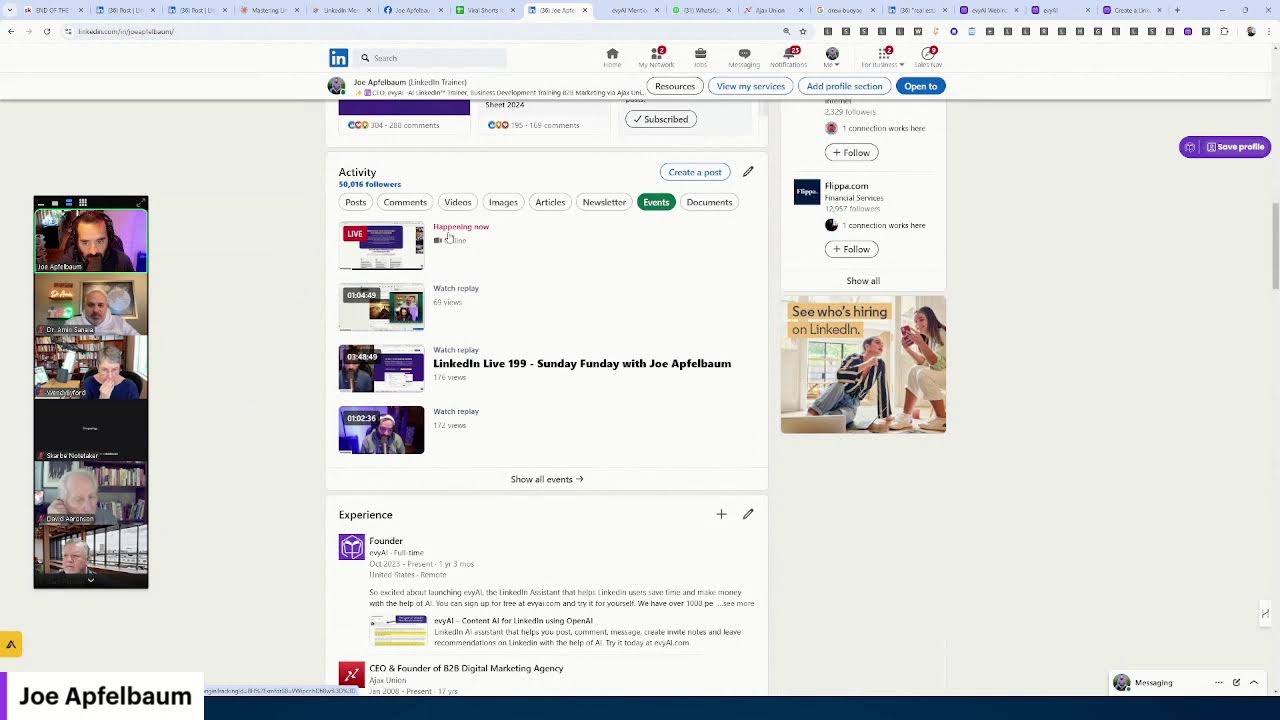
One of the biggest trends in 2025 on LinkedIn is going to be video. If you guys are not doing video yet for LinkedIn, I highly recommend you start getting on the video bandwagon. And the reason why you want to get on the video bandwagon is because LinkedIn started a new feature on the mobile app called LinkedIn Video Shorts. So on the bottom left of your mobile app, you're going to see a little video tab on the mobile app that they launched a few weeks ago. For some people, they already had access to it a few months, but they rolled it out for a few weeks ago to everybody. So if you open up the mobile app on the bottom of your LinkedIn app, it's gonna say video. And when you click on that video, you're gonna start seeing videos. Like for example, on my profile, if you click on video on my profile, so if you go to Joe Apfelbaum's profile and you scroll down and you click on videos, you're gonna start seeing all the different videos that I have. Now this video over here, I'm going to click on this one right over here, this particular video that I posted. This video here I posted today, um, just 2 hours ago, already 200 people saw this video and this video shows up in that little video tab. And the way that you create that video, this video is created with artificial intelligence. I used a tool called Opus, O-P-U-S, to be able to create this video, but you can use another tool called CapCut to create the video. So there's many different ways to create videos. But what I'll do is I'll go on LinkedIn Live and then from my LinkedIn Live, I will then create videos off my LinkedIn Live using artificial intelligence. That is extremely, an extremely powerful way for you to be able to create lots of content. I also take those LinkedIn Lives and then I run them into this tool called Evy AI, evyai.com. If you're not familiar with Evy AI, it's a sales assistant for LinkedIn. Mm-hmm. That allows you to be able to create posts relatively quickly. So if I want to create a post, I just log into Evvii AI. On the left side, I click on Post Writer, and then I can put in whatever I want to write the post about. So for example, if I want to write a post about the power of LinkedIn Live, I just click on this microphone on the top right. Check this out. Talk about the power of LinkedIn Live and how LinkedIn Live is going to totally crush it in 2025. Ask people what their goals are, And what they want to achieve from a live standpoint. People can get interviewed on LinkedIn Live, but they could also interview other LinkedIn connections. So talk about the fact that a live can also be used as like a big content piece, a content matrix piece, or a fundamental piece of content that could then could be turned into LinkedIn articles and LinkedIn posts and tweets and many other sources of content. And then you can also take that live, cut it up using artificial intelligence and turn it into Shorts. as well that could be published on Instagram and Twitter and YouTube and many other places. And LinkedIn is now prioritizing video on their platform. Okay, so you guys, you guys see what I just said? I said that and Evie AI typed it up. Now I'm gonna hit generate and then it's going to just generate the, the post. Ooh. Just like this. Now it does take a few seconds for it to generate the post 'cause it's writing a hook, it's writing main points. It's writing a call to action and it's writing hashtags. Okay? So it did all that for me in a matter of a few seconds. Now I press copy this post. I go into LinkedIn, and now that I go into LinkedIn, I can just click on start a post and I can simply post it just like this. You see that? Have you ever considered a single live session could transform your entire strategy? As we look ahead at 2025, LinkedIn Live is poised to become a powerhouse for professionals. Think about it. The live session could be repurposed as LinkedIn articles, blah, blah, blah. Everything that I said, but in a much more professional tone. Okay. So if you guys want to go live in 2025, just say live in the chat. I'm curious to know who here wants to start going live. Um, and even if you're doing one live per month, you can schedule it out. And, um, you could even just do one live. You don't have to go, you don't have to do live a million times over. Um, and if you guys wanna be in a selfie, I'm gonna make a little selfie of all of us inside that post. So look at the camera and smile real quick. If you guys are up for it. Perfect, I just took a little selfie of us, and then what I'm going to do is I'm going to use a little screenshot tool that allows me to save that selfie. I'm going to type in selfie of webinar, and then I'm going to just attach that post. I'll share my screen, I'll show you how I attach the photo to the post. So you see on the bottom here there's a little photo add media button here, do you guys see that? on the bottom of the post. So I click on Add Media. I saved it to my folder called Pictures, and then I called it Selfie, Selfie Webinar right here, and then I press Open, and then it just takes our photo and puts it there. Then I press the Next button, and then I go ahead, so the question was drop a comment with your goals for your LinkedIn Live. So I press Post, and now this is live on LinkedIn, and 1,000 people are going to see this. So now what I want you guys to do is I'm going to copy this, um, and then I'm going to go into the comments of right over here. I want to get on live. So go ahead and share a comment on that post. I'm going to stop sharing my screen for just a moment. Go ahead and share a comment on that post that I shared in the comments of Zoom with what do you want to talk about on live, or if you want to be on live, because people will see that and they'll want to interview you on live, or maybe you You'll see people there that you'll want to interview on live. And with artificial intelligence, with tools like ChatGPT, you can have ChatGPT go in and start talking on the live and helping you interview the people and being your co-host. I don't know if you guys know how to do that, but we're gonna be discussing that on January 8th. For those of you that are pro, write I'm pro in the chat. For those of you that are premium, write I'm premium in the chat and wanna go to pro. Let me know. I'm pro. Eileen said, I'm pro. I'm pro. I'm pro. Some people are pro. Some people are premium. If you're pro, you're gonna join us January 8th at 10 AM for 2 hours. If you're premium and you wanna upgrade to pro, say upgrade me in the chat. I'm not sure what I am. Carlos, I'll check what you are, but if you want me to upgrade you, I can upgrade you so that you can become pro. And my goal is to be able to help people be able to take their life and business to the next level. So today's the last day that we're offering $20,000 worth of bonuses. For those of you that want to upgrade, just write upgrade in the chat and we'll help you upgrade, um, and get you in on that conversation to show you how to use, um, an AI to be your LinkedIn co-host. Um, but what I want to teach you guys here today is the trends for LinkedIn. So how do you know what trends are going on on LinkedIn? So let me show you something in, in the chat. Put in your industry. I'm going to show you something interesting. I just had a conversation with a guy who is targeting real estate agents. And I told the guy, I said, you know that there's over a million real estate agents on LinkedIn. Now, unfortunately, most people have no idea how to be able to find people on LinkedIn. So we're going to do an entire search masterclass teaching people how to do search. But if you just type in real estate agent right over here on the top, and then on the left side, you click on people, it'll show you all the real estate agents. over 2 million real estate agents on LinkedIn. You see that? Now you can target real estate agents of a specific location or of a specific company. So for example, if I want eXp real estate agents, I can see all the eXp agents. I see 36,000 eXp agents that are on LinkedIn. You see that? It filters out just for the people in eXp real estate. So if you think about this, this is a powerful way for you guys to be able to find people on LinkedIn, but you can also look for content on LinkedIn that is that is popular content. So instead of searching for people, you could be searching through posts and you can search for posts related to real estate agents. And if you're using artificial intelligence, you can grab all these posts on a specific topic and put it into AI and help you find all the trends. So I'm going to show you how I do that with Evvy AI Pro. You're going to get all the tools and the education on how to do this type of stuff. So if I click on date posted, and I want to see what's trending in the past week, I'm going to click on the past week, things related to real estate agent, right? I'm going to go down over here and I'm going to load all these posts. So do you see the way it's scrolling down and loading more and more posts? These are all the posts on LinkedIn related to real estate agents in the past week with the word real estate agent in it. And so I can see what's going on. I'm going to click on show more results. LinkedIn is going to keep loading more and more results. You could load as many results as as LinkedIn has available. And my computer might crash because I have a lot of stuff going on and I'm actually on live right now as well, which I'll show you what it looks like when someone's on live on LinkedIn. So if you go to my profile, and I can teach you how to find all the different lives as well. So if you go to my profile and you scroll down to my events, you see it says events, you can see that this is happening right now. There's a live right now that's happening. You see that? And you can see all my previous events. So every live becomes an event. Do you see 3 hours and 48 minutes? The maximum amount of time you could be on LinkedIn Live is 4 hours. Yesterday I was on LinkedIn Live for 3 hours and 48 minutes. I wanted to get to the end, end, end, but my daughter wanted to go to Costco. We ended up going to Costco and then we ended up leaving cuz the line was too long. It was literally wrapping around the store, the line to check out. So we filled up a whole basket. A whole basket of stuff. And then we left Costco and we didn't end up buying any of the stuff. We said we're gonna come back when there's no line. Um, but that's why I kind of left a couple minutes early, just FYI, in case you guys were wondering. Um, but I'm on LinkedIn Live right now, so I'm gonna probably stop the live. But if you guys are watching this live right now and you wanna be able to watch this full webinar, just go to evviai.com/webinar or send me a DM and I'll send you the replay. Or just write replay in the chat if you're watching this live. So thank you very much for watching the live. And look at this, guys. I'm gonna end the live right here by hitting end stream.
More from Joe


How to Beat the Algorithm: Remove Hidden Watermarks & Scale Content with evyAI









AEO & GEO: SEO's Future Explained! Master Answer & Generative Engines! #shorts