Joe Apfelbaum shows three tools he built to speed up AI prompting: an optimizer that runs through Make.com to refine prompts across Claude, ChatGPT, and Perplexity; a prompt library at strategy.eviai.com; and a Chrome extension that injects saved prompts with Ctrl+Shift+Space. He demos it writing a tailored Upwork cover letter without typing the prompt manually.
Chapters
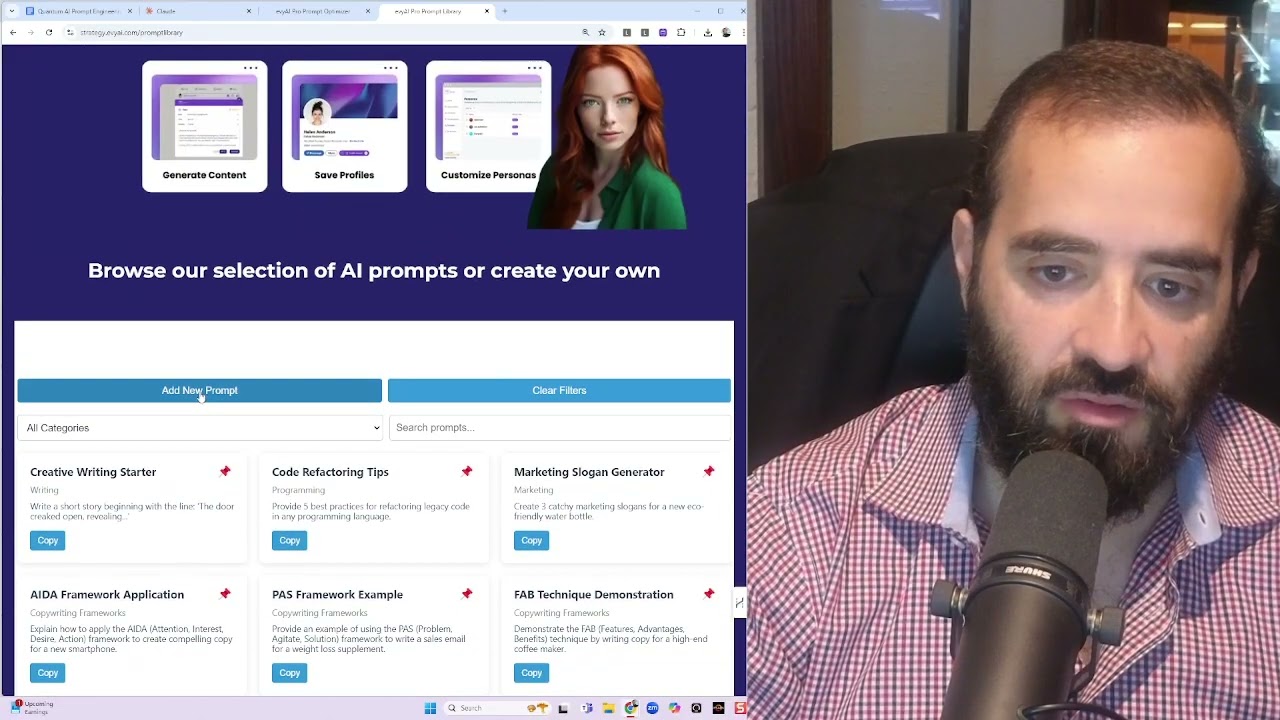
Hello, this is Joe Apfelbaum, CEO of Evy AI, and I created this prompt optimizer, this prompt library, and then a Chrome extension. And I'm going to break down each one for you in just a matter of seconds. But first, what I wanted to do is I wanted to create a way for people to be able to optimize any prompt. You see, you take a prompt, You want to make it better. So you put the prompt in here and then you click send prompt. It sends it to make.com and it makes it better. So what's the prompt that I used? This is the Ultimate AI Prompt Builder. And if you want this prompt builder document, I'll send you this link to this, to this Google Doc. Happy to send it to you. Just write prompt builder in the, in the, in the comments below. So check this out. AI prompt optimizer instructions. You, you just copy this and you add any prompt to, let's say for example, Claude. So over here is a link of all the different AIs that you can use. So let's say you want to use Claude, you just click on Claude and then you could say, make me a blog post about AI and LinkedIn. And then you first go here. You do this, you put that in there before, and you say, you are an AI assistant specialized in optimizing prompts, blah, blah, blah, analyze the input, incorporate best practices, enhance the depth, ethical considerations, refine and polish. I'm going to say, here is the prompt to optimize. Okay, and I'm going to press enter and let's see what it does. So it took that prompt that says make me a blog about AI and LinkedIn, and it basically just breaks down the entire things. It makes me like this crazy, crazy blog, this crazy prompt to create a blog. Discuss 3 to 4 specific ways AI can currently use LinkedIn, future possibilities, impacts on job seekers, best practices for users, ethical consider— this is like just mind-blowing. It's mind-blowing that you can take a very, very simple prompt and turn it into a crazy one. But I have 5 levels of optimizing your prompt. So this is level 1, which is the AI Prompt Optimizer, the basic one. If you want more advanced instructions, you can give it intent and subject matter analysis, clarification and expansion, incorporating best practices, depth, output quality improvement. Meta-instructions, tailoring to specific AI systems, ethical considerations, and refinement. And if you want to go a little bit deeper, you have the AI Optimizer, the Advanced AI Optimizer 3.0, which does a multi-dimensional intent analysis, context enhancement, advanced structural optimization, cognitive load balancing. If you want to take it to a whole nother level, you move on to Level 4, which is the Hyper-Advanced AI Optimizer Framework Level 4. And this will take it to a whole nother level. So you kind of go through this, which includes cross-domain knowledge synthesis and output quality assurance protocol and a metacognitive instructional layer with— it just shows the whole thing. And then if you want to take it to a whole nother level, you can use the Quantum AI Prompt Engineering Framework, and you can take each prompt and pass it through each one of these filters, and it'll just go deeper and deeper and deeper. Okay, so now once you have your prompt and you have the right prompt. Sometimes you don't want to overcomplicate your prompt and keep it simple, so I just use the first one here. So I created a webhook that when I submit this, it goes to make.com, sends it to ChatGPT or Claude or Perplexity, improves the prompt, and sends the prompt back over here. And it— you can do it with multiple AIs as well. The second thing I created was a prompt library. So you can add a new prompt to the library, or you could just have any of these prompts. And if— and What this does is you can pin it and it goes to the top as your pinned one. So all this is plain HTML and CSS. I created this with Claude and ChatGPT. And if you want to check this out, just go to strategy.eviai.com/prompt-library. I have many, many prompts here. You can filter, sort, and search here as well. And it all loads in your browser instantly. And then you can add your own prompts here as well, which will save it. And then the third thing I created was a Chrome extension. So if you go to manage your extensions and you turn on developer mode, you can install any extension you want that you created. And so I created this Chrome extension, which again, I'm happy to send you. Just write Chrome extension in the chat. I'm happy to send you this prompt injector. And the way this prompt injector works, um, I'm going to turn it on right here just to kind of show you how it works. I have it here on the top and I can add as many prompts as I want to my library. So here I have a SWOT analysis prompt. I have a whole library full of prompts over here. But if you want to add your own, you can add your own. And these are the prompts that are active. These are in the library. These are the ones that are active. And so for the ones that are active, let's say for example, I go to ChatGPT, chat.openai.com. I press Ctrl+Shift+Spacebar. That's what I programmed it to do in Windows. And then I can select any of these. So for example, if I want the Joe Upwork application prompt, I click on that and it'll say generate a compelling and tailored response to an Upwork project application based on the following information. Job description, applicant background, and it shows my applicant background, relevant experience and success in the project field, unique proposition, blah, blah, blah, tone and style. So I created this prompt based off my prompt optimizer. So I said, I need, I'm Joe Apfelbaum, CEO of Ajax Union. We do AI automations for people. And what I need is I need a better prompt to submit jobs to people on Upwork. So I go to Upwork, I go to my Upwork scraper. I built a whole Upwork scraper. I get a job and now I want to submit a cover letter to that job that's custom. And so I don't need to sit down. I can just copy and paste information. I don't need to sit down and write a whole prompt. I have a prompt already in my prompt injector. And I just inject that prompt into ChatGPT, and then I put in the job description here. I press go and it just builds out the whole thing. So any type of prompt that I want is already built into my browser using this custom Chrome extension, which is the Quick Prompt Injector. I called it the Quick Prompt Inserter, but I'm calling it the Prompt Injector. And so that's what I built. Hopefully you enjoy it. Let me know if you need any of these tools. I'll make them available for you. And I appreciate you being in my life. And if you can check out evviai.com, I'd appreciate it. And let me know what you think about these automations. Talk to you soon. Boom.