Networking Tips By Joe Apfelbaum
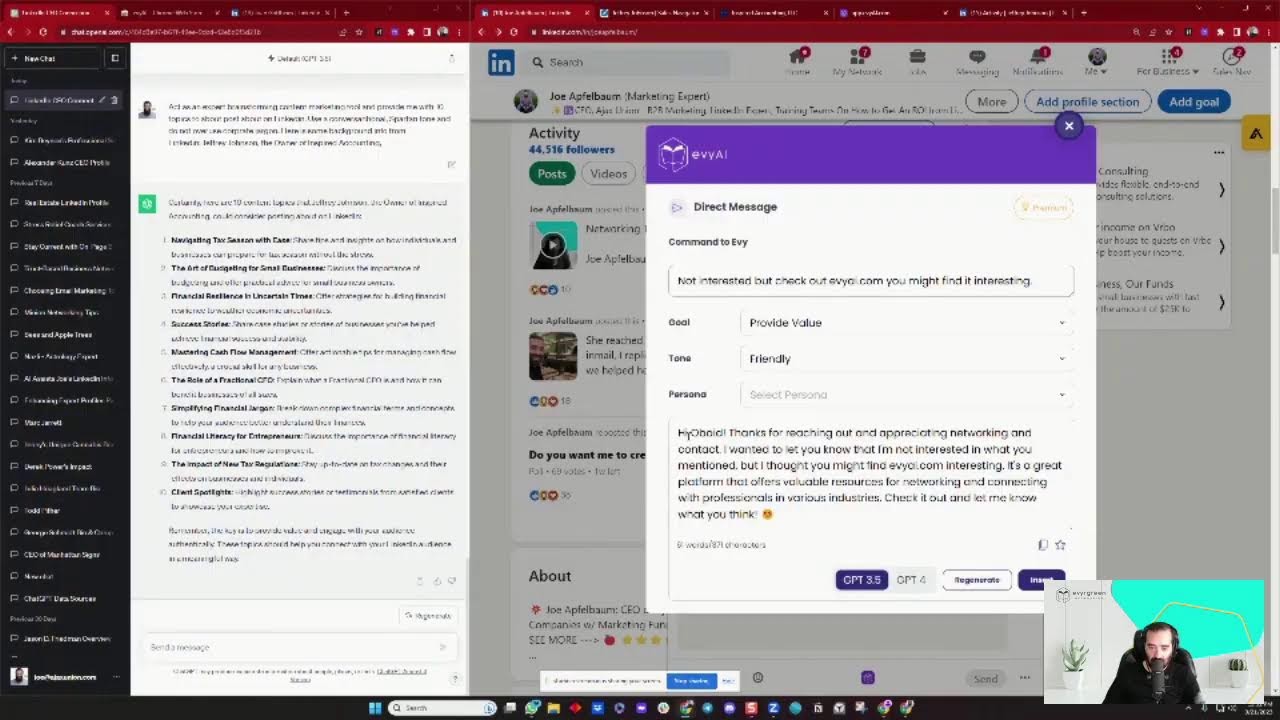
Joe Apfelbaum, founder of Ajax Union and Evy AI, shows how to reach $100,000 in revenue through LinkedIn networking instead of paid ads. He walks through his AI Chrome extension that automates comments, posts, and messaging, and explains why a strong LinkedIn presence often beats a traditional website for B2B businesses. He emphasizes posting once daily and building a large, relevant first-degree network.
Chapters
Ajax Union, digital marketing agency, and founder of Evergreen, a LinkedIn training business and an AI training business. And also now we have a software called Evy AI. That's evyai.com. And I just had a conversation with an entrepreneur who is launching a business and he generated about $20,000 in revenue. And he wanted to know about how he should get to his first $100,000 in revenue. Should he start doing marketing? And I said, I believe that the first $100,000 in revenue can easily come from networking. If you are networking and building relationships, you can get to your first $100,000 in revenue. And he says, but what about me advertising and marketing to get to my first $100,000 in revenue? I said, depending on the business, Some businesses like software businesses that have smaller average order, yes, advertising and marketing will help you, but the initial investment that you're gonna have to make on that is gonna be probably much more than what you're gonna make initially. And he's like, okay, so how do I understand how much to invest? I said, first of all, how much do you have to invest? And what is your long-term plan for the business? If you wanna build the business to $100 million business over the course of the next 10 years, you're gonna have to invest a lot more upfront than if you want to build a business that does $250,000 in revenue. It's going to be an overkill to spend $50,000 a month for a $250,000 a year business. Depends what are your goals? What do you want to achieve? So he's like, I never really thought about my goals, but right now I really want to brand myself. And I said, to brand yourself, you can have a really solid LinkedIn profile. Especially if you're doing business to business or if you have a high-ticket B2C product or service. And he said, okay, that sounds exciting. He's like, is LinkedIn more important than a website? I said, I believe that in certain industries, LinkedIn is indeed more important than a website. Why? Because with a website, there's a lot of upfront work that you need to do to get the website up and running. You got to create a whole content. You gotta create a sitemap. You gotta get a designer. You gotta get a developer. You gotta do the front end. You gotta do the back end. You gotta get hosting. Then you have to get people to come to the website once the website is built out. But if you're using LinkedIn as your platform, you already have an audience of 930 million members. There are 930 million people that are live on LinkedIn. 58% of them are logging in from their mobile phone. There's a large percentage of people that are logging in every single day. I mean, you're here live. If you're live, just write live in the chat. If you're watching the replay, just write replay in the chat. I'm curious to know. So I said, leveraging LinkedIn is really important. He's like, I don't know how to use LinkedIn. I have no idea how to use LinkedIn. And I said, okay, well, first of all, you gotta spend time on LinkedIn to learn it. Just like riding a bike, you gotta spend time on the bike. So if you're not spending any time on LinkedIn right now because you're overwhelmed by the platform, you're never gonna learn it. I said, you can also hire a coach. You can also take a training program. Many of our clients that have taken our training program have taken many other training programs in the past. And the training program that we have is just another training program that helped them get further along on the path. You don't just hire one coach in your whole career. You don't just hire one person in your whole career. You hire a multitude of people. I have multiple books. I've read over 300 books. So you hire multiple people and you hire multiple coaches and you take multiple training programs. There isn't one answer to your problem. What got you here is not going to get you there. So often our clients will come to us after they took a few training programs and they didn't get what they wanted. And then they take our training program and often they'll get exactly what they want, which is conversations. But then after they have the conversations, often they'll need a sales trainer or they'll need someone to help them with artificial intelligence or something else. And we can definitely help out with AI because we have a new AI course. If you go to newaicourse.com. So he's like, okay, I want to build a website. I don't really have more than just $300. What do I do? I said, okay, if you want to build a website with $300, use a website called Fiverr, F-I-V-E-R-R. And he's like, what do you mean? What's Fiverr? Fiverr is a website that you can go to, try it out, F-I-V-E-R-R. And you can essentially hire people for $5 to do things for you. He's like, what? Why would anybody do something for $5? I said, because there are plenty of people that just want clients. That's what they want to do. They want clients and they want to be able to get clients to do things for like logos and websites and graphic design. And they're willing to do things for $5. So my recommendation is to think about ways to be able to be frugal, but then also learn how to use artificial intelligence to help that person be able to do a good job on the website. So you need to prepare a person. If you have a web developer designing a website, by the way, if you have a website, put your website in the chat. I'm curious to know if you have a website right now, put it in the chat. And if you're loving this live and you want me to do this more often, just say, I'm loving the live, Joe, do this more often. This is awesome information. I'm curious to know if you guys are getting value, whether you're watching the live or the replay. Let me know if you're getting value. I'm curious to know who's getting value, who's not getting value. Um, yeah, so Fiverr is a great place to find people to do graphic design for you, to do web design. So if you go to fiverr.com, you hover over graphics and design, then you click on web design. You can get somebody to create you a website for, you know, $50, $30, $5, whatever. They have all different types of people because all they're going to do is they're going to customize a template for you. There are many different templates, but you need someone to kind of implement it for you and help you out. So people, people have all different types of levels of design and levels of knowledge. And, and some people are just students on there that are just bored and they're happy to do something for a couple dollars. Some people charge $100, $300. You could get people that charge $500 or $285 for a really nice website. But the key is going to be coming up with a strategy for the sitemap and using artificial intelligence to do that, to come up with your sitemap, to come up with your content, to come up with the design aesthetics, and to come up with the tone of your website and all the different pages and everything that's going to go onto it. You can now use artificial intelligence to do all that for you so that you don't have to like sit there and wonder and do it yourself. We do have a course if you go to newaicourse.com where you can learn how to use artificial intelligence. We have over 1,000 ChatGPT prompts inside our course. So if you go to one, if you go to newaicourse.com, we teach you 20 different tutorials on 20 different types of tools that you can use. To learn your business, to like learn how to do things like sales and marketing and so on. So if you want more information about it, definitely check out the comments. I absolutely love doing LinkedIn Lives and engaging with my audience and connecting and building relationships. One of the things that I wanted to talk about today is using artificial intelligence specifically with LinkedIn. I don't know if you know about this, but there's A new application that we created called Evy AI, evyai.com. And what I'm gonna do is I'm gonna show you guys how Evy AI works now, but I'm just curious to know if you want to see it. Say, show us Evy AI in the chat, and I will show you how I easily leave comments with Evy AI inside LinkedIn by just clicking a few buttons. And I'll show you how many comments I can actually leave. In just a few minutes. And literally just a few minutes, I can just leave a bunch of comments. And it's just a very powerful experience to do that. So if you're interested, say, Joe, I'm interested in seeing the Evvy AI overview or watching you use Evvy AI or AI on LinkedIn, go ahead and put that in the comments. I'm curious to know how many of you are curious about that. Joan, welcome. So good to see you. Hunter said show Evvy AI. Kelly said, love the live. Thank you, Joan. Thank you, Ange. Thank you, Maria and Wendy and everybody else that's here. I appreciate you guys. I love watching this thing live and watching all the people, um, chat with me live. Okay, so I'm gonna share my screen right now. Hopefully you guys could see my screen. I don't know if it's big enough, but just in case it's not big enough, I'm going to zoom in for those of you that want to see it a little bit bigger. So if it's big enough, just write big enough in the chat. If it's not big and you just say write bigger in the chat and I'll, and I'll write bigger and I'll make it a little bit bigger, but I'm gonna refresh. I'm gonna refresh this page real quick over here just to kind of see what people are saying in the comments. The one place that you can see all the comments, um, is if you go to somebody's recent activities like posts, and then you scroll down and you click on comments. In this case, I have 9 comments. Um, I see Katrina, uh, and I see Joan, and I can see all the different comments and you can actually interact with the comments here. So. It's a different place where you can go to in a different tab where you can see somebody's recent activity, and that's where you actually go to interact with people. Okay, so let me show you how Evy AI works. The first thing you want to do is you want to go to evyai.com. That's evyai.com, and you want to install the Chrome extension. So what's a Chrome extension? A Chrome extension is the ability for you to install a little plugin inside your browser. And that plugin does 6 things. It does comments, posts, recommendations, messaging, profile optimization, and connection customizer. What do these things mean? Well, I'm just gonna focus on the first 2, which is comment generator and post writer. Comment generator means it reads a post and it generates a comment for you. Post writer is it reads your persona, who you are, and it'll generate a LinkedIn post that is optimized. Now LinkedIn does have AI built into it, but the posts that they write are very small. It's only like 2 sentences. Our post is gonna be an entire massive, beautiful post with lots of bullet points and call to action and hashtags and everything. So Brendan is a member of the Joint Venture Mastermind group that I'm part of. I'm gonna give him a like and let's start timing this. I wonder if we can actually set a timer somewhere, but it's 12:18 right now and 6 seconds. So let's just see how long it'll take me for for me to leave 10 comments. I always say leave 10 to 15 comments a day, and so I just wrote up a comment for Brendan. I'm actually going to tag Brendan as well, and says the power of the pause blah blah blah becoming exceptional communicator thanks for the valuable insight. Okay, so I just shared a very valuable comment. It actually read this whole post and it just click click boom. Perry is a client of mine. He's also a LinkedIn trainer and I wanna stay top of mind with him. So it's important for me to read his posts and to leave a comment, but I don't have a ton of time, so I'm just gonna use Evvy AI. Great post, Perry. I completely agree with creating crucial content. It's today's landscape. Yep. This is exactly what I wanna say. I'm also gonna tag him so this way he gets notified. I always like tagging. I'm gonna keep going down the feed over here. I see Shalom Markman. He said, I can't raise $250,000. He gave a whole story about it. I'm gonna give him a like, and I'm also gonna be one of the 4 people that generate a comment. Now I can choose my goal, my tone, and the persona. I'm not gonna choose the persona for now. I'm just, and I'm not even gonna specify the goal and tone, and I'm just gonna say the first sentence here. So I deleted most of it, and as you can see, I customized it so it looks like I wrote this. You know, it's not, I don't always have to leave really long comments. Okay, so this is comment number, I think number 5 or so. And so far we're doing this for a minute and 20 seconds, just FYI. Okay, I'm gonna agree with George. And sometimes LinkedIn doesn't pick up the George. See, Murray, I completely agree with you. Each day we present as an opportunity, blah, blah, blah, seize the day. Okay, post. Okay, so that's comment number 6. I'm gonna— so Roy has one comment over here about this. I'm gonna leave my comment right here. By the way, if you guys are getting value, write value in the chat. I'm curious to know how many of you are getting value so far. Great breakdown of LinkedIn Mastery, Roy. It's crucial to progress. Stage four, top one percent, blah blah blah. Stage five. I'm gonna tag him, Roy Young, and I'm also gonna send him an a message saying loved your last post. So I'm gonna say by the way, loved your last post. Okay, so I love DMing people as well. I can use Evie AI to write. Um, to write a post for me as well. If I click on the little Evy AI button, I can say, did you hear about the new AI called Evy AI? It's a LinkedIn assistant. And I'm going to press GPT-4. I'm going to press generate. It's going to read our conversation and And it's gonna come up with a better, hey Roy, have you heard of the new AI called Evvy AI? It's actually a LinkedIn assistant. Quite fascinating, isn't it? I'm gonna press insert and it kind of types up the whole thing for me. I mean, it just makes it much easier. Just write wow in the chat if you're just wowed by what I just did. Especially if your English is not perfect or if you don't have great grammar or whatever, that really helps with that. Now there is a part, if you go to app. Once you sign up to Evvy AI, if you go into the app, the backend, you can see all your activity here. So I could see my message that I created to Roy. See the comments that I've left. Do you see how many things I've done in just 2 minutes? If I click on Post Writer, I have the ability to write posts. If I click on Personas, I have the ability to add my own personas. I added one for Ajax Union and I added one for Joe Apfelbaum. Now I also have the ability to save profiles. So I have lots of people over here that I saved. And when I save somebody's profile, like for example, Jeff Haack, which is a client of mine. Um, I click on his profile, it opens up in a new window, and I'm only sharing this window over here, so I'll just open it here. It opens up in a new window, and what happens is it shows me all his posts with a click of a button. And as you can see, he posted this a day ago. I already liked and commented on it, so I don't have to re-like and comment on it. But as you can see, I saved a bunch of people here, and I can easily go to their profile and check out their profile by copying their profile URL, or I can click on See Recent Activity. It'll take me right to their posts and I can just drop comments, which makes it so much easier for me to be able to leave comments on people's posts. So how do I do that? So if I want to add somebody to it, I just have to go to their profile with Evie AI installed, and then I can just save their profile. By the way, put your profile URL in the chat I'm curious to know how many of you are on LinkedIn right now that know what their profile URL is. So this is my profile URL right now, linkedin.com/in/joeapelbaum, but put in yours. I'm curious to see your URLs. And I'm going to show you how you can find this video and see all the comments. You click on posts on my profile, and then you click on show all posts. And by the way, give this a light bulb if you know how to give a light bulb. I'm curious to know if you guys know how to give a light bulb. I'm going to give it a light bulb right now. But you guys can try to give it a light bulb and let's see if it comes out as a light bulb. Looks like Joan wrote wow over here. I'm going to refresh this as well so I can see the latest comments that you guys are leaving. If you haven't left your LinkedIn URL, feel free to leave your LinkedIn URL, or you can even find your most recent posts URL. This is my most recent posts URL. You see that? That's my most recent posts URL. So if I wanted to save, say, Hunter Messman's profile, because I So now he sent me his profile URL. If I wanted to save his profile to Evvy AI so that I can always comment and like on his posts, I just press save to Evvy AI and it automatically gets saved to app.evyai.com/save-profiles. And that, and that saves it over there so I can always go back to it later. If I go to his post over here, I see that he wrote a whole post. I wanna leave a comment. I'm gonna use my AI tool to leave a comment. It'll provide value, be friendly, and once it's ready to go, I'm just gonna hit the insert button and then I am ready to go. Now, there are lots of ways to be able to do this. You can copy and paste the post into ChatGPT directly, but it's much easier to be able to use a tool like this that allows you just to click on a button and produce a comment. Um, if it doesn't work for whatever reason, I do suggest Trying to change to GPT-4. Sometimes the AI is a bit slow, sometimes it doesn't read it. So for whatever reason, it doesn't work right away. I really don't like that when it doesn't work right away, but if it does work, GPT-4 takes a little bit longer than 3, but it's still much faster to be able to do this than it is to be able to write it yourself. I'm curious to know, what do you think about transitioning digital style? So I just asked him a question. Really cool. And I'm gonna give him a little light bulb, just like you guys gave me a bunch of light bulbs. Thank you for the light bulbs, by the way, guys. All right, so let's see what else you guys are commenting over here. I'm gonna check this out, see if you guys have any questions about this. Um, I highly recommend checking out these tools, and the reason I recommend checking out these tools is because it saves you a ton of time. A ton of time. Okay. I'm gonna check out Joan's profile as well. I'm gonna open it up right over here. You see Joan and I are connected first degree. She has 1,000 followers. I'm gonna scroll down. I see the last time she posted was 5 months ago. So what I would do is if I was Joan and she's a project manager for Bruce Steinfeld's company, um, Bit by Bit, which is an awesome company. So if I was Joan, what I would do is I would start posting on LinkedIn. What type of posts would I post about? So for her, I would post about technology. So I would take this information, brainstorm a bunch of ideas around what I should be posting about. And by the way, I posted something. I posted a poll. So if you go to my LinkedIn polls, if you go here to posts and you scroll down to this poll here. So I posted this poll. A couple days ago and I said, do you need help with your marketing and LinkedIn but can't afford a marketing agency? What if I created a strategy for you with AI and didn't charge you anything for that strategy? Then I took that strategy and creating training data with, and optimized headline and about section for your profile. Then I created 10 incredible posts that you could use anytime to get you exposure on LinkedIn. Would that be something that you want me to personally do for you as a gift? I just need you to do 3 things for me. And then I tell you 1, 2, 3 of what you should do. And then you can vote on this poll and I can see all the people that have voted. My goal is to get to 100 votes. So if you wanna vote on this and you wanna let me know that you want me to help you, I can help you. I could even do all this work live on LinkedIn Live. So I don't have to do this privately, like on my own. I can turn this into content and show you as I create a strategy. So if you want a strategy, just write, I want a strategy in the chat. I'm curious to know how many of you actually want a strategy. I'm gonna copy this post URL and I'll pop it in the comments so that you guys have it as well for later. I'm gonna click on posts and then I'm gonna scroll down to this particular post. And as, as you can see over here, I can't really reply to people properly. So if I wanna see every single comment, I have to do it a different way. What I need to do is I need to see all posts. Show all posts. And then what I need to do is I need to click on this 36 comments here, and then I can reply over here. So I'm going to reply over here. It's called www.evyai.com. Okay, now if you want the course, the course is available at newaicourse.com. Okay, so there's 2 different things. There's a technology called evviai.com and there's a course available at newaicourse.com. The course teaches you how to use ChatGPT, how to use Google Bard, how to use 20 different technologies. And Evvy AI is a product that helps you as an assistant on LinkedIn. Okay, so I'm gonna post this link over here. If you need help with a LinkedIn strategy and content, content, check this out. Okay. I'm going to fix this. I'm going to press post. And now I posted the link for you guys over here in the chat. So if you go there later, you can definitely check that out. Okay, fantastic. I see some of you have left me a light bulb. Let's see how many light bulbs we got. We got four light bulbs. Look at that. We got Hunter. We got Ange. We got Katrina. We got Sheldon Polter. By the way, guys, give me a light bulb if you're watching this live. Don't be stingy with the light bulbs. Give me a light bulb. I want to see a bunch of light bulbs here lighting up, lighting up. Now I'm curious to know what line of business are you in? I'm curious to know. So Sheldon Polter, he said, "How often should we post on LinkedIn?" Well, I believe that you should be posting on LinkedIn at least once a day. It depends also how many followers you have and how much time you have. But Shell and Poulter, the last time you posted on LinkedIn was 2 days ago. So I recommend posting at least once a day. And you reposted this from your page. Posting on a page doesn't really give you a lot of action. It, you know, not a lot of people are gonna see that when you post on a page, cuz LinkedIn wants people to LinkedIn wants people to use their profiles more as human beings rather than pages. Pages are there for people to advertise. So of course I'm going to leave a nice big comment here and I'll be top of mind on your company page, which is powerful. I just dropped another comment, but you know, the last time you posted on your profile was this. And by the way, when you're posting on your profile, I don't recommend including links because if you go to include links, LinkedIn generally doesn't like that. This is something I teach my students in our Evergreen Networking course. And I recommend making sure that you post at least once a day. And if you use AI to post, it just makes it much easier. So I'm gonna go into Shalom's profile here. I'm gonna send him a quick message and I'm gonna say Ctrl+V and I'll send him the little poll here. What I love about this poll is that when you send somebody a poll through a LinkedIn DM, the poll lights up right here and they can vote inside the DM. Which is something I found that was really, really interesting. A lot of people have no idea how to do that. So highly recommend checking that out. All right. So also your notifications, highly recommend checking your notifications on a regular basis and then replying to comments. If somebody left a comment or did something like, for example, the Value Prop Initiative with Joe Apfelbaum, you see somebody mentioned me, I'm gonna do generate and I'm actually gonna reply. Using artificial intelligence. Great post. And it says Joe because it thinks it's me, but it's not me. The rap because it looks like me. The rapid pace, it's undeniable B2B marketing. I'm excited to do a discussion with Jose Palomino. I'm about to check out the disc. I'm excited to do, to have, to have, to have the discussion and to learn more about the evolving landscape. And teach more. Okay. All right, cool. So I'm gonna post that. And now Jose is gonna get a notification that I commented on his post. And anyone else that sees this anytime in the future, you know, every single time you drop a comment on LinkedIn, that comment just stays there. And posts will get seen for many years into the future. It's not just one thing that does one time. Let's look at my analytics. Let's look at my posts from the past month. So I'm going to click on the past month, past 28 days results. I have had over half a million impressions on my content because I post every single day. Now sometimes I'll get 400,000 impressions on something that AI wrote, and sometimes I'll get 16,000, sometimes I'll get 5,000. Sometimes I'll just get a few hundred. I don't, I, for me it's about just consistency, consistent, like just adding value consistently. Look at all these posts. Even a post of me putting water on my feet is powerful. A, a picture of my, an AI avatar of mine. Look at this. Look at all these, this, and by the way, this post over here was from a really long time ago, from 2 months ago, and it's still got 2,000 impressions. You see that? So these posts really are really powerful. If you go through my posts, you'll be able to see on average, I get about 1,000 impressions on every post that I post. But look how many times I posted and I got 1,000 impressions. Let's just count how many times. 1, 2, 3, 4, 5, 6, 7, 8, 9, 10, 11, 12, 13, 14, 15, 16, 17, 18, 19, 20, 21, 22, 23, 24, 25, 26, 27, 28. So at least once a day, I get about 1,000, over 1,000 impressions. 29, 30, 31, 32, 33, 34, 35, 36, 37, 38, 39, 40, 41, 42, 43, 44, 45, 46, 47, 48, 49, 50. So these are my top 50 posts, okay? These are my top 50 posts. They all have over 1,000 impressions. And that was just in the past 28 days. Think about that for a second. By the way, if this is valuable, write valuable in the chat. I'm curious to know if this is valuable to you. If you're, if what I'm showing here today is valuable, just write valuable in the chat. Let me know what you're getting out of this. Now, this is impressions and this is LinkedIn statistics. If you go to linkedin.com/dashboard, you can see this. If you click on engagements, I'm going to click on engagements right over here. You can see how many engagements I got on each thing in the past 28 days. You can see I got 69 engagements, 65, 59, or whatever. And you can just keep scrolling down and seeing. So for me, it's not about going viral. It's not about getting millions and millions and millions of people to see me. It's about consistently staying top of mind with dozens and dozens and dozens of people that are my target market, that are my ideal client. And I'm curious to know, who is your target market? Who is your ideal client? I'm going to go into my profile real quick over here and just kind of look and see what's going on over here. We have a few dozen people watching right now. I'm going to go down here to click on see all posts and click on show all posts so I can see the actual comments that people are leaving. Let me see. And over here you can see most relevant or most recent. See that? So most recent, it looks like Hunter said valuable. Ange said valuable. Thank you. Shalom said valuable. Dave said valuable. Awesome. And Jeffrey Johnson posted his LinkedIn URL. Awesome, awesome, awesome. Thank you. Okay, so who is your ideal target market? My ideal target market are marketing directors at B2B companies with over 5 million $5 million a year in annual sales in the US. Okay. So think about this, B2B marketing, B2B directors at B2B marketing directors at B2B companies with over $5 million in annual sales in the US. I'm going to post that right over here. That's my comment here. That's who I want to target. So if I want to target those people, I need to make sure that I'm connected to those people. So if I search marketing director on LinkedIn, And I'll teach you how you can see how many people are connected. If I search marketing director and I click on people, and then from people, I click on connections, first-degree connections, how many people have the word marketing director? I'm connected to almost 5,000 marketing directors. Think about that for a second. Could you imagine if you had a specific target market? And I'm going to select the United States just to kind of really narrow it down. Um, you had a specific target market and you were able to Have thousands of people that are your current connections that are your target market. If that's powerful, write powerful in the chat. Again, I'm not looking to go viral. If I got a dozen clients in the next year to each spend $200,000 a year with me, that's very valuable for me. That's millions and millions and millions of dollars in revenue for me, in long-term recurring revenue. Not just a client for a day, but client for many years. Some of our clients stay with us for 10 years. At our marketing agency. Now, my other demographic is CEOs. So if I just search CEO in my first degree in the United States, but for CEO, it's a global— I help CEOs globally. I have 11,000 CEOs that I'm connected to, right? Wow. In the chat, if that's a lot of CEOs, I can build relationships with every one of these CEOs. 11,000 people is a lot, but not all of them will respond. So if I get a 25% response rate or a 10% response rate, that means I'm having 1,000 calls a year. If I'm getting 10% of these people, I'm getting over 1,000 calls a year with these people. That's 5 calls a day. And I can reach out to any of these people. I have personal relationships with a lot of these CEOs. And I know some of these CEOs, their companies are huge, huge, huge, huge companies. And I've— many of these I've already sent proposals to, and maybe they haven't taken me up on it yet, but I'll do things like endorse them and I will message them. I see he doesn't have any recommendations, so, um, I haven't messaged him in quite a bit. Long time no speak, David. Hope you are well. Are you celebrating? The high holidays. Okay. So I just wrote that over there. Long time no speak, David. Hope you are well. Are you celebrating the high holidays? And, um, that's a way for me to stay top of mind and build a relationship with somebody. Now I could also click on contact info, email him as well. Um, I can pull up my technology that I teach my students how to use, and I can grab his cell phone number from here. And it'll look for his cell phone number and find his cell phone number. And I'll just pick up the phone and call him and ask him how he's doing in real time. I could just click on it here and just call him up and catch up with him. You know, there's a lot that you can do with these tools if you learn how to use these tools properly. And most people have no idea how to use this stuff. And that's why at Evergreen Networking, we teach people. We've taught over 1,000 clients how to use LinkedIn over the past 3 years. And we've taught over 1,000 clients how to use AI just in the past few months alone. We've taught over 1,000 people how to use AI. Our AI course is extremely affordable. So if you go to newaicourse.com, you can read all about it right here. We have 9 modules in our course, how to brainstorm, how to research, how to create strategy, how to summarize content, how to create content, how to write scripts, social media, emails, creativity. Looks like Scott just signed up. Congratulations, Scott. How we have tutorials on 20 different tutorials on tools like how to use ChatGPT, how to use Otter to transcribe audio, how to use TextA, how to use Canva to create images and Midjourney. And we have an example tutorial right here on the landing page that you can watch if you want. We give you over 1,000 ChatGPT prompts. Rob, congratulations on signing up. We have over 1,000 ChatGPT prompts. We do email support. We have templates, cheat sheets, checklists. We have everything that you need in order for you to get started with AI. So if you're a business development professional, sales professional, marketing entrepreneur, CEO, business owner, lawyer, accountant, doctor, financial advisor, real estate broker, marketing consultant, whatever you are, then it's very powerful to you, for you to learn how to use these tools. To help you be able to do what you need to do. Adam, thank you for signing up. So as you can see, go here, get started today, and you'll have instant access to our course and our tutorials. And we even do case studies with our clients as well. So we have lots of different case studies that we've done with our clients. And if you want to try our AI tool, you go to evyai.com. That's Evy AI. And this is our AI tool that you can grab if If you're using it already, say, Joe, I'm using it in the chat. If you're not using it, say, I will use it. And if you click on Add to Chrome, it takes you into the Google Chrome Store. This is what the Google Chrome Store looks like. If you have used this tool and you really like it, my only request is that you just leave us a positive review here under Reviews. We have many positive reviews here, but my goal is to get a couple more positive reviews. People are saying it helps them save time. You know, it really, really helps them avoid mistakes. It's a time-saving tool, save a ton of time and energy. I've been using this tool heavily recently, and I showed you how I use this tool myself. So if you're using it, um, thank you so much, Jeff Johnson, for the beautiful recommendation that you left. I see that you're here live and you left me a beautiful recommendation. So thank you for that. I did find this helpful. Um, so I appreciate that. And my goal is to get to 1,000 users. So we're at 926 users right now. I need to add about 74 additional users and then we cross the 1,000 mark and then I can pop the champagne and celebrate that we have our first 1,000 users at Evy AI. So for just, uh, uh, just as an idea for my company Ajax Union, it took me almost a decade to get to 1,000 clients. With my company Evergreen, E-V-Y-R Green, Evergreen, where I teach LinkedIn, it took me about 3 years to get to 1,000 clients. With, um, with Evvy AI, it's only been taking me a few months. And so, you know, the growth is much faster depending on the value that you add and your price point and what you're looking to do. You can really impact a lot of people very quickly. And so for me, the features that we offer here are just really incredible. Um, if you wanna see ChatGPT, I'll show you what ChatGPT looks like. A lot of people wanna know what it looks like. This is essentially what ChatGPT looks like. Um, it's just a very simple interface. It has a little box over here where it says enter a message, and you can enter a message right over there. So what I like doing is I like finding people's profiles that on LinkedIn and just copying and pasting the information from their profile into ChatGPT and then asking ChatGPT to give me information about that person to like break it down for me. And then analyze that information. It's it it becomes really really helpful when you start doing that. By the way, have you used ChatGPT? Just write yes ChatGPT or no ChatGPT. I'm curious to know if you've used it or have not used it in the past. I'm just curious to know in the chat. Let me know used it or not used it in the past for ChatGPT. And if you guys want to watch me in real time use ChatGPT, I'm happy to do that. So for example, for Jeffrey Johnson. I'm gonna pull up his profile on LinkedIn right now. What I'm actually gonna do is I'm gonna put side by side ChatGPT and LinkedIn. So I'm gonna stop sharing my screen for just a moment. I'm gonna do a screen share. Uh, let's see how I stop sharing my screen. Oh, stop sharing. Okay, so I'm gonna stop sharing my screen for a second. I'm gonna set up my screen where I have Jeffrey Johnson on one side and I have ChatGPT on the other side, and I'm going to reshare. My screen. Let's see what I can do here. Window. Let's see if there's a side-by-side option. Entire screen. Okay, good. I'm gonna do entire screen here so you guys can see my entire screen. Okay, cool. Can you guys see my screen now? Could you guys see my entire screen? Hopefully you can. So on the left side is ChatGPT. On the right side we have LinkedIn. So what I'm gonna do is I'm gonna copy this information right over here for, uh, one of our clients. Jeffrey Johnson. And Jeffrey, thank you for being a client of Evvy AI. I'm gonna go over here and I'm gonna do summarize this LinkedIn connection. Okay? I'm gonna paste it and it's gonna summarize it right here. Okay? So it summarized it. Now what I'm gonna do is I'm gonna get more information from his profile so it could help me summarize this LinkedIn connection better. Okay? So I'm gonna copy this. I'm gonna be like, um, add this information to the summary as well and redo it with lots of detail about him. Okay, now I'm gonna add a little bit more information about his experience over here. I'm gonna try to grab as much information as I can. Okay, I'm gonna paste it over here and then I'm gonna try to get a little more over here from his education. Now, what I also like to do sometimes is Google a person. Okay? So if I Google them, sometimes I'll find their website. Um, sometimes I'll click on their contact information to find more information. Inspired by Accounting. Do you see his website's over here? About Us. I'm going to copy and paste this from his About Us here. Just adding that because he doesn't have that on his LinkedIn. Um, I'm going to click on Services. I'm going to copy and paste some of these services in here as well. I love doing that as well. What clients have to say. I'm gonna click on about. Sometimes there's some, a little more information. Okay, that's all he has over here. Sometimes I'll add some testimonials and stuff and so on, but this is enough information. I'm just gonna add all this information into ChatGPT. And do you see the way it's typing all this up over here? Okay, so it, it typed all this up for me. Now what I'm gonna do is I'm gonna take this information, um, And I'm going to ask ChatGPT, and I have built-in prompts that I give you inside the course. I'm going to ask him, I'm going to ask ChatGPT to give me some topics. By the way, are these good topics for you? And I'm going to send this to him as well as a, as a gift. Here are 10 topics. I'm going to copy this. I'm going to go into Jeff's profile and I'm going to give him 10 topics. Okay. I'm going to go in here. I want to click on view in Sales Navigator. And I'll send him the message through Sales Navigator right now. I'm gonna click on message. I'm gonna play. I'm gonna click here, and I just sent him these ten topics inside Sales Navigator. So I just I just messaged him. I'm also gonna save his profile to Evie AI. I just saved it to Evie AI, and I'm gonna go into Evie AI just to kind of show you how that would work. If you go to app.evieai.com and I click on save profiles, you'll see Jeffrey's profiles right here. So I can quickly. See his latest posts. I click on see latest posts and I can see his latest post. So now if I wanted to use Evie AI to create a post for him, this is what I would do. I would go to the post writer inside Evie AI. I would click on post writer and I would essentially tell it, I would just paste this. I would write informative navigating the tab, share tips on insights on how people can prepare for taxes. With less stress. Okay? And I'm gonna press generate and it's gonna generate a post about, for Jeff, that Jeffrey can use about this topic. Now, I don't know if Jeffrey wants this topic or not, but, um, you know, I can, I can totally do posts on any particular topic for him. And I could also add her persona here so I can copy and paste this information here. Jeffrey's information right over here, all this information that AI kind of organized. And put it in here and then boom. So tell me what you think of this. Navigating tax season with ease. Share tips and insights on how individuals can prepare for tax season and stress. Okay. So I probably wouldn't include that first part, but I would start with tax season is upon us and many individuals and businesses, it can be a stressful time, but fear not. I'm here to share some valuable tips and insights on how you can navigate the season with ease. Stay organized, maximize deductions, consider professional help, plan for the future. And then it has a call to action. Share your own tips and insights in the comments below. I'd love to hear how you navigate tax season. And don't forget to like this post if you found it helpful. Is this good or is this not good? I'm curious to know. Is this good or not good? If it's good, write good in the chat. If it's terrible, write terrible. I personally like this post. Of course, I would customize this even a little more. I could make it rhyme. I can enter a prompt here and make it rhyme or make it in a specific voice or Add one of my personas to it and then make it even better. I could use ChatGPT-4 instead of ChatGPT-3. I could regenerate it, I can copy it. And if I go to my homepage over here, it's all saved here. So if I want to send this to Jeff, uh, to Jeffrey, I would go to Jeffrey and just send him this post so that he has it. I can go right over here, click on type this post, press send, and now he has this post here as my gift to him. Um, yeah, so there's, there's, there's a lot that you can do here on LinkedIn using these particular tools. And I just wanted to give you a little bit of insight. My, my team is telling me that I have a call coming up with one of my potential clients. So I think this was a lot that I shared with you guys. There's a lot more that I can share with you guys. If you want me to do this on more of a regular basis, I'm happy to do it. I just decided to do this impromptu. I didn't even plan it. Um, but if you want more, just write, I want more, Joe, in the chat. And if I do this again or plan on doing this on a regular basis, I will include you into these free training sessions to help you be able to understand how to use AI a little bit more, how to be able to get what you need from, from with your business. And, and hopefully maybe even bring some of you on into, into the conversation, like in real time, you know, like get you on this live and have you ask questions and me look at your profile and make suggestions and so on. So if this is helpful, just let me know that it's something that you would want me to do more often in the chat. Just write more Joe. I'm going to thank a couple of people right now. I'm going to go to my profile. And I'm going to see more, see all my recent posts over here. And I'm going to thank some people for, for leaving comments. I really appreciate it. If you have any specific takeaway values, just write Takeaway and put your takeaway in. Maybe your takeaway is that you need to buy the course, newaicourse.com. I'm gonna, by the way, I'm gonna reply to this guy over here. He just sent me a message. I'm gonna write, not interested, but check out heavyai.com. You might find it interesting. Okay, now I'm gonna write generate 'cause I don't wanna write that. That's rude. I don't wanna write, not interested, but check out heavyai.com when someone sends me a message. I'm gonna say, hi. Thanks for reaching out. Appreciate your kind networking contact. I wanted to let you know that I'm not interested in what you mentioned, but I thought you might find Evie AI interesting. It's a great platform that blah, blah, blah. I'm going to press insert. Okay. And I'm going to press send. You see that? So if somebody just randomly sends me stuff or whatever, I might say, hey, I'm not really interested in what you have to offer, but I'll do it in a very nice way. Just to kind of give you an example, you know, I want to be nice to people. Like somebody cold called me today. I was so nice to them. And she was like, oh my God, you're so nice to me. What can I do for you? And I said, well, try out Evie AI and see what you have to say. All right, so takeaways. Put in your takeaways. Thanks. Joe Moore is always good, Jason. So thank you, Jeffrey. Thank you, Jason. Thank you, Jennifer. Thank you, Ange. Really appreciate you, Dave. Thank you so much, Jeffrey. Once again, thanks. Really appreciate you guys, Shalom. Thank you so much, Jennifer. GPT four is an advanced version of. Generative Pre-trained Transformer. So OpenAI has different versions of their GPT, of their generative AI, and 4 is much more advanced, a little bit slower, but it's more advanced. Okay, so thank you guys, really appreciate all of you being here today and appreciate all the lovely comments. I'm going to click on instead of more relevant, most recent comments, just to kind of see the people that have the most recent comments over here. So you can see we have 82 comments. I'm going to go through all the comments later and see See what else is going on. But, you know, one of the things that I think is really, really powerful is when you go to somebody's profile on LinkedIn and you wanna be able to like build a relationship with them. Of course, Jennifer, I'll accept the connection request that you just sent me over here. One of the things that you can do with Evvy AI is, thanks for connecting. What did you think about the live? And I'm gonna have Evvy AI actually write that. So I don't, I wanna just see how it does it. You know, like always testing this out. I wanna be extra friendly. So instead of me just writing that, hey, thanks for connecting. I hope you're doing well. I want to reach out and see what you thought about the live event. It was just amazing experience for me. Wanted to hear your thoughts. Let me know if it's valuable. I'm gonna write a LinkedIn live event. Okay. I'm gonna press send. And now I was able to send a much more detailed message. Very, very cool. So I just love, very love Powerful. Yeah, my team's nagging me to go to my call. So thank you, Ange, for that. Anyway, I appreciate you guys very, very much. And I just love teaching. I love training. I love guiding. I love coaching. So if you need more of this, just hit me up. Let me know. I'm always happy to do that. And also send me a DM. Let me know that you like this. If you enjoy this, just go into the DM and just shoot me a DM. Say, Joe, I watched your live. I watched a replay or I watched a live. I really enjoyed it. I hope you do it again. Send me some encouragement. I really appreciate the encouragement and I'll see you guys soon. All right. All the best, Jennifer. I definitely will check out your AI post now.
More from Joe


How to Beat the Algorithm: Remove Hidden Watermarks & Scale Content with evyAI









AEO & GEO: SEO's Future Explained! Master Answer & Generative Engines! #shorts