Noemi Kis + Joe Apfelbaum Do a Workshop
Joe Apfelbaum, CEO of Evvy AI, walks through how to use LinkedIn for sales and community building with his Chrome extension. The tool extracts engaged commenters from profiles, turns them into spreadsheets for outreach, and automates birthday greetings and connection cleanup. He demos the full workflow and answers questions on scaling it across languages.
Chapters
I'm so excited to be going live here with Naomi and her community. And so guys, stay tuned and watch what's going on because we're about to do some amazing LinkedIn training. So Naomi, thank you for having me here.
Yeah, Joe, you are welcome. I'm so excited to do this training. I know when we met last, uh, last couple of weeks, I was completely amazed at all the tricks and hacks and, and actual strategies that you've had. So I can't wait to share with everyone on the call, and we're just seeing people trickling in.
Awesome, awesome, great.
Hi, hi everyone. Alam, Jen, I've— hello, so excited. Okay, so Hello, Allah. Good to see you. I'm good.
How are you?
I'm not too bad.
Nice to see you.
Yeah, you too.
Good to see you. Yeah, Honey and Jen are on my team, just FYI.
Oh, great. Amazing. Okay. Awesome. So let's—
Got the notes ready.
Okay.
So we're live on LinkedIn as well, just so you all know. Which is really exciting. And Joe, I'm going to repost that once you give me the link.
Okay, I'll drop the link in the, in the Zoom chat so everybody can go ahead and repost it.
Okay, perfect.
And I'll also share my— should I share my screen now or wait a few minutes?
Um, you're welcome to share. So let me just do a quick intro for everyone who's here. So, um, welcome. Um, I am hosting this masterclass Because a few weeks ago Joe and I met, and the things he showed me, what you can do with LinkedIn, really impressed me. And many of them I didn't know myself. And so I said, I have to share this with my community because it's very, very valuable. So Joe is the CEO and co-founder of EvAI. And Joe, feel free to also introduce yourself, and then I'm gonna just make sure that we have all the time because I think you showed me around 5 things that were all really valuable. We have around maybe 50 minutes, then Q&A. Joe, do you prefer that people kind of interact with you during and kind of put up their hand, or do you want to kind of leave space?
People can ask questions in the chat at any time, and they could— they can tune in anytime.
Excellent.
Yeah. So if you guys have questions, also let us know where you're dialing in from. And also let us know what your LinkedIn URL is. If you want to put it in the chat, feel free to put it in the chat. So I'm going to be, I'm going to be sharing with you guys step by step how I do things and how I help people be more successful.
Awesome. So Joe, we can kick it off. Feel free to share your screen and we'll get started.
All right, let's get the ball started.
Yes, let's do it.
Amazing, amazing, amazing. So welcome everybody. My name is Joe Apfelbaum. I'm the CEO of Evvy AI. We're an artificial intelligence specifically designed to help you be able to generate more sales. One of the big questions people ask is, Joe, how do you make money off LinkedIn? And the answer is not just by getting lucky, but by having the right strategy and by doing the right activities. So there are 3 things you really want to consider: strategy, community, and technology. Those are the 3 things you really want to kind of dig in on. And so strategy means what is your plan? Who are the people you're targeting? And what is the message that you need to give those people for them to help be able to get to your plan? When I say plan, I mean business plan, marketing plan, and LinkedIn plan. And when I say people, I mean ideal clients and centers of influence. And when I say messaging, I mean, what are their goals? What are the dreams? What are the fears? What are the things that will get your customers tickling? What are the questions they're typically asking or they need to be asking? And so I take people down this journey to help them be able to be more successful. And I give them the community. We have 1,000 people in our school community where we guide them through step-by-step everything that they need to do in order for them to be successful. And then we bring them together. We help them introduce themselves. We allow them to connect. And on a regular basis, we are building those relationships and getting to know people. And as you can see, people are engaging with each other. So yesterday we had an accountability meeting. We had over 100 people that are going back and forth in the comments, supporting each other's content and so on. And Naomi, I know you don't really need anybody's support when it comes to like getting yourself out there because your last post got 238 comments. and 500 likes, which is very impressive. But building a real community of getting to know people is really essential, and understanding how to do that is the name of the game. Now, a lot of people are afraid of using artificial intelligence, but if you learn how to be able to train the AI to sound exactly like you, with just a click of a button, you can have the AI be able to create comments for you in a meaningful way to assist you in everything that you're doing. So for example, if I want to leave a comment on Naomi's most recent post, all I gotta do is put in a keyboard shortcut in here, and then all of a sudden the comment just appears, and the comment that I would typically leave. The only thing that's left to do is to tag Naomi and then to go ahead and drop the comment here. And so if I want to reply to all the comments that are available here, I can just push buttons. Now I could also use templates, Naomi. So instead of me having to write it, if I know exactly what I want to say, I can go into the side panel here and I can drop a template. Like for example, I want to drop in this template with a bunch of misspelled words. It says the human brain can read words even when the letters are jumbled, as long as the first and last letters are in the right place. And then I'm going to delete where it says retry Claude makes mistakes because I left that in there.
Joe, can I— could you show us how you are doing this exactly? Like what that extension is?
Yeah, absolutely. Yeah, absolutely. So if you go to, if you go to evviai.com, this is a piece of technology that I use that helps me out with my sales. It's a sales assistant. It'll help you enhance your presence online, and it has a couple of different features. But if you want to install it, you just click on where it says add Evvy AI to Chrome right here. It takes you to the Chrome Store, and then on the top where it says remove from Chrome, it'll typically say add to Chrome. And it's as simple as just clicking add to Chrome and it just gets added to the Chrome. Once it gets added to your Chrome, you could just log in, sign up for an account, and then you have the different features. So for example, you have the AI writer that helps you write content, and this AI writer works everywhere. You have the ability to save profiles to lists. For example, I saved Naomi into a, into a list called Conversation 2025 because we spoke, we had a conversation. And then I could find her on Facebook, Instagram, Google, YouTube, TikTok, X, and of course on LinkedIn. Then I can save her contact information. And then what I can do is I can deploy agents. So I showed Naomi how I deployed a bunch of these agents that did research on her and it found everything there is about her. So she's a serial entrepreneur, automation strategist that helps non-technical founders build scalable freedom-based businesses with AI and automation. So I see who she serves, her key services, how she helps clients. I see her website over here, her Instagram. So if I want to load up her website, I just click on it and now I'm able to load up her website and see everything about her on her website. And this is powerful because I'm able to build a relationship with her without even contacting her or speaking to her or being connected to her. I can now follow her on Instagram. I can build that relationship and get to know all the different things that she has. And connect with her in a meaningful way using artificial intelligence or using templates and systems. So once I deploy the agent, I can further deploy more agents that will do different things. So this is a Perplexity agent that I did over here. If I want this Perplexity agent to then be able to do other things, I have templates that are prompts. So for example, I'm gonna go ahead and research her a little bit more. Maybe I'll research her personality or maybe, maybe I want a networking intro. I want the AI to build me a 150-word networking intro about Naomi. So I can inject that into this agent. It'll do the research and it'll prepare a little networking intro like this. You see this in the way that I wanted it. So anytime I need anything, I have everything on the side over here. If I want to research her further, I have research templates and I have a full 1-hour class on how to do this. So if you guys need any of this, just let me know. And these research templates will find all her articles, all the podcasts that she's been on, and anything else that it can find about Naomi by me just Giving it instructions and telling it where to go and find, you know, I don't even have to tell it where to go, but it found 35 different sources and it's telling me all her recurring themes, the terminology she uses, the industry problems she focuses on. And this can help me be able to prepare really good proposals if I need to be able to sell her something or offer her something. So this makes life a lot easier. That's really the key. The key is to build relationships with people in a meaningful way. By the way, if you guys are just joining right now, Go ahead and put your LinkedIn URL in the chat so I can show you in real time how these agents can research you if you want to be able to learn more about that. But the key, Naomi, is to use technology like this that will save you a ton of time and will help you be able to even tap into the community aspect of LinkedIn, because most people have no idea the amount of power a community has when you build a real community of people. And if you have access to 1,000 people, you can literally get anything you want in life.
So, Joe, my question is, I know my concern was connecting any automation to the LinkedIn because third-party apps can be difficult. So can you tell us, this is, as far as I understand, this is not a third-party automation, right?
Yeah, our technology is independent from LinkedIn. We don't actually ask you for your LinkedIn profile. We don't even know what LinkedIn account you're logged into, or even if you're not logged into LinkedIn, this technology will work. Because it works on, say, Facebook. You see, I'm on Facebook over here and I wanna write something. I can easily use this on Facebook just like this. You see this? I can go ahead and do this and send people this. There's, there's a lot of powerful things that I can do. Like, I'm on live on Facebook right now showing Facebook on Facebook. You see that? So I can, I can drop a comment over here if I wanna be able to drop a comment or drop a a template or something, I can easily drop a template right here and then just put this into the comments of Facebook. You see that with this? Because this has nothing to do with LinkedIn. We're a sales assistant that supports you everywhere on the internet, even inside school.
Yeah.
We can even read school and send information related to like if somebody has a question over here. So this is why this guy over here has a question related to this. I can have Evie AI answer the question for me. So I can go in here, put in my school persona, because you can, you can train the artificial intelligence to be anything you want. I can send this text over to the, to the side panel. You see that? I just sent it over. And then it'll just create a reply for me. And then I can take this reply and I can just inject it into LinkedIn. It sounds like you're having a really deep dive into the world of templates. Regarding the side panel displaying 15 out of 20 templates, it's a common quirk on many platforms. Often the limit can be shown all at once. It's a bit frustrating. In fact, blah, blah, blah. You see that? So what I—
Yeah, Joe, I have a question. Yeah, sorry to interrupt. Um, I, I know many people here on this call are interested in LinkedIn, so I may— I wanna— I'd love to go through all those things that you showed me. So one was, I think, personalized emails and how to reply to all the messages on a comment at the same time. And you also showed me birthdays, how we can call them. So I wanna make sure we get all those 5 things in there because they were so incredibly valuable.
Yeah, 100%. So let me get through them. Let me go through them one by Okay, great. And you kind of, if I'm going off the rails, just let me know and I'll get back on the rails. Okay, we'll do it. If you want to be able to reply quickly to comments, let's start with that. I'm going to go to a post that I recently posted. So the way that you see your own posts is you click on Me and then you click on Posts and Activity. You guys see what I did there? And then I'm going to pick a persona called a reply persona. So I'm going to go here and I'm going to click on Comment Reply. You see that's a reply persona. And then I can also determine my goal, my tone, and everything else that I want. So in this case, I'm going to make a sincere tone, and then this is my goal. And I'm going to go down here and I'm going to look at one of my posts. So for example, this post over here got 13,000 likes and 700 comments. You see that? So if I want to reply to all these people, what I can easily do is I can easily start replying to these 700 people. And the way that I would do that is by using my technology. And I simply push a button and then the comment appears in here. My reply, I appreciate the engagement here on LinkedIn. It's so true, blah, blah, blah. It's a keyboard shortcut that I use called Alt+G. If you're— by the way, you guys using a Mac or using a PC? I'm curious to know. Naomi, what are you using, Mac or PC?
Mac. I'm a Mac girl.
All right. So you would instead of—
Halim's a PC. Okay.
All right. So if you're using, if you're using a PC, it's Alt+G. If you're using a Mac, it would be Option+G.
And does that shortcut only work if you have the extension?
Yeah, it'll, it'll, yeah, you have to have the extension in order for it to work. But as you can see, I'll show you 2 different ways to do this. But if I wanted to read the comment and to draft a comment related to the comment, I can do it this way. You see the way that I'm, I'm drafting comments related to the comment that the person said. So it's actually addressing their comment and it helps me be able to quickly respond to each person and actually acknowledge who they are and acknowledge the fact that they even responded to it. You see that?
So is the AI just kind of reading the post and giving you different replies to each comment on—
It's actually reading the comment. It's actually reading the comment.
Oh, that's, sorry, that's what I meant.
Yeah.
Yeah, it's actually reading the comment and speaking to the comment. Um, and just, and, and I told it, started off with, I appreciate the engagement and blah, blah, blah. I, I, the instructions are in here. So if I go into Evvy AI and I click log in, On the left side, there's a section called personas. And in personas, you can actually train the AI to sound a specific way. So if I go in here and I look at my comment reply, I actually have a persona that says, act as Joe Apfelbaum, create a thoughtful reply to the comment on my post. Make sure not to mention the author of the comment. Instead, mention that you read what they said and be thoughtful with them, blah, blah, blah. Start it off with, I appreciate the engagement here on LinkedIn, and tie in whatever they said and ask them a question to see if it makes sense. You see that? So that's, so that's me really breaking down that. I mean, you don't have to use that to that level, but in my opinion, if you're responding to somebody, you want to make sure that they, that they know that you read their comment and that they feel special about it.
Yeah, I just think, I just think that it should start— all of them should be different so that people don't think it's a copy.
Every, every, every single comment That I'm leaving, um, is just a little bit different. You see that? It's amazing how the mind syncs up.
Yeah, I think it's just the first line is the same, right? You can change that first line.
Yeah, you can change the first line. I could actually tell the AI to do whatever, whatever I wanted to do and completely be different. But as you can see, I replied to almost everybody here. There's a couple new people that I didn't reply to, but this person did reply very quickly.
You have to be careful with the numbers so you, so LinkedIn doesn't Because you can't reply to 1,300 in one day, right? So what limit do you recommend?
I would say 50 comments a day. If you leave 50 comments a day, you're fine. If you're going to leave more than 50 comments a day, just do it throughout the day. Don't do it all at once because LinkedIn will get upset about it. So for example, Steve Green, he just said something over here, so I want to reply to him, but I want to use a different reply technology, a different reply thing. So as you can see, I hit generate here. It says the shift, you see it acknowledged him more of like a statement. And then I use that statement over here as a reply to him. Now, for some people, what I wanna do is I wanna just reply with a template. So I don't even wanna use AI at all. So I would use the same template every single time. So I can create a comment template, put it into comments, like a category of comments, and I can agree with the person or I can have whatever comment I want in here. And these are all comments that I'm leaving with people for people. So for example, if I agree with this person, I could say, I absolutely agree with your points here. Very insightful. You see that?
Yeah.
And I boom, and I just do that. And you see how fast I'm able to, I don't even have to copy and paste anything. I just push the arrow down.
Yeah, it's great. I really like that.
And it goes right into the— yeah.
Can folks download this? Is this part of the subscription or how does this work?
Oh, you could, you could try it at no cost. There's no cost to try it out. So yeah, you can, you can try it out at no cost. Um, but if you want to, if you wanna pay, we have 2 options. We have an option that's either, uh, $29 per month or $200 per month, like $197 a month. We do offer a special where we bundle in a ton of LinkedIn training on top of this and a community, because it's really hard to like know how to use LinkedIn. LinkedIn is very complicated. There's a lot of things to do on LinkedIn. Um, so we do bundle in, we charge $10,000 for our coaching program, but now for a few hundred dollars. a year, you can get both our coaching program, our training program, our community, and also our technology. So if you go to evviai.com/bundle, you can get the bundle. We call it the bundle deal. So if you want the bundle deal, go to Evviai. We don't make that publicly available because we'd rather people pay full price. But if you guys are watching this, then you go to evviai.com/bundle and you'll be able to kind of see what I'm talking about over there.
And then do you, does this extension have a free version?
It has a trial that gives you 20 generations, but you could use, between me and you, you can use that free version as much as you want if you're just using the templates and other stuff. But it'll block you out after you do more than 20 generations.
Got it. Okay.
Yeah. But the goal is for people to kind of join the community, take LinkedIn seriously, and really learn how to leverage the platform to be able to be more successful. That's really the key. And so let me just show you birthdays also because you mentioned birthdays.
Yeah, let's go through birthdays.
So I'm going to click on login to Evvii. And if I log into Evvii and you're paying for Evvii, you get access to our learning hub, which has a bunch of quick links here. So if I, if I go into where it says birthdays, you could do birthdays on Facebook or you could do birthdays on LinkedIn. We're going to do birthdays on LinkedIn. It'll show you everybody's birthday. So for example, Emily has a birthday today. So I'm going to go over here and I'm going to switch to my greetings. And I'm going to pull up my birthday greeting here, and I'm going to switch the date out to the 14th because today's the 14th. You see that? I'm going to hit save changes. Now I have the birthday here. So what I do is I double-click on this and then I press the up arrow, and that replaces the message, the original message, with that message. And that helps me be able to really stand out without having to do anything. I just click a button. And do you see the way that I'm staying top of mind with all these people here? And sending an authentic message with a blessing, because I'm the type of guy that likes to bless people on their birthdays, which really makes me stand out to the people that I'm blessing and building those relationships very quickly. And so, as you can see, I'm wishing all these people a happy birthday, and it's not taking me more than just a few seconds to do. And now I'm done wishing all the people happy birthday. Do you see that? It took less than a minute, and I was able to write a custom message to each person. I'm using a template. Now if I want to message all these people that I missed their birthday from yesterday, I would have a belated birthday, a belated happy birthday one. So you see one I have here called belated. So I'm going to do, I missed their birthday on the 13th. So I'm going to hit save changes and I'm going to do the same thing for the belated happy birthday people that I missed on the 13th. So instead of just saying happy belated birthday, um, I missed your birthday yesterday. I hope you did something. I see, I see it was yesterday, 5/13. I hope it was a special day. Let me know if you did anything amazing. Talk soon. And I wrote lol in there. You see that? So it sounds like really nice. It really sounds really authentic and nice and original. And so I'll do this to all the people. I'm not going to go wish happy birthday every single day because I don't often make the time to do it. Like yesterday was an insane day for me. Sorry, I didn't have the time to do it, but I don't mind missing it because I have up to 2 weeks. LinkedIn gives you up to 2 weeks to wish people a happy birthday because they recognize that a lot of people miss birthdays. So I would, I don't mind missing it sometimes because then I take advantage of the belated birthday, which they have less traffic when it's belated. You get what I'm saying? But I still acknowledge them and I just use a template and I just literally communicated with all these people in a very quick way. How cool was that?
So you could actually do this without EvAI as well, right? So if somebody doesn't have the subscription, they could actually use the template, birthdays, and then use a template and then kind of push in all the templates. How did you personalize it where each— remember you did something where each of them, you just pulled up like all the Ryans or all the—
Oh, so let me teach you that strategy. So I have a strategy called the first name strategy. It's a little bit of a hack. So if you go to, if If you go to connections, typically I have 29,999 connections. You see that? So if I'm going to search, let's say I use the regular search box and I search Naomi, N-O-E-M-I. I misspelled it. Let me just quickly fix the spelling.
There's not many Noemis, just to let you know.
Oh, there's not many?
Okay.
So what's a popular name then?
Try John, let's say.
Let me just see how many Naomis I have. Okay, so I have a few, by the way. I have 2. Okay, but John, you're right.
Yeah, let's do John.
Okay, so in order to find all my Johns, I can just search for John, right? But it's only going to show me 10 at a time. You see, I do first-degree John and it's only going to show me 10, 10 Johns at a time. And I have 800. I have 800 Johns. You see that?
Yes, yes.
So how do I get all the Johns in one page? What's the hack? Does anybody know the hack? So I have 99 LinkedIn hacks that I teach people. Um, and so I'm gonna— I'm in the middle of creating a course. Um, so Kareem, Kareem, even if you do a Boolean search, it's still not going to show you all 99 here in one page or all 800 on one page. So Kareem, this is how I would do it. There's a special place in LinkedIn. called My Network. And within My Network, there's a special place called Connections. We actually have a shortcut to it here. So if you go down over here to recent connections inside Evvii AI, you click on recent connections, it'll just load up all your connections. Every single connection you have is loaded up on this page. Now I'm going to filter by name just for John, and then you're going to see it's going to pull up only the Johns. You see, I just pulled up all the Johns. Now what I want to do is I want to message each one of these Johns. The problem is that that if I try to message all these Johns, let me just quickly close these out right over here. Okay, the problem is if I try to message all these Johns, I'm going to click on message here, it's going to pop up over here. But how do I message every single John that's here? You see John Usher from Usher Strategies. I haven't messaged him since 2024 and I want to message all these Johns and I want to say, hey John, are you actually using LinkedIn? So this is what I would do. I would find a template that I want to use. And I have many, many templates that I can use, but I would find a specific template that I want to use related to like, are you using LinkedIn? Like for example, this one over here, you see, this one says Amy, I'm going to change it to John. Okay. So now it says, John, do you still use LinkedIn? The reason I'm asking is because I'm trying to clean up my connections and I want to make sure that I'm still connected to you. That you're still using it. Okay, so now that I have this, um, this template ready to go, I just have to press the up arrow here. You see that? So if I click on message and then I click on this up arrow— oh, sorry, I just clicked on the down arrow. Okay, if I click on the up arrow, it'll automatically say, John, do you still use LinkedIn? The reason I ask is because I'm cleaning up my connections and I want to make sure that I'm connected to the right people. You see that? So I sent this to this John. Now I want to go to the next John and send him the same thing. So all I need to do is just press this up arrow and hit go. And then I could just keep going through each John over here in a very quick way and send all these Johns this message. You see that? So this is not going to take me much time to go through every single John. Now I do— the reason I'm doing it this way and I'm not using automation is because A, it's against LinkedIn's terms and conditions to use automation. That's number one. And number 2 is I don't want to look stupid if I just communicated with the John a few minutes ago and I sent him another message trying to say that he's not active on LinkedIn. You know what I mean? I don't want it to be weird. And so now I'm able to communicate with every single one of these Johns, like this person I just communicated over here. So I'm not going to send him that same message. That would be weird. I'm just going to say, let me know. You see that? I just continued the conversation. So otherwise it would be really weird. And I also want to know when was the last time I communicated with the person and what happened and who's this person? So if you have 500 people that you're connected to, 500 unique names, not like Naomi, but 500 unique names that are really unique, you'll quickly see that, you know, out of your, if you have 1,000 connections, you only have several people that are really unique. You know what I mean? You're not going to have millions of unique names. You're going to have a few hundred unique names. So all you have to do is make sure that you go through all the unique names that you have. And that you communicate with all those unique people in a unique way, and that builds out those relationships. And this way you—
Great. I love it. So let's move on to the next one. Uh, Joe, you showed me quite a few things. So this is a really good one. Remember, personalization on LinkedIn is really important because people get a ton of messages. So this way you can have a higher chance of people responding.
Yeah.
And I'm also letting them know, hey, I'm looking to clean up my connections. By the way, I don't know if I showed you this, but do you have the ability to see who's online right now and who's not? Was that something you wanted me to show?
Um, yeah, let's do that.
Okay. So you see all these people here that are, that are using LinkedIn, that are on LinkedIn. We don't know who's actually on LinkedIn this second and who's not on LinkedIn this second from all these Johns. Or for example, if I wanted to just pick any, anybody from LinkedIn, like my last, my most recent 500 connections. How do I get my— how do I determine out of my most recent 1,000 connections, how do I determine which ones are actually using LinkedIn right now this minute and which one are not using LinkedIn right now this minute? Does anybody know how to do that in the chat? Let me know what, what method you would use to determine which one of these people are actually on LinkedIn this minute.
Can you use the filters up top?
So let's look at the filters on top and check. We're gonna go all the way to the top real quick just to kind of see the filters on top. Just basically allow you to search by name or search other filters that would go into the LinkedIn search. And by the way, John Null just, uh, communicated, I'm still here, just not active in the community chatter. I'm just gonna say thanks. You see that? So now I'm, I'm engaging with him. The next step would be to— yeah, exactly. So, so what would I do? So the answer would be is you would take everybody and select all their names.
Oh, okay.
So this is what I'm gonna do. I'm gonna select all the names of the people cuz I don't wanna use automation. So I'm gonna go all the way to the bottom and you see I selected all the names.
Yeah.
Now what I'm gonna do is I'm gonna go into our community, our Evie AI Pro members that get the bundle have a special section in our community that we give them access to special tools. This is not available for the general public, but this is available for our, um, our—
Oh, so I wanna focus on things people can do for free because people, if they wanna Sign up, they can use— yeah, but you can do these trainings.
People can sign up for free if they want. So you could, you could, you could still be able to determine, uh, for free who's online and who's not online.
Oh, you can?
You could. Yes, you could. But I just want to show you how to turn it into a spreadsheet quickly, and then I'll show you how to do it for free without using any of my tools.
Love it. Love it. Thank you.
Um, do you see the way I just took this tool and it tells you who's actually online and who's reachable and who's offline? You see that?
Hmm.
And now I want to take this. So this is a premium tool that allows you to be able to take all these people from here and then copy the table or download as a CSV and then just put it right into a sheet. So this is what it would look like inside a sheet. So if you use technology like ours and you pay, you'd be able to get access to a tool that allows you to turn this into a sheet like this so you can sort and filter. If you want to manually do this yourself, you can still do this manually for free. There's no cost to it. And the way that you would do it is you would go through a list of all your connections, and one by one you would look to see, do they have a dot on their profile or do they not have a dot? If they have a green dot, that means that they're currently online. If they don't have a dot, that means they're offline. And then if they have a dot with a white dot in it, that means that they're available on their cell phone.
Oh, wow. Okay.
So that, that would be that. But if you, if you could manually write each person down and copy and paste each thing into a spreadsheet manually and type it all up, Or with 1 second, you could use Evvy AI and it'll basically take everything here.
Um, these change though really quickly, like, right? Somebody could be offline now and 5 minutes they're— Exactly.
Exactly. Exactly. This can change quickly, but you can see who's actually active on LinkedIn and hit people up now. So let's say you're going live. I'm live right now. I can filter for all the live people quickly with a click of a button. I can just say, show me all the live people, and then I can quickly just message all those live people. Great.
Yeah, love it. Yeah.
Why don't we open it up a little bit for people in attendance? So hello everyone, thanks for being here. Let's open it up for questions and also what questions you have and what other features you'd like Joe to show you. So Alam, did you have a question?
Wondering, you know, when people read the comments that is written from the Evi AI, that is it? Do they have to state that it's we've used the Evi for the comment?
No, you don't have to say that you use that AI. You absolutely don't.
So they'll they'll understand that it's just done from your your own efforts.
You technically— it is done from your own efforts, Alam, because you are pushing a button and then you're reviewing it and then you're putting it in. It's your assistant is helping you be able to do that. That's the idea. The idea is using the assistant to help you do that.
Oh, that's clever. Thank you, Joe.
My pleasure. Alam, what's your business? What business are you in?
I, um, I'm a driving instructor.
Oh, you're— and you're— are you in the UK?
Yes, in the UK, Manchester.
You're in Manchester as a driving instructor. That's amazing. Yes, that's wonderful. And, and see, you know, the beauty is that I can easily find anyone with any name.
Yeah, you can find me. We can, we can, um, link on the LinkedIn.
Of course we could link on the LinkedIn, but if I wanted to kind of like do a little bit of research on you to see what the internet says about you, um, I can, I can, I can deploy an agent and then the agent starts looking into you. Automatically without me doing anything. And it tells me that you are a seasoned driving instructor. You're not just a driving instructor, you're seasoned with salt and pepper.
Yes.
And you're the owner of, of, of a, of a school in, uh, in Manchester, which is awesome. And it tells me, um, where I can find your email and phone via this website called RocketReach. It shows me your, your Facebook. It shows me your LinkedIn. It shows me what we should be talking about when we chat together. And this is really particularly helpful because This helps me understand how to build rapport. I always tell people there are 3 things that you need. You need a strategy, you need a community, and you need a technology. Those are the 3 things that you need to be successful, to be smarter. Strategy will help you be smarter. Community will help you be more connected. And then technology will help you be more efficient and save a ton of time. So if you have those 3 pillars, that's how you're going to be successful using tools like LinkedIn or Facebook. But if you really want to be able to make money, you need connecting and calling. Those are the 2 things that you need. You need to be connecting with people, which is literally connecting with them like me and you, Elam, are connecting.
Mm-hmm.
And then you need to be calling people, having conversations like me and Naomi are having a conversation. And so if you're not having those conversations by connecting and calling, you're not gonna be successful on LinkedIn. What I, what I tell people is if you don't wanna be a spammer, get to know the person first, build a real relationship with them. So if I get to know you first, by the way, here's a tip for you. You write, please contact Elaz today, but you don't tell them how to contact them. So if you're telling someone to contact you, it's like giving a person a business card. Say, contact me, with no phone number. Like, how am I supposed to contact you? There's no phone number, no email address. There's no way for me to reach out to you.
Right.
So what I tell people is like, that's not obvious to people. And that's why you need strategy. 'Cause strategy will teach you that. Community will have people in the community say, hey, I'm trying to reach out to you. I can't find you. So that'll give you an indication of why, how to improve your strategy. And then technology will help automatically write it all up for you. So with Evvy AI, you could automatically write it up for you. So if I wanted to find out your information, I'd click on contact info, and I have this random Hotmail account over here that I can email about your school.
Right.
So I can definitely take your Hotmail, save it into Evvy AI so I have it later if I want to communicate with you. And if I go to your school, I might find things related to like a phone number or something. If I click on contact us, I see there's a, company number here that might be your phone number. Is that the phone number for your company? Or is that some other random thing?
That's some— something else.
Okay, your phone number is not there. That's great. My point is, my point is building a relationship with someone and getting to know them. If somebody wants to call you to buy stuff from you, you're not making it easy for people to do that. That's my point. My agent makes it easier for me to research you. So I'm gonna be able to like find you on Facebook and start looking for you everywhere that I could find you to start scouring the internet. But most people are not gonna sit down and start looking for everything to try to, to try to find you. You know, right now I see your phone number's here. Okay. So now I see your phone number's here. You see that?
Yeah.
So I can right-click on this picture, copy it, paste it into here, and then I could, or paste it into another agent. I'm gonna deploy another agent that allows me to paste pictures into. So I'm going to paste the picture here and I'm going to say, tell me his phone number, but in a way that I can WhatsApp him, um, with the +44 or whatever. Okay. Do you see what I'm saying? So I can say, give me his phone number in like the right format, because the way that you have it in your car, I can't just WhatsApp you.
You don't know the country code.
I don't know the country code. So now it shows me— it shows me—
it did it automatically.
See the way it did it automatically over here? But it didn't even have to get you from the image. It found the image automatically. But I'm just gonna say— I'm just gonna stop this right here and start it again. So it looks at the image, and it gets the phone number from your car, because the image from your car is different than the image that it found. Do you see that?
Yes.
So which one's the right one? Is it 83, or is it 32?
32.
32 is the right phone number. You see that? So now I have the right phone number, and it even gives me a WhatsApp link that I can just WhatsApp you. So it found some other number here that was the wrong number, but I know that the right one was this one. So now I can WhatsApp you. If I hit this number, it'll WhatsApp you directly. If I hit this link—
I think because we're connecting and calling and talking to each other, we could get all this sorted out before even—
Exactly. I can— exactly. Before we even have a conversation, you can have everything that you need. You're not— you're making it really hard for me to find you. As a business person, that's a very— it's not the best thing to do. But—
Yeah, because my business has been put on hold, Joe. For some reasons, but thanks to Noemi, things are improving, and hopefully I should get back to work when I'm ready, and then I can add all these amazing little—
Great, Bala. Yeah, amazing. Joe, I think Kalim, did you have a question?
Yeah. Sorry, my camera. Can you hear me?
Oh yes, we can hear you.
You might be able to see me now as well. Yeah, no, so, um, I think the, the inventory of all the, you know, the agents and the commands, are they— is that like a library, or do you have the ability to add your own ones?
Yeah, you can add whatever you want.
You—
we do have libraries inside our community. We have tons of libraries of templates and prompts and everything, and we kind of guide you through everything. But you can add whatever you want in there, and you could literally train the AI to sound however you want it to sound and have whatever prompts you want it to have. And it's very, very customizable. We actually office— we actually hold office hours every day to answer questions and to support our students and clients. So if you ever have a question, you could always hop on Zoom with us, and it happens every single day. And we also have regular training sessions. Where we guide you through step by step how to be able to use the technology.
You just subscribe to like, say the, you just wanna kind of get a feel for the technology, right? So I subscribe to, I don't know, the $29 a month package. So what do I get access?
So for the, for the $20 a month, for the $29 a month, you would get access to 10 personas, unlimited posts, Unlimited comments, messages, connection notes, templates, the profile optimizer, LinkedIn recommendations, the ability to write recommendations. You can save 1,000 profiles to a list or to multiple lists, up to 50 lists. You can generate InMails, you can use voices and tones, you can use like the AI that you can speak to and all that. What you won't have access to is the AI research, the ability to save notes on connections, the ability to collect important resources, a LinkedIn connections dashboard, AI data enrichment, all this other stuff you're not gonna have access to, but you'll get access to quite a bit. For a few dollars more a month, you get access to Pro, which gives you basically unlimited personas and 30,000 profiles and much more. But you can start with $29 and see where that takes you. And we'll still support you and help you and you get comments and messages and everything for that price. But if you did want to upgrade to the next level, you would also get $10,000 worth of training with the bundle. Does that make sense, Kaleem?
Yeah, no, it does. But I use Sales Navigator.
Yeah, me too.
Right.
Me too. I love Sales Navigator. Sales Navigator is a game changer.
So are you, are you using this? Like, is your tool complementing Sales Navigator?
Absolutely.
Absolutely. So for example, I have a lead in Sales Navigator. His name is Joe. He's a very good friend of mine. I love him very much. I want to support him by leaving him a comment so I can easily just click in over here, press Alt+G, and Sales Navigator will now get a new comment from Evy AI. And then I can go ahead and leave a comment. You see that? So all of my leads within Sales Navigator, I can be top of mind with. Same thing if I want to send messages to people in Sales Navigator or InMails or whatever it is, I can easily be able to just push some buttons and it automatically helps me be able to communicate with people in Sales Navigator, both through the messages and through the comments. You see that? I'm doing it in real time for you.
Okay. So basically, are you using Sales Nav as like a prospect?
Correct. I'm using Sales Nav to prospect. I'm also, I'm also having Evvy AI help me send messages out. So you can see, look how many messages I sent out just this week alone. So you can see how many messages I'm sending out. So I teach our students how to send out up to 800 messages through Sales Navigator every month. You see that? And not everybody's going to respond to me right away, but people respond over time. So this was sent via templates. So I have templates specifically for my InMails, and then I take the templates and I inject the templates into Sales Navigator. It makes it go really, really quick. I love it. And then I have a list of people that I target, and then I just send all these people messages. You see? Most people can only send 50 InMails per month, but I can send 800. Do you see how many I sent is way more than 50?
Why is that?
Because of the way that I do it. I can send people messages that I'm not connected to in a very specific way using the skills that we teach people on how to do that. So for example, if I want to send somebody a message, so let's say I did a search on Sales Navigator. Khalim, who's your target market on Sales Navigator?
Right, I'm a career coach, so.
You what?
I'm a career coach.
A career coach. Yeah. Okay. So who are you?
Mid to mid to kind of experienced career professionals looking for a job change.
Are you, are you working with, um, uh, DGL, uh, DGTL Partners?
Yeah. So that's a company I own.
Oh, so that's your company. Okay.
Yeah. So we're like a recruitment agency, but we also do coaching, mentoring. Amazing.
So if I wanted to find your target market, what I would do is I would pull up your profile. And then what I would do is I would save your profile into Evvy AI would be the first thing that I would do. Then I would pull up your profile over here and I would do a little bit of AI research on you. And then I would use one of my templates that I, that I can add here, a prompt template that I have that would allow me to figure out who your target market is. So for example, I'm going to pull up this prompt template and it'll tell me who your target market is. It's called the target market identifier template. And then I can go in here and I could just inject this template into here. You see the way I— so this one tells me, using the business information that you've already provided, please provide highly whatever, blah, blah, blah, blah, blah, blah, blah, blah, blah, so that I can put that into Sales Navigator. You know what I mean? So I see I have your email address here and all your information, but now what I want to do is I want to have it do a little more research so I know how to intelligently use Sales Navigator. So Evvy AI kind of helps me do this in a way that's meaningful. And so now that I have, now that I understand your exact target market, I know exactly who to go after. So are you looking for chief data officers, right?
Yeah.
Or chief HR officers in Dubai or in Greater London. So I'm going to look for a chief data officer or VP of data strategy in London. So this is how I would do it. I would go into here, Sales Navigator. I would click on current job title. I would paste that in there. And by the way, Naomi, I know that you wanted only to share free things, but Sales Navigator is not free. It costs $100 a month or something, or $150 a month, whatever, depending on the one that you have. I'm going to go down to geography.
That's okay.
I'm going to type in—
This is helpful.
Okay. I'm going to type in London. So I'm going to do London area. So now I see all the chief data officers in London. Now, how do I know if I can message more than 50 of these? If I click on message over here, it shows me I have credits. You see, I have 1 of 145. So if it shows that there's credits here, that means that you can't message these people unless you have a credit and you can only use 50 credits per month. You only get 50 credits per month, but they stack up every 90 days. So I don't really use my credits unless I need to. But if you click on some other people, you'll notice that they don't take credits. Like for example, I'm going to click on some of these. Like this one over here, it doesn't say— it says free. I could send it to open. You see, it says free. So if you go through the messaging of these people, some of them it'll say free and some of them it'll say, um, how many—
Oh yeah, it's depending on what your settings, right? In—
yeah, exactly, exactly, exactly. So I have technology that I teach my students in our courses on how to be able to automatically pull thousands of people that have free open profiles that you could message within your target market. So I just showed you how to be able to pull your target market using technology, using Evy AI. But once you know the target market, then you need to use third-party tools to help you extract everything from here with their email address and all their information to be able to message them. So you can message them through LinkedIn or you can message them through a third-party tool. That's the idea. But that's, Khalim, that's how I would do it if I were you. You get it?
Yeah, no, thanks for that.
And then for each person, I would do research on them. So for example, if I pulled up this person's profile and I hit view profile, I can pull up his profile and I can do the same thing I did for you, I can do for him. So I could do it organically or I could do it from the Sales Navigator side. From the Sales Navigator side, I get this little pop-up box, but organically, I could also go organically, pull up this guy's profile. You see it looks a little different than the Sales Navigator side. And then I can add him and I can start researching him and building relationships with him just like the way I did with you. So you see, I just add him. I go to the profile section. It's going to load right over here. Peter, you see it loaded. And then I can do research on him and try to find his email address and all his contact information and then learn more about him. The key is how much information can you get on a person? If you're manually doing a Google search, that's one thing. But if you're having AI do research on the person and tell you everything about the person, That's a whole nother ballgame that you now have a whole nother access of information on the person. So I know this was an important part of what you wanted to cover, Naomi.
Yeah, exactly. And I think one more thing that I get asked a lot is what is the most effective way to reach out?
Not just the template itself as well, Yeah, so I'll show you, I'll show you how I would reach out to this guy. So once I did research on this guy and I know a lot about him, now what I'm gonna do is I'm gonna use a special research prompt that will give me the ability to create not just an email that I can use for him, but also a connection note and also, uh, an InMail. So here's a personalized email. And again, I didn't personalize this to me, but look at this. I recently came across your insightful article in The Stack. And you emphasize the importance of robust data foundations for AI initiatives. Your perspective on the lengthy, costly, and unglamorous work required to prepare data infrastructures resonates deeply with the challenges many organizations face today. Given your leadership in steering Shell's data strategy and your recent certification as a Certified Information Privacy Professional, I would appreciate the opportunity to discuss how organizations can balance innovation through ethical AI governance. Would you be open for a 15-minute call to exchange ideas on this topic? Can you get more personalized than this, Alam or Karim? Can you guys get more personalized than this? This is so personal. The only way that I would get more personalized is by it automatically entering my name, my company name, and all that.
Well, I guess what I'm thinking is in a DM, you know, especially like connection requests where you're not connected, You have to have a, you like at scale, what would you do at scale? Because is it, hey, I've been, we are connected and I'd like to do this, or what?
At scale, at scale, what I would do is I would train the AI to be able to find things on their profile and be able to, when you say at scale, you're not, you can't send, there's a limit to how many connection requests you can send out per day. per, per, per week. So, right. So let's say it's 100 or 200 if you have Sales Nav. So you can't really scale to thousands and thousands. Mm-hmm. Okay. So when you say scale, you mean let's say 20 a day. Let's just say.
Yeah, exactly. 20. Let's say 20 a day.
If you're, if you're only reaching out to 20 people a day, you can do AI research on each person. Mm-hmm. And pull enough information.
Yeah.
And so what I would do is if it's, if you're targeting, let's say, let's say you want to go deep and you want to just basically connect with 100, 200 people per month and really get to know them and, and even, and not just message them, but like comment on their posts and, and really get to know everything about them. And then take those notes and put those notes into your CRM, you know, cuz you wanna make sure that you're taking notes on people. What I would do is I would click on networking here, click on add a note and add all the information about this person to the note so that you don't have to do the AI research later. You know, you do the AI research one time and then you copy this research that it already did, and then you save it as a note. So that you can reference it later if the person replies to you. So now that I have the information about Peter, Peter's a valuable person that I'm going to want to be able to be top of mind with often. So what I would do for Peter is I would save his profile, which allows me to be able to access his profile within a list of prospects. So I would add him to a list over here called prospects. You see prospects. And once they're in a list of prospects, then what you do is you save his recent activities into your quick link. So if, especially if he's active on LinkedIn, if he was active on Facebook or Twitter or somewhere else, you would save, um, wherever they're active, that's the quick link you would save. And if I'm ever just kind of like on the internet, just surfing the web, doing whatever I'm doing, whatever, you know, and I want to pull up Peter's information, I would just click on open quick link and it'll automatically open up his recent posts on LinkedIn. And then I see that he posted right now. He posted a month ago and 5 months ago. But if I wanted to get on the phone with him, what I would do is I would leave a comment on his post and I would leave a thoughtful comment using AI related to whoever he is and what he does for a living. And you can see, and if I want him to, uh, to remember that I exist, I tag him and he will get a popup notification on his profile that I just left a comment and tagged him, especially if it's an old post from a month ago that stopped receiving comments 3 and a half weeks ago, cuz it's not gonna receive any new comments. You can see that all the comments are from a month ago. So the post is dead, but I just revived this post, tagged him, sent him an email, sent him an InMail, called him, did all the things I need to do to get through to him. And I know exactly what to say and everything is super custom. The likelihood of this guy responding to me is so much higher now than if I would've just basically sent him some generic connection request. And by the way, Naomi, I don't know if you know this, but if you take a look at my profile, you'll see that I have over 1,000 people waiting to connect with me on LinkedIn. You see that?
Hmm.
So here's another hack that most people don't know. If I want to be able to message somebody that I'm not connected to, so let's say for example, Karimella. If I go to Karimella and I try to message her, let's say I go here and I click on message, there's no button. You know, there's no ability for me to message her. It takes me to Sales Navigator. I then have to use a credit and whatever.
Yes.
But check out this hack. If she sent me a connection request, what I can do is I can go to the special place and we give people all the special places for everything here. So if you wanna see pending sent or pending incoming, you click on pending incoming, which is a special place in our learning hub. You click on this and it takes you right to where all the people are pending and you'll see a blue link under their name. Do you see this blue link? What does it say here?
Um, I'll zoom in. So can you do this without Evie AI?
Yeah, you can do this without Evie AI. Check this out.
How do you do it? Yeah, go ahead.
I'm gonna click on message.
Mm-hmm.
And do you see the way that it popped up here?
Yes.
So now I can say, I can go into Evie AI and I can say, it looks like we have a pending connection request. I'm curious to know what made you decide to wanna connect with me on LinkedIn.
Wait, will you repeat how you did that? I may have missed it.
Of course. I'm gonna say Carmela. Um, I just sent her a message. Okay, so if I go to Carmela's— I'll do this all over again from scratch, okay? If I go to Carmela's profile, I see that she has a way for me to accept her connection request, but then I have to accept her and she might be a spammer and then she'll get all my contact info.
Right.
So I don't necessarily want to just accept this connection request. And again, I have 1,000 people waiting to connect with me and I only have room for how many?
30— I think it's 30K, right?
Right, so I only have room for one person. So I only have one more spot, Naomi. Only one more spot. That's it. So why would I choose this person out of all the people? So the first thing I need to do is I need to find out how I can reply to all these people. How do I reply to Priyanka? There's no way for me to reply. I can ignore, I can accept. If I go to Priyanka's profile, I can't even message Priyanka even if I wanted to. I can click on more and message and use Sales Navigator to do it, but it's a pain in the ass. So how do I message this person? So there's a, there's a hack to do it. The short way to do it is to get Evy AI, go to the Learning Hub and click on where it says pending incoming connections under the Learning Hub. You see that? You just click on this, it takes you right to the place, and then you'll be able to see the link. The long way to get here without Evy AI is you go to the LinkedIn homepage. There's a couple steps. You go, do you see where I am? I'm on the LinkedIn homepage.
Yes. Yes, we see it.
Then, then you click on my network. So that's step number 2, is you click on My Network. Step number 3 is you see where it says Invitations, 1,500? You click on Show All, and then you find the person, and then this link appears here.
Got it. So this only works if they have sent you a connection request. If you are reaching out cold to somebody, you— do you still— is there a way to still message them without Having to be connected.
There are ways to do that. There are ways to be able to message people without having to be connected. If you go down to most people's profiles and you click on groups, you'll see what groups they're part of. You can join that group and then you can message them through the group.
Oh yeah, good idea. And then also the way you previously showed via, if it's an open profile, right?
If it's an open profile, you can do that. And the other thing that you can do is I can do deep research on this person in a few seconds and pull up their email address. And all their, their cell phone number and everything else that we did for like Alam or whatever. And then, and then I could just call her and say, you know, I'd really love to connect with you. I noticed that you do X, Y, and Z, blah, blah, blah. And that's the idea.
Yeah.
Yeah.
Well, this is great.
Yeah, my pleasure. I'm glad that we got this done. Yeah, it's so much more that I can teach. I have, I have just this year alone, I did 10 hours of intense training on all the different hacks related to LinkedIn. So if you guys wanna join our community, if you go to evviai.com/bundle, we have a special deal on that. on getting everything for less than $1,000 a year. And you get, that means you get access to Evvii AI Pro and the $10,000 worth of LinkedIn training. So if that's something that you want, just go to, again, that link is not publicly available cuz we want everybody to pay full price. But if you guys are friends of Naomi and you want to get that deal, then go ahead to go to evvii.com/bundle.
And then what about the, um, sorry, I just lost my train of thought. Yeah, anybody else? Oh yeah, your school community, is that—
You can join it. Yeah, anybody can join our school community. It's for engaged LinkedIn users. It's school.com/evai. Yeah, great.
Okay, well, thank you so much. If anybody has any questions afterwards, just comment on the— we'll post this live recording as well in the school and in the WhatsApp group.
And it's on YouTube too. So if you go to youtube.com/evai, You can subscribe and see what I'm doing. You can see this is, is live on YouTube right now.
Oh, amazing.
So what I can do is I can go here and then just drop it in. And, you know, I can go to school and just drop it in the community over here and just say, oh good, replay of, um, Nomi Kiss, um, class. And then I go in here and I just post it here. And then if I want to get like the transcript of all this, I can get the entire transcript and have Evie AI turn that into a post. But we're not going to cover that right now. But you'll see when you come back here, you'll actually see the— you'll see this video available for you guys that you can watch it now. I put the link in the chat.
Excellent. Well, great. Thank you so much. We have the link in the chat. So if anyone needs that, please take that.
Yeah. And if you guys want more tips, I'm happy to come back and share more tips. There's so many more things you can do on LinkedIn, Naomi. But for me, it's more about posting. The 3 most important things you need to do on LinkedIn every day is making sure that you're posting, you're engaging, and you're messaging.
Yes.
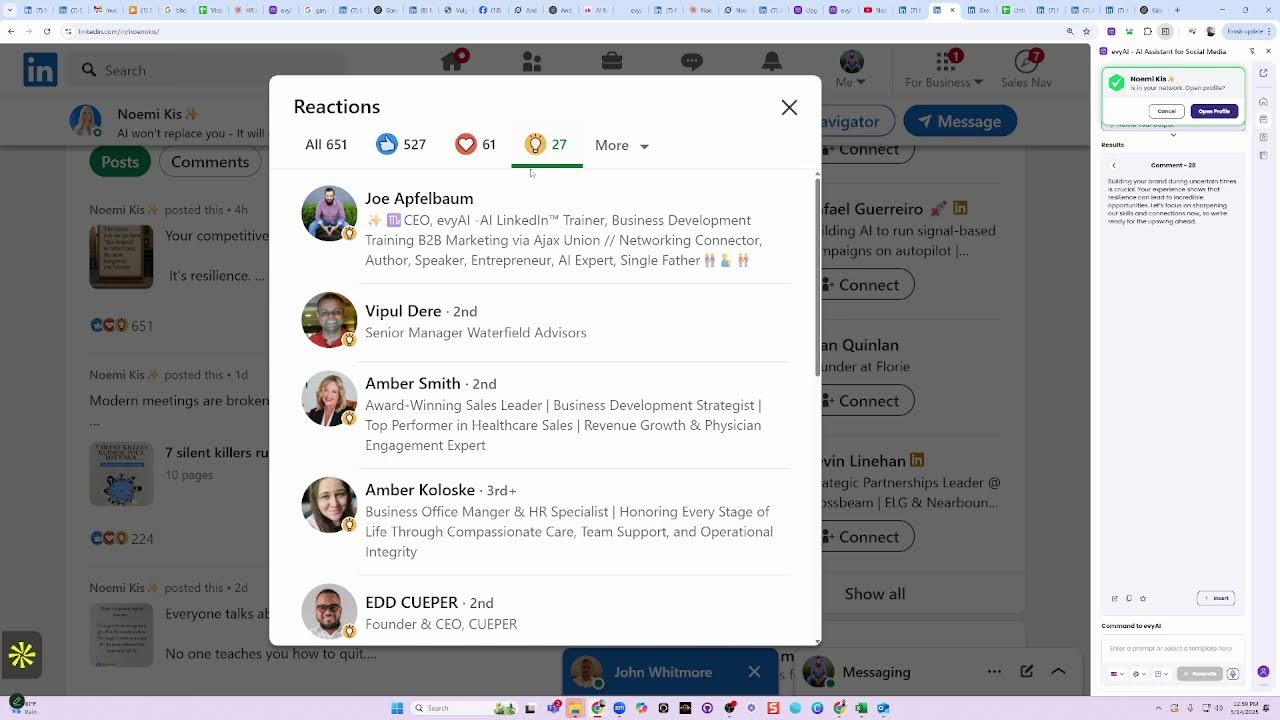
And the number one way that I find engage people on LinkedIn is I go to people that are really savvy, like for example, Naomi, and I go to her profile. And then I go to see who commented on her profile. So for example, there's 651 people. And then I go to see who hearted it because they took the extra time to heart it or to light bulb it or to round of applause it. And then I find these people and these are the people that are the most engaged. And so I copy this list of people and then I go find a technology that will allow me to take those people and put them into a, say for example, a spreadsheet. Using our engagement saver, and then I just paste this in here and I hit process. And now I have a spreadsheet of everybody that comment that liked it with the round of applause, and then I can start connecting and building relationships with those people.
Yeah, that's great. I like that a lot.
Yeah, that's again. There's so many different ways to be able to cut skin the cat, but the key is building relationships with people, getting to know them, reading about them, learning, you know, connect with them. But my number one tip for both Alam and Khalim. Is get your contact information in your About section so people can actually reach out to you. They can find it anyway if they do deep research on you online, so you may as well make it easy for them. And we have clients in 37 countries around the world, so we teach every country that has our clients how to be able to use it in their own language. So you can actually do— you can actually change the language over here as well. So LinkedIn works in many, many, many languages, so I want to make sure that you guys know that this works in every language. Including we have a UK one. I know somebody's here from the UK. We have a UK one as well.
Okay. All right. Well, awesome, Joe. Thank you so much. Thanks everyone for being here.
And we'll see you guys on the next one.
More from Joe


How to Beat the Algorithm: Remove Hidden Watermarks & Scale Content with evyAI









AEO & GEO: SEO's Future Explained! Master Answer & Generative Engines! #shorts