Top LinkedIn Influeners and how to engaged with them 120 LinkedIn Live 2024 with Joe Apfelbaum
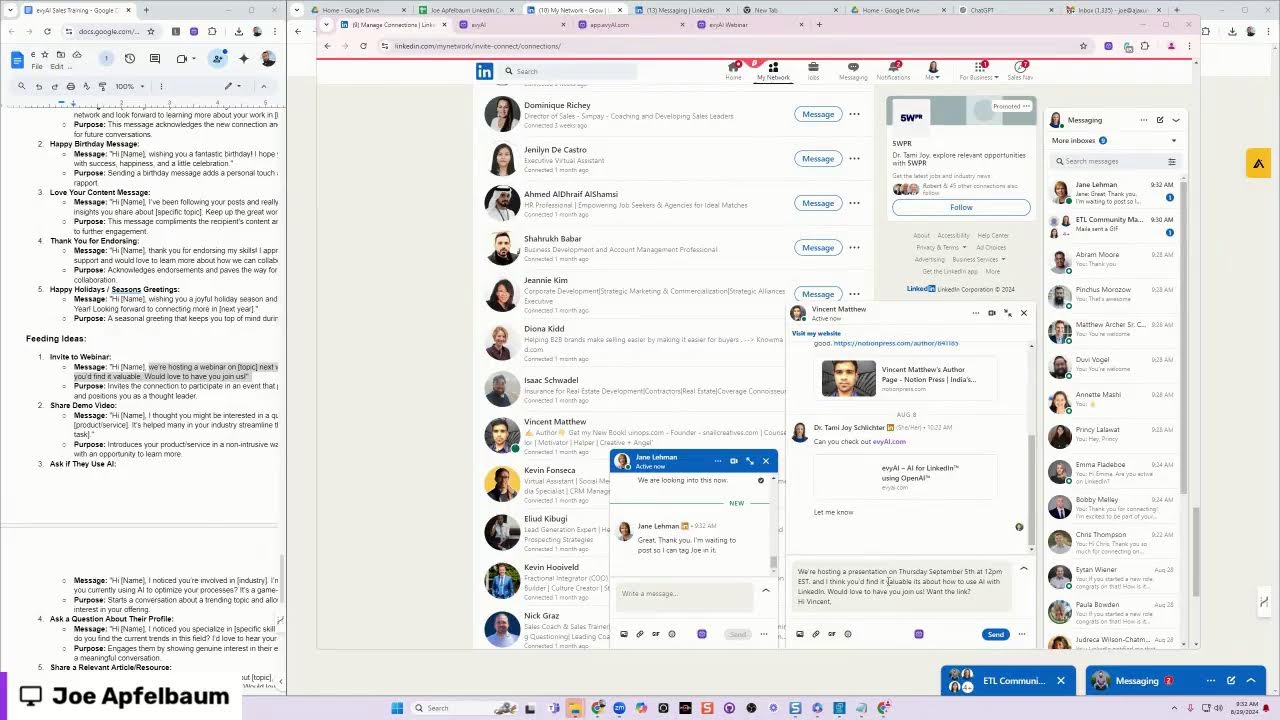
Joe Apfelbaum shows how to use Evy AI to automate LinkedIn outreach with pre-written templates. He walks through his "greeting, feeding, and meeting" framework: start with a low-touch greeting, move to personalized comments using AI, then ask for a meeting. Templates cover thank-yous, birthdays, and webinar invites.
Chapters
Hello everybody, this is Joe Apfelbaum coming live on LinkedIn from Tammy's account. Hopefully you can see me live. I wanted to discuss the greeting, feeding, and meeting system, and a lot of you are unfamiliar with this greeting, feeding, and meeting system. And so I would like to just take a minute and educate you on this process. How it works, why it's important, and why you should use the greeting, feeding, and meeting system on LinkedIn. So when it comes to like messaging somebody for the first time, when you're on LinkedIn, it could be very problematic if you message somebody and you have no idea who they are and you try to set up a meeting with them right away. You ever get one of those coffee meetings? Super, super annoying. So the first thing you want to do is you want to greet them. Greeting people is extremely, extremely important. How do you greet somebody? Well, I'm going to give you a couple of examples on how to greet somebody, but essentially it's the ability to connect with somebody on a low touch, in a low touch way where you're not actually asking them for anything major. You're just basically just greeting them. You're connecting with them. You're building a relationship with them. You're getting to know them. And so the first thing that I do is I say something like, Thank you for connecting with me on LinkedIn. That would be the first thing that you do. Um, the second thing that you want to do when it comes to using LinkedIn is you want to move on to— once you actually have some type of rapport with them, you want to be able to move on to the next stage, which is feeding. Now I'm going to give you specific examples here. I'm going to share my screen in just a moment and give you specific examples on what to do. But I want you to know that there's a method to this madness. And if you're feeling alone or if you're feeling stuck or if you're feeling like you're not sure what to do, no worries. I'm going to give you step by step exactly what to do. All right. And I'm going to give you insights into the types of training, the types of meetings. Now, if you actually want the greeting, feeding, and meeting system, just write greeting, feeding, and meeting, and I'll send you a link with the actual templates that I'm going to be discussing here on this video here. So no worries. I'm happy to send you that link. To all the people that are following here. Um, just write greeting, feeding, and meeting in the comments. I'm going to share my screen right now. I'm going to click on this. I'm going to click on share screen just to kind of guide you through this process. Marielle, you can hear me on Zoom, right? Yes. Okay, hopefully you can see my screen now. Do you guys see both screens? You should be able to see them side by side, or See, uh, let's see. See full screen spotlight. There you go. You should be able to see my full screen now. Can you hide this? How do you unhide that? Okay, you don't need to unhide that. All right, so hopefully you guys see my full screen here. Um, let me just scroll down here. All right, so thank you for connecting. That would be the first thing. Thank you for connecting on LinkedIn. So let me give you an example of that. Hey, thank you so much for connecting. So if I'm going into Tammy's account and I'm gonna go to her, this is not Tammy's account. Let me hop into Tammy's account. Right, I think it's right here. Let me hop into Tammy's account real quick. All right, so this is Tammy's account here. I'm gonna go to home. And I'm gonna go to my network. Uh, looks like there is an issue with that website. Okay. So this is Tammy's account. Oh, right over here. I'm gonna click on manage my network and I'm gonna click on connections. You see she has 6,094 connections. You see that? The last person she connected to was the CEO at Fuel Meals, Chris Thompson. So I'm gonna send a message to Chris and I'm gonna say, hey Chris, thank you so much for connecting on LinkedIn. Looking forward to getting to know you. If you're anything like me, you wanna be able to, um, you wanna be able to use templates. That's, that's something that I'm a big fan of, you know, using templates, making sure that you're using templates instead of trying to reinvent the wheel. Um, so how do you use templates? What do you do? Um, so with Evy AI, this is the website I'm talking about, evyai.com. It's specifically an AI for LinkedIn that allows you to do things to make, make things easier. Um, let me just show you how that works. Okay. If you go to, if you go to Evy AI, you click on Get Started, sign up for a free account. I'm gonna press login just to kind of show you how that works over here. On the left side, you see it says templates. I'm going to click templates. And over here, there's no templates on this particular account. So I'm going to click new template. And now I'm going to say thanks for connecting message. So I'm going to go here. I'm going to copy this. I'm going to paste it in here. And I'm going to say, I'm just going to say without a name, I'm going to say thank you for connecting. I'm super excited to be part of your network. I'm ready to get to know you. I'm gonna delete the industry and field about your work, and I'm gonna delete the purpose. Okay, so thank you so much for connecting. I'm excited to get to know you, learning more about your network. May I tell you about what I am up to? Okay, and I'm gonna say thank you for connecting. And over here, I'm gonna say message. Press enter. So I just added a tag so I can filter later all my templates for particular tags. I put a name to the template and then I put the template information. I'm gonna press save and I just saved my very first template. You see, I saved my first template into this Evvy AI account. Now that I have my template in here, when I go back to LinkedIn, see I have all my LinkedIn stuff right over here. When I go back into LinkedIn, what I can easily do here is click on Bobby's name. Click message. I can click on the template right over here. You see it says template, thank you for connecting. And I could just insert the template here. You see that? And I just hit send. And now I don't have to think about, okay, what should I send this guy Bobby? I just connected with him 2 days ago. I connected with Bobby. I don't know what to send him, but now I know what to send him because I actually have a template. I've been helping sales implement AI, blah, blah, blah. Thanks for connecting. Just so you know, my company developed an AI for LinkedIn. And I'm gonna say, hey Emma, um, are you active on LinkedIn? Okay, so she has not responded to me. Let me go back to her profile, see what she's up to. Director of sales, MBA, 18 hours ago. I'm gonna go ahead and leave a comment on her post. You see she posted this thing. I'm gonna use AI. There's no persona on Tammy's account. So I'm gonna go to Tammy's account and click on personas. I'm gonna add persona. I'm gonna say Tammy Joy, industry marketing, tone friendly, keyword facts, correct info. And I'm gonna say, I am the president of Evvy AI and I help people use LinkedIn with AI. I am straightforward, to the point, and love helping people out. I am kind, friendly, and I love to share stats and correct information-backed By science. Make sure that all my comments are professional, to the point, and do not repeat what the post says, but acknowledge it. But acknowledges. Use conversational, friendly words and do not use corporate jargon. Do not say you nailed it. Do not say absolutely. Do not say spot on. Okay, say persona. Tag is required. Person. Say persona. Okay, I saved the persona. Now this persona is saved. So when I wanna leave a message here, I can click select persona. I'm gonna close this box out, reopen it. Now there's personas here. So I'm gonna click in here. I'm gonna click Tammy Joy persona. I'm gonna hit generate. Now it's gonna use this persona like this. Okay, I'm gonna tag the author and I'm gonna hit comment. And so now I left a comment For this person related to what she wrote about. You see that? I left a thoughtful comment just like that. Okay, let's see what these people have been messaging. Hey Tammy, how you been? Long time. Hey Pincy. Okay, so I'm just messaging all these people. Dovi, you're welcome. You're welcome. Okay, thank you. It's basically the same role running my own company. I upgraded some of the profiles. That's awesome. Jane, weird. We are looking into this now. Okay, thank you. Thank you. Okay, so there are 3 types of messages you want to be sharing on LinkedIn. What are the 3 types of messages? Let me just see what people are writing over here. I can see your screen, Jen said. Thank you for saying that, Jen. Marielle, if you want to leave a comment, you could always like, give a heart, put a light bulb. I recommend, Jen, you do the same. Always give a heart, a celebration, a light bulb, something like that. You see, those are the things that I would tell you to do. 'Cause then it adds it to the bottom here and it makes it look better. So go ahead and try it out if you're watching this live. Light bulb for me. I'm gonna put a heart. I'm gonna refresh this just to kinda see what comes up. This is duly noted. Okay, good. Um, I see light bulbs going on over here. I'm gonna put a heart on myself. I'm gonna refresh the page. Looks like Tammy wants to join. I'm gonna have Tammy join as well. Okay, so these are the templates right over here. So there's also a happy birthday template. There's a love your content template. I've been following your posts and insights. Keep up the great work. There's thank you for endorsing message. There's invite to webinar message. There's share demo message. So for example, we have a webinar coming up. If you go to evyai.com/webinar, you'll notice we have a webinar that is coming up on, let's see, when's the webinar coming up? September 5th. Do you see that? So next week, next Thursday, we have a webinar. So how do I take this webinar and put it into Evy AI? It's very simple. You go into Evy AI, you log in, you click on templates, See that? I'm gonna press new template. I wanna call the template invite to webinar. Then the tag is gonna be message, and then the template is gonna be simply this just template. And by the way, if you guys want these templates, just write templates in the chat and I'll be happy to send you this. We're hosting a webinar on September, on Thursday, September 5th. Uh, on Thursday, September 5th, at what time? At 12 PM EST. Um, at 12 PM EST. At 12 PM EST. And I think you might find it valuable. Um, we'd love to have you join us. Want the link? We're hosting, we're hosting a presentation on Thursday, September 5th at 12:00 PM. I think you might find it valuable. It's about how to use AI with LinkedIn. Would you like to join us? We'd love to have you join us. Would you like the link? Okay, so I'm gonna press save template. And now I have a template for inviting to webinars. So this is feeding. So there's greeting, feeding, and meeting. This is feeding. And so now if I go to LinkedIn and I wanna send a message, I click on manage my network, I click on connections, I'll find a person that maybe I have conversations with in the past and we went back and forth on, like this person here. And instead of saying, hi Vincent, How have you been? I'm just gonna inject that template. So I'm gonna go in here. I'm not even gonna use AI. I'm gonna say invite to webinar. I'm gonna say insert. Joe, do you think you're sharing your screen? Uh, I am sharing my screen, but I'm sharing my screen on LinkedIn Live, but I can share it on Zoom too. Oh, so you can see what I'm doing. Okay, now I'm sharing it on Zoom. Um, we're hosting a presentation on September 5th at 12:00 PM. If you find it val— I think you'd find it valuable to join. I'm gonna press send. Okay, so now I hit send. I'm waiting to post so I can tag Joe. Thank you. We are chatting with LinkedIn security to get— Yeah, we have to wrap up the meeting. His account. Okay, let's do that. To get his account back. Um, all right, I'm gonna end the meeting. Thank you very much everyone for watching this. If you guys want the list of greeting, feeding, and meeting templates We're making them all available to you guys so you can use it. Thank you very much for watching this stream on Tammy's account.
More from Joe


How to Beat the Algorithm: Remove Hidden Watermarks & Scale Content with evyAI









AEO & GEO: SEO's Future Explained! Master Answer & Generative Engines! #shorts