Trying new LinkedIn Live Scenes 082 LinkedIn Live 2024 with Joe Apfelbaum
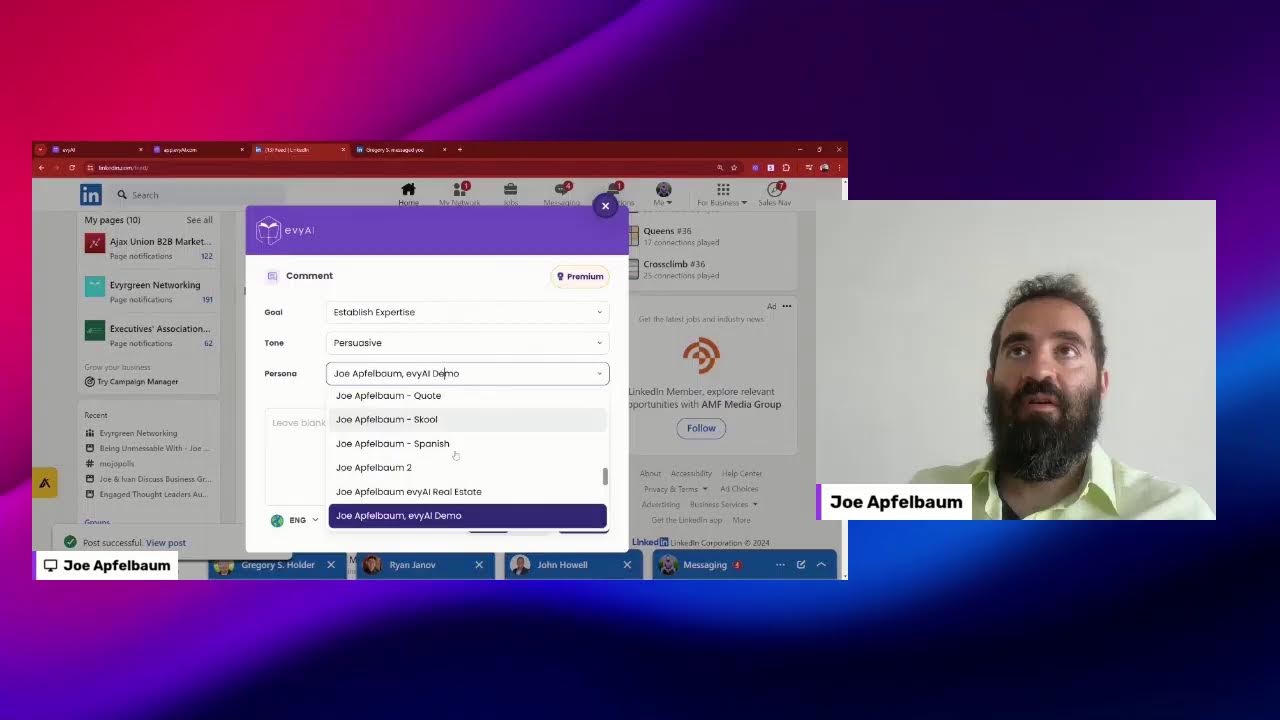
Joe Apfelbaum demos Evy AI, a Chrome extension that helps LinkedIn users generate personalized comments, posts, and messages. Over 10,000 people use it to stay top-of-mind with contacts. The tool pulls recent activity, creates AI comments with mentions, and writes full posts with hooks and CTAs in seconds.
Chapters
Evy AI. Evy AI is a LinkedIn content assistant. We have 2 options. We have the Chrome extension and we have the web app, and I'm going to just show you how you can use this tool. But first, let me tell you who it's for. Evy AI is perfect for LinkedIn users who want to optimize their profiles, increase their engagement, and be able to leverage their LinkedIn network more effectively. We have over 10,000 people using Evvy AI right now, and if you want to be able to get more engagement on your content, if you want to be able to save profiles and organize them into lists, if you want to optimize your profile on LinkedIn in your voice, then you want to use Evvy AI because we have a comment generator, a post writer, a recommendation creator, a messaging helper, a profile optimizer, and a connection customizer. And we now have templates that you can use as well. So let me kick in— kick this into gear and just show you. I'm going to log in right now into Evvii AI. I just click the login button on the top right corner. On the left side, you're going to see we have quite a few options. We have saved profiles. So if I click on saved profiles, you can see all the profiles that I saved. I have different lists that I can choose from. So for example, if I want to choose like a JVMM engaged, I click on JVMM engaged and I can see all the engaged members in JVMM. I want to leave a comment for them, I could just click on this little button here that says See Recent Activity. Or if I want to add a new profile, let's see where it says Add New Profile. You can add a new profile directly from there, or you can download the Google Chrome extension on the bottom left corner here. There's a purple box that says Download Chrome Extension, and then you'll have a Save button on people's profiles from the Chrome extension, and then you can save them directly into particular lists. So as you can see right over here, Jennifer is both an ETL investor and she's a JVMM Engaged. ETL stands for the Engaged Thought Leader Community. So she's in the community. So what I'm going to do is I'm going to click on see recent activity, and this is going to load up all her recent posts. And that will allow me to be able to see what she has recently posted on LinkedIn. So I could see she posted 6 hours ago. I'm going to give this post— and I see now she has 10 comments over here. I'm going to click on this little purple icon. It's going to load Evvy AI. Establish expertise, be persuasive, and drop a quote. And so it's going to generate. I hit the generate button. It generates a quote in about 2 seconds. I press insert. It says, incredible achievement, Jessica. The only thing I need to do here is I need to actually mention her name by putting the@ sign, clicking on her name, and that turns into a mention or a tag. And now I click on post. Now I just posted on LinkedIn just like that. And this helps me be able to stay top of mind with the right people. And Evvy AI, it's all the into one list. So this makes it really, really easy for me to stay top of mind with specific people. I don't have to sit there and look, oh, who should I be top of mind with today, or wait for things to show up in the feed. I have everything organized. I have all the recent posts over here. I can be the only person that commented on this person's post ever, which creates a long shelf life for my own advertisement on this person's on this person's thing. Now, if I don't have what to post, I don't know what to post, I can use a template. So if I go down over here and I'm not sure what to comment on this and I just want to write great post, I'm just going to go in here and I'm going to load my templates. And as you can see, I have lots of templates here that I, that I created. And what I can do is I can search through my templates or I can select a particular template if I want. So in this case, I'm just going to search for great post. I'm going to click on great post template. Great post, keep up the good work. I'm going to press insert and then I'm going to press post. So I didn't use artificial intelligence. You don't need to use AI. You could just use Evvy AI without using the AI. You could just use Evvy and then you can use the templates or you can use the AI to custom create stuff. But the key is save people to your LinkedIn lists and then organize your lists here outside of LinkedIn. We also have a post writer where you can write a topic, it'll generate a post for you with a hook, with main points, with a call to action, with hashtags. So for example, if I wanted to select a particular persona and I wanted to say, okay, make me a post about the Evvy AI demo, I'm going to say create a post about the Evvy AI demo video. Encouraging people to— encouraging people to watch the demo video in the comments. Okay, now I'm going to press informative. I'm going to hit generate. It's going to write a hook, it's going to write main points, it's going to write a call to action, and it's going to include hashtags. And it's going to do all that in less than 10 seconds. Okay, so this is done. Ever found yourself staring at a blank screen? Blah blah blah blah blah. I've been there too. Years ago, I struggled finding the right words to express my thoughts. Blah blah blah. So now I'm going to copy this right here, just like this, and I'm going to go into LinkedIn, click on the home page, and I'll show you how I do it. I'm going to click on Start a Post. I'm going to, I'm going to paste this. Ever found yourself stuck in a box and wondering how to craft the perfect LinkedIn post? I've been there too. By the way, most people never post on LinkedIn for this reason. Years ago, I struggled to find the right words to express my thoughts. That's why I created Evie AI. Imagine having an AI that not only writes posts for you in your voice, but also you reply to direct messages. It's like having a personal senior area style inside out. Best of all, you can also leave. You can also leave comments. I remember the first time I saw V.I. in action was like a low point when suddenly I could focus more on strategic aspects of work. Oh no no no! It's a game changer. If you ever felt overwhelmed by constant da da da, I'm excited to share the demo of V.I. in action. It's a quick glimpse at it. Check out the demo in the comments. Below, how you can enter now. Please let me go in and watch the demo and let me know your thoughts. Do you want me to send it to you via DM? Let me know. Okay, I'm going to press post and I'm going to post it. No image required, just literally a text post, just like that. You see, I just posted this as a text post. Now what I'm going to do is I'm going to go here I'm going to click on the actual demonstration video persona, and that will allow me to be able to actually drop a link to the demo. So if I click on VEI demo and I hit generate, it's going to read the post and it's going to actually generate the link to the demonstration video. Okay, I'm going to press insert. And I'm going to say check out the demo here. Okay, and I'm going to press post and it just put the link to the demo here. Now if I want to invite people to a particular webinar, I can do that as well. I'm going to click here, I'm going to click on the dropdown, and I'm going to find the webinar persona. I have a persona, a specific persona related to webinars. So where is the webinar one? Let me see if I could find this right here. I'm going to press generate. What it's going to do is it's going to read the post and it's going to generate a link to the next webinar. I'm going to press insert. Totally get where you're coming from. It's exactly where we build that VAI, take the stress out of interactions. If you're curious, we're hosting a webinar on Tuesday, June 11th. I'm going to go here, press post, and now it's going to link to this webinar here. You see that all the calls to action that I want to create are built into Evy AI if you build it into your personas. So you don't have to think about what to do. You literally just go and do it just like that. It's really awesome. So we have templates. I showed you some templates. I showed you personas. I showed you how to be able to, you know, you could reply to people here. So look at that. Have you ever tried to use it or not? Drop comment, Gregory. All my LinkedIn connections, no. Yeah, curious how people are using it. Please send me the demo. Okay, so this guy said please send me the demo. I can have the AI send him the demo. So look at that, I'm going to reply with my— remember I showed you I had a persona called the demo persona? I'm going to pull up the demo persona, I'm going to hit generate, and it's going to write a message to this person. Thanks for your interest, I'm here to share the demo with you. Here's the link, let me know what you think. Okay, and now it wrote this entire thing for me. I didn't have to write this demo, I didn't have to write this this DM. Somebody literally asked me for information about my business, and I had a custom message created for that person. How cool is that? I want you to think about that for a moment, how much time this would save you. Think about how much time this would save you if you had this type of technology. Would you pay 50 cents to have this type of technology available at your fingertips anytime? I know that I would pay 50 cents for this. Um, so yeah, so that's the idea. I mean, there's a lot more that it can do, a lot more. I don't have the time to share everything with you now because I have to hop on a call, but I just want to say thank you very much for watching this video. I really appreciate it, and I'm looking forward to seeing you again on the next one. Let me check— let me check out the countdown timer on the left over here, see if All right, I guess that's what happened. We had a little 30-second timer. I wanted to test it out. And if I click on this, I could also have multiple people on the stream side by side. So you can add scenes now. Wow, I love that you can add scenes. All right, well, thank you very much for watching this. I'm going to mess around with this more and then maybe I'll make a video. If you want to get the video on how this new tool works for LinkedIn Live and how to create this type of stuff,
More from Joe


How to Beat the Algorithm: Remove Hidden Watermarks & Scale Content with evyAI









AEO & GEO: SEO's Future Explained! Master Answer & Generative Engines! #shorts