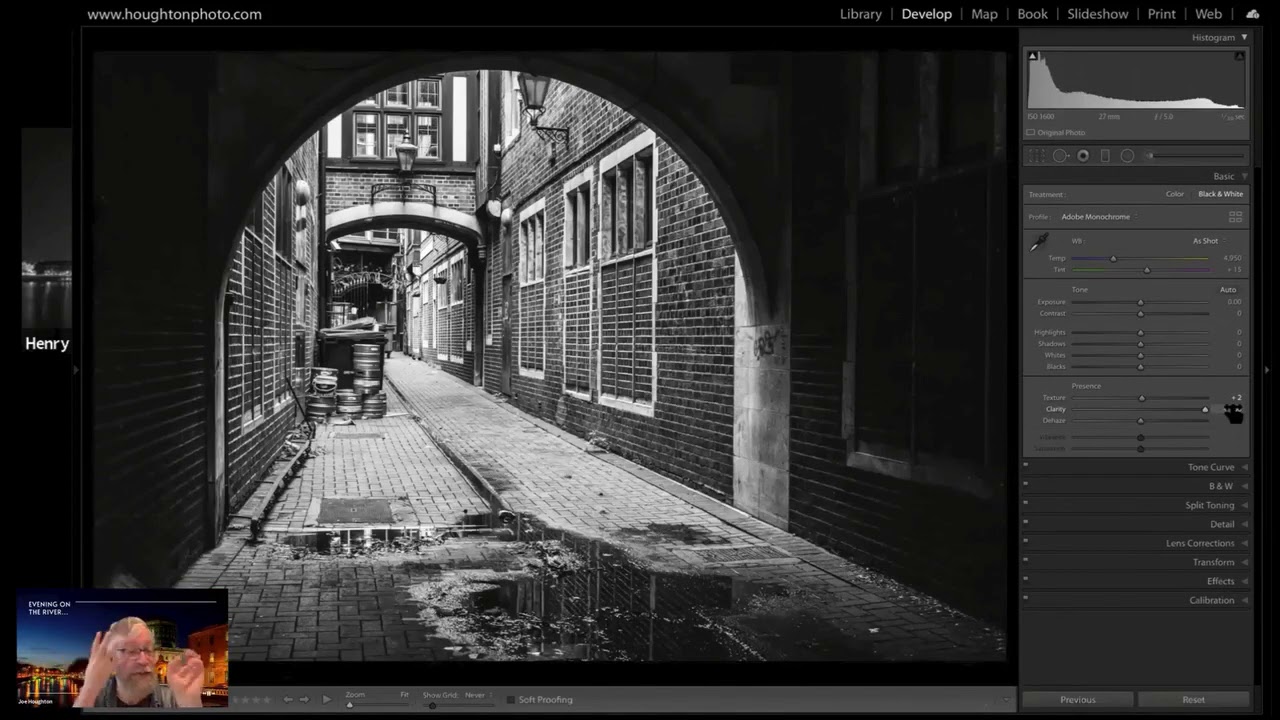
In this 6‑minute tutorial, photographer Joe Houghton walks through his workflow for converting a raw street photograph of a central Dublin archway into a striking black‑and‑white image. He begins by dropping the image into B&W to simplify distracting colors, then dramatically boosts clarity (to 80) and adds moderate texture to reveal fine stone and brick details. After these aggressive adjustments, he reins in blown‑out highlights and subtly raises the whites to retain detail. He checks vertical alignment in the Transform tab, makes minor vertical tweaks, and deliberates on cropping to emphasize the arch while minimizing corner distractions. Finally, he considers a slight shadow lift to draw the eye deeper into the arch, concluding that the form already works well without further darkening. Throughout, Houghton explains the visual impact of each step and his compositional reasoning.
Chapters
So yeah, we can certainly try this one. Let's do this. So D for Develop then. Let's have a look. And I'm going to open it up because it's a landscape. So it's your image? Yeah, this is one of mine. This is one of my street images that I shot. So this is central Dublin, and this is a distillery, a brewery, right off— I think it's Tara Street, where the Irish Times building is in Tara Street, but I just pointed the camera through some railings and looked down this lovely archway, and I just love the form of the archway and the light kind of pooled here with the dark behind it. And obviously, you know, all the lines, the converging lines, and just like you said, the detail, you know. And I mean, this, to me, this screams for a black and white conversion. So let's start straight away and just drop it into black and white. And I think, I mean, just look at that from colour, okay, where you've got kind of distracting elements like this colour here and the bin colour and all the rest of it, and it just kind of like simplifies it, doesn't it? Immediately it just simplifies it. Now for me, with this kind of an image, The first thing I'm gonna do with it for, for in terms of black and white is clarity. Okay, I just love— look what clarity does to an image like that, which that's gray, and look at the midterm contrasts come out in that. I mean, you almost don't need to do anything else, just clarity gives you this bang from that which is, you know, okay Boom! Yeah, instant impact. Wow. Yeah, texture. What clarity did you use there? I went up to 80. I mean, pretty much the whole thing, just bang it all the way up. Yeah, I mean, this is stone, this is brick, this is dust and grime and grot, and, you know, so you almost can't get enough clarity. So I I bang it all the way up. And what I'd also do is probably go about halfway with texture, because texture brings out the micro. So just watch what happens to the wall and to these paving slabs as I push the texture. Boom! It's just like this mist disappears and you've got this pin-sharp detail coming out. It's incredible what a raw file has got in it, and these 2 sliders in Urban Stonework just are just awesome. Now by doing those, we've blown some highlights, just, just very slightly. We've blown some highlights. If I click on that circle, look up in the window just here, okay. And you can see the highlights blowing up there. So let's leave them on, and then let's just pull the highlights down just until they disappear out of the window. So we'll just pull the highlights back. So it just, it just pulls those overblown bits and gives us all our detail back. Okay, and then I might, I might just put push my whites just a tad more, just like that. Now, do I want to do anything else to this? Let's go to the Transform tab and just check our verticals. So I'll draw a line here down that vertical there. I'll draw— here's a strong vertical on this side there. Yeah, so we've got a couple of degrees of tweak to do there, but not a lot. It's pretty much straight. And then it's really just a matter of, do I want to crop it at all? Do I want to change the detail? Do I want to lose this, you know, subject, backgrounds, find corners? This might be a distraction in the corner. So if this is a distraction in the corner, and I— do I want to maybe just focus on the arch there and just lose that distraction in the corner? In which case, do I need quite as much width? I like the width, I like the way the arch is on the left-hand side, so it's the left-hand 2/3, if you like, of the image, but I also like a little bit of lead-in from the left. So, you know, I might, I might leave a little bit of lead-in, and that gives me a bit more depth before we start to hit there. Maybe something like that. That's probably a just a slightly better crop. Um, I don't think I want to bring out the darker areas anymore here because I, it's just accentuating the archway, and I love the archway. Can we, can we do even more by taking the eye just a little bit more down there? Now what I would do there is I would just maybe pull the shadows up a little bit in the background just to see if I can pull the eye down down into that arch even more, but I'm not sure that it actually really, really, really needs it. I think it's just a form— it's such a beautiful form shot, this, that I'm really kind of tweaking