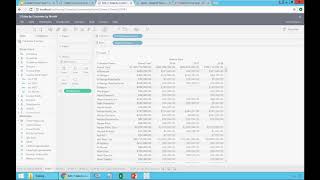
This is a short tutorial transcript demonstrating how to add and position grand totals and subtotals in a Tableau worksheet. The speaker shows adding column and row grand totals, moving grand totals to top/left, stacking dimensions (salesperson, customer, product) and enabling subtotals at different grouping levels.
Chapters
All right, now let's go and talk about totals. So I'm going to duplicate my sheet, original sheet, and in this case, I'm going to collapse it. And right now I'm only showing. Actually, I'm going to collapse. Let me see. Yeah, that's fine. I'm showing sales by customer by year is the whole. The whole data. But how much is the total that I'm selling by year? So when I add a total here, very simple, you come to this totals icon. Click on it. You can choose to put totals for your rows for your columns. So I'm going to add columns. What I mean is putting a total at the bottom of the sheet, all the way down. Now I have a grand total. And one thing that we do, our clients do a lot is actually put the totals at the top. So I'm going to go here and say put column totals to the top so I don't have to scroll all the way down to see how much is my total. It's always at the top. It's very convenient. If you want to add the rows. You just come here and say, show row grand totals. And now it goes to the far right. If you have a lot of rows. If you put the grand total on the left, same thing. You come here. Put row totals to the left. And now the grand totals on the left and on the top. It's very practical. Let me remove these row totals for now. So I'm only leaving the grand total at the column level. But what if I want to see subtotals? What if I have a stacked query? Let's say I'm going to come here and say I'm going to add salesperson and I'm going to put salesperson name before my customer. So I'm dragging my salesperson, dragging and dropping before my customer name. So now I have by salesperson, I have sales by customer. Let me do that again. You can just stack, you know, things any shape or form you want. I'm going to take salesperson. I can drag it after my customer name. So right now the salesperson is here. Or I can drag it and put before and I have now the salesperson before the customer. Accidentally I might drag it on top of customer. Right now I'm dragging on top of the customer. And what happens when you do that? You remove customer and you replace it with whatever that you did. So in this case, I just replaced customer with salesperson. Actually was a mistake. I'm going to click back and I want to leave the salesperson before my customer. Okay, so now I have by salesperson, I have by customer. But I don't see subtotals. I want to see the subtotal by salesperson. What do you do? You go back to your total icon and you choose all subtotals. And now every salesperson will have a subtotal at the top of the entry. And if you add more components, you know, hey, let's add product. When I take product, ID drag and drop after my customer. So what happens is, right now I only have subtotal at the salesperson level. But if I also want to have subtotal at the customer level, I go back and say, add all subtotals. Now I have the grand total, the subtotal by rep and the subtotal by customer. So that's how you add totals and subtotals. Let me rename, call this totals by customer.