5 Analytics for Sales: Demo for Salespeople - DataSelf / Tableau
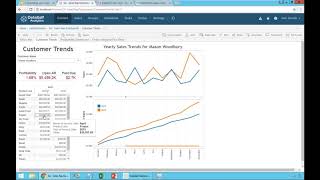
DataSelf and Tableau show dashboards that help account managers decide who to call. A "who's hot" dashboard ranks accounts by website visits and CRM activity. Salespeople can set alerts on orders over $500,000 to trigger outreach, and track which product lines are losing sales or shrinking margins.
Chapters
Let's take a quick look at some examples of sales rep dashboards that some of our clients are taking advantage of. I'm going to go back to data self and I'm going to show this particular dashboard. So this particular dashboard is from another organization is a very interesting story. They have a large number of clients, they have a large number of salespeople, I mean 50 or 60 salespeople. And one of the things that they realize over time is that there is a certain number of opportunities on each salesperson account that they are calling frequently and it's moving forward and it's awesome. But each salesperson has a business big chunk of other opportunities or other prospects in their account that you know, they're not with hard opportunities or they have nothing the pipeline or little things and they want to help the account manager to decide who is going to call next. So once you call all the ones you know that you have to call and now you go call someone else is who should you call? So it took them a while to come up with this idea of who's hot dashboard. And the way that they found out is they have a marketing automation tool that gives them the amount of contacts, actually the marketer automation tool, which looks at how many website visits they have as well as, you know, information from the CRM system, you know, number of calls, number of emails, the that this organization is exchanging with your business and they put it on this dashboard, on this chart on a descending order. So the more contacts a company is doing with your company, the more likely you can sell them more if you're not already trying to sell them more. So as an account manager, suppose 11am is a great time to call a few states. So I come here, I select the state I'm going to be calling and then I look at this top list here. Yes, I already called Michael. Yes, we're talking with this other client, Frederick. Wow. Yeah, Frederick. I haven't called Freddy for, I don't know, for a month or so and he's been doing a lot of website visits and been talking with a lot of people. I don't know who they are, so I'm going to call Frederic. But the other thing that the organization also did in the business process is what should you do before you call a prospect? So usually notice this person goes through a certain process before they call a prospect. But the company decided what you have to do is you have to go to the customer trends. This is almost like an obligation. If you're going to call someone, come here, choose the customer, which in this case I already have selected, but it's Frederick, it's already here. So he picked the priority client. And then it shows last year and this year, side by side, sales by product line. This company is really driven by product line sales. And the idea was if you see declines like in this case, there might be a red flag and they could have even more detail. So the point is you would see how they're, how they're selling over by month. This year, last year, it is growing or declining as an accumulated perspective. So he would get educated about important things that could matter for this client. And then he would call Frederick, hey Fredk, how's it going? He would ask a bunch of questions and once the chit chat would be over, he'd say, hey Frederik, last year in April as well, you bought, you know, quite a bit of dairy products. Dairy products, sorry, why is this year you're just buying, you know, just a little bit. So now you're having a targeted and educated conversation. And what this client told me is that sometimes when the account, the salespeople are talking with clients, sometimes clients don't even know of that particular problem, sometimes a problem in the client and they were busy, they didn't even know something was not selling as well. Sometimes it's a competitor, sometimes it's something that the client knows a problem, but sometimes it's not. But by helping your account manager, your salespeople to know important things to have in conversation before they call is great. And this is part of the sales knowledge of the organization. Again, by learning from the high performers, by learning from salespeople how they're doing better, quite often many of those learning things are applicable to everyone else. And when you learn those things and you incorporate into the analytics solution and you do things like this, you kind of help the salespeople to go through these things and more effectively be more educated, be more targeted. Now in this particular example of this company, they also, let's say, hey, I'm going to call now Mason, another client. And then once I choose Mason here and I see the trends, I see what's going on and oops, look at this, it's red. Something is not good in this case for this organization. They also have internal goals that profitability should be a certain percentage and the client shouldn't be too past due. So in this case, by clicking here, you go to a different part of the dashboard showing in this case the profitability of this client by different product line. You have the color showing how profitable Those sales are. So the idea is for the account manager, hey, not only does it have to sell more, but you have to be sure the profitability is above a certain percentage. If it's not, you got to do a better job, call the manager or try to do something else. But again, you have your obligation with your clients and you have obligation with your manager and company. And then allowing all these metrics to be easy are very helpful. The last thing about account managers is also you're going to be creating a framework of analytics reports and dashboard that they can easily navigate and have these answers, these questions answered quickly. But you also want to give them freedom to make different things to change, to slice and dice. What I'm going to show you now is an example that now we have enabled or released in our product that is being very helpful for some organizations. This particular view is just showing orders that were shipped this week. So it shows for account manager, in this case this one by customer, how much was shipped this week. And in this particular business, quite often you would be just shipped and job done, you got your commission, no problem. But sometimes some account managers say, hey, actually I want to be notified when shipments are above a certain threshold because I want to call the client, say thank you for your business. So by having something like this, an account manager could come here and say, hey, I want to create an alert. And every time that any of these customers have a shipment above, let's say $500,000, I want to receive an email in my inbox and I'll give them a call. So as a salesperson, I come here, I click on this axis, I still want to create an alert. So let me just click here, Revert. Okay, sorry. So when I click an alert, sorry, I click the bar, I click alert and then I say, hey, when the order ships, go above $500,000, I want to send an email to myself with this subject. I want to send this every day. I want to send to myself plus Joe, who is my, I don't know, my manager. And I click the alert. That's it. Now I don't have to worry about this thing anymore, I don't care. But if or when a customer goes above $500,000, what happens is I get an email in my inbox showing exactly what happened and then I can call the client, I can send them an email to, to thank. So it's completely self service. I did it by myself. Suppose eventually I decide, hey, you know, actually I want to call people that are, you know, over $400,000. I want to lower the threshold. Do I need to call it to ask the change? Nope. I come here and I say edit this alert. I go right back into the product. I just change 400. I click save and that's it. Or maybe, you know, I forward this email to someone else. Oh, check this out. Suppose I'm another salesperson. Wow, this is awesome. I also want to receive this alert. I just come here and click add me to this alert by myself. Don't need to call it. I'm added to the alert or I'm removed to the alert. Or I can edit the alert. Very straightforward and very empowering for salespeople. All right, let's move forward. Going to make my last quick poll, so if you don't mind anything quickly. How engaged is your salespeople with data analysis? Please check all the options that apply to your business and click the submit button. Ten more seconds. Five more seconds. Thank you very much. All right, so.










