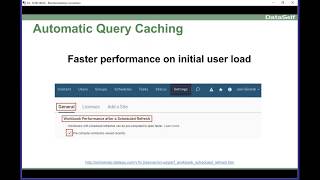
DataSelf AI walks through Tableau v10.3's automatic query caching, which speeds up first-load performance by warming frequently used queries on the server. Admins can enable cache warming in settings, and keeping queries under 10 seconds gives users a better experience.
Questions this video answers
August 28, 2017
Tableau v10.3
Less than 10 seconds
Chapters
The first main feature is about automatic query caching. That's a kind of tacky name. In a nutshell, it's speed. If you're using our framework, Data Self and Tableau, sometimes you might realize that when you open a query early in the morning, the query might run slowly. But when you open the second time, or when someone else opens after the first user, it runs very fast. And that's pretty much because of the cache. It's a feature of computers. And what Tableau has done now is created a feature that allows Tableau Server to automatically warm up the cache, meaning queries that are popular that have been used frequently. If you go as an admin, if you go to Tableau Server on settings, general workbook performance, after schedule refreshing, click this checkbox. What will happen is that every time the tableau refreshes, the tableau extracts, it will check what queries have been used. The most recently used in the last week, it would automatically run them as part of the refresh. So when a user will open one of these queries for the first time, it will run much more quickly. Overall, with Data Self, we tell people that queries should run in less than 10 seconds. If they take more than 10 seconds, many users will not wait. So this feature will be very helpful to allow users to run queries again within seconds. Regardless of how much data you have. I think most of our clients will really benefit from using this new functionality. Make things really fast for all queries at the very beginning of the day. Next, one of the most cool things that Tableau is doing is bringing more and more functionality to the web and mobile user interface. So if you have access to the mobile interface and you are a power user or publisher user or interrecord as some people call now, you can do a lot more without the desktop client. And I'm going to be showing these features that are new and available. So let me switch gears here. And I'm going to go to the web portal of my presentation and I'm going to open one of these workbooks to show the new features and I'm going to open the first view. So far, I'm just opening a view or a report in the web server. Now, if I have the edit button again, if I'm a power user, publisher, user interactor, I can click the edit button and go into the edit mode where I can change the query dramatically. I can change things, I can create new reports, dashboards and stories. I'm going to show you now in the edit Mode, these new 10.3 features. The first one is format numbers more easily. So what is that about? If you want to change how a measure is being showed, you can come on a query, come and where the measure is being shown on the query, click the dropdown list here, the little arrow pointing down and choose format. And right here comes this very user friendly way of choosing different ways to show the data. Point and click. You change and you get a different result. Let's say I'm going to see currency, but I don't want to see decimals. There it is. Maybe you want to see in thousands. Very easy to change your format and I believe will be very popular among many people. Let me open another query that shows the same idea. So here I'm seeing a plot of numbers on a chart. So I go to the measure per se, I click the arrow pointing down, choose format number and then I can say hey, I'm going to show with decimals. And then it changes automatically the formatting. So this feature I believe will be popular is focused on a specific, specific report or dashboard. You cannot change the data source. Formatting is just how it looks on a given report or dashboard. Next is drill up on continuous axis. That's a new feature as well.