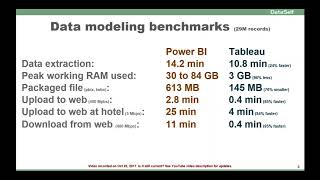
DataSelf AI tested Power BI and Tableau on a 29-million-record dataset. Tableau processed it in 10.8 minutes versus Power BI's 14 minutes, used 3 GB of RAM instead of 30-84 GB, and created a 145 MB package versus 613 MB. Tableau also uploaded, downloaded, and edited hierarchies significantly faster.
Questions this video answers
29 million records.
About 14 minutes (reported as "about 14 minutes 0.2").
10.8 minutes.
Reported between 30 and 84 gigabytes (variable across runs).
About 3 gigabytes.
Chapters
Data modeling benchmarks we made a comparison of both products using a table with 29 million records and data modeling is usually fairly common for business analysts, people that will be creating and maintaining different data sources. It's important to mention that many organizations do need a lot of data modeling and also many organizations have much smaller data sources or tables as I'm benchmarking here, so keep that in mind. Having said that, let's see how both products compare when it comes to the time that it takes to extract those 29 million records into each product and process the the data sources. Power bi took about 14 minutes 0.2 while tableau 10.8 minutes. That was 24% faster for tableau. The amount of RAM used during the process. The peak working RAM used for Power BI was huge, was from 30 to 84 gigabytes. It was not consistent. Sometimes it was slow, sometimes it was high in the middle, but but consistently took a lot of ram. While Tableau was pretty consistent. Pretty much every time it was refreshed was up to 3 gigabytes. So 96% less RAM required than Power BI. By the way, if Power BI didn't have enough RAM, it would fail. So you need to have enough RAM to complete the data processing once you save the local file, the package file on the hard drive. The package file in power BI was 613 megabytes in size while tableau was 145 megabytes, so 76% smaller. To upload those package files to the web using a fast Internet connection, dual speed synchronized 400 megabytes, power BI was 2.8 minutes versus tableau was 0.4 80% faster. Most of the time is pretty much no transferring the data from the local to the web server to upload the same file using a slower connection. Maybe you're traveling, you're in a hotel, or maybe you're doing from home and your Internet connection is not as fast. Now power BI took 25 minutes to upload that file while Tableau was four minutes, meaning 84% faster. Now to download from the web using the fast Internet connection was really interesting. Power BI took 11 minutes. That's a long time. And it was interesting because it seemed that the file was downloaded in about the same time as the upload in about 2.8 minutes. But for some reason it took an extra almost nine minutes to complete the saving of the file locally. We tried in different machines and this is pretty consistent. So I think there's something that, you know, Microsoft needs to adjust to make the download to be pretty much consistent as the upload. They should be about the same speed. And sure enough, you know, Tableau was the same. About the same speed. Upload or download, because we're using the same Internet connection, was pretty consistent. Anyhow. In this case, the download was 95% faster. Change data model this is when we're creating the hierarchies inside of the product and we need to drag and drop or sort the members inside of a hierarchy or the dimensions. Set up a hierarchy with POWER BI up to three to four dimensions in a hierarchy, it was pretty much drag and drop restored. It was done. But above three to four dimensions, Power BI would take a long time to process this change, up to 100 seconds. Sometimes it was really slow. While with Tableau was pretty much drag and drop resorted. No matter how many dimensions you had in hierarchy, it was pretty consistent, pretty fast. So overall, Tableau was faster up to 99% than Power BI. Saving the package file Power BI saves the metadata and the data inside of a single file. Because it's a large file, every time you save it, it would take 70 seconds. When you're doing data modeling, you have to save several times. So this actually adds up quite a bit. While in Tableau, it separates the metadata from the data into separate files and making change to the data model, you can save pretty much in less than a second. So about 97% faster than Power BI. Again, in the long run, this adds a lot of savings. If you learn more about the testing what we did this page gives you the details about the procedure, environment, versions, source table structure, source table size, and how the structure look in the product. At the end of the day.