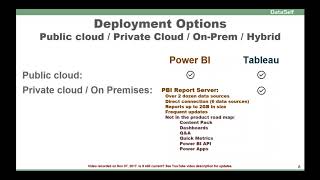
Power BI and Tableau both offer cloud and on-premises deployment, but Tableau supports more scenarios. Power BI's on-premises option, Report Server, has a 2 GB report size limit and doesn't support all cloud features or data sources.
Chapters
Deployment options of your BI solution Should you go Public Cloud Private Cloud on premises Hybrid Many organizations are moving full cloud public cloud and it's working really well for them. Some other organizations still have legacy systems and some other systems that might take a while to move to the cloud if they will ever move to the cloud. So you have to see what your situation is to see which platform will be a better fit. When it comes to Power BI and Tableau, both of them provide a very good public cloud offer. So if you are already in the public cloud or that direction is certain there's no problem, then both of them are in a similar competing platform. Now if you're not already 100% sure public cloud is the right option, then you have to look in more detail. Tableau has all options. You know, public, private, on prem, hybrid, any combination of them. They cover really well with a wide and deep range of features. If you're considering Power BI Power BI has recently released their Power BI Report Server was released back in June just this month. In November they released several new features. It's a fairly new framework. It sits on top of reporting services and takes advantage of a lot of the framework of reporting services, which is pretty good. But because this is fairly new, there's still many features that probably are required when you're looking at a company wide or enterprise wide analytics platform. At least here some of the limitations still with the Power BI Report Server now there's a little over two dozen data sources. Actually most of the data sources are probably yeah, most of the data sources very popular in the mid market are covered which is great if you want to do direct connection with your data sources. They cover now six also the most popular, so likely most organizations will be fine. Be sure to check your data sources and be sure if they are part of these supported ones already. From a size of reports they Support up to 2 gigabytes which can cover a lot of data analysis. Most mid sized organizations should be fine with that limit. If you have a lot of data then you have to see once you compile the data how large those files will be. One of the things with Power BI Report Server and Power BI in general is Microsoft is aggressively adding more features and improving it almost every month or so. There are more things coming out which is good, but at the same time this also causes more overhead to be installing new versions and making adjustments if needed, or doing retraining. So be sure that your organization can handle the extra bandwidth of frequent updates. If you are seriously considering Power BI for non public cloud, then keep in mind that at least as of mid October, Microsoft roadmap for the Power BI Report server was that you would not include some key features available in the Power BI Cloud server. Here I list what those key features that are not part of the roadmap. So if you need them, you have to leave with the Power BI on prem and also some of the reports or some of those things that you need those additional features in the cloud. If that works for you, great. If not, you have to see how to work around those things. Overall, this is the assessment between the two when it comes to deployment options.