DataSelf AI compares building BI from scratch with Tableau or Power BI against using a pre-built platform. A manufacturing dashboard example shows why ad-hoc dashboards fail without a consolidated data warehouse. DataSelf claims its platform deploys in minutes with dashboards that refresh in seconds.
Chapters
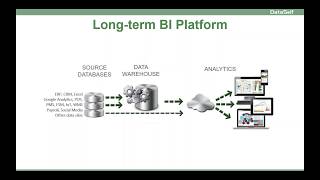
A Successful BI Journey in Data Self A successful BI journey involves many things aside from Tableau or Power bi. Let me give an overview and discuss how Data Self can add value. Many organizations start their BI project with baby steps. They select an analytics tool like Tableau or Power Bi and start putting together some dashboards. It's usually fun and exciting since you can get some wins very quickly. But more often than not and sooner than later, the baby steps approach starts to run into issues. Let me give an example. This example from a manufacturing company shows a 360 degree view of customers. Each account manager can see their own customers, how much they owe in open receivables, who has past due invoices, CRM opportunities expect to close this quarter, Orders to be shipped, sales and gross profit. Clicking on any of these metrics will show more details, for instance, which invoices or pass due. Building a dashboard like this can be complex. With a baby step platform, you'll need to pull data from open receivables, CRM opportunities, orders and invoices, align the metrics by customer, filter data by account manager and time, color code the bars based on the AR passed to status and build the drill down to transaction details. It's not a simple job. Also, if you have lots of data, refreshing, its data may be slow and it might even affect the performance of your ERP and CRM systems. So while the baby steps platform can take you a bit forward, you're pretty much guaranteed to make major changes sooner than later, even if you're only querying your ERP and CRM and it tends to get more challenging in the long run. Your management will likely ask for data coming from all of your data sources. Eventually you also have to bring in data from other systems such as Google Analytics, project management software, social media and other data stylists. As your needs evolve, you'll need a BI platform like this. Eventually you'll have a data warehouse framework for data validation, one version of the Truth, auto refresh and high performance, and an analytics platform to easily render information to users anytime and anywhere some data can come live. The biggest data sets will go to the data warehouse anyhow. So one of your main BI decisions is start with baby steps and see how things evolve or leverage an off the shelf platform that will shortcut the time and investment to get the job done. If you decide to start with baby steps, as you move forward you will need people with expertise in your source systems. You'll need people with expertise in data warehousing in the analytics platform and business analysts who will get management requirements and translate them to the rest of the team to get the job done. Some organizations have a person or a group of people with expertise in all of these areas above, but most organizations don't and they will have to decide to hire more people and or involve a BI partner to complement their expertise. Also, it will take time to connect the dots. For instance, I've seen many organizations taking a great deal of effort and time just to bring different ERP modules into the BI system. This is usually a multi month project and too often becomes years in costing six figures to cover a single data source like erp, it can be very complex. Now it's critical that you keep around the people involved in building this platform. As your business changes, you'll need to adapt your BI platform. If the people who built it is no longer around, it can get really complicated and expensive to maintain it. I've seen horror cases where a new team decided to kill an existing BI system, started a new one from scratch and left the organization before the new system was operational. It was ugly. So I always recommend working with a BI partner to augment your BI team. A BI partner can fill in the gaps in expertise, can train and support your needs when you run cleaning resources or have change in your team. Now if you have any of these popular mid market ERP and CRM systems, I have great news for you. Dataself offers an off the shelf BI platform that covers a lot of the things that you would have to build from scratch. It comes with a comprehensive data warehouse framework that already brings and optimizes data from any of these systems for easy and fast reporting. It plugs an analytics layer of your choice and delivers more than 5,000 reports and dashboards across more than 15 reporting areas for CRM and ERP such as sales, inventory, financials and opportunities. There's a lot more, but these are some of them your management will love the wide and deep range of available KPIs, the speed and ease of use. Data Self can also bring all of your other data silos together for a 360 degree view of your business. In a nutshell, Data Self provides you with best in class BI software, dramatically reduced time and cost to get real BI value from your ERP and CRM for these two type of systems. I mean dramatic. It will take days to deploy a lot of things, not months and years. Reduce time to connect all the dots by providing expertise and tools to consolidate all of your data sources. Expertise to augment your BI team We have expertise in source systems data warehousing analytics platform business analysts in how to deliver value with bi you might not need to hire more BI people. Actually many of our clients were able to free some of their reporting people to focus on other higher value tasks. Finally we provide long term peace of mind as your business evolves as some of your people might change. We'll be here to assist as your BI needs change. Just to wrap up, how much effort would it take to build a dashboard like this in dataself? The individual parts of this dashboard are ready out of the box so it just takes minutes to blend them on a dashboard like this. How long does it take to refresh a dashboard like this in data Self Data self dashboards run in seconds no matter how much data you have. If you found this video informative please like it in YouTube and make comments. We love feedback. Also our YouTube channel has lots of educational materials. I encourage you to subscribe. Thanks for watching.