A Minimalist Bullet Journal Week: The 10 Blocks of Time [Productivity Planning]
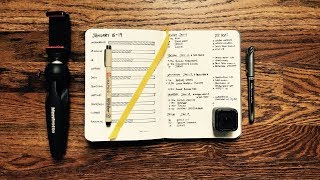
Matt Ragland shows how to build a one-page weekly planner with ten blocks, each representing four hours of work. He maps out 40 hours across major projects, adds a daily agenda column, and uses arrows to track tasks that carry over. The system gives you a visual report of where your time actually goes.
Chapters
Everyone, welcome back. My name is Matt, and in today's video, I'm going to show you the only page that you need to plan your week. It's a simple one-page system that allows you to see what's important and what's timely and how to get those things done. I'll still be using like a bullet journal style productivity system like I linked to in the last video that I did that's been doing great. Thank you so much for all of the views and thumbs ups and comments that I've been getting on that video. Definitely check it out for like the whole system, but one of the things that I got the most questions on was this 10-block weekly productivity system that I'm gonna lay out for you this week. Another great thing is if you're ready to take a step with this and try it out yourself, there's also a download, a PDF download that you can print out and start doing this this week. It's a Monday, so it's a perfect time to test this out. But go ahead, check this video out, give it a thumbs up, make a comment below. And again, thank you so much for watching. Go ahead and subscribe if you like this as well. We're gonna go ahead and jump into the video right now. Glad you're here.
Let's go. For today's video, I'm going to be using the Baron Fig Mastermind Dot Grid Desk Pad, and it is a lovely setup. I'm going to show you a little bit more of it, and we'll talk about it a little bit more, but you can easily use just any, you know, regular old printer paper, anything like that. It's super easy. Let's go ahead and jump over to the actual sheet itself. So, just starting out with a blank sheet. Isn't that a good way to start every day? Blank slate, blank page, but this is going to be for our entire week. So, what I'm going to do to start is I'll just take a little bit larger pen at the beginning. This is a Micron Pigma Graphic 1 right here. Now we're just going to go through and we're going to start listing out these 10 blocks down from the top. The next thing that I'll do is I'll go down each of these 10 blocks and I'll list the primary task that I'm going to spend the time on. So to start out, the role that I'm in at ConvertKit, I spend most of my time working on onboarding. So let's give a few blocks to onboarding. Now for this last one, I'm doing a complete reboot of our onboarding email. So I might write here, onboarding emails. And if it's enough, it's some, if it's something that I'm going to spend at least like 4 hours on this week, then it's, it's worthy of its own block. And I'll talk more about the time, the time aspects of everything because it does, all of this has, has a reason. The other thing that I'll do is I'll be working on the support success side. So let's give a couple of blocks to support here. And let's just zoom in a little. And then all the way down here, I'm just going to go ahead and put like planning, which I spend about 30-ish minutes of each day on planning. And then that's just some more miscellaneous time. So about 10% of the week. The other thing that I'll do is I spend time like going over our data and churn. So that's a good 4-hour block there as well. So I've got 3 blocks left and one of them is going to be for meetings. We don't have a ton of meetings at ConvertKit, but they do normally take up, say, 3 to 4 hours overall. So meetings as a full block, but what this specifically helps me with is making sure that I don't like go overboard with meetings. I mean, 4 hours a week is more than enough time for the amount of meetings that I can have. And then I also do some workshops. So teaching documentation. So that's the teach doc right there. And then what I'll also do here is that I still send Bonjuros, these welcome videos to customers. So that can take about 4 hours. But this is also like plus extra support if needed. So a little bit more like miscellaneous time between these two. But that's really a look at a full week and what I'll be doing. And let me tell you the meaning and the purpose of the size of these blocks and how that I break them up. So 10 blocks, say around 40 hours each week, is what I spend my time on. And so each block is representative of 4 hours. And on the dot grid, what I find really nice is that the way that I've structured this block specifically is that it's 16 dots long. If I went all the way out to 4 blocks, here, then that's representative of spending an hour on something. So what I'll normally do up here is count out 1, 2, 3, 4, and put a little 25, 5, 6, 7, 8, 5, 6, 7, 8, 50. So this is right now 2 hours. 9, 10, 11, 12, 75%, and then 100% of the block. I can just go ahead and put a 0 here if I want. And then what I'll probably do here, or what I normally do just to keep myself straight on what I'm spending the time on. So let's say down here on meetings, because this is totally going to happen. I already know I was going to go ahead. We have our Monday ConvertKit meeting. So I'm going to go ahead and put an hour in right here. And I'll just go ahead and say team. And bring a line out right there. You can see it. So this is how I think through, and this is how I kind of— the formula behind the blocks: 16 dots long. Each set of 4 dots is representative of an hour. Each block is representative of 4 hours. So that's how I break out the 10 blocks. I know a lot of you would ask, like, tell me a little bit more about the blocks and how the timing is. That's exactly how it is. So 16 16 dots long. Each block is 4 hours. Every 4 dots is an hour. And I normally go ahead and just say, I just make kind of a rule of thumb, just a little measurement right here, 25, 50, 75, 100, just so that I can eyeball it. And then I'll make a little annotation on what I spent usually that hour on. So I could also like probably in the morning, I just go ahead and fill in 2 blocks right here because I spent I spent time doing this and I might just say like Monday or Mon since that's not enough room. Okay. So that's how I'm going to plan out the week from a block perspective and just keeping an eye on the big things that I need to be doing to make sure that I'm staying on task and not going, not going overboard is the big part right here. Like if I filled up meetings by Wednesday and then someone asks me, hey Matt, do you want to have a call on Friday? Unless it's incredibly important and maybe applicable to like onboarding in a, in a, in a specific way, then I'm probably just going to say like, no, I can't do just— I can't do a one-on-one call that day. Okay. So hopefully that makes sense. Now coming over here a little bit, what I'm going to be doing on this side is that I'm going to go ahead and start writing down my days. Okay. So now getting to the actual days of the week, what I'll do over here, and I've showed you before in past spreads, is that— and the video that was before this one is that What I do is I list my agenda items like my meetings on the left side with the days here, and then I'll put my top tasks over here on the right side. And what this allows me to do is keep a running tally. Let me show you what I have so far from past week is this allows me to keep a running tally of what I need to be doing, and it makes it really easy for me to move them downwards. So something that like I didn't get to daily trial emails on Tuesday, or sorry, on Monday, really easy to kind of move them down right here to daily trial email on Tuesday and then exit out. And so it just allows for a really easy vertical flow of top tasks. So on Monday, I'll probably just have, let's see, there might be something that comes up earlier than this. So let's just go ahead and say 11 AM team meeting. This gives me space right above this for anything that might come up. And then I have our team support sprint at 1, say Q Sprint. And then I'm probably going to have a meeting, not sure the specific time just yet. But let's just go ahead and write in onboarding. So a couple of meetings right off the bat on Monday. This is not uncommon, because it really sets the tone for the rest of the week. But that's probably all I'm going to have on on a Monday in terms of things that I absolutely need to be at. Now, there are certainly other things that I have to do on a Monday, and that's where they go in the top tasks, because it's not necessarily anything that I have to be at at a specific time. And so I'm just going to put it up here on my top tasks. And the reason that I do this a little bit differently, instead of saying like 9 AM, first thing that you need to do, and now I can kind of go ahead and just start to prioritize those. So I can say right from the beginning, Churn, churn metrics for the past week need to go out. Update to new bill needs to go out. And then new form video needs to be shipped. And I might also put— I'm just going to go ahead and put— I normally only try and get like 3 to 4 things done. Each day. And you may think that that doesn't sound like very much, but when you get down to it, like getting 3 or 4 things done, like good solid things done in a given day is actually pretty solid. So, uh, let's go ahead and put a 4th thing in. New sequence video. So those are my top 4 things. And actually what I'm going to do is right here on the update new bill, it's an important thing, but it's also due at a specific time. It's due by 10., and so I'm gonna go ahead and put that in here as well. It's not anything specifically that I have to be at, but it is due at a specific time. So the thing to think about is that on the left side here, I have things that are due or have to happen at a specific time. So 10:00 AM, the update is due, 11:00 AM meeting, 1:00 PM sprint, and I might have an onboarding meeting, but now I can just add the time in right here. And then I have my top tasks over to the right side. And as I'm going through, I'll normally check in around lunch and I'll update, I'll update the blocks and just kind of see where my week is going already. And just keep, keep churning through these. And so like when a day, let's say I go through this and I get like all 3 of these things done, but then sequence video wasn't completed. I'm going to— this is classic, classic bullet journal— put a little right arrow signifier., and then I'll bring it down here, and I'm going to go ahead and start with the right arrow. This just helps me again, keep a nice vertical flow, and I can see like it just signifies to me right from the beginning, like, hey, you didn't get this done yesterday. So it boosts up in order of importance for me. So here you have it. This is a great one-page spread, really easy to see, that you can set up to make your week successful and on task, just making sure that you're getting the most important things done, that you're managing your time here on the left by filling in these blocks and making sure that like, oh my gosh, I've spent 4 hours in meetings and it's only Tuesday, really kind of need to step back from that. Or, you know, there's still, there's still plenty of flexibility here to rearrange your tasks. But it does help you see at the beginning of a week, hey, I wanted to spend this amount of time on these tasks. And I was able to do that pretty well, or it totally went sideways. And that gives you some context for going back and figuring out why that happened. If you're working for yourself, then that's incredibly, that's incredibly important. But if you're, you know, working with other people, and certainly if you have a boss, if you have someone you're reporting to directly, then being able to show this to them at the beginning of the week and say like, this is what I want to spend my time on, this is what I see as important. And if that doesn't happen, then it gives you a good starting place to talk with them about like, hey, why is, why is this not working the way that we want it to when it's something that we've both said is an important way for me to spend my time. And again, so just to give you a big review over it, we've got the blocks of time over here that we want to spend on our, uh, like overarching, like, assignments and projects. We've got our daily agendas down here kind of in the middle, and then we've got our top tasks. And this gives us a really good vertical flow of— instead of like rewriting everything like on different pages, we just get to see from the top the things that we, the things that we're able to do in a particular week. You also have a little room down here, you know, just kind of depending on how you lay this out for additional notes or, you know, whatever it, whatever it may be. Lots of flexibility in this. I encourage you to get a system that works for you. That's the only way that it's going to work. I hope that you're able to take some tips from this and, you know, definitely try it out, but see what works for you and and get all of those things done that are important and matter to you in life and work. Okay, there is going to be a download in the description, and you can also click up here in the card, or maybe it's up here, sometimes I'm not sure, but one of these places there's going to be a card where you can download a weekly plan that I've put together for you that is just like this, and then you can just fill in your tasks and, you know, whatever your, whatever your project assignments are. So Totally up to you. So, I would love for you to download this. Go ahead and let me know how it works for you. Any of your feedback is always appreciated. And thanks so much for watching. Make sure you subscribe in, you know, the button down here at the bottom. This is not like thumbs down. I want a thumbs up. But you can subscribe down here.
Thanks so much for watching this video on the 10 Block Weekly Productivity System, the only page that you need, one page to crush your week. Go ahead and download the PDF that's linked below and the card above. You can also check out the video that I did last time on the complete Bullet Journal productivity system that I have.
You can see it in an end screen. It may already be up, or it's coming up very soon.
And if you've been liking these videos, there's even more to come on productivity, and planners, and notebooks, all of these, like, things that we really love. I'm just going through this Baron Fig little tiny baby Confidant notebook, so I'm gonna be talking about it a little bit more. So, go ahead and give this a thumbs up, and subscribe below. A lot of you have, And I want to thank each and every one of you that's been doing that. So, hope you have a great week. I'm going to see you soon with another video on productivity, planning, and Bullet Journaling systems.
Take care, and I'll talk to you soon. Bye.
More from Matt









Journal reading 📖 Reflectjons on how I’m living & how it aligns with the vision I have for my life.

You don’t have to listen to me. But you do have to be intentional about the systems in your life.
