A Simple Analog Productivity System That Fits In Your Pocket
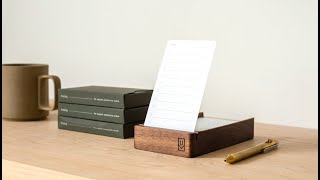
Matt Ragland reviews Analog, a card-based productivity system by Jeff Sheldon that uses three card types: Today, Next, and Someday. You write up to ten tasks per Today card, mark them with custom symbols for completion or delegation, and use the back for time-blocking. The system launches on Kickstarter June 23, 2020.
Chapters
Most of the videos on this channel focus on the Bullet Journal. I love the Bullet Journal. I think it is the best analog productivity system, and there is something very specific about analog productivity that allows me to stay focused on the work that I have every single day, every single week, and going into every single month. But I know a lot of you, and sometimes even for me too, the whole Bullet Journal can feel a little overwhelming, whether it's from setup or staying consistent with it. And what if there was a system that was even easier? What if there was something that you could just use a card for, or a couple of different cards, to make sure that you were staying focused on what mattered today, what you need to do next, and all the things that you hope to do someday in the future? I'm really excited to share this video with you, friends, because because my friend Jeff Sheldon, who runs Uggmonk, it's one of my favorite online brands. He is a product designer and entrepreneur. I have a bunch of his prints and some of his clothes. Not his specific clothes, but clothes that he designed. That's what I should have said instead. But like, this Never Settle print is one of Jeff's, and he also is the creator of the Gather organizational system. And so when Jeff reached out to me a few months ago and said, hey, I'm putting together a analog-focused productivity system. I'd love for you to take a look at it. I was more than happy to talk through it with him, because you can remember I did a video last year that asked the question, could you replace a Bullet Journal with a note card? And you can watch that video up here if you want, but basically this is what Jeff has done, is he has taken something that, even though the Bullet Journal can be pretty simple, it can still, for a lot of people, be overwhelming. That's why the Bullet Journal Basics series that I created does so well, because it's just like, here's what you need to do. The productivity tool that Jeff has created is simply called Analog, and I love the name of it. I love the design. I love how easy it is to get into it, how you can easily like carry the different cards around and even store them for future reference or for review later on. Before I get into showing you the review of Analog, you should know that it's actually a preview of what's to come because today, June 23rd, 2020, is the official official Kickstarter launch date of Analog. You can check out the description in the— no, you can check out the link in the description below. I get nothing out of this. I just believe in what Jeff does. I've been using it as, like, some supplemental go-between after I finish the last Bullet Journal. It's often something that I will do if I, you know, can't get to or don't want to get into the Bullet Journal entirely. I know that sounds kind of sacrilegious, but I'll just grab a today card. You'll learn more all about these in just a moment, but I'll grab a today card and I'll just start making lists of what I need to do. There's also an early Kickstarter launch bonus that if you back the project within the first 48 hours, you'll get an additional month of Analog cards completely free. Okay, so make sure that you check out the link to the Kickstarter in the description below. Let's go ahead though and jump into the actual, like, preview review. I'll show you exactly how Analog looks, what you should do with it. It's a really simple system, and that's what makes it so effective.
So let's go ahead and jump in. Okay, friends, I am thrilled to introduce you to Analog by Jeff Sheldon and Ugg Monk. There are 3 different types of cards in Analog. There is the Today card, then there is the Next card, and then there is a Someday card. Now, the way that Jeff describes these is at the beginning of each day write up to 10 tasks. Use suggested task— use suggested task signals, which he shows on the other side of this introductory card. And then next cards are important tasks that need to be done but not today. Use this list to help fill out your subsequent today cards. And then someday is to capture ideas, aspirations, and goals that you would like to accomplish. Sunday. So in just a really simple way, let me show you how I'm kind of thinking through this and how I've been using it. And so I set this up on Sunday of writing out things that I wanted to do on Monday, June 22nd. So I just started listing out the tasks that I wanted to do. So the way that this would work now, let's just give you a, you know, kind of a play-by-play of everything, is if we look at the task signals, a lot of you will, you know, find this pretty similar, maybe from Bullet Journal or other productivity systems, but you can see that there is a little circle with a line in the middle of it. So if you complete something, just draw it, you know, circle it all the way in like that. If something is in progress, like currently this video, fill it in halfway. Email newsletter, ready. Change Austin flight, maybe I'll delegate that. The delegate is that little arrow, like pointing away. But the nice thing about all this is, and Jeff does a good job of pointing this out, is that you can always create your own. So if you wanted to say, not necessarily in progress, but if you wanted to migrate something, you know, in Bullet Journal style. Like, I could just draw an M in there. I could also put something maybe like an L for later. But basically, again, I can do whatever I want. I can create your own. And what I like about Analog in this sense is that because it is a simple system, but it still has a little bit of structure, I can do whatever I want with it. I can use a system that I've kind of put together in my head of thinking about, like, what kind of information is this? Where am I going to use it in my work or in my business or in my life? And I can create filters around those. Now the other thing— we'll get to the next cards in just a second— but the other thing that I would— I like to do that I've been testing that I really like with the Today cards is that I can flip those around and create a time track or a little agenda on the backside. So I just have it listed from 8 AM down to 10 PM, the 10 PM hour, so technically it would end at 11 PM. PM right here, and mercy if I'm not in bed by 11 PM. There's a, there's a hurting of a day coming for me next. So I just write down what I do before 8 o'clock. Often it's working out, you know, obviously I have breakfast and then family time. And now I'm doing this as like a time tracking. So many of you are familiar with my time tracking methods of just breaking a day into 30-minute chunks and then occasionally reviewing, going back and seeing that this is what I have to do today. These are the things that I have been spending my time on and just gaining a a bigger level, a higher level of awareness about what I'm spending my time on every single day. Now, another thing that you can look at from an agenda perspective on this card, if you wanted to do this, is instead of reflecting on what you have been doing, you can also use it to proactively write down either appointments or calls or things that you intend to do. So it can be more of a reflective time tracking or more of a proactive time blocking. Like I already know with these calls with Jay and can, and then blocking out a little bit more time to wrap up this video. So that is the Today card. Again, it's really simple, but also has a little bit of structure for you. The other, the other type of card to check out is the Next card. Let me show you a couple of different options, at least in how I'm using it. Now, if there is something that I have due during the week and I know that I have to do it, often because there are a lot more Today cards than Next cards, I will save these Next ones for things that I know I want to do like maybe next week, maybe this month, this quarter, so a little bit further down than just thinking about tomorrow. If I have something that I know I have to do this week, often what I'll do at the beginning of the week is I'll go ahead and just pre-write down, pre-format, pre-templatize, whatever, 5 cards for the week ahead, or at least the next 3 days. So that gives me a little bit of agenda if I know on Wednesday the 24th that I have a Podia Q&A. So now I know I have this, and I go ahead and I put it on the Today card for that. So what I use the Next card for is looking at things that I want to do next, like in this month or in this quarter. So I'm going to be relaunching the Journal Habit course. Some of you have heard about that, but some of you have not, so you're going to learn about it for the first time. I'm going to be doing some more videos on a Bullet Journal setup. A book notes video, a collaboration with my friend Amy. So these are all things that are coming up next, not in the next couple of days, maybe not even in the next week, but in the next month and possibly in the next quarter. As I've been thinking through it more, it'll probably end up being, as I've written here, July. So July is the next month coming up. These are the things that I want to make sure I get done. So often these aren't necessarily tasks. It'll probably often end up being like these bigger picture projects or videos that I want to do. So that is the next card. There's also a little dot grid layout on the back here, and then I can also use this to do some referencing. So like for this course notes, I can also use this to do some cross-referencing with notes that I've already created in the Clear Habit Journal. Yeah, so this right here. So here and say page 158, 159, So I'm just doing some cross-referencing threading here between notes that I'm creating on Analog and where I already have them listed in Clear. So that, my friends, is the Next card. The final card in the Analog system is Someday. And Someday is just what it sounds like. I mentioned it earlier, but a place to capture ideas, aspirations, and goals that you would someday like to accomplish. And this is very meta, but one day, very— I don't know, soon, but not next, but someday— going to do a journal of my own and do it on Kickstarter. And I did write down here like a little subtask. One way that I could test that and get some feedback from y'all is just to start with a PDF of how the layout might be and what it might look like. So this is a someday idea, aspiration, goal. It's all of those things right here of writing down, I want to have a Kickstarter for a journal of my own. One other little thing that I added here is just the date. And so especially on the someday card, and maybe even on the next, giving like a little note on when you put down this idea will help give you a little bit more of a reference. Like, man, I've been sitting on this idea for 2, 3 months, 4, 6 months, for a year. Does this really matter to me? Or, and if it does, I need to really prioritize some time for it. The other thing to note, this is really the only other thing in it, is that there is a section right here for card signals, and it's organized related cards by filling in different dot patterns. To be honest, I don't see myself doing that.. But what another idea that Jeff has here that I probably will do is fill in the dots to rate yourself on how productive you are each day. Now that can be productivity, it can be like your mood, it can kind of be like, yeah, just kind of how you're feeling. So here's one, you can see it in the top right here. Focus. There we go. See it in the top right here. Like mentally, I'm good, but physically I'm very sore right now. It's a big workout in the morning. So I'm going to give myself 2 of 3 dots. Okay, the other way to kind of think about this, and you've seen it in my own— let me just find a month layout here— is how I've done— yeah, here's one for April— mood tracking with a check mark, a Z, an O for okay, and then an X for not great. So you kind of think of it the same way here. So if it's just one, that means kind of a bad X day. And then two would be okay. And then all three is good. And you can use that, you can use that kind of framing for whatever you want. It could be how productive you are, how good you feel, what your mood is, whatever you want it to be. But there are three little card signals up here. And I would use it for like a mood or productivity rating. So friend, those are the three cards in the Analog system.
Highly recommend.
Today, next, someday. All different ways that you can organize your thoughts and focus on what matters while keeping track of what you want to do in the future.
What I love about Analog is its balance between simplicity and structure. I know a lot of times people can get overwhelmed with a blank Bullet Journal wondering, what should I do next? And at the same time, you can get a little, like, kind of stuck in the structure of some things, like the Best Self Journal or the Full Focus Planner or, you know, Baron Fig's Do Work Journal, all of which I love and I think have their place in your, like, productivity planner, you know, like, library. But I do love the, you know, just the easy size of analog. I love its balance between simplicity and structure because you can make the lists that you want to make. You can, you know, write out notes on the back of the cards, and there's all writ, but there is also that like little like circle shading system that you can use in order to like give a little bit of structure to like, this is what I got done today, this is what's in progress, this is what is delegated, this is what had a time to it or a date. There's a lot of different ways that you can do it. And so I highly, uh, you know, support and encourage you to go check out and even back the Kickstarter for Jeff for Analog. Again, you can check out the link in the description below. And don't forget, if you watch this on June 23rd, launch day, there's a 48-hour window where you can get an early bird bonus of an additional month of analog cards. All right, thank you so much for watching this. We've got some great videos and collaborations coming up in the next month. Also going to be doing a special webinar on creating a journaling habit in a couple of weeks, so keep an eye out for that. If you're not signed up for my email newsletter where I announce everything for the first time. Anything that I'm doing with courses or videos often comes through the email list first, so make sure that you check that out. You can sign up at the link in the description below. It will be very—
like, this is where the newsletter is.
I love making these videos for you. Please let me know in the comments anything that maybe you would like to see me covered or any questions that you have about Analog. Be more than happy to answer them for you. Thank you so much for watching, and I hope you have a great week.
Bye!
More from Matt









Journal reading 📖 Reflectjons on how I’m living & how it aligns with the vision I have for my life.

You don’t have to listen to me. But you do have to be intentional about the systems in your life.
