A System That Turns Notes Into Real Work
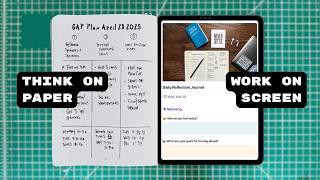
Matt Ragland moves ideas from paper to Craft Docs using Tiago Forte's PARA method, then writes his three to four most important tasks back into a notebook each morning. This analog-digital-analog loop keeps him focused on work that matters instead of notifications and distractions.
Chapters
Most of my best ideas start on paper, but that's not where they stay. If you're like me, you love the focus and simplicity of analog tools. They help you stay present, but we also need a reliable way to track, organize, and finish our work. I'm going to show you how I brainstorm and plan on paper, then move everything into Craft Docs for more editing and research and expansion, but then also why I return to the notebook, whether that is Bullet Journal, Field Notes, or some other kind of notebook. For daily focus and task management. This system is what I use to stay focused, keep things simple, and run my business and day-to-day life. And the reason that it works is it's simple, intentional, and easy to stick with. Let's go ahead and dive into the system. We're going to start as we always do with pen, paper, and the 3 things that matter for today. Every project I start starts right here in the notebook with a blank page. There's something powerful about paper. You can write without rules. You can doodle, sketch, circle, draw arrows, literally connect the dots, whatever the moment calls for. There's no formatting, there's no notifications, there's no pressure to make it look nice. And that's why it works for me. And yeah, judging by this channel, for thousands of other people. Paper, I'm not just trying to build a system. I'm just capturing, I'm thinking, I'm developing, I'm iterating. You don't like go down a rabbit hole the same way when you're holding a pen. You can't get distracted by notifications. You can't have like productive procrastination, like, oh, here's this thing that's related to my project and I, or I got to look up this link. And then all of a sudden I'm looking at something completely unrelated. It's just you, pen, paper, planning. Let's go. So once I've worked things out on paper, I have the basis of the idea. I have the initial planning. I have text and notes that I've written out. That's where I need to bring more structure and more organization to it. And this is where Craft Docs comes in. Craft Docs is your personal space for notes, tasks, and ideas. I've really liked using it over the past couple of months because I can see how simple and really actually like analog inspired the tool is. I was really struck how they were talking about a trip that they took to Japan and seeing like washi tape and thinking about how much they enjoy and like to use paper in their own planning, in their own work. And you can really kind of see how that comes into the product. And so I'm going to show you how I'm using Craft for my own work and how like the, the migration from analog to digital back to analog, I think works really well in Craft. Once I've worked things out on paper, it's time to create some more structure and organization in a digital tool like Craft Docs. I use a really simple setup. You know me, I like to keep things simple so I don't have to work too hard to do things like this., but I use folders, I use pages. There are these cool subpages that you can use inside of CraftDocs as well. Another like way of thinking about this is I also use Tiago Forte's PARA method. So I have different folders and then subfolders for projects, areas, resources, and archives. One of the things that I used and liked the most in CraftDocs that I wasn't really expecting as much when I first came in is their calendar view. And the thing that I like about the calendar view is that Even though they have like a cool bullet journal template, I actually think from a simple minimalist perspective, using the daily note feature that they have in the calendar view is a really good way to track your daily tasks. Now the thing, and this is just such a beautiful thing in Craft and in digital tools, Craft especially, is you can also embed those tasks, add those tasks to the specific projects that you're working on., and those will also show up if you give them a due date. It'll also show up in the daily note on the calendar. So when I'm putting together my gap and wrap plans for each week, I can assign those tasks to a specific day and they're gonna show up in the gap plan. I can reference the specific project, the specific page that that task is related to, and I can also see what days of the week that those tasks are assigned in the calendar view. So it provides a really nice cohesive way of looking at the work that you're doing and the different places that you're doing that work in Craft. Even though Craft Docs helps me organize and track my work, I don't start my day staring at the screen. I start with the notebook just like every single day. After I've checked the gap plan that I've made for the week, which I'm still writing in the Bullet Journal, I then take a quick glance at Craft and I'm mostly just looking at the day view, that calendar view that I like. Because it's going to show me the tasks that I kind of already have pre-assigned for the day. And then I'm taking a look through those specific project pages and looking at other tasks that I need to get done. Once I know what those are, because they've been tracked and organized in Craft, I'm writing them down inside of the Bullet Journal. And people have always asked me whether it's Bullet Journal, whatever, it's already in Craft. Or whatever tool you're using? Why are you then writing it down in a notebook? And the reason is because when I write it down, it does two things. One, it does reinforce the importance of that task in my mind, and it also means that I don't have to keep checking back into Craft in order to say like, oh, what was that thing that I need to do? It's just on the page because I know, knowing myself and many, many of you watching, I really do know many of you that when I go back into Craft or any other tool, I'm going to see something else that is going to catch my attention. Maybe it's a comment or a notification. Maybe it's another task that I didn't necessarily prioritize for the day that has now caught my attention. Maybe it seems easier. Maybe it's something that, yeah, maybe it's a little bit more interesting, but it's not the thing that I set out at the beginning of the day to do. This process of going from analog to digital back to analog keeps me focused. It's not just about checking more boxes. It's about checking the right boxes, the things that move the needle, what Michael Hyatt calls uphill work that will get you to your summit of success. As I was putting this video together and thinking about how to communicate this clearly to you, I kept trying to come up with these like clever acronyms, be like, okay, well, all you have to remember is POST and BEAM. And I'm like, okay. And to be honest, like, even as I do that, I can't even fully remember what those stood for. I just know that they were acronyms that I came up with that did have a meaning, but that kind of proves my point. If I was to simplify this for you, analog, digital, analog. Start with planning and brainstorming and get your ideas out on paper where you're not distracting. You can just focus. And then organize and track and communicate with your team digitally, because that's where all of that work happens in the best way. And then each day in the morning, return to the notebook, take a quick glance at your digital tool, take a quick glance at Kraft if you need to, write down the 3 or 4 things that matter the most to you. And my rule is, once it goes on the paper, nothing else gets done until those things that I wrote down, the ones that I prioritized, that I said were important. Nothing else gets done before those things get done. If you want to give this analog to digital to analog workflow a try, I highly recommend Craft for your digital productivity. I think you've seen how well they prioritize intention of work rather than prioritizing your attention and keeping it on the app. And for viewers of this channel, Craft is offering a special 50% off lifetime discount. So as long as you're using Craft, you're going to get 50% off. It won't expire after the first month. It's an incredible deal, and I really appreciate them offering it to viewers of this channel. And if you want some help building this rhythm into your day, I have a free 5-day analog to digital to analog workflow email series. Just enter your email in the description below as well, and you'll be able to get a free, easy-to-follow daily email, just 5 days., and it will kind of walk you through some things to keep in mind and just some encouragement, some quotes, some things that I think will make this really impactful for you. If you want to know why I feel so strongly about this distinction between analog work and digital work, then I encourage you to check out the video that's going to pop up on the screen right here, because it's really a manifesto for me about how these notebooks helped me stop infinite scrolling, kind of the doom scrolling stuff. And really see how it freed my mind and helped me to focus on the work that matters. Thanks for watching.
More from Matt









Journal reading 📖 Reflectjons on how I’m living & how it aligns with the vision I have for my life.

You don’t have to listen to me. But you do have to be intentional about the systems in your life.
