Minimalist Bullet Journal Productivity Planning: Monthly Layout, Time Tracker, & Project Sprints
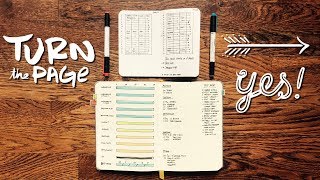
In this instructional video, Matt Ragland walks viewers through his March 2018 Bullet Journal setup, demonstrating how he plans the month, tracks habits, integrates a time‑tracking grid into a single notebook, and organizes project work. He reviews his February habit tracker results, explains layout tweaks (color‑coded habit blocks, combined daily grids, and deep‑work sections), and outlines his “one notebook to rule them all” approach using the Baron Fig Confidant. Matt introduces a 5‑Day Time‑Tracking Challenge, providing prompts for identifying 15‑30‑minute blocks to allocate toward meaningful activities. He details his primary and secondary projects for March, shares his weekly reflection questions, and addresses a viewer comment about his apparent obsession with time, framing time management as a budgeting exercise. The video concludes with a call to action to join the challenge, like, subscribe, and share the content.
Chapters
Hey everyone, my name is Matt, and welcome back to another Bullet Journal productivity video. In today's video, we're going to be going through my Bullet Journal for March 2018, plan the month with me. You can see how I'm laying everything out, a couple of changes that I've made to the Bullet Journal in terms of, like, layouts and the habit tracker. And one of the main things that I'm doing is the time tracking grid that you saw in the last video, you can check it out over here, is I'm actually putting that all into the Baron Fig Confidant Bullet Journal right here. And so this will give me one notebook to rule them all, in Lord of the Rings style.
So go ahead, hop in this with me.
There's going to be timestamps, there's going to be descriptions, everything is in the box below.
So if you want to skip around, that's totally fine with me. Do what works best for you.
The other thing that I want to tell you about is today is also the start of the 5-Day Time Tracking Challenge. So if you want to hop in and really see where your time is going so that you can pick out the 1 to 2, like, 15-30 minute blocks in your day, or even during your week, where you can start to make progress on something new that you want to get started on, or something that you know you want to give more time to, but just haven't really been able to find it, 5 days, I'm going to show you and give you prompts throughout those days on how you can find those little blocks of time that help you make progress on the things that really matter to you. So go ahead and check that out.
There's going to be a card for it here. There's also going to be a link in the description below.
So check that out, and let's go ahead and get started with planning March 2018 in the Bullet Journal.
Here we go. So let's take a quick look at February and zoom in here for you. On my habit tracker, I actually did a really good job, and I was pleased with a bunch of the different habits that I was tracking. You can see I only missed 1 day total of journaling, only 5 days total of some kind of exercise for the entire month. The deep work was a little bit more haphazard. Same with creativity. I did have 16 days of making something for the blog or for the vlog. I also had about 20 days of reading something. I feel really good about the habits, and I felt good about what I did all month in terms of tracking these. I would— some of them that I know I can chain together a little bit better. I don't know if I'll get into like creating something every single day just because it doesn't always work. With work, but I guess I could do something small, something in a 15-minute block, if you will. And then I can, I can certainly take time to read every day, read 10 to 15 minutes. This page over here, I'm just going to keep it— I'm just going to keep this one covered up. You remember, this is the food spending. I'm going to keep this one covered up. I did not hit the goal, which I was sad about. And to be totally honest, I don't feel 100% comfortable, uh, showing my spending, but I missed the goal, which kind of sucked. So thumbs down, thumbs down, thumbs down to that. The quotes I'm pondering, I didn't actually write any of them down in the BuJo, which was a fail on my part, but I did get into the habit of writing them down on these index cards. Now these are the Baron Fig Strategist note cards. They do have the dot grid on them. And this is great, excellent book by the way, 12 Rules for Life. And you can see, you can see the dots, a nice, a nice subtle rounded edge as well. February is kind of a different month for me. We went on a ConvertKit retreat, so I didn't really do any like planning or writing things down for that, for that week. And then I took a big chunk of another week off, and so didn't have like a full layout for either of those. So a little bit tighter. I did experiment with using some highlighter colors to fill in my 10 blocks. I really like that. I also experimented, remember, with adding the deep work graph for each week. So this is actually the current week that I'm on, right at the end of February going into March. So you can see, you know, again, using those highlighter colors, it just, it creates a nice little pop, and it's a nice subtle way of adding some color without getting too fancy with it. For these, I'm using the Zebra Eco Highlighters. Super difficult to zoom in on, but I'll, I'll add them into the description below. Below in the video. Same, same kind of layout. 10 blocks over here. Agenda, tasks, all on the right side. All right, so let's take a look at March. Very similar to what I did in February. Month at a glance on the left side for the first page here. I am adding in some like just really simple like bookmark. January back here, February right here, and then March right here with the blue. Same thing also with the habit grid. Just laying that out in the same way. The only change that I'm making in terms of the layout here is that I did have reading next to creating, that pink next to red. And so it just, you can see it kind of blends together visually. So I'm just splitting those out this month. Green for exercise, C for create, C for create, red C for create, blue D for deep work. Orange J for journal, and then red R for read/meditate. What I'm doing a little bit differently this month is you'll remember, and you know from my videos, that I've been doing the time tracking with these different grids. And so I'm going to be testing these out instead of having a separate one like this. This is just a Field Notes little pocket notebook, which I really do like carrying around. But instead of having two separate notebooks in Lord of the Rings style, I'm going to try to have one notebook to rule them all, one Bullet Journal to rule them all. So I'll still have my 10 blocks with a Deep Work grid. Then I'm going to have each day to just have its grid already right here. So this would be Monday, this will be Tuesday. I'm still going to have time for my meetings and agenda items right here. So this one would be for Monday, and then top tasks still go up here to the right. So I still have my top tasks. I still say Monday, March 5th is what this would be, so meetings. I know it's going to be 11 AM, team meeting. So I still have my meetings down here, and now I'll just have my grid. Instead of it being, instead of it being in a separate notebook, I'll have this grid right here inside of the primary Bullet Journal. So I'm still going to have my 10 blocks over on the left side here, and I'm going to have my grid over on the right side. Of the page, still room for my top tasks and my meetings. Now the way these grids are going to be laid out is, let's say now this is going to be Wednesday, then Thursday, Friday, still top tasks over to the right. It does take me away from having this full page, you know, kind of single spread view for the week, but I'm going to try and sacrifice this, see how this works. So top tasks, Top Tasks, I'll definitely be migrating things from one page over to the next. But this gives me a way to look at my time grid along with everything else that's happening during the day. So, again, just going to give me that one view, that one notebook to rule them all, Lord of the Rings style. 5:00 AM, waking up, 6, 7, 8. Now this would take me through to 9:00 AM. 9:00 AM is normally when I start work. And then this is, this kind of block is going to be out for work time. So let's look right here and start again at 5:00 PM, 6, 7, 8, 9. And this takes me through to 10:00 PM when I normally go to bed. Okay. So now what I'm able to do with this, here's the hour coming across and this is, from 5 to 5:15, 5:15 to 5:30, 5:30 to 5:45, and then 5:45 to 6. So I might make— kind of scrunching things here— goes up to 30, goes up to 45, and then goes up to 0 at the top of the hour. So you can see what I'll normally do here, and this is actually today. So this is day before March 1st, February 28th. Shout out to Aunt Chris. Happy birthday to you. So you can see this morning, woke up, or actually slept in a little bit, so woke up at 5:30, thus sleep through to here, then coffee, journal, spend some time with my wife, and then work on the vlog. Just sit. Had breakfast here, work on the vlog here, and then son woke up. And played with him, fed him, like the dad of the year that I am, through until 9 o'clock where I started to work. And so this is the, this is the zone that I'm in right now, you know, 9 AM to 5 PM work time. The other two things that I'm working on for the week, and one of the reasons that I wanted to give myself a little bit wider spread for the week, so I've got my grids, and then I'm also asking myself, what did I learn At the end of each week, what did I learn about the week? What's the main thing that I need to take away? Any patterns that I noticed or things that I need to be aware of that are happening for future reference or for current reference? And then how did I move forward? How did I make progress on the things that I care about and how am I moving forward? So just 4 quick questions. I'm not going to spend a lot of time answering them. They don't need like, you can see I don't even have a lot of room for a ton of words, but just a little something. And then over the next several pages, I just have space here for future weeks. So each week right now take up 4 pages. So this is about 16, 12 more pages. And then, so this is the end of the month. I'm going to be keeping for March my primary project. So we've talked about this in the main video that came out at the end of 2017, beginning of 2018, but how I plan my projects. And what I'm doing right here is I'm just giving myself 2 primary projects that I already know, I already know these are on my plate. So in-app onboarding and then the courses that we're doing for ConvertKit customers. And then I have 4 smaller projects that are going to take up a little bit less time but are still things that I need to be aware of. So dunning, which are like cancellation emails for people whose credit cards have expired, and then creating better metrics for our onboarding and customer success. Right now those are the only 4 that I know I have, but pretty much every month something I either bring up or kind of gets tossed to me, I'm able to take on. So I'm leaving some space here. This is what I can do for a month. And so having these two extra spaces right here gives me the flexibility to say yes to something. If there are other things that come up, then I know that I just need to say no to it because I'm already kind of booked out. So that's the way that I'm planning out March. I'm really excited about it. I'm looking forward to seeing how all this works and comes together. Like I said, the primary things to check out these habit trackers, the time grid. There is still time, there is still time, my friends, to join the time tracking challenge on March 1st. So if you're watching this, go ahead and sign up.
Also in the card that's gonna pop up to the right here.
But go ahead and sign up for that, and we can, we can track our time together.
Someone asked in the comments for the time tracking video that I did last time, why are you so obsessed with your time? And I thought it was a reasonable question, because if you watch any of my videos without much context, or if you just like grab something from it, you think, this guy is obsessed with his time. Like, why doesn't he just like—
the commenter was asking like, if you want to spend time with your family, what do you go in and say like, all right, family, it is time now. We will— I have 30 minutes for you. It's not really like that.
Like, it's more of a reflective action right now. Like, okay, I spent an hour with my family, but yesterday, you know, I had a little break and I just went and wrestled with my son for for a little bit. And I didn't, you know, and I just kind of went back and said, you know, wrestled and played with my son for 15 minutes in the middle of the day. I think the gist of the question, like, I am kind of obsessed with my time. The reason for that is I believe that time is one of the most important resources that we have, and the way that we spend our time is how we spend our lives. And I want to make sure that I'm spending my time on the things that really matter to me. So if I'm, if I'm picking out things and I'm noticing like, oh, I spent like x number of minutes or hours on this thing that doesn't really matter to me, I'd rather redirect that, but I need to recognize it first. It's almost like budgeting your money. Like, if you're like, why am I spending like x number of dollars on this thing that really doesn't matter to me? Like, it doesn't make me happy. Now I can redirect that money to something that does make me happy. So think about your time in the same way. Thank you so much for watching these videos. Give it a thumbs up and make sure you subscribe. The channel's been growing like gangbusters. I don't know why I called it—
why I said that.
Thanks so much for watching these.
Please share it with a friend if you think it can be helpful to someone.
And make sure that you sign up for the time tracking challenge in the card up here and also the link below. Your comments mean a lot to me, all the thumbs ups, and yeah, thanks so much. It's a pleasure and an honor, and I'll see you next week with another video.
Take care, bye.
More from Matt









Journal reading 📖 Reflectjons on how I’m living & how it aligns with the vision I have for my life.

You don’t have to listen to me. But you do have to be intentional about the systems in your life.
