My Insanely Productive Home Office Setup
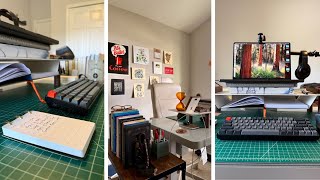
Matt Ragland walks through his home office setup in Jacksonville and explains how he stays focused with a family of six. He uses an analog system from Ugmonk with daily priority cards, an hourglass clock, and a closed door to create physical cues that pull him back to work when distractions hit.
Chapters
So a lot has happened in the past month for me. I shaved my mustache and we moved from Nashville to Jacksonville, Florida, and that's obviously a really big thing. The— I mean, the, the moving, the moving is a big thing, not the mustache. The mustache is a big thing to me. I'm going to give you a look at my workspace, how I get things done, some of the cool tools that I use, especially of course from an analog pen and paper perspective and give you some ideas on how to create quality working time and space when you are working from home, especially if you're working and there are a bunch of kids outside. I do want to be upfront with all of you that I got hooked up with a lot of this gear from my friend Jeff Sheldon, who runs an amazing company and brand called Uggmonk. Now, this isn't a paid promotion, but it's a promotion nonetheless because I've known Jeff for a number of years. I love the work that he does. I love the taste that he has and the perspective that he brings to work and life and the design of an environment. Specifically, Jeff has an incredible eye for design. I think he's one of the most liked/followed photographers on Unsplash, even though he's not a photographer. He's just that good at setting up his space and inspiring others through his work and life. I've talked about Jeff's work before on the channel. A few years ago, I did a review of his analog to-do productivity system. And what I love about analog is how simple it is. It's even simpler than the Bullet Journal because you are just writing down tasks on a note card. And even though, yes, you could use any note card or any piece of paper for this, the way that Jeff Uggmunk designs and builds things makes me more inspired to do the work. And I'm inspired to be in a space that's surrounded by tools that are inspiring, that I find to be very beautiful and long-lasting and easy to use. And look, I'm not trying to get on Architectural Digest here, so you're going to see just stuff. I haven't put all my clothes away. There's just things on the floor. And yeah, I put off recording this video for like a week and like, oh, it just needs to get a little cleaner. I got 4 kids. It's not gonna get cleaner than it is right now, so you're gonna see some stuff. That's okay, because let's be honest, working from home can be hard, even though it is nice to be at home and not have to commute especially. And even if you don't have 4 kids like I do, I— there's always something pulling at your attention. Could be that all of a sudden you really feel like the laundry needs to be done, or that random shelf needs to be organized, or you just have your dog looking at you like, hey, it's walk o'clock for the third time today. And you're like, well, you know, I got to take care of the guy there. And I've been thinking a lot about what makes a workspace actually work. And this can be from home, this could be at your office, maybe you have a studio or coworking space. And it is nice on my end that I do have a physical boundary. So I am in a room, I'm actually like in our guest room. And so when I close the door, my, my brain knows this is work time. And I also flip over this beautiful clock from a beautiful hourglass from Uggmung. This is like one of my favorite pieces that I got from the store. And so that those mental and physical cues are really powerful, especially when the rest of life is happening just one room away. One thing I'm still working on is the lighting in here. And this is actually like pretty good. This is as good as I have felt about it. I have a lot of natural light light over here with these windows, and I do have a fill light that's over here. I don't have anything behind me right now, but what you will recognize behind me are a lot of the signs from the last studio office that I recorded in. I am making, you know, the, the, uh, the YouTube button a little bigger, a little— not bigger, but more prominent than it was in the past. Great stuff from Hat Show Print based in Nashville, and then Sam Larson, who's one of my favorite artists. Got a bunch of stuff from them behind me on the screen., and then, you know, plant over here. There's probably going to be more added to the wall, but I can't go too hard on it because this is also our guest bedroom. And yeah, I got to make sure that it still doesn't feel like you're in a recording studio if you're, you know, for, for friends and family that come visit. I've already mentioned these tools to you, but one that really helps me anchor that focus is Analog by Jeff over at Ugmonk.. And if you've been around the channel, you've seen me talk about it, but it's basically a simple note card system for capturing your most important tasks during the day. There's nothing fancy, just beautifully designed cards that just sit here right on my desk. And you may be asking yourself, Matt, does she use the Bullet Journal? And yes, I do. And the Bullet Journal is like my, my, my home base, my dashboard for my analog work. But some days, and you know, to be honest, it's not every day when I know that there are 2 or 3 things that I absolutely have to get done, that's when I'll just jot them down on one of the analog cards and like prop it up here on this lovely American walnut stand so that even if I'm looking at my computer, I have that visual cue right next to me of seeing like these are the things that need to get done. And I may not write every single little thing down, but one of the things that I have found is helpful, especially in my GAP planning method, is whatever action items that I have for the day that are going to pull me closer to the goal that I have for this week. Those are the primary tasks that go on the analog card. So again, I may not write down every single little to-do, but I am going to write down those 2 or 3 things. So I keep these next to my keyboard, next to my MacBook, so I can't ignore them. There's no tabs, there's no digital clutter. It's just the card. It's 2 to 3 priorities for the day. It sounds almost too simple, but that's what makes it effective because I can't ignore it and I can get it done so quickly. To me, like, having things that are designed really thoughtfully and look really nice just help create an environment of productivity and focus and inspiration that I can work really easily in. Another thing that Ugmonk just came out with are these dot grid cards. And so especially for the dot grid journalers, like my bullet journalists out there, you're gonna like just having a dot grid note card instead of like a normal, like, old old-school lined note card. I, I really love this nice little thoughtful detail is a little tray underneath where I can tuck my notebook in. It's really easy to grab, but it's not taking up space on the desk. That accessibility really makes a difference because if it's out of sight, out of mind, or maybe if it's taking up too much space on the desk, then I'll kind of like shuffle it to the side or like pile other things on top of it. But then I can just kind of slide it in, slide it out, jot something down, and I'm just kind of seeing it as a way to remember like, hey, the things that you said were important are what is on that notebook that you can see right above the keyboard. Another thing that Jeff sent me is this phone stand, and usually I'd say keep your phones away when you're working, but this is a little bit of a loophole. When I, when I tilt it sideways, it goes into standby mode so I can see the time. If I am using a digital timer for something that is longer, like a 45-minute or an hour-long block, I can have the weather up. It can show photos, but it keeps the phone passive instead of tempting me to scroll because everything else is on Do Not Disturb mode. So nothing's like popping through and like notifying me. One of the important takeaways that I want you to have from this is that this setup that I have is not about having the perfect office. It's about creating space that supports my focus. And this space reminds me of what I said was important today, where I place the note cards, how I have different pieces on the desk set up. Because if you're anything like me, it's not about lacking motivation. It's about creating a system that kind of nudges me back on track when life tries to pull me in a bunch of different directions. So if you're working from home and trying to figure out how to focus, try some of these analog tricks. It could be the note card system, a bullet journal, like this is my work time, this is where I do this specific thing, because small changes like this really can make a difference. The other thing that you need to know is Jeff and I are doing a big analog giveaway for subscribers of this channel. All you have to do to enter is one, be subscribed to the Analog Action channel and go to the link in the description to sign up on your email because email's how I'm going to let you know that you won. So the only two things that you have to do are be subscribed to this channel and sign up through your email at the link in the description below. We're gonna have a great prize bag. All the details are gonna be on that signup page. Go ahead, go do it. We're gonna draw a couple of winners and it's you're going to really love what you end up getting. So this is the new space. This is my new face. Thank you so much for watching this video. If you want to see more about how I use the Analog System and the reasons why I recommend it and all of Jeff's products, make sure you check out this video and it will show you, show you everything that you need to know.
More from Matt









Journal reading 📖 Reflectjons on how I’m living & how it aligns with the vision I have for my life.

You don’t have to listen to me. But you do have to be intentional about the systems in your life.
