New Year Planning: A Minimalist Bullet Journal for Productivity
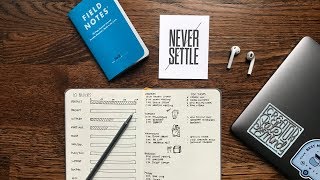
Matt Ragland shows his minimalist bullet journal system for the new year, including a color-coded mood tracker, weekly time blocks for 40 work hours, and a daily page with one top task. He also uses 6-week project sprints borrowed from Basecamp and reviews the Baron Fig Confidant notebook.
Chapters
Everyone, happy end of 2017! It's crazy to think that December, really mid-December, is already here. Just a couple of weeks until the new year, and one of the things that so many of us do around this time in the next month is set our goals for the next year. And that's what I want to concentrate on in the video today. In fact, one of the things that, as I was looking back through YouTube and I was looking back through which videos really stood out, what are things that maybe I need to do a little bit more of in the coming year, my most popular popular video from 2017 was this one. [MUSIC] So, when I looked at those stats and I saw that video was the most popular, even though, like, not even half of the video, perhaps, was actually about planning, was about the Bullet Journal, was about the tactics itself, and so it was really— and I didn't even get into it until, like, 3 or 4 minutes into the video. So, what I want to do here today with you is 2 things. One, I want to take you through everything that I do to plan my day, to plan my week, and to plan my project batches, those 4 to 6 week sprints where I go through a really specific thing, either with my side hustle or just specifically with ConvertKit. So that is what I'm going to spend the majority of this video on. And then the second half of the video, maybe last third of the video, is going to be a little review of this Baron Fig Confidant 2 notebook. I mean, this thing is just fantastic. The one that I was using before is this. I pronounced it terribly in the video, going to pronounce it terribly again. Leuchtturm. This Baron Fig one, they're both fantastic. But this Baron Fig one, besides being easier to pronounce, it's just a beautiful notebook. And I'm going to show this off to you a little bit. Things that I like about it, maybe a couple of suggestions, but this is what the video is going to be about. I can't wait to show you my whole system for being more productive, being more focused. There are a few people and a few processes that have been incredibly helpful for me to, you know, reach where I'm at right now in terms of a productivity process, a process of focus that allows me to get my best work done, the most important work done, day to day, week to week, month to month, and every year. So, let's go ahead, I'm gonna show you exactly how I set everything up with my Bullet Journal. Again, this is the Baron Fig Confidant notebook. I mean, let's, I'll show you, I'll show you, but this thing, It's, it's really nice, so can't wait to show it off to you. Here we go. All right everyone, finally time to rock and roll. Let's go ahead and jump into the Baron Fig Confidant. So let me give you a quick size comparison with the Leuchtturm, like, official, quote unquote, official Bullet Journal. And you can see that the Baron Fig is a little bit shorter and, uh, actually a tad, just a sliver sliver less— what, less wider? That's not a thing. That's not a thing you say. More narrow. But I do really like the shape of it. Let's go ahead and look in. First, we have just, I guess, a box for your information. I did think the paper choice, even though it is nice and thick right here— it's really thick, actually. I don't know what the weight is, but it's, it's just a, it's just a rectangle and the ink shows up. I was using these Staedtler pens to write and the ink is, is kind of light. It was kind of an odd writing surface, but not a huge deal. Let's go ahead and jump over. I just, just here on— it's, this isn't just, this isn't just a Baron Fig thing, but just in general, I hate first pages of notebooks. It has kind of an, just an odd I'll try and bring it up here for you a little bit. It just has an odd bend to it because of how it's glued right here, and it's just, it's just terrible to write on, you know. I mean, those of you who have used a lot of notebooks yourselves, you know, this is just, just a bad experience. And I don't know if anyone can fix that, but it's not Baron Fig's fault. It's everyone's fault who makes a notebook. What I do use this for, and I haven't done anything with it right now, but what I normally do is just like make random notes like what I have up here. It's the number of grid spaces horizontally and then vertically. Now this is where already we're kind of getting into some kind of touchy-feely stuff because what I'm going to be doing right here is kind of my feelings grid. And that is going to be— let me show you what I'm talking about— mood tracker. So you can see this right here. We'll talk a little bit about this in just a second, but different colors for happy, good, content, creative, sad, Stressed, busy, frustrated, energized, and tired. So the reason that I do this, and it's something to check in the morning and then check in the evening. So that's why there's 2 boxes per day, but something to check in the morning, check in the evening. I've been doing it a little bit this year, just on a month-to-month basis, but wanted to break this out for an entire year. One of the reasons that I bring this up is that I've noticed that there are like kind of around September, October of each year, I start to hit a lull. And really have to kind of pull myself out of it. And that's, that's not a good feeling. And that way I can kind of tell— let's go back, let's go back to this real quick. I want to be able to kind of track a little bit better when, when am I getting into these ruts and how can I best kind of pull out of it. So you can see I was having some stretches of like feeling, feeling kind of tired, feeling, feeling not so great. And so I need to have a better idea of how, how I'm getting into that. Let's hop over now and talk about what I'm doing month to month, piece by piece, step by step. So this right here is my January look. And all I'm doing right here, let's zoom in a little bit more. So this is January at a glance. So I don't have a super, like, a super pretty, like scrapbook almost style, even though I do. I do sketch notes and I do a lot of, uh, sort of icon design, even though I'm very comfortable sketching, this isn't where I necessarily have wanted to do it right now, because I know that if I spend too much time trying to make something look the best just for me, the— and this is it, like, this is just for me. And so if I spend a ton of time trying to make something look great just for me, then I won't spend as much time doing the actual work. And so that's why I keep this really minimalist, really simple. Just month at the top, events and birthdays, things that I need to know about, things I need to remember, birthdays like my mother-in-law's and my dad's, and then a couple of work projects that I'm focusing on. This isn't necessarily like the day-to-day work, but the main things that I want to focus on with ConvertKit. Side hustles, and so different things that I'm doing. So film 2 new sketch note videos, tighten up a sales funnel, write 2 to 3 times per week, and do 4 website reviews or blog sketches for money. Then a developmental goal, so weekly Treehouse module in SQL, and then establish proper note-taking. I'll talk a little bit more about this in a different video, but it is one of my primary goals for 2018. And then relationships, I want to call someone that I care about once a week, someone like not necessarily related to me either, even though I have plenty of people related to me that I need to call. Shout out to my brothers. And write a quick postcard. I want to do that a couple of times next, next month and see how that goes. I'm sure it'll go— I'm sure it'll go swimmingly. I do have these little boxes right next to each one so that when it's done, I can check off one of those things. So that's, that's just kind of the month at a glance. Now, I don't— one of the things that I don't have here are my fitness goals, and I keep a separate notebook for those. So that's why you're not seeing anything related to fitness. On this. Now let's hop into the meat of this and how I'm planning out each week. So this is where I really like— the way that you live your weeks, to me, the way that you live your days, the way that you live your weeks, that defines how your month goes, and that defines how your year goes, and your years are how your life goes. That's why I do most of my planning in the daily and weekly stage. So right here you'll see one of the things that I've kind of developed, and this is something that has worked really well for me over the past few months, is breaking down every week into these 10 10 blocks of time. So if you think about it, 10 blocks of 4 hours gives you about a 40-hour week. Now, do every week you work 40 hours? Maybe, maybe not. Maybe it's a little more, maybe it's a little less, but it does give you a good visual timeline of how you want to be spending your week. And for me, what this really does is allow me to course correct over the course of a week. And so I know I have 2 blocks set out for projects, one, actually 2, for support, but one primary support. And then, uh, often I have noticed it'll bleed into a second block, uh, one for meetings, for teaching, for data and SQL learning, um, and just doing our own data inside of ConvertKit as well. And then planning documentation, we want to be able to spend plenty of time on that and then sending Bonjuros and then miscellaneous tasks. So what this allows me to do is like, let's say at the beginning of a week, I've spent a lot of time in support, or I've sent Bonjuros, or spent a lot of time planning. That way I can break this down into seeing as the week goes on, like, okay, I've spent— I haven't spent enough time in my project, so I need to spend some more time, say Wednesday, Thursday, Friday, catching up on that. So I'm making sure that I'm making progress on the things that are most important to me. And usually we've done, we've done really well with meetings as ConvertKit has grown and developed. And so I don't spend a ton of time in meetings. This actually doesn't normally get full the whole way, get filled up the whole way. Teaching, same thing. I do workshops and Facebook Lives for our customers. And then usually the ones that don't fill up as much for me is data and SQL and then miscellaneous. Sometimes I'll spend more time in planning and documentation because that can kind of spill into my project time as well. So I just have to be careful about how I'm how I'm defining it. But what this allows me to do, like I said, is if I notice, say, middle of the week that I've spent a lot of time in one thing, like I've already redlined teaching or planning documentation or, or meetings, meetings, meetings especially, that way I know, okay, I need to kind of dial back on that and say no to any meetings for the rest of the week so I can get the rest of the important things done. And speaking of important things and top tasks, let's go ahead and take a closer look at this. All I will do on a weekly basis, I used to, and I showed you this, you kind of saw this a moment ago in my September right here. I've gone through a couple of iterations of this, but what you'll see here, and I still do this sometimes, I want to give you a look at it, is this bar graph of like, this is how I'm like a minute, kind of an hour-by-hour breakdown of each day. And I still use— I still can use this sometimes, but now what I'm doing instead, because one of the things that I don't like in my notebooks is too much like white space that isn't truly being used. And so what I'm doing now is I'm just putting down like my primary agenda items and the things that I know need to get done., and then I'll just start knocking those out piece by piece. And so like, whereas before I would say like here on Tuesday, I'm gonna plan and then I'm gonna document stuff and I'm gonna do my data and then Bonjoro's. Now instead I'll just kind of switch those out and I'll just have my agenda right here and my top task. And then same thing, Tuesday, Wednesday, Thursday, Friday. The thing that I like about this is especially from a top task perspective, This way, as I'm, as I'm setting things up, I'm setting up my top tasks for the day. And as I add them in, it's really easy to migrate at this point. So you can see like this one, I know I'm not going to get to new billing steps by today now. And so I've migrated, I've already migrated that into Tuesday and it's just really easy visually to move that down. And that way I know like if I start seeing like new billing steps, which is totally going to be done by tomorrow, yay me, then I need to kind of reevaluate. Is this really important to me? So if I'm steadily moving this down, then I know I need to reevaluate. Like, is this really important to me? What's blocking me from completing this top task? And that will, that'll cause me to hopefully ask some hard questions about why I haven't been getting this done when I've said it's a top task for me. And so that's pretty much it on a daily and weekly basis. I have my 10 blocks, so I'm keeping an eye on how my time is being split out. Am I using it wisely? My agenda items on the left, my top tasks on the right, and that allows me to kind of keep them in a line right here. And I can be mindful of the things that are maybe taking me multiple days and figure out why I'm pushing them off. Hey, sorry to interrupt real quick, but I wanted to tell you something cool happened the day that I'm making this video. The other thing that I do, because I'm not going to be opening the notebook like all the time or always having it open every day, and so I make these little cards every single day that show me the things that I need to be doing, the stuff that I'm working on, just so that I can have a quick look at that. But my friend Sean Blanc sent me a little, just a little because he's a great guy. So he sent me these Field Notes, and I love Field Notes. I'm going to do a separate— I need to do a separate video on Field Notes, but he sent me this one, and this is a 48-page checklist journal. Check this out. With this, I can just have like my daily, like, 2 or 3 big tasks and already have those written down. So shout out to Sean and Field Notes. Thanks so much, my friend. And let's get back into the actual Baron Fig notebook and its luxurious cloth cover. The last thing that I want to cover with you, even though I just said that your life and your work is down to the day and down to the week and how you spend your time, I do think that it's important to take a somewhat larger view in terms of the bigger projects that you want to take advantage of and the ones that you want to move forward with in every single year. And so I do that with project sprints, and it's something that we do as an engineering team at ConvertKit, and we do them in 6-week increments because 6 weeks is enough time to do something important inside of your app or with any kind of project. And maybe it's a break— Maybe it's breaking down a bigger project into a 6-week sprint, and that's totally fine too. But it's also a small enough timeframe that you can always see the finish line with it. If I was to say like, you know, what is the like big, you know, goal for 2018, I might have a hard time doing that, and I would certainly have a hard time like keeping an eye on that for the entire year. So project sprints of 6 weeks— I'll link to the article in the description below— but this is a great way. We use it at ConvertKit, and it was kind of pioneered at Basecamp as a way of thinking through like how they wanted to change things inside of their app or things that they wanted to do as a team in a short amount of time. And so what I, what I'm doing here, my first project sprint for the year, I've kind of already started on it, so just getting ahead of things a little bit, but revamping in-app onboarding inside of ConvertKit. And it's a project that a couple of us on the team are working, working on. And this is what I wrote down on the on the right side here. Again, I'm not getting like too deep and detailed with anything here because I want to leave plenty of space for lots of notes, lots of actions, and lots of tasks. So all I've got right here is who is working on it. So Matt being me, Dylan, Nathan, a couple of engineers are about to come on board with it. It's going to— what type is it? An in-app product, customer-facing. And then the goal is to totally revamp customer onboarding. Gotta have the timeframe in here completed within Q1 of 2018, and then any milestones. So 3 total scoped out in Basecamp. So I'll still be doing a lot of communication for this inside of Basecamp because that's where we have these conversations as a team, and Basecamp and Slack. But for me, like, this is for me. Again, I can't, I can't emphasize this enough for you. Like, when you put this stuff together, like, it's cool to take pictures of and it's cool to make videos of and like have everybody celebrate it. I get that more than, probably more than anyone. But like, this is for me first and foremost. And did I want to like maybe fancy this up a little bit more so that you would think it was really cool? Yeah, but then, you know, I've already gone a week late on when I wanted to ship this. So ship your things and make things that work for you. I think other people are going to find it useful too. So this timeframe, these milestones, and then what we've done. So We're not going to be able to do all this, you know, totally revamp customer onboarding in 6 weeks. But what we can do is split out 3 distinct milestones, scope them out in Basecamp, and then that's what I'm going over here on this left side. So week 1, 2, 3, 4, 5, 6, and then I'm just going through what are the primary objectives to be done each week. What are those top tasks each week for in-app onboarding? And so that way I'm seeing here what needs to, what needs to occur every single week so that we can keep moving this forward and make it a great product for our customers. So I'll do one of these, you know, 6 times 8. I'll normally do 8 of these throughout a year, and I normally set out at the beginning of the year thinking of like 3 or 4 that I want to start with, and the rest of them kind of get filled in as the year goes on. You know, 6 times 8 is 48 weeks. Obviously there's 52 weeks in a year, but also have 4 weeks off. You know, it could even be as low as 6 or 7 project batches, but just kind of depends on how things look at ConvertKit and the things that I need to be working on. But I can also set this up for things that I want to be doing personally if I don't have a distinct ConvertKit project that I'm working on at that time. A couple more notes on just the Baron Fig notebook. Again, I really like it. One of the things that I think is fantastic is just the paper is a little bit thicker, and you can see it doesn't really bleed through at all. So like, if we zoom in right here, like, this is a thick pen that, you know, just— this is a Micron graphic pen right here, and this will normally bleed through. But you can see it's— it's— you can't really see, like, there's maybe something really faint, but it's nothing that gets in the way of the experience of writing on other pages, which I really appreciate. You know, if I used a much wetter pen, you know, maybe like a brush pen, it might show up a little bit, a little bit more. But I'm not like personally really doing that inside of, inside of my notebooks, at least ones like this. So the paper has a great thickness to it. It's still very pliable. I love the color of this marker, this ribbon marker right here. I will say the Leuchtturm does have 3, but I found those to be a little too dangly. A little too dangly for my— I never know what to do with all of them, or like, do I need to look at 3 different places at once? I think I broke one of them, which I don't even know how that's possible. Maybe my son did it. Always blame the 2-year-old. Let's see, I mentioned before it doesn't have a back envelope or a little pocket, which I might miss. Same kind of really thick, won't do anything here. Maybe this is where my stickers will go because it does have this, uh, you know, very classy, very smooth, very classy, uh, kind of fabric right here. Let me bring it up here for you. But yeah, there's no way I'm getting any stickers on here. And as you, uh, probably saw from my last notebook, I'm a fan of stickers, but I could probably put them on this not easy to write on, very rigid, you know, backing paper thing here. Just from Field Notes are the things that Sean sent me. He's got a little calendar stuck in here. I could use that as another marking device just to know where things are. One other thing that I'll normally do, way to just flip your mind around real quick, One of the things that I don't like doing necessarily is trying to figure out like where, where like my week's going to stop so that that's where I can actually start taking notes. Because I'll be honest, I'm not going to fill up, I'm not going to fill this all up, you know, with a year. You know, this, this one has taken me about a year and a half. This one will probably take me about the same. So one of the things that I do, and I haven't really started yet, is that the primary place where you open, this is where I'll do all my planning.. But the flip side, what I'll do is literally flip it around and I'll take like actual notes right here. Okay. On the backside. And so that way I can start this almost like, it's almost like, it's almost like getting two notebooks in one and I'll just flip it around and I'll take like actual written notes, like going quote unquote backwards. That looks really weird. Quote-unquote backwards from the other side. Could it get a little confusing? Yeah, I just grab it, you know, haphazardly open up like, where's my stuff? I'd— oh man. Oh, fix it. It's okay. So that's one other thing that I do. I actually take, I flip it around, and I take notes. And I do any writing or note-taking on the backside here, kind of going backwards upside down, or maybe the other one's upside down. I don't know. One last thing about the Baron Fig right here is that they do have some perforated pages in the back. I don't know if you'll really be able to see it, but it's just, it's just a fun notebook. I don't know if I'll actually like use these perforated pages. Maybe. And in other notebooks like this, I've never really used those, but it is a, it is a nice little feature. I would prefer to have a pocket. I would prefer to have a pocket than perforated pages. Just heads up. To, to the Baron Fig friends as you're watching this. You made a beautiful notebook. I will, I will continue to buy. In fact, I have some other, some other pieces already on order from your fine store. Definitely check them out. This is worth, this is worth purchasing. It's fantastic. And if you have any questions about bullet journaling, about my mood tracker, and just some of the way that I'm feeling, some of the colors and different things that I'm talking about, please reach out and let me know. I'd be happy to talk with you about feelings, and also about planning, productivity, scoping things out, blocking your time, having an agenda, having your top tasks, and that's the next week. And then also sprinting through the projects and the things that really matter to you so that you can make progress on your year. All right, everyone, peace. Make sure you subscribe to this, give it a thumbs up. I'm putting my arm at a really odd angle here to give you a proper thumbs, but please do that. It helps people. It helps people find it. It makes me happy. And thank— no, oh my gosh, I shouldn't have done that. Anyway, bye. Hope you're doing well. Have a great day. Oh my gosh, I have to stop. Please subscribe. Please subscribe. Oh my gosh. All right, peace. Bye.
More from Matt









Journal reading 📖 Reflectjons on how I’m living & how it aligns with the vision I have for my life.

You don’t have to listen to me. But you do have to be intentional about the systems in your life.
