The 10 Blocks Method for Managing Your Calendar & Tasks
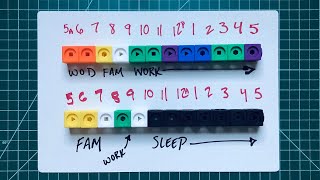
Matt Ragland divides his calendar into 10 blocks across work, family, fitness, and other priorities. He pre-blocks recurring commitments, assigns 2-3 day blocks for focused projects, and reassesses mid-week. Starting with just one hour a week can build the habit and reduce anxiety about what matters most.
Chapters
I started time blocking after our first child was born. Before that, I just kind of knew the things that I had to do and then took the time to do it afterwards. Now that it's been 5 years and 2 kids— that's 2 kids total, not 2 plus the 1, 2 kids total— I see that it's an underrated superpower for prioritizing, focusing, and actually getting the things done that really matter to me. Hi everyone, and welcome back to the channel. My name is Matt, and I make videos about how to make the most of the time that you have for the people, the projects, and the purpose that matters the most to you. In this video, I'm going to show you my time blocking strategy for getting everything done that I believe I need to get done every week, and that includes work, specific work projects, family time, and working out, and kind of everything else that I do in a normal day. So let's go ahead and jump into a couple of examples of how you can do this in your own life as well. Let's start with a visual example of what a normal day looks like for me. Remember, there are 4 main areas of my life that I focus on every single day and I spend time on. That's work, family, working out, and then kind of everything else. I borrow Kanan's math blocks to help me show you this because I think they're one, they're really fun, they're very bright, it's a really good representation of, you know, a block. Most days I wake up in the 5 o'clock hour to either go to CrossFit or to jiu-jitsu. After an hour in class, I come home, I shower, and I start to make breakfast for the boys. All of this takes about an hour to 2 hours depending on what time they wake up and how soon I get breakfast done and kind of everything else that goes in, to kind of a mix of both family time and everything else time from kind of the 7 to 9 o'clock hour. Around 9 AM, I start work, which like most people goes until about 5 PM. We'll come back to this in a moment because it's precisely in these working hours that we want to make sure that we're blocking time for the projects and the responsibilities that we have. And this is where things can get a little murky and where I really want to help you. After 5:00 PM, it's another mix of family time and kind of doing everything else that goes into like just having a life through, throughout the day. But often in kind of the 8 o'clock-ish hour, I'll try and sneak another block of creative work in. Then it's watching a show, reading, and try to be in bed by 10 PM every night. This video is sponsored by Woven, the intelligent calendar for smart schedulers. Now I've been using Woven for a few months now, and I really love it for how the templates help me with my time blocking every single day and every single week. The template feature makes it easy to quickly schedule and sort time blocks for the projects, tasks, and events that matter in my life and work. You can create a template in just a few minutes or use Woven's suggested templates from past events, like when I schedule time for jiu-jitsu. Woven connects with Google Calendar, Outlook, and even Zoom to create one-time meeting IDs so your personal meeting link stays private. Just go to mattrogland.com/woven or see the link in the description to try it completely free. So I have like 8 to 10 work hours every single day. Now some of these are already spoken for, like I have meetings, I have scheduled times that I'm available for calls with customers. I have weekly workshops and product demos that I do that are already scheduled in. So if you look at a normal day or a normal week for me, not everything is available to just be freely blocked out. But even outside of those previously scheduled committed hours, I still have a significant chunk of time every single week that I can block and schedule as I see fit. Now, this is really nice, but at the same time, it can be a little overwhelming when you realize that the responsibility is with you to effectively use your time every single day and every single week and effectively every single month and year. Let's look at a normal Monday. Starting at the 9 o'clock hour, I have 2 hours available until team meetings start. They're back to back, but still only an hour. Then I process my emails or other messages for an hour before another scheduled hour of customer calls. I have another 2 hours after that before closing the day on a training call. So basically on this Monday, I have 4 free hours that I can assign to whatever project matters most and I have set as the priority for the day. I really like to start the day with as much focused creative work as I can before I dive into what other people's needs, priorities, expectations are. And this is really important when you're doing creative work because it's really easy to jump into like the easier downhill work of like responding to emails or like jumping onto Slack. But oftentimes when you do that, you end up being more reactive to what other people are asking you to do instead of setting the priorities for what you believe are most important for your work. So for this Monday, these 2 hours are blocked off to work on Podia Create 2020. This is my top current work project and something that I want to make sure that I'm diving into right away and getting some of those key tasks done to start my week off right. In other days, this first hour or two might be, like setting up, scripting, filming a new YouTube video, writing my email newsletter, I really try and start the day, every single day, with one or two blocks of creative time to help me move forward on my primary projects. In the afternoon, I'm doing the same thing. I'm focusing my attention and energy on a specific project or set of tasks to move my work and life forward. What I love about time blocking is it creates space for me to focus. It's clear what I've chosen to spend my time on, and I'm free to do that without worry. At the beginning of the week, I go into Woven and block out any pre-scheduled hours like meetings or product demos. Then I'll review the state of my projects in Notion or the Bullet Journal to start blocking specific hours to focus on those priorities. Usually I pre-block 2 or 3 days at a time before doing a midweek assessment of my progress. A really common and reasonable question is, well, my work or my life isn't really conducive or doesn't really fit into a time blocking strategy. And I totally get that. Some roles and some responsibilities and some things that we're doing in life don't really fit into, like, okay, well, this is going to happen at 10 AM, and I know it's going to happen. I'm going to be able to switch my attention and energy into that project. Not always the case. But here's the thing: even if your overall work doesn't really fit into a time blocking strategy, you can still use pieces of these principles to create time for habits and hobbies that you want to do more of or get started on for the first time.. So, for example, instead of thinking like, well, I can't block out like all 40 hours of my work week, or I don't have a 40-hour work week, whatever it might be, you can still use these same principles to say, what is 1 hour per day, or even 1 hour this week, that I want to look at and say, this is a time that I'm blocking off to do something specific that matters to me. That could be a project, it could be a blog, it could be a new habit, it could be a new hobby, it could be anything that you want to do. That maybe you've had trouble scheduling and prioritizing and setting aside time for. This is where a specific dedicated time block can come in really handy and help you move forward with this thing that you want to be doing more of. The key benefit of time blocking is that it allows you to set the priorities for what you want to do every single day and every single week.. And this is really helpful because for me, it helps me be really clear about what matters to me. And time blocking and just looking at my week ahead allows me to know what those priorities are and not feel as much anxiety or stress around trying to decide if I've, like, in real time, if I'm spending these time blocks, these hours, on the right projects. The other thing that time blocking really helps me with is the ability to push aside or reschedule different distractions, or maybe urgent or unimportant tasks that just kind of pop up in my inbox, or like as a requested task, because then I can look at it and say like, okay, I maybe I block out some time just to do those things later in the week. But I'm looking at it and saying, I have prioritized this project for this hour or set of hours, and I know that I can feel comfortable just doing those things. Something we'll talk about in a future video is how to review and track your time blocks from each week. This kind of observe and report kind of thinking is really helpful for understanding how you might need to pivot your projects and priorities from the past week into the new week with the kind of updated understanding and information that you have about how your work is going. I'd love to hear what you think about time blocking, and if it's something that you think could be helpful in your work and in your life. Just remember that even if you're not going to be blocking like every single day and every single hour of your work, that just finding that 1 hour every single day or every single week that you can focus on something new that you want to be doing, or something that you used to enjoy doing that you don't make as time— as much time for going ahead. Time blocking can be really useful for that because you're looking at it ahead of time and saying, this is something that matters to me, and this is a time of the day, of the week that I'm going to get it done. Thanks again to Woven for sponsoring the channel this month. It's an invaluable tool for me. In my time blocking and scheduling that I know you're going to love as well. All you have to do to get started is, of course, sign up, but then connect your Google or Outlook calendar and you will be ready to go. If you want to learn more, I did a video right before this about how to use Woven and how I'm setting it up. So make sure you go to that video that's going to be linked in the end screen. And also there's a link to sign up for Woven in the description below. Thank you so much for watching this, and I can't wait to see you in the next video. Thanks a lot. Bye.
More from Matt









Journal reading 📖 Reflectjons on how I’m living & how it aligns with the vision I have for my life.

You don’t have to listen to me. But you do have to be intentional about the systems in your life.
