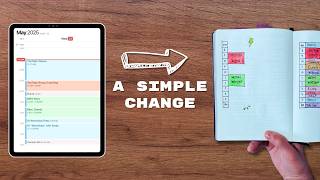
In this video Matt Ragland argues that the single most effective productivity habit is time blocking – deliberately reserving calendar slots for your highest‑leverage work. He explains why most people fail at time blocking: they try to schedule every minute of the day, which creates frustration when unexpected demands arise. Ragland’s solution is to start small, protecting just 1–2 hours each day for the one project that will move the needle the most (e.g., a YouTube video, a course, a key work deliverable). He uses the "big rocks" analogy to illustrate that big, important tasks must be placed first, with smaller tasks filling the gaps. He contrasts analog methods (a single column in a bullet journal) with digital tools, endorsing Sunsama for its channel‑based time‑tracking, weekly objective planning, and focus mode with Pomodoro support. Ragland also frames time blocking as a mirror that shows whether your actions align with your stated priorities, turning missed blocks into self‑reflection rather than failure. He concludes with a call to experiment with a single focused block, adjust based on outcomes, and explore related content on time tracking.
Chapters
If I give you one piece of advice on how to be more productive and focused, it would be to block your time. Time blocking is an incredibly effective strategy because you're giving yourself permission to do the thing that you have said is most important to you. And we can talk about a bunch of different things like how to prioritize, what projects or tasks you should be working on. But In essence, you probably know the thing that either you should be doing, or maybe there's something else that you want to be doing, and time blocking is a way to give yourself permission and protect time in your calendar. Now, what most people get wrong with time blocking is they try to block out their entire day or their entire week, and you get frustrated, you get off track, and you think, well, this doesn't work, or I'm not any good at it. But I'm going to tell you in this video today that you're wrong because you're not bad at it. You're just making a couple of mistakes that are easy to overcome and fix. And that's what we're going to talk about in this video. My name is Matt Ragland. I'm a father of 4, an entrepreneur. I've been married for 18 years. And so I think I know a little bit about how to balance things and keep a tight schedule focusing on the things that are most important to me. Let's go ahead and get into it. When you start to learn about time blocking, maybe it's from Cal Newport or you see some other viral time blocking, like big color-coded calendar with all these different responsibilities and appointments. And you look at it and say like, okay, I gotta make sure that I see I want to see enough green because green is when I'm doing sales, or I want to see enough blue because blue is when I'm doing creator work and that's what matters to me. You can look at it and feel pretty overwhelmed pretty fast, or you could look at it and think that's how it's supposed to be done. And I'm here to tell you that unless you're either really disciplined and have a lot of control over your own time and calendar, then you're going to kind of mess it up pretty quickly. And that's not your fault. It's just because time blocking is hard. You can't be in time block mode all the time. When you're really early on with trying out this time blocking stuff, it's tough to estimate how long things are going to take and things are just going to naturally come up in life, especially if you have like kids or you work from home. Even if you, you know, work at a job, your boss or somebody that you work with is gonna come in and be like, hey, I need you to work on this thing. And you can't just be like, oh, well, I don't have time blocked for that right now, boss. You're gonna have to come back to me in a couple hours. That's just, you know, not realistically how it works. I wanna give you a quick heads up that in this video, I've partnered with Sunsama to give you an overview about how to use a digital calendar for your time blocking. If you're looking for a digital calendar tool, I think you'd be hard-pressed to find something better than Sunsama. I'll show you a little bit more about it later in the video, but wanted to give you a heads up here at the beginning. If you want to have a successful start at time blocking and see the benefits of this practice, what I recommend you doing is only blocking 1 to 2 hours per day for the thing that is most important to you. Now, when I say what is most important to you, that can have a lot of different meanings, but the way that I want you to think about it is What is the most important project that you're working on? The kind of project or task that if you complete this one, it's going to make everything else easier, or it's going to create more leverage for you in your life and work. You're working on a project at your— in your career, at your job, that you're like, if I do this thing, then I'm going to get recognized, I might get a promotion. Another thing, like for me, running my own business, being an entrepreneur, being a content creator, is like, if I protect time to work on YouTube videos, if I protect time to build courses, then those are high leverage things that I can do that's going to reach more people and allow me to earn more money so that I can spend more time on videos and continue to reach more people. Remember, the temptation is to block every hour, every minute of your day. So like, I'm going to write from 8 to 9, I'm going to check emails from 9 to 9:30, I'm going to have all my calls from 9:30 to 11, I'm going to do teaching sessions from 11 to 12, and then I have lunch, I'm gonna have a workout. And, you know, most likely there's going to be something that throws a wrench into your plans. And if you're not very experienced with this, then most people are going to get pretty bummed out and think time blocking isn't for me. There's too much uncertainty in my day, in my life, to be able to practice this effectively. Even when I start to block off more of my time, more of my day, I still see this happen. I've just been doing it long enough that I can kind of pull myself back from the edge of spiraling downward into thinking that I'm not very productive or not very good at anything. And think like, oh yeah, this is the thing that happens when I try and schedule every minute of every day. When you only block out 1, 2, maybe 3 hours, you start to see that the rest of life and the rest of work can then kind of fit into that primary time block that you've protected for yourself. It's kind of like the big rocks theory. If you've heard of this, it's where, say you have a jar and if you put in the big rocks first, the things that are most important, then you can put in like some, you know, mid-tier tasks and projects and those start to fit in too. And pretty soon, like, you know, you're able to fit everything else in, like those little things, like, let's make sure we check email, let's make sure we follow up on Slack messages, let's make sure we check our mentions and our DMs on social media. Those are like the sand. And so you can always fill in more sand. The problem is like, if you start with the sand and the little things, then you look at it like, oh, I don't have any room for the big rocks anymore. And that's often what happens is when you start to like do a little too much, like over-optimizing of your schedule minute by minute, hour by hour, You're kind of fit starting with the sand and then trying to fill everything else in and it gets a little unwieldy pretty quick. So what's the analog angle to this? Well, for me, it's really simple. I just make one column in my bullet journal and write down each hour of the day. And then I block out on the paper, the hours that I'm going to be working on YouTube videos, or that I'm going to be working on a course, or maybe I have a coaching call. These are all things that I'm putting down. And even though it's not blocked in a digital calendar, the more that you write things down, even if you feel like you're duplicating your effort, the more those tasks and goals and appointments are going to strengthen and power in your mind. You're going to remember them better because you're writing them down. Now, since we're talking about calendars and many of us have appointments, we have meetings, we have things that need to be blocked off in the calendar. I'm not saying that you should never use a digital calendar because even though I like writing things down on pen and paper and in the Bullet Journal, I still use a digital calendar. In fact, it's the most consistent digital tool or software that I use. And one that I've been using a lot recently and have really enjoyed, and I think you should check out, is Sunsama. Honestly, Sunsama is my favorite digital calendar. I've used a lot of different calendars besides Google or Outlook, but Sunsama has a lot of great features for productivity and focus that align with how I work. Here are 3 of my favorites. First, you can add channels to your time blocks. That means you can basically track your time while you block it, and I can see how much time I'm spending on these blocks and projects. I have another video that talks about time tracking in more detail, but it's my belief that in order to block your time effectively, it helps to know how much time you need to block for that task or project. The second thing that I like is that I can plan my objectives at the start of the week. So I have this whole like weekly planning, weekly review ritual. And what this allows me to do is match my tasks and time blocks to align with the objectives. I love this thing because it's basically like a digital equivalent of my GAP planning system. I have another video about that. You can also see it in the description below, but it's really effective and people really like it. Number 3 is there's a focus mode that hides everything in the calendar except for the time blocker task that you're working on. And there's even a nice little Pomodoro option to help you get in a rhythm., and I like this because often productivity tools can cause as many distractions as they want to help you eliminate. And so just having like a quick button that you can click to focus on the thing that you're working on, I really enjoy. So if you sign up for Sunsama with the link below, you'll get a 30-day trial and access to a full training video where I'm gonna show you exactly how I set up and get the most out of Sunsama in my daily workflow. The other thing that I love about time blocking, and it's kind of a blessing and a curse, is that time blocking is a mirror. It shows you what you're actually doing and what is important to you. So if I say to myself that it's really important for me to do YouTube videos and I block out 2 separate 2-hour blocks or 3 separate 3-hour blocks throughout the week, and I don't like actually do YouTube during those time blocks, it's a mirror for me to look at and be like, do you really care about these videos as much as you say you do, because your intentions are not matching the reality of what you're actually doing. And it's important to know that doesn't mean I'm a failure or that I'm not doing the right things, but it is an opportunity for me to take a step back and think, huh, I'm not following through on my time blocks. I'm not like allowing myself to do the thing that I said it was important to me. Why is that? Is it because I'm scared? Is it because I actually have other priorities? It's just an opportunity to have a conversation with yourself. Whereas I think a lot of times when our actual work does not match our intention, there's a temptation to like feel really bad and to judge ourselves. And, you know, sometimes we do need to be like, hey, you need to step up, you need to do this more, you need to follow through, you need to overcome your fear. But it's also just, again, like the first question is an opportunity to be like, Hey, what I'm reflecting back to myself and the work that I'm doing does not match the intention that I have. Why is that? What's actually going on here? And that for me is what a big gift of time blocking is. I set an intention, I protect the time, then I need to say like, okay, did I actually do the thing? And sometimes things go over or like I work for 2 hours, but I don't quite have like a completed video the way that I wanted to. That's okay too. Now I just have more information. A video isn't going to take me just 2 or 3 hours. It's probably going to take me 4 or 5 or 6 hours. I need to reassess my time blocks. I need to see where I can protect more time to have the outcome and complete the goal that I set. So if you want to try out time blocking, the big thing to remember is don't block out your entire day. You're setting yourself up for failure and frustration. Instead, pick out 1 to 2 hours today or some day very soon and follow through with that time block. You may get done with the thing that you plan to do much faster. It might also take longer, but then you just have more information. But set yourself up for success by giving yourself one single time block to work on one thing that you have said is really important to you, and then learn more about yourself, learn more about how you're working and how you're enjoying the work that you're doing. If you have any other questions about time blocking, please ask in the comments below. I'd love to talk with you in there. And another way of thinking about time blocking is also with time tracking. So I have another video. About time tracking that you can watch right here. Make sure you check it out, and I'll see you in the next video.