This Simple Analog Kit Fixed My Phone Addiction
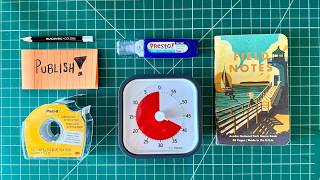
Matt Ragland replaces digital productivity apps with five analog tools: sticky notes for daily priorities, a bullet journal for planning and tracking, a whiteboard for mind-maps, a visual Time Timer for 45-50 minute work blocks, and correction tools to keep everything tidy. Moving planning off screens reduces distractions and helps you think more clearly.
Chapters
So have you ever noticed that productivity apps tend to cause the same sort of problems that they want to solve? Things like distractions, wasted time, or mental fatigue. And don't even get me started on the rabbit holes you can go down just because you're on a screen or on your computer, on your laptop, on your phone. The other things that can take away your distraction, everything is just a tap or a click away. But what if I told you there is a better way to brainstorm, plan, and track your work? Tools that you could use that would allow you to get more done with less stress. So I've been using these 5 tools for a number of years to make serious progress on the goals and the work that matter the most to me. But it's not just me talking about this anecdotally. The biggest tech companies in the world use these same tools to stay productive and focused even while they build software that actually like is made to distract us from other things and to keep our attention on the screen and on their apps. In this video, I'll walk you through those 5 analog tools that you can use to plan better, think clearly, and take action faster. We'll start with this really simple, powerful tool that I use before I even touch a to-do list or my notebook. And by the end, you'll see how all of this comes together to form a powerful analog productivity system. All right, let's start with tool number 1. It's probably on your desk or somewhere in your house and office right now. I'm talking about the humble sticky note. Now, I use sticky notes every day, but the one thing that I always use it for is to write down my number one goal or task for the day. This aligns perfectly with my GAP method, and it allows me to stay on track and stay focused on the goals and the projects that are going to drive my life and drive my career forward. What the sticky note does is it creates a visual anchor that cuts through the noise.. So even if my Bullet Journal is tucked away, I can still look up and see that sticky note stuck to the monitor or stuck somewhere in my office that provides that cue of reminding me, for better or for worse, this is the thing that you said was most important to do today. Okay, now that you are locked in on your number one goal with the sticky note, let's go ahead and shift to a tool or a tools. I smuggled one in here on ya. Something that you're all going to be familiar with, but it's the number one thing that I use to keep track of my tasks and projects every single day. I'm talking, of course, about my bullet journal. Now, this could also be Field Notes, this could be any notebook, it could really be any kind of paper system like an analog card or just a note card that you're using. But I like to use it for brainstorming, for writing down notes, jotting down ideas. I plan out all my YouTube videos in a bullet journal. And the other thing that I really started to like to use it for again is habit tracking and time tracking. Habit tracking I do just to give myself that, you know, momentum, that like belief that I'm pursuing the things that matter the most to me. And then time tracking— and I have videos up about both these topics— but time tracking also helps me stay aligned of knowing these are the things that matter, this is what I'm spending, this is how much time I'm spending on each one. And consequently, kind of vice versa, I guess, on the flip side, that if I'm spending a lot of time on things that don't matter as much to me, things that I have stated as, okay, this isn't a high priority, then I get to see that. Okay, the third analog tool that you're going to want to use, and this is one might be a little bit harder to procure or use, but it's a whiteboard. But what I like to use it for is visual mind mapping, for kind of getting a timeline of a project down. I'll also use it for just quick ideas that I want to keep, like the sticky note, a little bit more front and center. Because while I love using the notebook, that is something that is closed quite often, or it's not necessarily directly in my, like, visual field. The sticky note right there, the whiteboard right there. And anytime I'm coming into the office, I'm seeing those things like, hey, here are the 5 analog tools that I love using. Here are other YouTube ideas.. If there are other like tasks, sometimes I'll just toss them onto that board, especially if they're not things that I have to do right away. Okay. I've given you 3 very tactical task management-based tools to use so far, but all of that to-do energy needs some structure. It needs some boundaries. And that's what we're going to talk about with this next tool, because how many of you have sat down to work, you even have a clear idea of what you want to do, but all of a sudden 2 hours have gone by. Now sometimes that can be a really good thing. If you get into the flow and you just start working for 1, 2, 3, 4 hours or more, that can feel really good. But sometimes you don't really need to work that long on a thing, or you've already blocked out a certain amount of time. And like with everything else we've talked about, if you're keeping a timer on your phone or on your computer, then that's just another temptation to check and see how much time you have left, which can lead to distraction in other ways. That's why I like to use this visual timer called a Time Timer. And I heard about Time Timer in this book called Sprint. It's by Jake Knapp and John Zuraske, and they talked about using this tool when they would do design sprints at tech companies. Again, lots of sticky notes, lots of whiteboard sessions at these. Very inspirational to me, as you can tell. But the other thing that they talked about was using this Time Timer. And all you do is turn it and you see represented in red the amount of time that you have left. Now I have an hour-long Time Timer. And so one of the things that I'll often do is like use, create a mega Pomodoro type of like work block. Normal Pomodoro technique is 25 minutes of work, 5 minutes of break. I can go a little bit harder than that. Not saying I'm special. I probably do get distracted a little bit right in there, have to take a little mini break. But what I like to do is work for about 45, 50 minutes and then take a break for 10 or 15 minutes. So I go hour by hour throughout my day focusing on these Pomodoro chunks, and I can track them and keep an eye on them. Easily and visually without having to mess with my phone or even my Apple Watch with the Time Timer. Now, sometimes progress isn't as linear or as pretty as we want it to be. You make some mistakes, you write down the wrong thing, you go outside of your time boundary. And this last analog tool is actually two tools. So forgive me for smuggling one in here. Maybe I should have said seven tools, but they basically serve the same purpose. And that is a Presto whiteout pen and this cool like sticky like paper tape. And I like using both of these mainly in my notebook, but I can also put them on a sticky note. And I also use the Presto pen to like sign my name on stuff or draw, uh, things like on my phone case. So a little bit of like fun right there. But both of these tools are really great because they allow me to like just kind of COVID up some of the mistakes that I've made. And granted, mistakes are normal, but it is cool to use these couple of like fix-it tools that are analog, like an analog Band-Aid for my analog tool. So that one is maybe not quite as productive, but especially the Presto Pen It's among, if not the most fun tool out of this group. I recommend you getting one, even if all you do is draw on some things that aren't supposed to actually be drawn on, because it's kind of fun and it's a way to customize things that are personal to you. These tools aren't just productivity hacks. It's a mindset shift. It's saying to yourself, I don't have to stare at a screen. All day in order to do the things that are most important. I can almost promise you that if you start to use and stick with these analog tools, you'll find that you're thinking more clearly, you're getting more done, and you go into your, like, digital workspace with more intention and clarity, which allows you to get more work done in less time with less stress. If you like this video, make sure you check out this one, which tells you more about the GAP method of planning that I use for each week. It's a totally analog system, and I know you're gonna love it. Thanks for checking it out right here.
More from Matt









Journal reading 📖 Reflectjons on how I’m living & how it aligns with the vision I have for my life.

You don’t have to listen to me. But you do have to be intentional about the systems in your life.
