Copilot CRM vs Jobber CRM: Pricing comparison
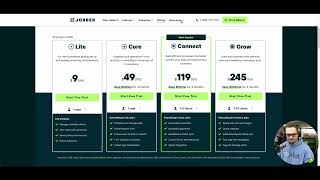
Christian compares pricing and features between Copilot CRM and Jobber CRM. Jobber Connect costs $119/month with limited trial access, while Copilot Pro runs $179/month and includes dispatch, automations, and two-way texting. Copilot charges $15 per extra user and caps ACH fees at 0.8% with a $5 limit, versus Jobber's uncapped 1%.
Questions this video answers
About 14 days.
Free/solo up to 50 users.
$15 per extra user/login.
$119 per month (Connect level).
Pro referenced as $179 per month; Enterprise referenced as $249 per month.
Chapters
What's up everybody? Christian here with tech support, sales and consulting. I got another comparison video between Copilot and Jobber CRM. We're gonna be talking about the pricing page and kind of just the differences between what we have to offer, what they have to offer. Functions, features. We're not gonna go too deep into the functions and the features in terms of definitely the functions of the features. Right. Go and check out our other videos. We have a Copilot university. We have other comparison videos on our YouTube page. So go and check those out. This is really just to kind of be on a nice talking point of like, what do they provide? Right. When you're, you know, what, what is, what is the user or customer looking at when thinking about switching CRMs that they're currently using? Right. So we're going to go to their Light option. They don't have a free option but they do have the ability to, to kind of have this start free trial and I think it's about 14 day free trial. You can, you can, you know, test out the grow, you can test the Connect Core and Light. Um, with that being said though, I tested out their grow with a 14 free trial and I still didn't have access to a lot of key functions. Um, you know, I didn't, I couldn't look at the email builder. Um, you know, I don't have access to I believe the one on one product coaching. I didn't see that option anywhere. You're just kind of limited to some things and, and they don't really tell you that. I don't see where they tell you that with the starter free trial you think that you're going to be getting all the, you know, functions within it, but you're not.
So first we're going to start with the Light, then on the Light.
Not a lot of, not a lot of features posted. I know for a fact they have more features that, you know, that are useful and worth putting on here, but they only give you like 4, 4 features to even really like. I boast about, right, the ability to manage unlimited clients. Fantastic copilot. You know, we have up to 50 for our free and that's kind of for a reason. We want our users to, you know, as they level up, as their business starts to, you know, obviously become more profitable. We want them to slowly gain more features from our other subscription levels and then obviously the enterprise level where they get max support. Right. So we want our users to grow with us as we're growing as well.
24. 7 client self serve hub. So their client portal, it's a very clean and functional client portal. Again we provide that as well at the free subscription level. Sending quotes, invoices, you know the basics that you're going to need to run a home service or lawn care business. They provide that and the ability of online payments. I'm not going to go through.
You know, Jobber and then find features to talk to you guys about. It's it. I don't know why they didn't list more for you guys. I don't know why they don't want to talk about some of the really good. Because they do have a good interface. They, you know, everything's very clean, it's very functionable but you're very limited. So I mean.
That'S, that's about it for the light. I mean that, that is about it for the Light. Going into our Copilot free. Tons, tons, tons and we call it the solo right up to, you know, free up to 50 users. We could do all the basics. Invoice estimates, what have you track your job. We got the client portal track expenses, bulk pricing. Some of the key things that they don't have those that powerful dispatch board. So obviously you don't have access to the dispatch board at the light subscription level with Jobber. So being able to be in control of your, your jobs live and having a map view that floats and, and having all those functions is massive. For the solo subscriber at Copilot being able to also, you know, tag system, tagging systems are huge. I think you're able to do it within Jobber. It's just not posted but we definitely like to post that because we think it's definitely inefficiency increase within your business to be able to kind of tag things and make workflows based off of that bulk email and one click estimate templates. So we got massive amounts of text and email templates and the ability to essentially create you know, put you know, HTML videos or even even just today we we innovated and add the ability to have gifs and some other different things within your email builder. So very, very, very powerful email builder for, for the solo for the free.
And in terms of the Zapier integration as well, you know, from free from solo all the way to enterprise level, you're going to get that Zapier integration, the ability to again connect you know, 5,000 apps or softwares to enhance your business and the communication to do so and maybe generate leads and, and you know, you name it. So if you if you're not familiar with Zapier, go ahead and hit hit up Copilot University. We got a video on that. Kind of talking a little bit more about that as well. So a lot more for our free. We want to list it. As you can see our free subscription has the most features listed because we just want to let you guys know what you're going to be getting in value from Copilot. Right.
Sweet. Let's go into the core. Core versus starter package. Right. So again, you could do a free trial. Within the free trial you're not going to have access. Access to some things. They, they've been around long enough to be able to put some, you know, Some, some save 30% off offers and some stuff like that there, which is nice. We don't have that, we don't have that track record but we definitely.
We'Re putting all of our money and our, all of our energy into the innovation and getting ourselves up to speed to be able to generate functions that are really applicable to the industry. Scheduling jobs and managing jobs. So obviously after you free or solo for Copilot, you can already operate a dispatch board, manage your schedule and way much more. So you're going to have to pay 50 bucks to even get to your schedule and to start managing your jobs within Jobber.
Online request form. So on the client portal they're able to, you're able to customize the request form, which is really nice. We are bringing that into Copilot here eventually. But our request forms are only for our enterprise level. So that's something that they have on us and that's something that we definitely may change in the future too. In Copilot we just got some bigger fish to fry in terms of, you know, features that we want to roll out here in the, in in the near future. Especially you know, with the summer coming up and spring rush, you know, coming to an end. So.
That could be something that we definitely end up implementing for just all paid users in the future. I know that was a conversation that's already been brought up with the team. So access to over 20 built in reports. So I guess they're just trying to say, hey, we got some templates for you. So do we. We have templates for automations 50 plus. We got templates for texts, for emails, we got templates for everything and it's free. So cool. A one on one product coaching. I don't really know what that looks like. I tried to YouTube it. I tried to gain some more access. I don't know if that's. They're teaching you tricks and ways to, you know, beef up your product. I don't know if that's just one on one support. I don't, I don't really know what that looks like. I tried to look into it a little bit more. Again, it's another one of those things where you don't have access to it when even though you have a free trial. Right. So not too sure what that looks like, but it's pretty cool that they provide that at that level. We don't provide any Zoom call or video call support until you get to our pro level. And that's for a reason, because it's very valuable. Stephen does a very good job breaking things down and making it an educational session between the user and tech support. And it's a really good way for us to gain a really good relationship with our users and kind of understand their workflows that they're creating within our own software. So the next time we service them, it's really easy to do so. So Jobber App Marketplace. So honestly, I'm going to highlight this massively for Jobber. The whole team over here really, really thinks that their app Marketplace is apex. It's cool. It's essentially what can Jobber integrate with? And it's very clean. The interface is clean. The marketplace is phenomenal. It's something that we are bringing here soon. I don't know the timeline quite on that yet, but we are bringing in a marketplace where essentially you'll be able to kind of share PDFs and different things with other locations to support franchises right within our CRM.
And as well as like Zapier integration. Again, go check out a video on that. That'll be kind of like our. Our app integration and you'll be able to kind of, you know, type in your favorite software that you're using for your business and see if it's compatible with, you know, Copilot. So it's pretty cool. Marketplace. Let's go and check out.
Copilot Starter. So some big things. Office hours, knowing when the co founder, Mike Andes is in there, when is his office hours, how can I get in contact with him? Access to the Facebook group is a big one. I talk about this one a lot because it's more into our transparency side. We talk about transparency a lot with Copilot. The ability to talk to the founder on a regular basis, biweekly, and to just ask him questions about Copilot softwares and really just business too, as well as becomes Very valuable. And you know, we're getting users kind of just talking about, you know, feature requests and just different things within Copilot. Creating a community on that Facebook page. Again, another way for us support guys to get really intimate relationships with our users. Unlimited customers, of course. The ability to be able to add a client widget. I believe Jobber has the same thing. They just don't want to list it. The live GPS tracking. Again, I believe Jobber has that as well. I just don't know what level two that you're going to get that or how functional it is or if you can even have that feature when you're in the free trial. Not sure. Buy Now, Pay later is coming soon. That's going to be a powerful function in the near future. The ability to be able to tip. I'm not too sure if Jobber CRM even has that to be able to give you guys some more money for your technicians that are out in the field. You know, put a tip on, on the job before you guys close it. And then our chat support. So our chat support or air traffic control is what we like to call ourselves. I am a part of that as well. And we like to get people, you know, get back to them within 24 hours. I know for a fact I get back to people a lot faster than that. It's a live chat. So as soon as you shoot a text in there, it runs you through a very efficient bot flow separating whether you need help with tech support or did you find a bug? Did you find. Or do you have a, you know, a fe. Your request or do you want to, you know, talk to sales and consulting, you know, it runs you through that bot, you know, and, and then, and then I'm here and then I'm talking to you, right? So it's very fast and we get back to people as soon as possible. We don't start providing the actual one on one zoom meetings or chat meetings until you get to that pro level. Right? So let's get into that pro level next.
So for Jobber, it is their most popular. It is their connect level, right at 1, 119amonth. And just to compare the price point of the Pro, I know I gave you guys a lot more.
Features and functions in comparison to what Jobber's given us. A lot of what Jobber's given us is what we have on our free. But that's at1.29amonth for our starter package. Let's get into the Pro119.1 to 5 users. I don't think I believe I talked about this on my comparison video to Yardbook, but it's a $15 per user. Anyone that you're going to want to have a login and full access to all the capabilities to our platform is going to be $15. There's no extended fees, there's no trial fees, there's no any extra extended fees. With Copilot, it's $15 flat for another user and we're not going to limit people to one to five users. It's, it's, it's unlimited, however many you need, how many, you know, employees you have within your business. Right.
Automation reminder. So I guess they're now providing automations at the connect level again. We can have automatic, we can have automatic reminders for to dos for meetings. You can set up reminders for, you know, job interviews for yourself with Copilot. So I'm glad that they do put out some automated reminders for you guys. But it's not until you get to the connect level. Automatic payments. That's great. We can do that at the free level here at Copilot. QuickBooks Sync Online is something that we definitely do at the enterprise level to support larger businesses maybe again, down the road. Like I said, we've only been really up and running for the public for months. So this is something that we definitely may be able to provide for all paid users here in the near future. But as of right now, we definitely provide it for the enterprise level. Custom forms and checklists.
Again, not too sure what that looks like. Sounds cool. At the free level, we, we allow you guys to be able to kind of set, you know, send documents and forms and attach forms to visits and, and different things like that. You can create, you know, tags, you know, what have you. So in terms of the, you know, custom forms and stuff like that, I would like to dive into that a little bit more, kind of see what value that brings to you in your business. Zapier integration. Again, we do Zapier integration at the free user level at Copilot. So I'm glad they do have the Zapier integration. Very powerful. But you don't get it until you get that connect level. So let's go and take a look at Copilot.
Pro level. So again, like I talked about, the support, the man, the myth, the legend, Stephen George himself, who created our Copilot University, you'd be able to schedule 15 minute Zoom calls. Again, we're not limited to 15 minutes. I've watched George hash out an hour long session with an enterprise user going over, you know, a list amount of issues he's running into and he was able to create a new workflow that supports our software and that bettered his business. So you're not limited to those 15 minutes but again it's a way more intimate way for us to be able to troubleshoot some of your issues and gain that better relationship with you guys as well. Optimized routes is at the pro level. The ability for downloadable backups, time tracking Pro is just a little bit more enhanced time tracking and some added options for your estimates as well.
And that is going to be at1.79amonth.
The support, the phone supports, massive. It's massive guys. Even our users that they'll join, they'll be using this for a month or two and they're not and they're not using our phone support. I'll personally reach out to them and say hey, schedule a zoom with Stephen. Schedule a zoom with Stephen. He'll be able to fix any little things that you were thinking about messaging us about. Yeah, go Air traffic control. Sweet. Let's go. Enterprise versus grow. So 249amonth.
Boom, boom boom. Quote add ons and images. Yeah we you can attach photos and thanks to your estimates at the free level with us. I'm glad you can do that though. Within jobber quote markups I'm not sure what that looks like but essentially you can kind of mark up.
You know, probably your services or whatever the case is. I'm not too sure what that actually entails. Fantastic automated quote follow ups. So again now you're looking at some more automations going on at their grow level. We have, you know, 60 for our free users and they're able to customize them in their own triggers and run times and sub actions and all the above. And even at our enterprise level we have a sequence automation that's going to be refined and dropped here within this week. That's again going to be able to kind of however, however creative you want to get with your communication, you'll be able to kind of create within the sequence automation as well. So another thing too is you can go into a customer's profile and essentially set up automations just specifically for that customer. Maybe you have customers of high value who have multiple properties, who get multiple different types of services. You want, you know, higher levels of communication with that, with that, that customer as well. Right. Two way texting. We have two way texting as well. It's a fantastic feature. Definitely applaud Jobber for having that again, it becomes a one stop shop. And that's what I think CRMs and software should be doing for business owners. You know, we shouldn't have to have multiple phone numbers, business numbers and, and all these different, you know, you know, a million different subscriptions to a million different softwares in order to run a functional business. It's nice to have that two way texting.
Tag and managing leads again. That's one thing that we highlighted heavily on our free subscriptions. I'm glad I went over, I'm glad I give it that energy because at the end of the day that's a really good way to create higher efficiency in workflows within software when you're able to tag things. Right. So glad that they have that. You don't get that until you're at their highest level. And even at the enterprise level you think that you'd be dropping some of your most powerful features to show people Here we, you know, one, we got just a handful of features shown here on Grow. I know for a fact I've been inside of Jobber that do have really clean and functional, you know, features and software in their software. But they're not, they're not telling you about it. It's a shame. Let's go and go to Copilot.
At the enterprise level. Like I said, we got the QuickBooks sync, the ability to have ACH on file. Let me check real quick to confirm that.
Yep. So they do have ACH on file as well, but they have no cap. So they set the cap right. At the end of the day you're going to be out on some money using the ach. If they have no cap on that, we have a cap of $5 and our ACH is at 0.8% versus a 1% at jobber as well. Saving money is what we want to do. We don't want to have this software that's essentially a payment processing software. This is a software to better home services.
So like I said, big, big ticket features. You would like to see that on the enterprise level or the your highest level. That's what we provide at our enterprise level. So auto charge cards on file, the ability to have hch, the two way texting from desktop and mobile version website lead integration. This is where you can again kind of attach that client widget URL and have customers fill out work request forms and jobs and then essentially you can create, you know, jobs from that work request form so you don't have to have any communication with customers or leads when you know, bringing in some new jobs, right. Paid for performance is massive. And the ability to count budgeted hours within, you know, your, your business and within the softwares. If you don't know about pay for performance, please check out copilot university and payforperformance.com. uh, that's going to be the future of the labor industry. We truly believe that. I mean we're going to be bringing that in the summer, founder guaranteed. So this is by far the biggest, I think feature for Copilot, period is the leadership. Right. So we talked about the Facebook group, we Talked about the 747 is our weekly updates on Saturdays of the goods and the bads and everything that's going on within Copilot in the, in the office. But also the ability to just give you guys your money back if things aren't working. Like if you guys end up signing with us and you guys are going for a couple months and things just aren't working. You're not finding good workflows. Even after getting all those multiple zoom calls with Steven or talking to me or if it's still not working, we definitely want to know why and we want to revise our systems and the way that we're doing things and we want to be able to give you your money back too. So we know here at Copilot how big of a risk it is transferring from another CRM to our CRM and what that looks like. Right. Especially during maybe a time like right now, like, like spring rush. So absolutely. Advanced Sequence Automations. I went into that a little bit, but again, go check out Copilot University. We got a video on that. Stephen will run you through a demo of what that looks like. And then coming summer job costing and price matrixing, you know, we want to be able to provide, you know, you know, 5 million plus companies some of these major features that we got coming out in the summer and further are going to be able to do so. And we're very, very, very excited about that. So that's going to be at 2, 49, 15 per extra login. Like I talked about, you can go build from monthly to yearly. I don't think I talked about that on my recent yard book comparison video. You know that. I hope you guys enjoyed this content.
Again, just looking at the pricing page, Copilot looks like it looks like Jobber can't even really compare to us with our features, unfortunately. I know they can. I know their software is really good, but they just, on their pricing page, they don't provide a lot of functions to show you guys, so I hope you enjoyed this video. I personally look forward to helping you guys out in the near future. Book a call with me if you want some more information. Talk to you guys soon.