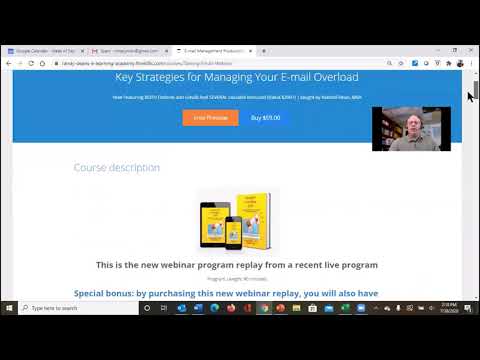
This content was created by Randall F. Dean. This content was uploaded by Randall F. Dean. This is a YouTube preview video titled "A Brief Preview of my Full-Length Taming the E-mail Beast online e-learning program, with bonuses!" (created 2021-10-22). A single presenter (contact randy@randalldean.com, likely Randall Dean) gives an informational/promotional monologue introducing the "Taming the Email Beast" e-learning program, describing its components (webinar replay covering Outlook and Gmail, a deeper email course, two focused 75-minute videos for Outlook and Gmail, a 20+ page Post-Program Interactive Self-Study Guide with links to articles and YouTube tutorials, the full e-book, a 90-minute email etiquette course, bonus PDFs, and ongoing access), viewing/practice recommendations, and contact information. The content is educational/marketing material rather than a multi-speaker conversation.
Chapters
All right. Hello everybody. Thanks for taking a look at my Taming the Email Beast webinar replay program. I just wanted to do a quick little intro about this program to let you know exactly what it is that you'll be getting, uh, for the program. Now, if you take a look at what this program offers, it's got quite a few features. Uh, first I want you to notice that there's 4 different videos that you can take advantage of. The first is a video that is a webinar replay of the combined Microsoft Outlook and Gmail program. It covers both programs and some of the key features in both, both on efficiency, productivity, reducing distraction, utilizing some of the better tools. What I've also done is included a more in-depth email course. That's sort of the quick hitter course, but the second one actually goes a little bit deeper. So if you're using both software programs, you can utilize that longer video to get even deeper after the first video. And then if you're just using one of the two programs, I actually have two 75-minute 5-minute focused videos. One which features Microsoft Outlook. I'm calling it 2016, but it's basically the local client version, uh, which is the version that is now the standard install on most PCs. And, um, I also have, uh, information on the newest releases of Gmail that are in there. Although I will tell you, I actually created a couple new YouTube videos— more about that in a minute— that talk about even some new features inside of both Outlook and Gmail that I'm going to be including in the program. And then one other thing that I wanted to share with you about is that I've actually done two more things to make this even more feature offered. One, I've created this item right here. It's called my Post-Program Interactive Self-Study Guide. Here's the easiest way to understand this thing. It's basically like a program handout on steroids. And here's what I mean by that. I'm going to take all the slides that you're going to see in the program. I'm put them into a 20-something page PDF booklet, and inside of that it's going to give you links to additional articles I've written. It's going to give you links to other books on time and productivity management that I recommend, and it's going to give you direct link to some— links to some of my YouTube tutorial videos. That's going to be inside this guide, and you can have this guide to basically do a deep dive self-study after you watch all of these videos. Additionally, you know what else you're gonna get? You're gonna get a full copy of my Amazon bestseller, Taming the Email Beast, so that you can use that and go as deep as you want with that. And I've even added in a copy of my 90-minute program on Taming the Email Etiquette Beast. I've actually rolled it into this program to make this a feature-loaded offer that gets into the construction of emails, how to make your emails do what they need to do when people read them, how to make sure that everybody understands stands their assignments, how to avoid the problem emails like carbon copies and forwards and replies and FYIs and reply all, all that kind of stuff. And it will talk to you about how you can actually make the written communications in your email work better for you. And that's just a special bonus we're going to add in. Now, as you can see, I go through a lot of detail. I recommend you read through this. This will sort of talk about a little bit more in detail as to what you're going to get from the program and the kind of ratings this program has received in the past. But if you come down here to the bottom, you can actually see the full course curriculum. And as you can see, I've got, like I said, the different videos, the related handouts for the videos. There's that self-study guide that we just discussed, you know, the 20-something page handouts on steroids, the email etiquette course. And like I said, take a look at this. You can get the full ebook PDF of the book as well as some additional bonus PDFs and I'm going to be adding a brand new PDF as soon as I get done recording this video, which gives you links to all of my favorite YouTube videos that I've created over the last, you know, 10 years or so on not just email management, but Outlook usage, Google usage, um, have some videos on general discussions on time management and productivity topics, things like that. So we'll get that one in there for you too. And that way you can basically take this as deep as you would like. I always tell people one thing that I would recommend doing this is to actually come up and view one of the original videos at the start. Pick one of these that you think is going to really help you most. Watch it once. Watch it in a full stream. Just let it run. That way you're going to get the larger overview of this whole concept of email management, Taming the Email Beast. Then what I'd recommend you do is come back and watch it a second time, but be ready to hit the pause button. And then what you can do is practice the skills as they're presented throughout. And of course, if you know there's certain things that are, um, even more important for you, then maybe what you do is you fast forward to those items and use the pause button as you go through that content to master your skills as deep as you can. And remember, when you make one of these purchases, you have access to it not just that first time you watch it, but ongoing. So you can come back and watch this thing 3, 4, 5 times until you really master these skills. Um, so with that, I hope that you enjoy the looks of this program and that you give it a try. Um, and if you have any questions, you can always follow up with me following the program. I give you all my contact information in there, but if you have any questions, you can email me at randy@randalldean.com. And I thank you for taking a look today. Bye now.