Distracted to Productive: Finding Focus in Hyper-Interrupted e-Distracted World Mini Program
In this concise workshop, productivity consultant Randy Dean (the "email sanity expert") outlines why modern professionals are overwhelmed by a flood of digital and physical distractions—email, instant messages, social media, streaming, apps, and workplace interruptions. He traces the evolution from early Outlook/BlackBerry days to today’s multi‑app ecosystem, describing how unchecked inputs consume 25‑50% of the workday and can impair short‑term IQ. Dean presents a five‑part framework: (1) email and input triage using rules, filters, and the "do it now" principle from Getting Things Done; (2) handling in‑person and virtual interruptions with a sticky‑note "next‑step" strategy; (3) curbing phone and app notification overload by disabling non‑essential alerts and using custom ringtones; (4) managing social media/streaming consumption through disciplined timing and awareness of device addiction; (5) redesigning the start of the day by reviewing calendar and task lists before diving into email. He also adds a bonus segment on decluttering physical workspaces. Throughout, Dean emphasizes practical, low‑tech habits, offers links to deeper tutorials, and encourages viewers to adapt strategies to their own office cultures.
Chapters
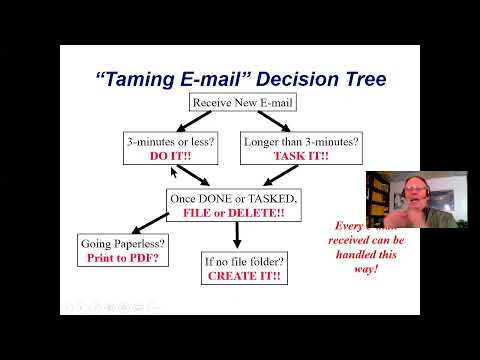
All right, hi everybody, Randy Dean here. As you can see, I am popularly known as the email sanity expert. Uh, give you a little background. Welcome to today's program on From Distracted to Productive: How to Find Your Focus in a Hyperinterrupted, E-Distracted World. Um, to give you a little background about sort of how I got to be doing this program, I started this company back in 2004. With an intent to show people how to be better time and productivity managers using modern technology. Now, back in 2004, that meant Outlooks and BlackBerrys, Microsoft Outlook and the BlackBerry devices, but things have morphed over the years. And about a year into the business, so we're talking 17 years ago, I realized that there was a real big issue for people dealing with their email. Um, email was popping up as a major issue, major problem, and I said major opportunity. Developed a program called Taming the Email Beast. You're going to get a couple highlights from that program in today's session. And also, um, it turned into my most popular program and it became a best-selling book. Out on Amazon. And I've been going all over the United States, Canada, and even Europe teaching that program on how to better manage your email now for 17+ years. But a few years ago, something else happened. I'm in my sessions and people were telling me, Randy, it's not just email anymore. It's everything. It's everything. And so because of that, I developed a program to go even beyond email and go into all of the distractions that we're fighting these days. And today's program is a bit of a highlights reel version of the program. I will let you know that, um, typically this program goes quite a bit longer for most of my audiences. Um, but what I want to do is ask you right off the bat, uh, a little question. And it's a simple question. How many of you are more distracted than you used to be? A few years ago, several years ago. And let's think about why people are so distracted these days. I'll move myself a little out of the way here. Uh, here's why I think people are so distracted these days. Email, voicemail, snail mail, documents, e-documents, faxes, text messages, stacks, piles, and clutter. How many of you got some stacks and piles? Couple tips coming for you later. Uh, text messaging. I am We got now the social media 24/7, 365. Now you went from traditional cable television to streaming, and now we've got 24/7, 365 streaming media, streaming news. We've even got the video games. I didn't even talk about all the pesky interruptions, people just stopping by giving you a phone call. You've even got your family and friends, which maybe are your most important people, but they can still cause you problems and distractions. And I didn't even talk about these things. How many of you got one of these? This is probably one of the biggest smart— or one of the biggest distractions. Sorry, I had to reach down because I got two, an iPhone and an Android. I'm not distracted at all. Oh, and then we've got even TikTok. Oh, and did you know that now there's anywhere from 3 to 4 million apps available for your smartphones and tablets? Huh. Wonder why we're so distracted. It's interesting because, um, you know, people that have been watching this program these days, uh, when I go speak at live conferences, a lot of the times, um, I end up having basically, uh, you know, the people that are a little bit older, a little more— how should we say— experienced They're telling me they're really struggling because when they grew up, they didn't have all this stuff. They had the television, they maybe had email. Some of them were even before email, they're thinking about their fax machine. And now we got all this. And if you don't have strategies for how to manage all this, I actually think it's led to this thing right here called AADD. If you see it down here in the bottom corner, AADD. Adult attention deficit disorder? How many feel far more, um, attention, uh, deficit than you ever used to be? And I, I will even admit, I teach this stuff and I struggle a little bit with this. But part of the reason that I made this program was because I looked at all this stuff and I said, boy, if you don't have strategies, you're gonna really struggle. And, um, you know, now we got to deal even with this TikTok craziness. Uh, so, um, My kid sometimes rolls me into her TikToks though, which is sort of fun. And here's the thing, I think it's actually led to something else. I like to call it this, the squirrel syndrome. Because when you think about it, so many of those things are basically squirrels. And check this guy out. Yeah, I'm actually proud of that picture, by the way. I took that picture. This guy came up and checked me out when I was out walking the dogs. And I said, oh, you just stay right there, buddy. I'm going to get get you in my program. Um, but when you think about it, almost all these things are squirrels that distract you from the things that you really should be focusing on. Now, some of them actually provide you the things you should be focusing on, but you have to wade through all of it to find your focus. Now, I want to share with you that I'm going to cover in the short version of my program 5 key areas today. 5. First thing I want to talk about is email and input insanity. You know, I told you I do email. Let's talk about that for a minute. I also want to talk about those pesky interruptions— in-person, phone, text messaging, IM— the things that are coming in and causing you to go, huh, huh, what's going on? I also want to talk about these phones making you dumb, because there's evidence that they actually are. And There's even now growing evidence of increasing addiction to the devices. And let's talk about your social and streaming for a minute, because honestly, these sort of enable that, plus everything else that you're getting, and some strategies for managing that. And I would like to finish with a thought on maybe a better way to start your day that's a little bit different from what many of you are doing right now that might help set up your day for better focus, better productivity, less stress, less distraction. And you know what? At the very end, any of you that are clutter hounds, you got the stacks, piles, and clutter. How many of you got the stacks, piles, and clutter? Um, I'm going to give you a couple bonus tips on how you can knock down the stacks, piles, and clutter too. Sound good? So let's dive in. Now I got to make a disclaimer right up here. This program is usually done in either a 90-minute to as much as a half-day or even three-quarter-day workshop, depending on what content I roll into it. I'm going to just share some quick top-level ideas, and I want to acknowledge this: not all of these ideas might work where you work. Um, part of the thing that you're going to have to deal with is your office culture, your business culture, the environment that you're in. And certain things I suggest, you might say, that's not going to work. But if I find your sore spot where, you know, it's causing you difficulty, pain, and distraction, what I'd recommend you do is don't just let it fester. Open that thing up and talk to the people that you're working with and say, hey, listen, this is an issue for us. What can we do? Did you hear that question? That's a powerful question. What can we do? What can I do to make this better. So keep that in mind. The other thing that I'm going to do is I'm going to avoid getting super technical here. In a lot of my programs, I do deep dives into Outlook and Gmail and smartphones. I'm not doing that today. But what I'm going to do is provide all of the viewers of today's program some bonus materials, mostly video links to short little videos I've created out on my YouTube channel and other sources to allow you to basically go do some additional self-study once you understand the top-level strategies. So let's dive into those top-level strategies, starting with electronic interruptions, including email. Now, usually when I do my live session right here, I actually tell people, hey, this is— this is time to find out if you've made a poor career choice. No jokes. And here's the thing I want to ask you. How many hours a day do you think that the average working professional, office-based working professional, is spending simply reading, responding to, and administering emails? Reading, responding to, administering emails on a daily basis in a typical professional office environment? I'll let you ponder that for a second. Maybe you could even type it into the chat if you're doing this as a chat view. And now let me make you feel bad, many of you, because the actual answer— whoa, geez, I went right by it— a little bit more than 2 hours per day. So if you're doing more than 2 hours per day, sorry, you've made the poor career choice. But now I want you to frame this. When I do my live programs in front of the larger audiences, I ask that question and typically I get answers anywhere from 3 to 6 hours a day, depending on the audience, sometimes even more than that. Okay, now here's the interesting thing. Um, I, you know, think about this. If you're working in human resources, have you identified that a significant portion of your professional staff is spending as much as 25 to 50% or more of each day just working on their inbox? And second level question I want you to think about: is that what you hired them to do, or did you hire them to be doing something more strategic, uh, and less immediate? Just something to think about. Now let me give you a real, uh, interesting follow-up statistic. I've been teaching this program, like I said, for 17 years. I, I've been asking this following question to especially audiences that have never been to one of my programs. Here's the question: How many of you prior to today have had a formal strategic level email management course? No jokes here. It's been less than 5% of the audience consistently for the last 17 years. So a tool that often takes 25 to 50% or more of each and every workday 95% of you are self-taught. You basically started your job, they said, here's your email, good luck to you. That means you picked up a few decent tips and some not so great tips. Let's talk about the two ways that I think email owns— actually, there's a third way I'm gonna save for the very end. Number one, you're checking it way too much. Average working professional, last statistic I saw, is about 17 times a day they reference their inbox. However, about a quarter of you are checking your inbox anywhere from 20 to 40 times per day. That's every couple minutes. Did I say squirrel? That's a big squirrel. Oh, and get this, because you're self-taught, guess what else you're doing? You're reading the same messages over and over and over again, doing nothing with them. Can I show you why? Now, like I said, I'm not going to do too much technical, but I just got to show you this. All right, let's go into my inbox. Notice it's really messy, but what I wanted to show you mostly is this. Here's what I see people do with their emails. Tell me I'm wrong. They open it up, they read it for a second, they go, you know what, I don't really have time for this one. I'll come up here and mark it unread, close it. Yeah, see, it's unread. No, no, even better. You know what I'm gonna do? I'm gonna come over here and turn on that little flag. Seriously, how many of you Mark it unread, turn on the flag. Use Gmail, you turn on the little star. Yeah, I know what you're doing. And think about what you just did. Didn't you just pretty much guarantee you got to look at that email and read it again later? And here's what's really ugly about that. They're going to stack on you too. That's where your clutter is coming from, because you're not making a decision of what to do. You're simply saving it for later to make that decision later. And then they start stacking and you get an out-of-control inbox. It's, it's that simple. But did you know that there's another strategy that you could use that will greatly reduce the number of times you look at each and every email? And both Outlook and Gmail have automated the process so that it's just about as quick. Let's talk about that. You know what else you're doing too? You're looking all the time because sometimes you get important stuff, but most of the stuff you get is not important at all. So you're looking all the time and— oh, listen to this— there was a study done a few years ago by the Institute of Psychiatry at the University of London where they found that people that were constantly checking their email, text messages, IMs, and voicemail all day long, it negatively affected their short-term IQ by about 10 points, which is about the same as missing an entire night's sleep and more than double the 4-point drop you'd have after using marijuana. No No jokes. That's what happens when you're looking at your inputs way too much and getting constantly squirreled by everything around you. Let's talk about a couple strategies here. First strategy that I always tell people is this: don't bling. And when I say bling, here's what I mean by the words don't bling. It has nothing to do with modern contemporary hip-hop culture. See that awesome Super Bowl show? What I'm saying is instead, is it's that little sound that your email or your phone makes when something new comes in. Bubbling. And what most people do, like Pavlov's dog, huh, huh, huh, huh, huh, squirrel. Did you know that both Outlook and Gmail actually have options? Outlook, under the rules, you can— I'm going to give you the links to this stuff so you can actually go see how to do it. Under the rules, you can actually tell Outlook who are your most important people, what are your most important messages, what are your most urgent messages, and then it will give you special notifications for those items. In Gmail, you can do the same thing using filters. You can set up filters and then let Gmail tell you when you're getting important stuff. And I want you to think about this. If you can utilize those tools, like I said, I'll share with you the technical details that you can go look up on your own afterward. But then you don't have to monitor everything constantly. And what you can then do is get yourself on a regimen to look at everything else based on how often should you be looking at your typical average stuff throughout the day. Now, if you're heavy client customer service and we're internal or external, You might still be checking fairly frequently because people expect a pretty quick response even on normal stuff. If you're more of a project-based worker that needs to deep dive and focus more, maybe you stretch it out. So the first case, maybe you're checking still every 15 to 30 minutes throughout the day. Second case, maybe you're only checking 3, 4 times a day. But if you have your system set up so that it tells you when something important's coming in, then you can look at those ones right away and manage everything else using a smart regimen, which I'm going to show you in just a minute. But here's the other thing— that idea works on these too. How many of you set up special ringtones? And listen to this, the standard text messaging app I have on my device, it also allows me to change the notification settings for certain people. So in essence, email, voice, and text— I can set it up so that I know when the important stuff is coming in, and thus I don't need to look at everything right now. Now, so look into— if you're using IM, I'd even check your IM tool to see if there's a way to even manage it that way there too. Um, now assuming that you get on the regimen, then what do you do? Here's what you do. This is what I've been teaching people for years now. Like I said, when I do my longer programs I get into the full technical details in both Outlook and Gmail. You'll get links to how you can look at this. But the simple matter is this: if you're going to open an email, don't just open it and mark it unread or put on a flag. Open it and make a decision. What do I need to do with this thing? And if that thing is quick— I learned this from David Allen, the guy who wrote the book Getting Things Done, highly recommend that book. I learned this from him 30 years ago. If it's quick, do it now. Here's a way to remember this. Let's go to Ohio. Ohio, only handle it once. Stop looking at the quick little things over and over again. That's how the stuff stacks. Keep the quick stuff moving. If it takes more than a couple minutes, then you should probably prioritize it compared to everything else you're working on. And that's where your task list should come in, or your calendar. Now, here's a little thing I want to share with you right here. Task list or calendar. Did you know that both Outlook and Gmail provide options to quickly convert your emails that you've received into both task and calendar items and even new contact items for the person sending you the email? It's super quick, it's super easy. I'll get you the details on that. As a matter of fact, both of those tools also provide options to automate some of your outgoing messages so they fit this box. So not only can you get more stuff going out more quickly from you, you can better manage the stuff coming in so that you can prioritize it, not be so distracted by it and look at it 3, 7 times. And then of course, once you either got it done or you got a task, you can either file it or delete it. And if you don't have a good place to file it, well, why don't you make a good place to file it and put it there? This is not rocket science. This is just straightforward decision tree management. It's a triage method. But now let me blow your mind here. That same triage method that you're looking at on the screen right now, there's absolutely no reason that you couldn't use the same one, not just for your emails, for your voicemail, for your snail mail, for your documents and e-documents, for your faxes, for your text messages. Maybe even for your stacks, piles, and clutter. You can even try it on your unexpected interruptions. Your boss comes walking in and says, hey, Randy, got a few minutes? You go, will this be 3 minutes or less? And they go, no. You go, well, then you got to go. No, that's not what I'm going to recommend you do. I got a different strategy for that. That's coming in just a minute. But sort of funny. Now, so you can use the same method for all of your normal office-based inputs. And if you could get on to a normal input management strategy where you reduce how many times you're looking at or touching something from 3 to 7 times each down to once, maybe twice, and you're able to better prioritize and see your more urgent stuff, how much time could that save you over a year? Now, like I said, the devil's in the details, so watch for the bonus materials to figure out what you need to look at next. But this gives you an idea on squirrel number 1, email and input. Let's talk about interruptions now. Fascinating study that I've been citing for probably close to 15 years now. A group did a research study and figured out at the time that unexpected workplace interruptions were probably costing American businesses about $650 billion a year in lost time and productivity. And it wasn't because each interruption takes 4 to 15 minutes. Listen to this closely. You get the unexpected stop by, you get the unexpected phone call, you get distracted by the unexpected text, and then you deal with it. You get off the phone, you answer that person's question, get them away from your desk. That's when the clock starts. See, what happens is we get unexpectedly distracted by the interruption And we forget what we were working on in the first place. And because of that, we lose our place. And now let me ask you this. If you're getting interrupted 10 to 20 times a day, which I know many of you probably are, how much time is that? 45 minutes to as much as a couple hours every day trying to remember, what was I working on? Wanna see the magic solution? This is a magic solution. I keep them right here so I can use them. There it is. You're— he's talking sticky notes. Let me tell you what I recommend you do every single time you get unexpectedly interrupted in person or by phone from this point forward for the rest of your career. They walk in, they say, hey, Randy, got a couple minutes? You go, one second, please. You pick this up and you write down the very next thing you need to do on whatever you're working on that's in front of It's called the next step strategy. And by getting that next step identified, you've basically created a bookmark for yourself. And can I make the argument that by asking for that one second, you just improved the quality of your communications with this other party also? Because think about it, if you don't do this, what are you very often doing the whole time you're talking to that person? You're trying to remember what you're working on, which means you're not fully listening. See, this is crazy, but you can go from 4 to 15 minutes each and every time down to 15 to 30 seconds every time and be a better communicator and listener too, because you know it's handled. Now, if you're a senior leader in an organization, maybe this is an idea to share with your whole team. And hey, you senior leaders, sometimes you're the very worst. You walk in You go, "Hey everybody, I'm here. Everybody drop everything now, listen to me." Try this instead. "Hey Joe, uh, do me a favor, grab a sticky note right now, write down exactly what you need to do next because I'm about to ruin your day." Try that instead. And then here's the thing, if because of the interruption you can't get back to what you were doing, I don't want you to end up with a big wall of sticky notes. That's a squirrel too. Turn it into a task or calendar item if you can't go back to working on the project because the interruption just changed your day. All right, now, you know, something to think about too. I always put text right after phone call because when you think about it, isn't a text message basically a written phone call? Sort of. Don't you choose to answer? Couldn't you just let it go to voicemail every now and then? And sometimes letting it go to voicemail saves you a lot of trouble because then you can listen to the message and think about a better response before you just start shooting from the hip. Um, second thing, uh, that I want to share here is this, um, the stop by. If they stop by, maybe the reason you're getting interrupted so much is they know how to find you. You got mobile tech, you got smartphones, you got tablets, you got laptops. Pick your stuff up, go move someplace else, get some work done. You know, there's been a lot of studies that since so many people were working from home from the pandemic, that their productivity actually went way up because people couldn't just come stop by. Make yourself a little bit scarce if that's a problem for you. Just let your boss know where you're going so they can come find you. All right, um, now, uh, let's keep talking about that sticky note. It really is such a simple con— solution. Just write down what you got to do next. It'll tell you where you were, then you can get back to it when you're done. Just make sure somebody else doesn't figure out what you're doing, because then all of a sudden you're gonna have sticky notes written by somebody that wasn't you appearing suddenly in your system. Um, yeah, watch for that. Let's talk about your phone real quick. Uh, let's see, we're almost out of time already. You see, I told you this is a quick session. Hey, by the way, let me show you a little something. This is called my productivity panel on my phone. Real quick, let me show you something. Work email, plus that's the Outlook app, which also has my Outlook calendar and access to my Outlook contacts. Oh, wait a second though, there's Microsoft To Do, which gives you the 365 access to your Outlook task list across your different Microsoft tools. And right there's my OneNote app where I can take all the notes I want. And you can even use the Sticky Notes bridge in Windows to get your Outlook notes into your OneNote app. Hold on, wait a minute. Gmail app, Google Calendar app, Google Contacts app, Google Tasks app, and Google Keep. Email, calendar, contacts, tasks, notes. Hey, see the, see the parallels there? Both systems. Oh wait, of course I've got my phone, I've got my voicemail, I've got my camera, I've got my video chat tool, which is Duo. But I also have Microsoft Teams and Zoom available on my devices. I've got OneDrive and Google Drive where I do my cloud storage. I even have the calculator app. I have a fax machine app, and I've got Office Lens by Microsoft, which allows me to use the camera on my phone to take pictures of real documents and immediately convert them into PDFs that can be stored into my OneDrive. You should get that app. This is called remote productivity. That's a full office right there. Now here's the thing, I sort of gave you here— I'll make sure that you get one of the things that you get is the handouts file. Here's sort of my killer suite of apps depending on whether you're using 365 or Workspace, um, plus, you know, a little thing about some of these other things. Uh, Squirrel though, you know, your phones which could make you super productive remote can actually be the things that drive you crazy. Here's what I want you to do for the next couple days. You start downloading apps, guess what? They start talking to you because they need you to look at them so they can make money. Here's what I want you to do for the next 2 to 3 days. Watch every single bling or pop-up that happens on your device and note which app is doing that to you. And once you identify that there's certain apps that are talking to you all the time go into— listen to this closely— Settings, Apps, Notifications. Turn off the notifications for those apps that are bothering you in a way that's unproductive and distracting. I will tell you that my life improved dramatically and my productivity and focus went up dramatically when I turned off notifications from Facebook and Twitter. That day my life got better. And I would even say this: informational-based stuff that you're doing on your phone, um, whether Sports, news, finance. Maybe you don't even need the app. Maybe you can just check out the browser on your device and go see if they have good mobile websites and just bookmark them. Then you don't need the app and then they can't send you the notifications. All right, so manage it. And like I said, set the special ringtones and notifiers for your most important people and maybe your least important too. Dun dun da dun dun. Don't look. There you go. And remember, you can always do this. Just— done. By the way, did you know that about 13% of American adults are clinically addicted to their devices? No jokes. And part of that comes from this, social and streaming. Um, 13%. You need some discipline. Um, And awareness. If you're looking at your devices too much and it's getting in the way of your professional success, then you need to be aware of the issue and do the right things with it. Now, my 14-year-old, 15 now, she just turned 15, she sets timer apps and, you know, it'll say, "Hey, too much TikTok, you're done." And she, has the self-discipline to say, yep, time to stop doing that, got to get back to work. I think we can all learn from that. Uh, you know, maybe get a buddy like spouse, significant other, good friend. Hey dude, you've been on that for a while. And one thing that I think helps a lot with this is have a written set of life and career goals and also a daily task list and reference them daily, and the task list multiple times per day, because once you see what you really need to be working on, it makes it a little bit easier to not get so sucked into these things. Now, I— right here, I jumped over that. Did you know that people that do periodically take breaks for social media actually are more productive than people that never do? What was the key word there? Periodic. You can look at it now and then. It's not the worst thing in the world if you keep it in balance. It only becomes a bad problem for you, social, streaming, and games, if they get in the way of your desired goals in life and your career. All right? All right. Better way to start your day. We're almost done. First coffee. First I do the coffee, then I do the things. Well, how many of you actually start your day looking at your email? So you're starting your day just diving into a pile of squirrels. Let's think this through. What if you instead looked at your calendar, not just today, to see what's going on and how much time you have available, and then looked a week or so ahead to see what else is coming, and then maybe build a smart task list for today, but then check your task list to make sure it not only reflects what's going on around you, but also a little bit, maybe what's coming in from your email and other inputs. And then you do your email and other inputs following that decision tree we talked about a minute ago. And then you revise your daily task list one more time, because after you go through your emails, you probably added too much stuff to your task list. And you did this whole startup, but most importantly, calendar and task list before email. Before you dive into full work mode. And then use that regimen to balance things. Hey, bonus on my YouTube channel, I'm going to give you links to this. If clutter is your problem, I have about a 15-minute tutorial on how to clean up your inbox for both Outlook and Gmail users, and I have a related 15-minute video on how to clean up your stacks, piles, and clutter in your workspace. Work or home. I'll make sure you get that too. So that way you can attack that squirrel if the clutter is the squirrel driving you crazy. Alright, like I said, this was super quick, super fast, but let's chase away these squirrels. Final thoughts. I gave you a lot of info in a short period of time. Use the bonus materials to address that and allow yourself to go for the lowest hanging fruit. Which ones are gonna work for you best, fastest, and then come back to your notes and go back to your bonus resources to dive in deeper later when it's time to improve in another place. Like I said, you know, consider whether this is something that maybe you should dive into, not just personally, but on an organizational level, and just keep getting better at this stuff. I mean, is there really any better investment of your time than to find ways to save time? Interesting. Um, so be that change. And here's some places to get more info. Notice that I am out there on, uh, Facebook, LinkedIn, and especially YouTube. And, um, also, uh, here's some of the other stuff that I teach. You can find out all about these programs and a few more that I have available out on my website. And with that, I'm going to say we're done. I hope you had fun. I hope you got a few ideas. And definitely use this as your launching pad for additional self-study in this area to help reduce your distractions. Thank you for your time today.
More from Randall

This simple #ADHD #hack might end your #tasklist paralysis called #executivedysfuntion #productivity

Have #ADHD? Do you make a daily #tasklist ? This might help. #tasks #productivity #procrastination

Found too many cool Petoskey Stones and “Greens” on vacation. Had to do something!


Another free #pallet project: I built a heavy duty #ladder stand for #housepainting

Quick Windows Tip: Organizing Multiple Windows on One Monitor or Screen for Faster Multi-Tasking!

Classic Outlook (New Screen): Converting an Email to Task, Calendar, or Contact Using Drag & Drop

Email Sanity Expert Tests SaneBox: Is This AI Email Tool Worth It? Might be for overloaded inbox!

Taming the Outlook Email Beast: 3 Flexible Learning Paths to Master Your Inbox (Video Course Intro)

#workspace #productivity multiscreen setup #email #calendar #pdf #outlook #gmail #microsoft #google
