In this 30‑minute narrated virtual tour, professional speaker Randall F. Dean shares his family’s August 2016 Yellowstone adventure, presenting his personal “Top 10” must‑see sites and several honorable mentions. He begins with an overview of planning tools (the official Yellowstone map, booking lodgings a year ahead, and entering via the South Entrance) and then walks through each highlighted location: the Grand Canyon of the Yellowstone and its spectacular falls; the wildlife‑rich Lamar and Hayden Valleys; the iconic Old Faithful geyser and its lodge; the massive limestone terraces of Mammoth Hot Springs; the vivid Grand Prismatic Spring; the secluded Mystic Falls; the otherworldly Norris Geyser Basin and Steamboat Geyser; the dramatic Tower Falls; and the lakeside West Thumb Geyser. He adds brief notes on hidden gems such as Hidden Lake, Mud Volcano, Gibbon Falls, and Mount Washburn, and recommends pairing Yellowstone with nearby Grand Teton National Park. Throughout, Dean offers practical travel advice—booking rooms far in advance, bringing binoculars or a telescope, carrying bear spray, and allowing ample time for wildlife viewing and driving between sites. The tone is conversational, enthusiastic, and occasionally cautionary, aiming to inspire viewers to plan their own immersive Yellowstone experience.
Chapters
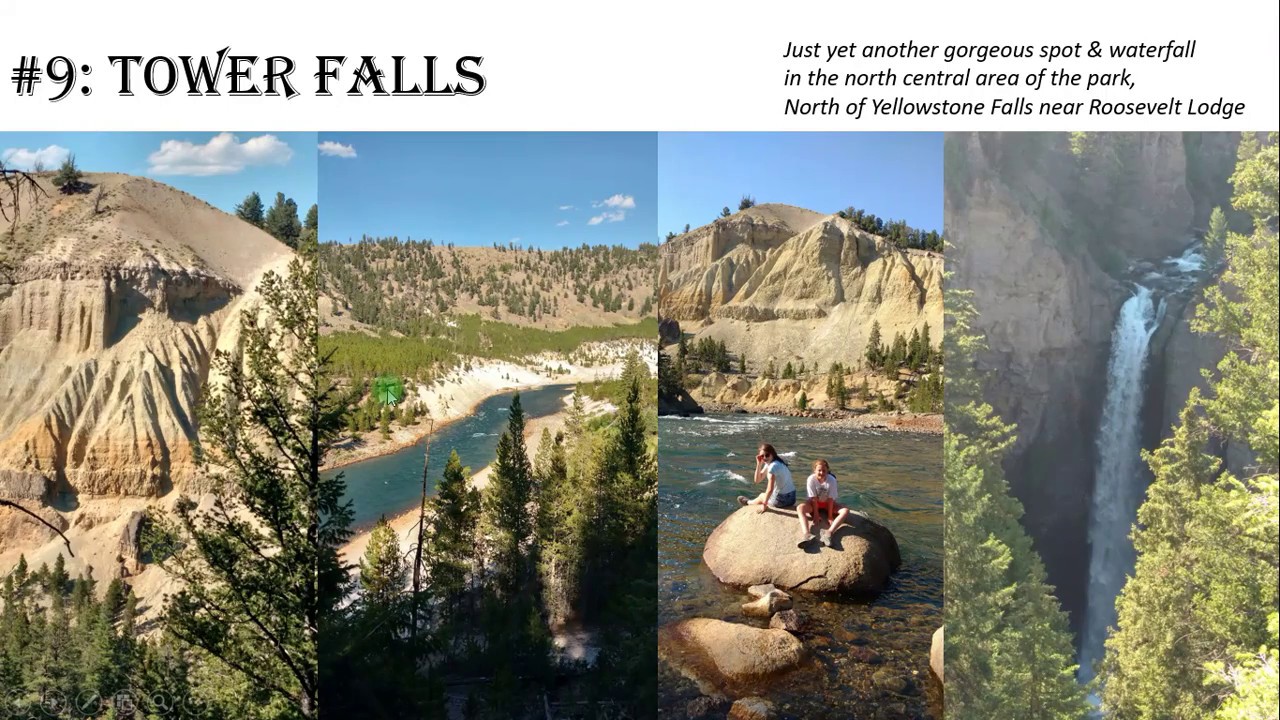
Hello there. Welcome to my virtual trip for you today to Yellowstone National Park. My name is Randall F. Dean, and by day I'm a professional speaker and trainer on time and email management, but I would say in my spare time I would call myself somewhat of a professional wanderer, and I'd like to take you on a virtual tour to Yellowstone National Park with my personal top 10. Now I know you may disagree with this top 10 if you make the visit,. But I'll share with you what I think was my favorite 10 places inside of Yellowstone National Park from our family trip this year in August of 2016. Not just Yellowstone, but to nearby areas including Wyoming, Montana, Utah, and Idaho. So let's dive in and get into this. Now I will tell you before we dive in, we spent all or part of 5 days in Yellowstone Park, and I will tell you that was nowhere near enough time to see everything. So if you're gonna go, make sure you give yourself some substantial time because I think you'll see why when you get a chance to take a look at everything that we had a chance to visit while we were there. So let's dive in. Now, I got this map right here off the Yellowstone website at the web address you can see in the upper right corner, and I recommend you click on maps when you go to this website and select the brochure map because this is the best map in terms of helping you see all of the different places that you may want to go visit while you're there. A lot of the key tourist areas where you can see some of the best things are pointed out very clearly on this map, and I will tell you that when we were there, we came in in through the South Entrance, which is down here just south of West Thumb. And let's blow this up a little bit. As you can see, here's West Thumb now for relation, and right down here is actually the entrance. And notice that it comes in from the Grand Teton National Park, which we're going to talk about a little bit more later. So this is the entrance we came in, and I have to tell you, this road right here was absolutely stunning just driving into the park off the South Entrance. So let's dive in now. Let's get into numbers 1 and 2, and I had to put them together. They're sort of in the same place, so I would put them together as 2 of the key things we saw. One is the Grand Canyon of the Yellowstone and two is Yellowstone Falls in the Grand Canyon of the Yellowstone. And as you can see, the views were spectacular. But here's the other thing that I loved about this destination. Not only was the views of both the Upper and Lower Falls absolutely stunning and the views of the canyon in the other direction absolutely stunning, there was some great hikes here too. So if you like to get good exercise, there was more than enough hiking here to give you your fill in some of the prettiest scenery you're going to see in North America. Now Yellowstone Falls— here's West Thumb again to give you some relation down here on the bottom of the screen— that's right up here by Canyon Village, which was where we actually stayed the first night. And a little blow-up, you can see it's really close to the Lower and Upper Falls, and it's a wonderful place to get in and get your place to get out and take off on the trip into the Grand Canyon of Yellowstone. Here is a view in the other direction. I said that the other direction was just as spectacular. It's not as big and impressive as the actual Grand Canyon in Arizona, but I have to tell you, it might be even a little prettier with the greens that come in from the pines that are there naturally. This is just a straight view down right into the, into the gorge right from one of the overlooks right by the side. As you can see, we were having a pretty fun day that day. Here's another view of the canyon. We came back on a late afternoon and we caught this beautiful light lighting up the mist from the fall. So it was absolutely stunning. So that's our number 1 and 2, Yellowstone Falls and the Grand Canyon of the Yellowstone. Now let's keep going. Right here is my number 3, and I sort of put these together because they were fairly similar even though they were displaced by quite some distance, and that was Lamar and Hayden Valleys. Both of these valleys are probably the heart of the wildlife viewing in Yellowstone National Park, and we actually spent a good part of 2 days just basically going into these valleys looking for the animals because this is where you you see the animals, and sometimes right up close. We actually had a bison herd cross the road with us and about 50 other cars where they're walking in between the cars 2 feet away from us. Something I believe my kids will never forget. But we didn't just see bison, we saw bison and elk and antelope and osprey and ravens and mule deer. My daughter even saw mountain goats on one of the ridges heading in. And get this, when we were in Hayden Valley one day, we actually saw at quite some distance the wolves. So this is the place to be. Make sure that when you come, give yourself plenty of time because you're going to see the animals and you're going to want to stop and watch. And also, if you can, bring binoculars or maybe even a telescope. There was quite a few people that had obviously been there many times, and many of them had some pretty high-powered telescopes and photography equipment to get the pictures of the animals. Now to give you a feel, once again, here's Canyon Village, here's the top part of Lake Yellowstone, and Hayden Valley is right in between. So So here's Hayden Valley. Now to give you a feel for where Lamar Valley is, Lamar Valley is actually north of the Canyon Village. So here's the Falls of the Yellowstone, here's the Tower Roosevelt area, and right over here is Lamar Valley. So both of the places were amazing. The one thing I will say about Lamar Valley, we saw a lot more elk in Lamar Valley as well as all of the bison. So if you really want to get in the wildlife viewing, make sure you give yourself plenty of time here. This was just a view. We were over near the Roosevelt Lodge looking basically due east over toward Lamar Valley and made me think of the Land of Rohan from Lord of the Rings. So you can see just stunning views, amazing vistas, places that you can really get into and see. Number 4 on our list, yeah, you know about Old Faithful. And I will have to tell you that Old Faithful was pretty much what you sort of expected. You get there and you're expecting to see this big giant geyser go off, and that's exactly what happens after waiting for a while and watching the entire crowd build to watch this thing go off. But I have to tell you, it still surprised me. I knew exactly what was going to happen, but it still surprises me because it's huge. It goes up so crazy high. So you got to get there, and if you're going to be there, strongly recommend that you take a little bit of time to get inside the Old Faithful Lodge pictured on the bottom of the screen, uh, the screen, because Wow, that's some pretty amazing architecture inside the building. I did take a few pictures, but they didn't turn out well enough to put in the presentation, so go in there and see it for yourself. Now Old Faithful, to give you some reference, once again right up here is the Yellowstone Falls Grand Canyon, down here is that entry from West Thumb. Old Faithful is here off to the east, so it's sort of in the southeast corner of the park. And as you can see, there's a whole lot going on down here. Not only do you have the Upper Geyser Basin where Old Faithful is, but there's more stuff going on here which we're going to be covering. So this was part of the park where we spent a good day or two just getting in to see a lot of the stuff that was down here. Number 5 on our list— wow, Mammoth Hot Springs. What an amazing place, and it deserves the name Mammoth because these things are huge, and you just can't even believe how big they are until you get there and get on top of these. To give you some reference, look over on this picture up here in the upper right. That is a full-sized two-lane road right down here. So I mean, that gives you a feel for how high up you are when you get to the top of the hot springs, and This is not snow. This was an 80-degree day in August. This is all limestone formations here. And so that's what you're going to see is it looks like you're walking into like this wintry wonderland, but it's anything but when you go there in summer. Notice that the elk came and visited us even that day. It's pretty amazing because it's so big, but at the same time, inside of this, there's so much amazing intricacy. You get all of these really intricate little, um, basically geologic and geothermal formations that have this amazing intricacy on this massively huge thing. Now Mammoth is way up in the far northwest corner of the park, almost in Montana. So as you can see, right up here is Mammoth Hot Springs, and if you zoom in, this is where you come in. And if you're going to be there, strongly recommend you maybe plan some time to go up to Gardiner. What a cool little town that was, right across the border in Montana. We went there and had lunch there and walked around the city for a little bit, so it was a pretty cool place to be. Coming back to Mammoth Hot Springs, just take a look at some of these formations. Now this was like, I think, an extinct or expired fumarole that had built up over the years. And to give you some feel for the size of this formation, these are people. So you can see this, and this was just the first level. There's a whole other big high level up behind this in the far back corner. But at the same time, so you got this massive thing with these amazingly intricate little geothermal fumaroles. Features that you could look into. And what's interesting is, like I said, a lot of it looks like ice and snow. It's not ice and snow, it's limestone. But then what you'll see is the places where there's color, that's where the cyanobacteria are active because the water is still actively going through there. And you can basically see how this thing builds itself over the eons. And pretty amazing, pretty amazing place to visit. Number 6 on my list, the Grand Prismatic Spring in the Middle Geyser Basin. And this was pretty amazing. We saw a lot of these kind of features in the park. You see these hot springs which have, you know, the really cool deep blues out in the middle where the water is hotter, but then on the sides you see the places where all the cyanobacteria are. But what made this place amazing was it's the size of a lake. It's huge. And to give you a feel, it's actually just north of Old Faithful, down here once again in the southwest corner of the park. So this will give you a little feel, and Grand Prismatic Spring, as you can see, is just a little bit to the north of the Old Faithful Upper Geyser Basin. But just look at that. Amazing. Now, one little bummer that we had when we were there, they were doing reconstruction of the observatory area that's up, I think, on this hill right over here, that allows you to see the overlook down on. So we couldn't see the big overlook view. We were basically down at level with the thing. But take a look over here. These are people. This gives you an idea for how big this thing is. It is unbelievably huge and just stunningly beautiful. And the middle guy Geyser Basin that it's in has some other very nice formations and once again some really good hikes. Alright, number 7 on our list: Mystic Falls. This is one of the lesser-known little corners of the park. You know, this was one of those places where a lot of these places have, you know, hundreds and hundreds of people. This one had like 20 people at it, and we heard about it from somebody that was at one of the lodges we stayed at, so we decided to go take a look at it because we wanted to find a bit of more of a natural feature waterfall that we went into. Obviously we weren't alone, which was nice because safety in numbers in a park with bears and wolves. But it was absolutely just a beautiful hike. Maybe about a 20-30 minute hike up this little rivulet canyon that we went into to get up to these falls. And then what people did, they were just getting right into the water at the base of the falls. It was like an 80-degree summer day. And now to give you a feel, here's Grand Prismatic Spring, here's Old Faithful. Look at this right here, Mystic Falls, right here between the two of them. And it's on a little side road, and then you do a little hike right up into it here in the Biscuit Basin. To get up to those Mystic Falls. So a pretty amazing little place to go visit. And this is probably my favorite picture from the entire trip when we were just basically there and part of this experience that's called Yellowstone. Alright, number 8, Norris Geyser Basin. This was the first geothermal feature that we went to when we were there, so we were basically there on day 2. And oh my gosh, it felt like we were going on to a different planet. What an amazing place this was. And it also actually has a pretty famous geyser called Steamboat Geyser. We got to see it go off a a few times. We didn't get to see one of the big ones. Actually, they say sometimes if you're really lucky, every few years, Steamboat Geyser actually has eruptions that are bigger than Old Faithful. We didn't see anything like that. I would guess that the eruptions were anywhere from 20 to 40 feet that day and we saw several of those. But apparently they sometimes have eruptions there that go as much as 300 feet up in the air. But like I said, this geyser basin, I mean, this is a walkway. Once again, these are people way down here to give you a feel for the scope of this thing. And it was the place where we got to see our first really cool geothermal things. Now Norris Geyser Basin is actually quite a bit to the north of Old Faithful and pretty much due west of the Grand Canyon to Yellowstone, right up here in this area. And you'll see you got Steamboat Geyser and a few other things. One thing that's interesting is, I mean, all of these places are 15, 20, 30 miles from each other. See, it was 12 miles between there. It sometimes takes you 45 minutes to an hour to get from one of these places to the other, especially if there's wildlife on the road. So don't try to hurry to get to all these places. See that drive as part of the thing because a lot of times you're going to stop because animals might be out on the road and you're going to want to stop and see those while you're out there. Number 9 on our list, Tower Falls. Yet another gorgeous spot, another gorgeous waterfall, another really amazing geological formation and riverway right there in the north of the park, sort of north of Yellowstone Falls and pretty much due east of Mammoth Hot Springs. Springs. And this was absolutely beautiful place. I will say one little thing that I didn't like about it was that the best view of the falls they had blocked off because at the base of the falls. So you could see it from high up but you couldn't see it from the bottom, although a few people disregarded the blocking signs and decided to go see it anyway. The other thing I will tell you about it right here is that is the Yellowstone River right there, and the current just past that giant boulder in picture number 3 was really fast. So keep a real good eye on your children when out there. They might want to get out in that water. They get too far out, they're gonna get swept right in the current through some rapids that you can see right over here. But Tower Falls, definitely a place that you want to go visit. Notice here's the Grand Canyon of the Yellowstone, here's Mammoth Hot Springs, and Tower is right here in this area, including a little place to park and a nice little hike. Not a very long hike, but a nice little hike down to the base of the falls and to the Yellowstone River where you can see that pretty amazing little valley that we were in. Here's a few more views, just stunning. Just absolutely stunning. So number 10 on the list. Okay, here's my number 10, West Thumb Geyser, which is actually on Lake Yellowstone. This was probably one of the cooler little things. A lot of these geothermal features are sort of separated away from Lake Yellowstone, but this one basically goes right out to it and even into Lake Yellowstone. When you're walking on the walkway out here and you get right out on the shore of the lake, you can actually see vents that are geothermal vents that are coming up into Lake Yellowstone. And so it's pretty amazing. And as you can see, the cyanobacteria, the coloration, and then that beautiful lake in the background. Absolutely stunning. Once again, West Thumb, coming back down here, was right off the South Entrance coming in directly into the park. And if you take a look at it, it's right down here on the edge of Lake Yellowstone, which is an absolutely massive lake in and of itself. And when you think that it's just part of the giant caldera that was the massive eruption eruption, you know, 640,000 years ago. It just gives you a feel for the scope of this place. This place is absolutely huge. By the way, Grant Village, good little visitor center down here and a nice little restaurant where we got lunch after our West Thumb visit. All right, honorable mentions that didn't make it into my top 10. Hidden Lake. This is actually directly behind the Roosevelt Lodge. There's a neat little hike that goes up in the hills up here and you come up this beautiful little hidden lake. I'll give you a little word of caution here. We expected this to be a pretty busy trail, and the lake was absolutely beautiful. There was not a lot of people on that trail. It was probably the one hike that I went on with my kids that I was a little bit bear scared because there was very little foot traffic and there was a whole lot of bear warning signs, and people had even handwritten on there about the bears that they had seen. We did not see a bear, but I will tell you, when we went into the park, especially if you're gonna go into some of the more remote areas like this, this, you might want to make sure you got bear spray with you. The north section of Lake Yellowstone, we actually stayed one night there at one of the Yellowstone lodges, and it's just beautiful. The lake is gorgeous, and some of the pictures we took off the lake were amazing. This one right here gives you a little feel, but definitely a place that you're going to want to go spend a little time. We also got to see a family of ravens hanging out with each other there right on the lakeshore. Another one was Mud Volcano and the Sulfur Cauldron. These are the Mud Volcano and Sulfur Cauldron areas. And then the one of the very last things that we did is right over here. It's called Gibbon Falls. Falls, and it was sort of on our way out when we were heading over toward West Yellowstone and about to leave the park. It was one of the last sights that we saw, and it's just a stunning, beautiful waterfall that you can get to. There's also a really cool road between the Grand Canyon, the Yellowstone, and Tower Roosevelt which goes by one of the highest points in the park, Mount Washburn. We got to see it. We didn't have enough time to go up there, but it looked like there was some pretty amazing hiking trails that could have gotten you to the top of Mount Washburn and see the scope of the entire park. So obviously we got to go back. There's more stuff to see. Now, this was from the Middle Geyser Basin, which is where Grand Prismatic Spring is. I just thought this was really pretty. And let me give you a little bonus traveler tip. I mentioned that we came in on the south entrance driving up through Jackson, Wyoming, and Grand Tetons. Why not get both national parks in on this one trip? Because Grand Tetons literally runs into Yellowstone. So, and the Tetons were spectacular. I've been overusing that word, but they were more than spectacular. Breathtaking would be an even better word. So we stopped in on our way, we went into Jackson, Wyoming, had lunch, and then we drove around the corner and saw these mountains. And then we even stopped in the park and looked at the mountains and then went for a hike along Jenny Lake. And the hike along Jenny Lake was equally beautiful. This is Jenny Lake right here, and the views and the vistas, waterfalls back in the woods. Check out this guy over over here though, he sort of ruined my picture, which I thought was beautiful, but he decided to go take a dip in there. That's really cold mountain water right there. So thank you all for joining me and my family on our trip to Yellowstone. This is the Yellowstone River, by the way, including the— I think it's the LaMarte Falls or rapids that's on the river heading into Hayden Valley. Here's yet another picture of Hidden Lake, and down here in the lower right-hand corner, that's the only bear I saw in Yellowstone the whole time we were there. I guess we got to go back again, see what we can see. If you'd like to learn more about what I'm doing when I'm not gallivanting around somewhere breathtaking, go check out my website. And if you're gonna go visit, before you go, go out and check out the National Park Service website for Yellowstone. And I'll give you a little tip: if you're gonna go, you want to book your rooms if you want to stay inside the park about a year in advance. We booked it about 8 months in advance. We only got 3 nights in the park. Park. That's all they had left. So thank you for your time. Thank you for joining us. Hope you had fun.
More from Randall

This simple #ADHD #hack might end your #tasklist paralysis called #executivedysfuntion #productivity

Have #ADHD? Do you make a daily #tasklist ? This might help. #tasks #productivity #procrastination

Found too many cool Petoskey Stones and “Greens” on vacation. Had to do something!


Another free #pallet project: I built a heavy duty #ladder stand for #housepainting

Quick Windows Tip: Organizing Multiple Windows on One Monitor or Screen for Faster Multi-Tasking!

Classic Outlook (New Screen): Converting an Email to Task, Calendar, or Contact Using Drag & Drop

Email Sanity Expert Tests SaneBox: Is This AI Email Tool Worth It? Might be for overloaded inbox!

Taming the Outlook Email Beast: 3 Flexible Learning Paths to Master Your Inbox (Video Course Intro)

#workspace #productivity multiscreen setup #email #calendar #pdf #outlook #gmail #microsoft #google
