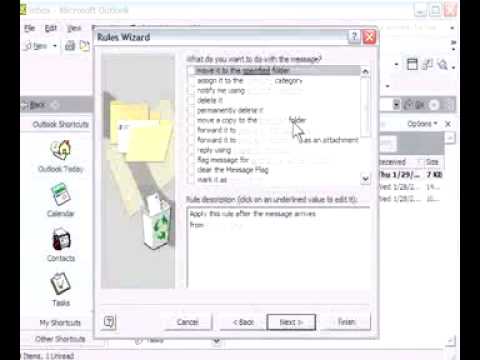
Randy Dean shows how to use Outlook's Create Rule feature to automate email handling. Set up rules to automatically move messages from specific senders to folders, delete unwanted emails, or play a sound for important contacts. The right-click menu makes it simple to streamline your inbox.
Chapters
Hello, this is Randy Dean, author of Managing My Life: Taming the Email Beast, and this is actually Randy that you're looking at right here, so you know who you're listening to. I will now be leading you through Tutorial #9, which deals with the topic of learning how to create rules for individual messages and the different people that might be sending you messages inside of your Microsoft Outlook account. This is one of the more cool things that Microsoft Outlook has the capability to do, so I want to sort of walk you through what the capabilities are here for this. And I'm going to bring up my active Microsoft Outlook account, and let's go into my inbox here. And you see I've got a few messages here. Here's this one from this Randy Dean guy, and let's take a look at what the capabilities are. You can take any message that you've got in your account that's selected. I just did a little quick single left-click to select that message. Now I'm going to do a right-click, and what I want you to see when I do this right-click capability is that it gives me a series of, of capable options here that I can take a look at, you know, a number of different things that I could do. Some of these things I could do a follow-up, so a follow-up flag pops up, and I can set a certain date that I want to make sure that I follow up on this message. I can also, you know, possibly come in and, and do mark this as unread. That's sort of handy. See, now that tells me that there's something in that message I need to look at again. I could go into the message and, you know, mark it as a junk email. I can automatically delete it. I could move it to a folder. Of course, I showed you in an earlier tutorial my preferred method, which is the drag-and-drop option. But, you know, this is a viable way that you can go ahead and move that email. And one that I really like is this Create Rule capability, because when you click on the Create Rule capability, when you do the right-click, what you can do is basically go in and take any message that you've got and set up some parameters or rules for that message, that sender, etc. And here's sort of the nice thing. Let's, let's take a look at a couple of the options that that come in here, you know, I can basically take this and say, you know, if I ever get a message from this Randy Dean guy, let's take a look at some of the options that I have. One, I could automatically move it to a specified folder. How would that be useful? Well, let's talk about this. What if you are getting a monthly e-newsletter from your professional association? It comes from the same email address every month, and you're so busy you don't really have time to read them, and you don't want them cluttering up your inbox. Well, what you could do is you could just set up the move it to a specified folder. The minute that email comes in, it auto-files over into the folder that you set up for your e-newsletters, and that way you don't even have to have those coming in and cluttering up your inbox. Another option that you could do— oh, by the way, before I talk about that, also might be handy, maybe if you've got a particular client or a particular boss, you could auto-file right into their folder, and that way whenever you see that that folder is lit up, you know you need to go check that folder. So, you know, that's one of those little tricks that you can do. Here's one. Let's say the person sending you a bunch of junk or spam, or, you know, they're, they're not doing the proper things when it comes to email. You just permanently delete the minute that you receive something from that sender. You can permanently delete them. You could move a copy of the message to a folder. That might be handy, you know, if you've got a certain person that every time it comes in you want to save it in a person folder, but maybe you also want to save it in a client or a project folder too. You could auto-forward it on to certain people. Maybe you got a personnel issue going on inside of your company, and, and so you want to copy your boss every time you get a message from a certain particular person. You know, there's a lot of things. This is one idea I don't even like to show, but maybe what you could do is play a unique sound. Let's say your husband, wife, spouse, significant other sends you an email. Well, you could set up a unique sound for that situation, and it works really nicely when you do something like that. That way, that way when you get that special message from a special person, you can do that. Yeah, you could use that for your boss too, but when you read in the book, you'll see how I'd rather have you talk to your boss if your boss is making you jump on stuff. So let's actually do this. Let's go in and let's set it up so that it moves to a specified folder, and you'll see down here it says when it comes here you have to actually select the folder. You can go in your personal folders, go into your inbox, and I could basically say every time I get a message from this Randy Dean guy, it can go into my Randy Stuff folder. Now I'm not going to do that because I actually don't want those to go there, but I wanted to show you how quick and easy it is to set up one of these kind of rules like that. And then once you have everything set up, you just hit the Finish button and that'll be a rule moving forward. So there's a lot of capabilities here. I strongly recommend that you go in and play around with, with that right-click capability on any selected message and and go in and see the different options that you have available to allow you to do some of these things, especially the Create Rule option, because there is so much capability there that can help maybe automate or speed up or allow you to do some of the things that you have to do as part of your job anyway a little bit smarter, better, faster. And that's what we're all doing it for in the first place. Thank you for taking the time to complete this tutorial. I hope that you found it useful. Once again, this is Randy Dean wishing you a wonderful day.