Rowan Trollope demos Re:Mem, a memory system for AI agents built on Redis VectorSet. User preferences like "five vegetarian kids" and "boat-only travel" are extracted, embedded as vectors, and retrieved to enrich future queries. The system grounds facts temporally, scores memories by relevance and recency, and reconstructs context for the LLM via a REST API.
Chapters
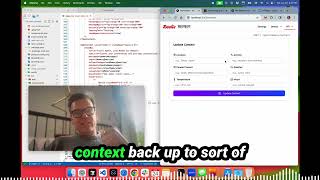
Okay, I'm gonna give a demo of something I've been working on, which is, um, called Re:Mem. Re:Mem is a memory system for AI agents that I have built using Redis VectorSet. So, uh, let me just go ahead and show you that. A sec. Here we go. So first of all, we are running Redis 8 on this computer. You can see that here, oh, somewhere. All right, I've lost it. Anyways, we've got Redis 8 running, which has the new Redis VectorSet in it. And we have this project here called Remem, which I'll have the links to the GitHub in there for you. And Remem has a very simple API, um, which is, um, basically store memories and retrieve memories. And this is inspired by, um, Marvin Minsky's book titled Society of Mind, the way that this works. So essentially you can pass in anything that the user says and the Remem API will use an OpenAI LLM call to figure out what's worth remembering. And then it will basically turn those into vector embeddings. So take user preferences or, you know, things that are interesting to be remembered. Let's say that we are a travel agent. We want to remember something about the user. It'll figure out what, what are the useful pieces of information to remember. It'll vector embed those, it'll turn those into vectors, and then it will and then it'll store those in the vector set along with some other metadata. So that's the way this works. Um, you can see I've got it running here. So this is the web app, which gives us a nice REST API. Uh, all the details in the, in the README. We also have, I also have built this as a memory agent so that we can use it with LangGraph. So there's tools, store memory, search memories, uh, answer with confidence. So you can say, you know, do we know, uh, if this user prefers window seats? And it'll answer based on what's in the memory with a confidence, uh, confidence answer. I'll show you that as well. Uh, some formatting stuff, some sort of contextual stuff. Uh, one of the interesting problems to be solved in, in memory is contextual grounding. So contextual grounding is taking something the user says, like, I want to go to Paris next Thursday and translating that into an actual date and time. Because if we store next Thursday, that has no rela— that's just a relative time and we want to obviously ground that in times and dates. So that's part of the capability here is contextual grounding, some relevance scoring stuff, et cetera. So that's Re:MEM. Let's go ahead and show you one of these demos here. So we can, let me show you a travel agent demo. So we have here 3 travel agents. One is just a standard travel agent, and this is using a system prompt that basically just says, you're a helpful travel agent, and passing that data to OpenAI. So, you know, help me plan a trip to Paris. We're gonna get kind of the standard OpenAI response to that. There it is. You know, tell me some information. So I can provide some information like I have 5 kids and they are vegetarians. We only travel by boat. So there we go. Uh, that's gonna pass that information to OpenAI. And obviously there's some pretty interesting information there that the user has just typed in, right? They've got 5 kids, they're vegetarians, and this crazy thing, they're only traveling by boats. So it's obviously listened to that and it's giving us some information about river cruises and family-friendly activities. Now the problem of course with this is there's no memory at all. So if I clear out this conversation and just start a new conversation, you know, help me plan a trip to, let's say Canada, no, let's just say Cuba. It's starting again from scratch. So it has no, memory. We're just passing all this stuff right back into OpenAI again. And you can see that if you read this text here, there's kind of nothing about our, our known preferences. Um, how many kids I have, or how I like travel. And of course it's going to say, nope, I don't have access to that details, right? Pretty standard, obviously, uh, no surprise there. And this is just very simple using, uh, calls into OpenAI. Now let's show you an example with the Redis Remem API. So what we do here is we're calling the API is just agent or I think it's, let's see, what is it? The chat API. So we have a chat API where we can, oh, session. So chat/session. So it's a session-based chat and we can say, help me do the same thing again, my trip Paris. And this time, What it's going to do, you can see it here operating. So it's created a new session. You can see user memory is enabled. Somewhere on here you'll see user memory enabled. And what it's doing is it's looking for any memories. Now it doesn't have any memories. You can see that right here. Similarity filtering result 0 of 0. So here's, here's this. Um, we can actually take a look here and see there's 0 memories. So this is calling the API. and so it doesn't really have anything yet. So let's go ahead and go back to that demo. Oh, we've reset it. So we'll start that again. Plan my trip, Paris. So here it's thinking, and, uh, it's looking for any memories, doesn't find any. So let's go ahead and say, um, I have 5 kids. They are all vegetarians, so I need appropriate food ideas. Also, we only travel by boat. So now when we do that, uh, the Remem API is going to detect that there's something worth remembering here. Probably 3 things: vegetarians, uh, that we only travel by boat, and that there's 5 kids. So it's using the context of your travel agent and it's pulling out the relevant facts. Now if we go back here and look at this, here you go. It's identified two memories. User has 5 kids who are vegetarians and user only travels by boat. So it's reframed the text and it's stored those. Now we could also do some contextual grounding. So let's put in some more information like I, I have to travel to Paris next Thursday. So what this should do is use the contextual grounding to store the information about next Thursday and actually change it. So you'll see that here. Let's see. So it's— where would I find that? Extracted one valid fact. Here it is. User has to travel to Paris on July 3rd, 2025. So it's, that's contextual grounding. In this app we support, I've, or in this API, Re:MEM, for contextual grounding, I support temporal grounding. So dates and times, relative dates and times, as well as location grounding. And there is a part of the API that's called the context, context agent. And so you can actually pass in context. So here you go, set context. So you can pass in interesting things to the API, like where is the user right now? Who's present, that could be interesting if we're doing like a meetings app or something else, maybe other interesting information like the weather, other activities, et cetera. Now, and these can be any metadata, so you can pass in any metadata to the Re:MEM API so that it will add that context and it'll pull that context back up to sort of recreate the frame of mind, or in Marvin Minsky's term, terminology, would be the K-line or the sort of the, the, the, the mind state that the person was in. I think they call it a mental state. And so that's important contextual information. Now, if we say, you know, the people who are here and we've included people that are present, it will include that into the memory. So it's embedded into the memory. So that's would be people grounding. So that's all about contextual grounding. And this is a new hot, interesting topic called context engineering, which is making sure that the chatbot has the most appropriate contextual information. So let's go back here. Now you can see I've reset the chat 'cause I've reloaded the page. So the good news is here, it should have remembered this stuff about me. Here's our memories. And in fact, if we go into our vector set browser, which I've showed before in other demos, here's the vector set called memories, and here are the various memories. The element ID is a UUID. And it's got the raw text, the final text. So here you can see contextual grounding has been applied in case of temporal dates, Thursday changed to July 3rd, et cetera. So I could go in here and I could put in food preferences and there we go. The top result is users who are all veggie, kids who are all vegetarians. I could put in, I could put in travel preferences we should get, there we go, user only travels by boat. So what's going on underneath the covers when we use the API is it's going to be asking for, it's gonna take the question. So let's go and do a, let's go and do a question. So we're gonna say, please help me plan my trip to Paris. And the LLM or the, that's gonna be sent to the vector embedding engine, rephrased. So it'll be hand me anything that relates to travel, you know, travel information or preferences that this user has and so on and so on. And it's gonna pull that information back. So let's go ahead and try that. Like, help me plan my trip to Paris. And this time what should happen is we should see that it pulls up the memories. Here you go. It's doing that. Memories used, 3. And it's gonna return those so we can see what they were. So it returns them as part of the reply. So memory number 1, user has to travel to Paris. So it's remembered that we want to travel to Paris on the 3rd of July. That's pretty helpful. It's remembered this silly idea that we only travel by boat and that we have 5 kids who are vegetarians. So that, let's see if you can see what it rephrases. Here it is. It uses an optimized search query. So instead of just taking the user's text, which is, I want to travel to Paris, or help me plan my trip to Paris, which is what, what was submitted. We use the LLM to rephrase that. And this is all with a lot of prompting that goes on in this, in this API. So passed in trip planning, Paris, travel itinerary, suggestions, accommodations, attractions, dining preferences. That's been vector embedded. That's been turned into a vector embedding and searched against the database so that we get a better result out of the vector set. Okay? It's then filtered with a minimum similarity of 0.7. It's also temporal filtered, so it, it sorts and gives some relevance information. So it looks at every time you access a memory, that memory is, got a ref counter on it, and the last access. So more recent memories will get higher relevance scores and therefore be used more often. Let's say, you know, we were planning a trip a year ago. That's much less relevant information than something that we might've said yesterday. So we do some recency bias, we do some access count bias and some other things to try to surface a context back to the LLM that is useful. So Here you go. You can see that it has remembered these things and it's included those in the answer. So of course, since you mentioned that you only travel by boat, I recommend looking into cruises that make stops in Paris, yada, yada, yada. Given that you have 5 vegetarian kids, here's some weather information, et cetera, et cetera. And so it's used those memories and inserted those into the prompt. So you can see that this is really, really easy to do. We're just using one API call here, which is chat/session. Those are all available here. So you can see. What are the various things. We also have sort of root API access. So I provided some API access here so we can just search a memory. Let's just put in travel. That's just gonna give us anything that relates to travel. There they are. User only travels by boat and I have to travel to Paris on July 3rd. So that is doing a vSim call. It's pulling, it's then taking the attribute data. So we store all the metadata including grounding information like this. You can see here, whenever we change something in a memory, we're using that attribute data and then storing that as JSON attached to this vector. So we know that the original or the grounded text was this. We actually have the original text, which you can see here. User has to travel to Paris next Thursday. And then that's the grounded text. And you can see what was changed. Next Thursday was changed to July 3rd, and that's the grounding that was done. And we can do different kinds of grounding as well. So that's the search API. Again, just using vSim under the covers. We can also create a new memory. You could just, this is a direct access to the API. So we can just say, I want travel, or let's just say, my grandmother always, always, always travels with me at my house. My kids. We need to save that. We can do some contextual grounding. There was no contextual grounding necessary. We put in something that does have a date. I'll just give you another example of that. Like, my trip, trip to Paris for next Thursday has to move to the Thursday after that. Now it's a little bit complicated. Let's see if it gets that. Here you go. Contextual grounding was applied. So the original text is here. Let's take a look at the actual grounded text. Here we go. So it's detected next Thursday and Thursday after that. And it has accurately, let's see, next Thursday. Yeah, that is right. That would be July 3rd. Is that right? Next Thursday is June 26th. Yes. Thursday after that would be June 3rd. So it accurately figured that out. So pretty helpful to be able to do that. There it is. January 15th. So it got that wrong. That's obviously some LLM hallucination going on there. But at any rate, you can get all the details here if you want to directly call these APIs. You can also recall a mental state. This is the concept from Marvin Minsky's K-line from Society of Mind. So What this is essentially is the API will, um, this is api/klinesrecall. So you can give it some text to search for. It'll find all the relevant memories, which internally we call neems. That's Marvin Minsky's terminology for a single sort of memory and capsule of information. And what we do is pull back the relevant memories and then reframe them and try and, uh, associate them together. Into one cohesive frame of mind. And that would include all the contextual information that you've passed in. And that's very useful for sort of passing into the, to the LLM so that it remembers all of these things. And then down the road, I'm going to add K-Line saving. So let's just do travel planning. And what you're going to see here is how the K-Line mental state reconstruction works. Here you go. So when we search for travel planning, we want a mental state for travel planning. So what it's done is it's pulled up the relevant knowledge using a VSim on the vector set. I only travel by boat. I have to travel on this date. Uh, grandmother always travels with me and my kids. There, it's got the additional memory that says that it's, it's moved. And then all the kid information. So 5 related memories. And then, uh, it's got, got the scoring that I talked about earlier. So first is the vector similarity, which you can see here sorted by vector similarity. So the most similar item here is, uh, only traveling by boat, but it's got a relevance score. And you can see that we've accessed that 4 times. Here's the last time it was accessed. Uh, it's got some tags and a tagging system here underneath the covers. Uh, here's the example of the memory that was, uh, grounded. So you can get the, all the details there. And again, this is giving you all the details underneath the covers so you can kind of debug what's going on. But it's very, very simple to use this at the surface level just using the API /kline/recall. Then there's the memory context as well and so on. So that's a quick overview of the new Remem API, which is really just built, I built this as an exploration into agent memory and how easy it would be to do that given the technology that we've built, Salvatore built, called VectorSets. And you can see that it is very, very simple. I'll have to actually show you the code at some point, but we'll publish the GitHub links and you'll see just how simple this all was to do with VectorSets and how cool it is. So that's the demo. I hope you like it. I'd love to see your feedback. Thank you.
More from Rowan

95% Prompt Cache Hit Rate: How LLM Cost Reduction Actually Works in Production


Office Hours with Guy: Building an external memory store with Redis CEO Rowan Trollope

Helpful Cost-Effective Customer Service Solutions for Every Industry With Rowan Trollope, CEO, Five9


Patrick Moorhead & Daniel Newman talk with Rowan Trollope, Five9 CEO for a Six Five INSIDER!