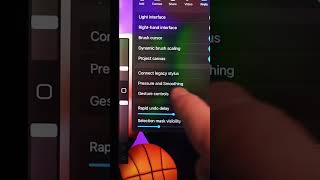
Getting a quick menu for Procreate

3 Jul 2024 · 0 min
0:07

In this brief tutorial, Ryan Maloney shows how to activate Procreate's Quick Menu. He navigates to the wrench icon, selects Gesture Controls, and assigns the Quick Menu to a four‑finger tap, emphasizing that this shortcut provides a time‑saving menu for artists.

More from Ryan

youtube.com

Sandlot Custom Helmet work in progress #posca #paint #customhelmet

9mo ago
youtube.com

Procreate brushes

9mo ago
youtube.com

How I use my favorite Muji notebooks #productivity

9mo ago
youtube.com

Drawing Mr. Beast into a Beastly Baller trading card #art #drawing #tradingcards card

10mo ago

youtube.com

I made a fun fitness card game out of my drawings

10mo ago
youtube.com

Josh Allen Drawing

1y ago
youtube.com

My morning routine when making a graphic novel #art #procreate #graphicnovel

1y ago
youtube.com

The first draft of my graphic novel #art #procreate #originacharacter #graphicnovel #drawing

1y ago

youtube.com

Drawing a page from my Graphic Novel in Procreate #art #drawing

1y ago
youtube.com

Simplifying your drawings #art #drawing

1y ago
youtube.com

Assembling my graphic novel in Indesign #art #drawing #originacharacter

1y ago
See all content







