How ARTISTS can use NFTS to SELL MORE WORK and build their BRAND
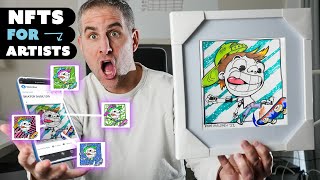
Ryan Maloney shows artists how to turn artwork into NFTs using Procreate and nft-generator.art, set up MetaMask and OpenSea, and earn ongoing royalties from secondary sales. He covers batch-generating unique images, linking physical pieces via QR codes, and building community through Discord.
Chapters
Here's why I think artists should be using NFTs. This light is like a light box. I don't— It's another way to sell your work, but it's also going to lead you into this new revolution that's been taking place around community. That probably scares you. It scared me. I didn't even know what a Discord was before I launched Crunchy Cows. What? All I wanted to do before was create artwork, sell it, or have clients hire me to make it. I didn't want to deal with all the messaging, all the alerts, the texts, all the Discords, all the inboxing. But it's absolutely essential to selling more of your work now. If you're an artist, creator, photographer, anybody who makes things, and you already know what you make and you don't need to be shown how to make it, skip this part of the video here. I'm going to be drawing some artwork here, but then I'm going to be generating that artwork and turning into multiple NFTs. So you might want to watch here, and then we'll post that work on OpenSea, and I'll give you some thoughts along the way about how you can use NFTs to grow your art business, sell more of your artwork, and connect deeper with your fan base. Like he was chasing his dream again out of— The first thing I'm going to do is create the line art for my unique art piece. I could have made this entire thing digitally, but I wanted to do something on paper, so it created a little complexity, just in case you are creating a painting or drawing that you need to scan in or digitize. Line art done. Time to digitize it. Just take a photo, scan it, do whatever you got to do to get your original line art in. If you don't have line art, you can still digitize it, bring the colors in, and break it apart. Here's the best artist in the family paying me a quick visit. I'm going to be using Procreate to create the different color variations and patterns in the background of my art. All done. I'm going to go back and add some color to my original work. This drawing is going to be the first NFT in the series. Breaking bills, friends breaking off.
You could be the youngest under the dawn, kiss the ring. Nah, in the scene like GOT, stay awake, don't sleep like Jon Snow. Get RIP.
Definitely need to add this to a frame. Quick Amazon buy. Eventually we're going to connect this artwork to that first NFT. But for now, let's start generating the artwork. I'm going to send my PNG layers from my Procreate file to my MacBook. Before you get into OpenSea, you're going to want to download MetaMask and load it up with some Ethereum. You can watch a YouTube video on how to set that up, but you can launch a browser directly from your OpenSea and see and find all of your NFT collections, including the one that you're going to create of your artwork. This is nft-generator.art. They have some insane features now. Add collaborators, you can add animated GIFs. I'm going to start building out my artwork of my character. I've broken apart the artwork into several different layers. I have backgrounds, the inks, and then different colors and patterns behind it. So I'm going to drag all of my files directly in here. I have my background set up. I've named my files. I don't worry about the layering when I first drop things in. I just try to get them— get it moving pretty quickly because I have a tendency to overthink things and then not do things. So I want to get these in here and then start shaping it. And by shaping it, I mean layering it correctly. Whatever your artwork looks like, there's going to be a way to break it apart. You can find different variations and different colors, different patterns to add in here to make it totally original. You can think of NFTs individual prints based off of your master painting. Let's just hit preview really quick because this might— nope, and it doesn't. Looks like my line is buried behind everything. So I'm going to bring the line and the signature to the top and just preview that again. Let's see what's going on here. There's clearly some issues. My line file didn't make it in here. There we go. First glance, it's looking pretty good. I used to be able to scale this window here. I'm not. I thought there was a little button. Oh, it's there. There we go. A little, little bit bigger. All right. Everything here looks like it magically lined up. So I'm going to treat myself with some iced coffee and figure out, is there something wrong with it? The thing I like about NFT Generator is you can just keep hitting this preview button without having to pay for it just to test your images. I don't know how I layered this correctly on the first try. I was I was sort of hoping that I would mess it up so I could show you how I fix it, but everything is pretty much perfect. You may have to organize these layers, so you can just drag and drop these layers and move them around. Say that background color laid over the lines, you could just drag it into the back, fix that. Thing I did with the signatures, I created 5 variations of my signature. Every one of these NFTs will have a totally original signature. It's digital, but every single thing on here is totally unique. The only thing that is the same is the line artwork file on the top. Which I'm totally fine with because in order to get your colors and your patterns match up in the background, those lines need to be locked in. If you're doing an abstract painting, those lines don't need to be the exact same on every single piece. I'm going to generate 100 characters. Let's— oh, this is cool. I'm going to move my screen around. I have a very special code that I'm going to apply. Skip the payment. And now this can take a little while. I'm going to generate 1,000 images, but I'm only going to upload 5 or 10 just for the purpose of this video. Downloading is the part that takes the takes the longest. So if this happens, don't panic. This can take, yeah, it says up to 2 hours, which is usually for around 10,000 images. For 1,000 images, it's probably only going to take about 20 minutes. So I'll meet you back here once these images are ready to be downloaded. Let's quickly touch on NFT community. Right now, you're creating your artwork and you're posting it on social, you're putting on your website, and you're selling it that way to your buyers. It's very much an outbound process. You constantly need to reach out and push things out to get people's attention. With NFTs, you create many NFTs, and when they're distributed to people's wallets. Those people check their wallets and will check the value of that NFT all the time, and they'll constantly be rooting you on because they want you to become more popular. So the value of your NFTs increases, the value of their NFT increases, and they'll also be working with you spreading the word of your artwork and of your brand so that NFT increases. So there's much more incentive for this NFT holder to spread your message. It's almost like free marketing. This new NFT way is much more of an inbound process. People will be coming to you and be watching you and this group of people sort of become your hive and you're the queen of the hive. If you need help setting up your Discord, stop by Modsters.io. This was created by the Crunchy Cows moderator Moon Knight. And if you have any questions, stop by the Crunchy Cows Discord. He's going to answer your questions about Discord and there's tons of other community members that can help you launch your NFT line. I noticed that one of my images was set to grayscale, so I changed that in Photoshop and then all the other photos were RGB. And I noticed when you upload a batch of images to NFT Generator, if one of them is grayscale,, it's going to make them all grayscale. So fix that one image, make sure everything's RGB, and let me show you what downloads. Here are all of my assets. I think it's so cool when you generate characters and the computer creates your artwork for you. Now I have 1,000 totally unique images here, all with unique signatures. All the background and artwork are different, so you're not going to get a combination that's exactly the same throughout. If you worked on your art piece like a custom painting and put everything you had into it and then photographed it, brought it into Photoshop and broke it apart into different layers, You can create thousands of images off of that one piece of art, and you can sell your main piece of art. You can sell thousands of NFTs. But did I mention secondary royalties? Here's what you need to know. You create this, turn it into an NFT. Somebody buys this NFT for $50. In the future, if they sell it for $1,000 and you set your secondary sales percentage to be 6%, you're going to make $60 automatically sent to your wallet. That hasn't happened before in the history of art. Usually artists will sell their work and only get a lump sum at the beginning. You can create this NFT every time it sells, you make money. This goes up to $1 million, we're going to make $60,000. Let's hop over to OpenSea and create a collection for the skater. Dude, you're gonna have to have your wallet connected with some Ethereum. You're gonna need to pay to create a collection. You can see all my collections here. I have Crunchy Cows, Tailgaters— not launched. Anytime you create a collection, you're going to need to sign. The MetaMask is going to pop up, just hit that sign button. So I created an item at first. What I want to do is create a collection for these skaters and then add items to it. This is pretty straightforward. Just create your profile picture, your featured image, and your banner image. I'm going to hop over to Photoshop really quick, set these up, and upload them. The graphics you need to upload to OpenSea are very basic. There's only 3 that you need: a profile photo—this can be an animated GIF—and then a collection image at 600 by 400, or a banner which is 1400 by 400. These sizes may change in the future based on when you're watching this video, so just Google it or stop by OpenSea to make sure you have the correct sizes. Set your percentage fee to 6%. This is what I use. This is what a lot of people I know use. This is the secondary royalty fee you're going to get paid every time your artwork sells. Uploading to OpenSea is super simple. Really, the big thing to know is you pay for a collection, and then within that collection you can add as many items as you want. I forgot about one thing with this. Sorry about the focus. You can connect your first art piece to this NFT. So if you sell the NFT, you can ship them the art piece. And every time this NFT sells, that person can just keep shipping the art piece to the next people if they want to. Does that make any sense at all? What you just said is one of the most insanely idiotic things I have ever heard. Well, how would you connect these two? Simple QR code. Google QR code generator and just copy and paste this link from OpenSea and create a QR code. You're going to print out that QR code and you're going to tape it on the back of your art. I printed this way too big. Don't be like me, print it a little bit smaller and then put it on the back of your art. Every time somebody scans that art, it's going to go directly to this OpenSea page. All right, so that's it. That's creating NFTs— sorry, that's turning your artwork into NFTs. So you put all of that effort into creating one art piece, make it as detailed as you want, pour all of your creativity into it, and then you can turn that into an NFT. Or a series of NFTs, you will get secondary royalties for the rest of your life and the rest of your grandchildren's grandchildren's grandchildren's grandchildren's grandchildren's life. Thanks for watching.
But then you told me, "Bray, just sing me a song on your ukulele." And so I gave another try, and soon I saw that I was just a fan for new guys. Wahoo! Do you know how I hope you think I'm cool?
More from Ryan




Drawing Mr. Beast into a Beastly Baller trading card #art #drawing #tradingcards card




The first draft of my graphic novel #art #procreate #originacharacter #graphicnovel #drawing


