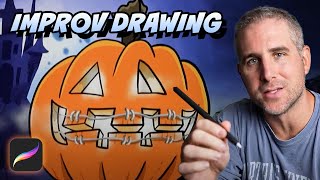
Ryan Maloney draws a pumpkin character in Procreate, starting with an hour of blue sketches, then inking with the free Crunchy Cow pen. He colors in layers: flat colors first, then shadows, highlights, and details, using Alpha Lock to keep paint inside the lines. His favorite brushes are Luminance and Nebula from Elements.
Chapters
I'm going to show you how I created this drawing from scratch. I actually didn't feel like drawing today, but sometimes I'll just force myself to sit down and draw for an hour. I'll start with no idea whatsoever and I'll just put my pen to tablet and start drawing. And this is what came out. So I like to sketch with a blue color. I program my brain to know that when I see that color, it makes me feel like it doesn't have to be perfect. I can do many layers of this and build up to my final drawing. As I'm making this sketch, I'm thinking about ways I can make the character seem different than anything else that's out there that somebody's already drawn. In this case, it was putting braces on a pumpkin and then turning that pumpkin into some sort of trick-or-treater. There's really no rhyme or reason to why I did that. I just wanted to create something that I haven't seen before and that maybe other people haven't seen before. I'm sure I could Google it and find 500,000 images of a pumpkin with braces, so it's probably totally unoriginal. In this drawing session, I thought, all right, here's something I can latch on to and that's interesting enough for me to push this drawing to the final. Before I get to my black lines, I always do 1 to 2 rough blue sketches. I'll draw one sketch, I'll turn down the opacity on that layer, and I'll create a brand new layer on top of that and do one more cleaned up sketch. So by the time I get to my black ink lines, I already see how things are shaping up and where I'm going to make that stroke in that black line. That black line is going to be smoother because I have more confidence into the exact location that I need to put it. I'm just making this up now, but it's almost like measure twice, cut once. For inking, I use the Crunchy Cow pen. It's free on crunchycows.com. Once my inking is done, I will duplicate that inked layer, and then on the layer below that main ink layer, that's where I'm gonna draw all my colors in. This allows me to preserve the lines on top, and I can draw colors underneath it without going over top of the line. When I'm drawing, I like to have a set process so I can focus on the creativity rather than thinking about what is the next step step I have to do. So I always have sketch, inks, flat colors, drop shadows or shadows, and then highlights on top of that, and then details. Whenever you need to color in a shape that you already have on the canvas and you don't want to go over the edges, just tap the thumbnail in the layer and select Alpha Lock. Then you're drawing right on that layer. If you want to draw on that shape layer and not go over the edges, but keep the color on top and the color on bottom, what you'll do is tap on the thumbnail, hit Select, create a new layer on top of that, and then you can draw through without going over the shape layer, and the colors are still preserved on top of each other. I'm a big fan of the Luminance brushes and the Nebula brush, which you can find in Elements. These are great for adding light to your characters, adding light to your background, and adding texture and depth and a little bit of mood to your background. I forgot to let the camera run while I was drawing the braces, so let me break it down. It's just gray shape layers with a, a, it's just gray shape layers with a shadow, a highlight, and then a long wire running behind them. And I duplicated the top and pasted it on the bottom and flipped it vertically and then just tweaked it to fit the other teeth on the bottom. That's it. That's my drawing. Let's call this Pumpkin Kid. Make sure you share it, and I'll see you next time.