$100M Client Acquisition System For High-Ticket Coaches
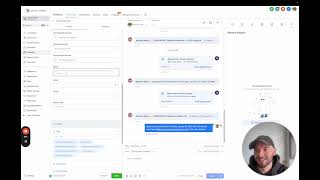
Maxime Warnault walks through a $100 million client acquisition system built in Go High Level, showing how to set up sales and client pipelines, automation sequences for leads and calls, payment processing with Stripe, and reporting dashboards that track everything from ad spend to client onboarding.
Chapters
Alrighty. In this video I'm going to give you an overview of the entire 100 million dollar client acquisition system that I have built inside of Go Eye Level, we're going to talk about the pipelines, the funnels, the automations and all. Everything works together so that you can get clients on demand. So let's get into it. So the very first thing you're gonna see when you log in is a dashboard. And this is where you're going to have an overview of your business, how much value you have generated, the conversion rate on each stage of the funnel, the tasks that you have to do, the people you have to call, and the ads data as well. Okay, so I want to start with the pipelines because that gives you an overview of the lead generation process and the client management process. So let's start with the pipelines here and then I'll go into the website, the the funnels and everything. Okay, so we have a sales pipeline here. All the new leads are going to go into the new leads column. And so that's when someone registers to watch your sales video. Then we're going to have people booking a breakthrough session or a discovery call and then we're going to have people if needed, book a follow up call. If you have a two call close. Okay, if so all of this is done automatically. When people book a call they are going to become come on this column and if the call is qualified they are going to move automatically in the qualified column. If they are not qualified they are going to move here. If they confirm the call or not, they are going to move into these columns. We have no show, canceled, rescheduled and showed. So whenever someone show up for a sales call we are also going to ask you what was the outcome of this sales call? Was it someone that joined using funding that got a deposit paid in to pay paid in full. We made an offer, but we did not close the sale. We did not make an offer because the lead was not qualified or we need to work the lead and book a follow up call here. And the outcome of the follow up call. Okay, and that's going to come here as well. So that's the sales pipeline to manage all of your leads, your calls. And now when you close people they are going to move into the client's pipeline so that you can have a client success system to deliver the same results to everyone every single time. So when someone pay, the second thing that they're going to need to do is to actually sign the contract that you have and then they are going to need to book an onboarding call from the onboarding call, the date of the onboarding call. This is where we're going to start everything. And we're going to move people from week one to week two to week, like however long your program is, week eight or 12. And in between we can add communications with your team to reach out to your clients. So you deliver the same experience and the same results to every client, as I said, every time. So that's all the client pipeline works. Okay. So every time someone registers, there's gonna be something here called manual action to call the leads as fast as possible. So every day you or someone on your team should be coming here and call the leads that have registered to your sales video. So you call them and you say, hey, this is Max. I just saw that you registered for my free presentation on X, Y and Z. I just wanted to make sure that you got access to it properly. And if you're still looking to achieve the outcome that you promise. Okay. And then if they have time now, you can take on the call. But what you would do generally is ask them when is the best time for them to speak and book them into the calendar. So that gets me to contacts here. Whenever you're on the phone with a contact, I would actually have this pulled up. And you can have your sales script in here if you want to to go through the buying process. Okay. So you could have a folder called sales script and you could say, do you have like 45 minutes to talk today? Yes. No. Okay, cool. Like, why did you book the call today? Because I want to. X, Y and Z. Okay, next question. And you can have your, your sales script in here and follow. And so this way you have systemized as well your sales process. Okay, now let's say at the end of the call, this person did not close. You might want to add a task for yourself to follow up with the lead. So follow up and assignee. We're gonna put myself here and the date, we're gonna do this next week, for example. And you can type it here. Okay, so that's a task. Then if you need to book a follow up call or like if you want to take notes during the call, this is where you do it. Insert note. Not here. And if you need to book a follow up call, then you would need to add a new calendar appointment. So you can see everything is done in one place. So follow up, call, follow up. And then you would need to select the date. So once again we're going to choose next week at the same time book appointment. And this is going to book the appointment on the call with the person so you know that they are going to show up. Okay. And it's going to send the email, the SMS to make sure that they show up for their call. Okay. If you need to send documents this is where you're going to do it. If you need to receive payments, this is where you're going to do it. And association is, let's say you're a parent and you have a coaching program for their children. Now what you need to do is to go to object setting to set up a children for the client that you have. And this way you can create an object with the children of your client. Okay, that makes sense. So now when you're on the call we are going to send you an email for all of this but basically we're going to ask you what was the outcome of the call. Let's say this person did a split pay for the coaching program that we have. So the close date is going to be today. So the 16th of January. The revenue is, let's say we have a ten thousand dollar offer and we the split pay. So five thousand dollar cash collected. Okay. So the first payment, the next payment that is going to happen since it's a second, it's a to pay is going to happen on February. We're going to say 19 here and the payment is going to be $5,000. Okay. And here you can add notes to, to the code. If you have like a three pay, four pay, whatever this is where you're going to insert this information. And if you're using stripe, this is automatically going to charge the client credit card so you don't have to chase after your clients to, to pay you basically. So now we have the note. So this is to make the transfer from the sales team to the delivery team to the fulfillment team. So what did you promise on the call to this person? What exactly is the most important to them? What are their problems? The pain points, the risk, the concerns that they have. And like what do you need to say to the delivery team to make sure that this client has a good experience? And then we can send this to a Slack channel whenever we have a new client to make this transition from the sales team to the delivery team. So it, it creates like a smooth onboarding process and everybody knows what exactly are the goals of these clients, the what's most important to them so they can repeat it. And the problems, the pain points, the risk to concern Everything should be written here. If there was a setter, if there was a closer, you can put it here and the client email, I mean it's already here. So I should just remove this field but. And then you hit save and I'll show you what this does. In the automation I went like all the way to the end to whenever you have a client. But I'll circle back step by step to when you have a new lead, new call, etc. So point of sale, as you can see this has been triggered. So this is when you change the sales call outcome to either paid in full, split pay, whatever, then it is going to add a tag to the person. So this, the one that we've done was a split pay. So if I show you the execution log here and if we do this, see contact execution path. So the sales call outcome has changed and it was a split pay. So we added a tag to the lead and we moved this contact to a split pay stage. And then we send a notification on Facebook to tell Facebook you had a new cell. Here's the cash collected that we generated from this lead. Now put it back in your campaign so Facebook knows exactly how to optimize for more people like this one. Okay, that just made a sale. If we go back to the opportunities now we should have a split pay here. So it doesn't show up because the advanced filters are on open but now we should have. Okay, I don't know why it doesn't show up here. Follow up call books. Okay. Because it was already advanced in the pipeline. But splitpay that should be, that should be here. Okay, so I might need to change this order. So you should have all of your, all of your leads here. And it was there because we booked a follow up call with this person. But if that was booked it would not have happened. Okay, so that's all the pipelines work and when you have a client as well, you're going to have to sign them to sign contracts. So here is where you can have your all of your documents and contracts so you can create it the way you want new you can upload a PDF, you can create a new contract and you can sign it, you can have them to sign it and whenever they sign the contract you can select automation to send the onboarding call for them to book their onboarding call. Okay, you can, while I'm here I'm going to go through this a little bit. So you can send invoices as well. When if you want to send invoices, I recommend that you take the payment on the call. And basically what you have to do is to create a product and on the call you drop a payment link with the splitpay. So let's say I'm on the phone with you right now and I would say, okay, go to. I'm gonna send you a link and you're gonna have to pay using the link that I just sent you. Okay? So you send the link and you ask them to fill out their information and they are going to pay. And when they pay, this is when you send them the contract to pay and then the onboarding call to get started with your program. Okay, so you can literally manage everything in one place here in terms of integration, you can integrate Stripe, PayPal, Authorize.net NMI, deposit and square and more if you want to. Okay, so that would allow you to manage literally everything in one place. Take payments, take calls, take, send your contracts, get them signed, send invoices, subscriptions. You can manage literally everything in here. And you don't have to log into Stripe or whatever payment processor that you have. Okay. So now when someone books an onboarding course, so for example, we are still on the phone, we send the payment link they just signed, we can send them the contract to sign. And what we're going to do is to actually book an onboarding call. So now that they became a client, we are going to book an onboarding call with this client. And this is. We can leave it there. And what this is going to do is going to add them to the client pipeline. Okay. So as you can see here, onboarding call booked. I know if we go to the client pipeline here, we can see Maxim 1, who has booked their onboarding code. Okay. When the onboarding code is going to be complete, it's going to move here. And then on the first, on the next Monday, it's going to be week one, week two, and we are going to move people from one week to the other. So you have an overview of where your clients are at and what they need help with. Exactly. Okay. And if this client needs help, you can add some notes as well in here to track. For example, every time you have a call with this client, you can add a note with. So we set up GHL for this client. Next steps, record VSL and launch ads. Okay. So you would come to this client and you would see, we set up JHL for this client. Next step, record VSL and launch ads. Okay, cool. Now everybody on the team knows what's happening with this client and can move on to the next step. Okay, now let me show you the automation so client management system here. So whenever someone books a call, actually let me show you on the code management system. So you can see it's a lead management system is the authority funnel. Call management system is for all the calls and the clients is when someone becomes a client. So because we booked a call, we add this to the onboarding call system. Onboarding code is booked. We are going to wait for the exact time of the call. So I can see I'm here, you can see I'm here. And at the exact time of the call we're going to add people to the client management system. Okay so when we get to the client management system here, this is what is going to make the client pipeline to work. So wait until next Monday to start week one. Okay. And if you want, what you can do is to add a Slack notification to your team and say it's been a week since Max joined the program. Let's reach out to see if I know we can help them to get clear on the offer. Whatever you you are doing in week one then you wait seven days and you go to week two and you can add whatever actions you want or what you're doing on week two. Maybe it's like recording the vsl so you need to follow up with the person and you can add a task here. Task follow up, follow up for PSL and assign to, you can assign to the contact now in one day, in seven days, five days. And you can follow up with this with these people from the automation. So you can have the Slack messages, you can have internal notification for your team to do that. I like to use Slack so it's all in Slack and clients can reach out to their clients. But yeah, you can customize this as much as you want. If you have a 12 week program then you can add more weeks and add like whatever communications you want to have with your clients in here. Okay so now let's talk about the. I'm gonna go to the funnel because that's going to make more sense for me to do it the other way around. Now so we have the authority funnel. So what we can do is like send people to the registration page in here. So this is a simple landing page or what we can do is run lead form ads directly to the training page. So people sign up on Facebook and they are being redirected to the page where we have the, the sales video so they sign up on Facebook. The cost per lead is cheaper. Quality of lead generally Is cheaper as is lower as well. So if you have more budget I would send people to the registration page. If you have lower budget I would send the use use lead forms because the software also integrates with Facebook. So Facebook form. Okay. So the, the page is not connected but here you can connect the lead forms to your account and it's going to add leads and make sure that they get the follow up and everything. Okay. So on the training page what we do here is we have the, the, the headline, we have the sales video and people can book a call right here and there. So if they book a call they can select a date and time and they are going to have a, an application to submit to make sure that they are the target audience and that they have the, the financial resources to actually work with you. Okay, so that's how it works. And then we have a thank you page here where people go to and they have a thank you video. We ask them to add the call to their calendar. If they are using Google Calendar or Apple or Outlook, we ask them to reply yes to their appointment. So otherwise the call is going to be canceled. And we ask them to when they add this to their calendar to make sure that they click, I know the sender to be able to add the call to their calendar. Okay, so that's how the funnel works. It's very simple. Three step process, register, book a call and add to your calendar. Now when people come from emails or if you want to direct people to a to book a call directly, we have this call management funnel. So this is where we have the breakthrough session or discovery call step. So we're going to send people directly to this page to book a call. So this is just a calendar embedded on the page and they can book a call right here and there. We have the exact same thank you page in here with the thank you video with the the call to action to add to their calendar to reply yes and once again add to their calendar and then we have the follow up call. If we need to send people to book a call using a link. But generally you're going to do this on the phone as I showed you in the contact, you're going to book the call for them. And here we have the call outcomes. Okay so one thing we are going to do in the automation is every time you have a call booked, we are going to ask you if the call showed or no showed. If the call didn't show we're going to send follow up emails to get them back on the calendar. If the call showed, however, we're going to send you an email to ask you what was the outcome of the call. Like I showed you here in the opportunity stage, was this funding, was this a deposit, split pay, paid in full, offer, no sell or no offer made. Okay. And you're going to have to tell you for reporting purposes what was the outcome of the call. And when you click on one of the links, this is going to take you to this page here and it's going to be customized based on the call outcome. Okay, so let me go into the automation to show you. Oh, that works. So I'll go from the beginning to the end. So when someone registers, what's happening when someone books a call, what's happening when someone. No shows, cancel, reschedule, whatever. I'm going to show you exactly. Oh, that works. And what is, sorry. And what is happening on each stage. So now we are in the automations. Okay, so when someone registers, they are going to go here, authority funnel number one, registration to call booking someone registers. We try to get them to book a call. Okay. The way we do this is by sending a few emails. So first of all, the first thing we do is we send an event to Facebook to tell them we have a new lead. And it came from this campaign. So the software is going to talk to Facebook. So now you're going to have accurate tracking on your Facebook and your ads can optimize on the right for the right people. We move people to the lead stage. So this one is the new lead. We assign these to a user. So whoever you are, we want to assign every lead to sellers, for example. And then we send email number one. You're in. Very simple email, you're in. You can watch the free presentation here. And this is the name of the presentation and then we sign with the username. Okay, just to show you before I go any further how to edit these emails. So you go to marketing email templates and here you're going to have different folders with the different stages and the different emails that are opening at each stage. So internal notification is for you if you want to, for example, know every time have a notification every time you have a lead. I have created this new lead email to tell you you just had a new, a new lead. You can click here to check who it is. So that's a new lead notification. Now next you have a new call notification. Every time you have a call. If you want to get notified, you can do that here. And I'll show you how to add this in the automations and then we have the call notifications is did the call show up or no showed. This is the like this email here. So it's very simple. I color coded this so they showed up. It's green, they didn't show up, it's it's red and it's going to automatically update the, the call status. So the code is going to go from confirmed to showed confirmed to no show. If the call didn't show. Just to show you here, let's go back to me for example and we can see all the appointments that I've booked. You can see the status for the follow up call is confirmed. Okay so if I edit this to confirm I'm going to say the lead showed. I'm going to save the appointment. Now in the pipeline we're going to move appointment completed and we're going to move to the call showed split pay follow up call. Oh there is not the no show. Yeah because it's on the. If the call showed now you're going to receive another email. Let me go back to the marketing templates. And you're going to receive the second email notification about the outcome of the call. So because it showed now you're going to receive this email asking you was this a funding deposit? Split pay paid in full. So for all the sales that you've made, if you're working the leads to have a follow up code with them that's going to get them in the follow up working leads section and if you didn't make a sale then it's going to get them to the offer. No sell, no offer made in, in here. Okay so based on the link that you click people are going to move from one stage to the, to the other here as I showed you. And yeah that's how, that's how it works. So let's go back to marketing email templates. So I went over the internal notification or all of this is working. One thing as well that is going to be important for you to know is all of these links are not regular links. They are what's called trigger links and this is a link that can trigger an action. Okay so when I click on this we're going to have a trigger link here. And for example this was a split pay. We're going to go to the domain name slash outcome and the outcome is split pay. Okay. And this is going to trigger an automation that. Let me show you code management breakthrough session showed. We're gonna wait for the trigger link to happen and then if the trigger link is SplitPay. Once again we're gonna send a. Notification to Facebook that this was a purchase and we're going to move people to the split pay column. Okay. Based on the email that you just, you just clicked. So there are two ways of doing it. You can either do it from the email that we send you or every time you have a call and you take the calls from the contact section that you update the point of sale to a split pay and then you can have the all the the payment information in in here. Okay. I would recommend this over the email but you can do both now. Marketing templates okay, so let me go into the this email. So we have created five emails follow up for people to go back and watch the the training when they, when they register. So you can watch your free presentation here. Click the link, they go back to the presentation, they can watch, they can book a call. And these emails are very straight to the point. Did you get access? So we send this 20 minutes after and you can update this image to be whatever you want. Just a friendly reminder to check this out. And then we have are you still looking to get the outcome? And this is going to be in your custom values. So I think you get the gist of this. So every time there is an appointment booked these are going to be the reminders to confirm the call to 24 hour before and one hour before. We send emails when someone no shows we can get them to reschedule using three emails. When someone cancel we can depending on the reason. If they didn't reply we can cancel and give their spot to someone else. If they cancel it to generic if they are not qualified. This is this one that is going to be sent. Appointment abandoned is when someone that registers goes to your calendar booking page. So this page here in the call management funnel. But they don't book a call. So you know, they clicked on the link to book a call but they did not book a call. So the emails that we are going to send are going to be the abandoned appointment and we're going to tell them. Looks like you tried to book a call but didn't complete the process. I wanted to personally reach out to see if there was an issue to find a suitable date and time for the call on this call we will and then you send them the link again for them to get them over the edge and book their call. Okay. So as you can see like every step of the way we have something happening to get people on the on the calendar. Now let me show you what's happening in this automation when someone registers to get them to book a call. So what we do is we send the first email and we send an SMS asking them did you get access to the free presentation, yes or no? If they don't reply, we add them to the manual call workflow to call them manually. Okay. I showed you to do that in the conversations manual actions. The entire list is going to be here and you can just click on start now and it's going to start dialing people and you can see what like if people pick up, you can book a call with them to get them on, on a sales call. Okay. So let's go back to the automation and the call booking here. So we send them an email. If they reply and they say I did not get access, we send them the link to the presentation. Okay. And then we move to call them right here to get, try to get them on, on the phone. If they reply yes, I got access, we are going to tell them, awesome, I have five minutes right now. Would you like to schedule a quick call to see if we can help you? And I would add the outcome in here. Okay. To make it more personalized, if they reply and they say if it was negative. No, I don't want to. We add them to the manual call to call them manually and see if we can help them. But if they reply positively. Yeah, I would like to book a call to see if you can help me get more clients. For example, then we have an AI booking bot that is going to check the availability that you have in your breakthrough session calendar and talk with the lead to book them into your calendar. So let's say you have spots available on Tuesday and Thursday. It's going to be okay. Do you want to book for Thursday, Tuesday or Thursday? Let's say Thursday works better for me. Okay. And it's going to look in the calendar, what are the dates and like the times that you have available on Thursday and send this to the client and or to the lead. And the lead is going to go through the process and you can book calls automatically like this. Okay. If it times out, we wait 20 minutes and then we send the second follow up email to get them back to watch the presentation. If the appointment was booked, we wait for a week. Generally we don't have the call for the week and then we add them to the long term nurture sequence. Okay. So then if they did not book the call, then we're going to keep following up with them. 1, 2, 3, 4, 5 and the last email we're going to tell them when you register you get a free breakthrough session. Are you available for a quick chat today or tomorrow? And the same process happens again to try to get them on the calendar. Okay. So that should give you a lot more calls booked without having to lift the a finger. So that's pretty exciting as well. Then we have the manual call workflow. This is what is going to add people to the manual actions here for, for you to call them directly. Okay. Without having to wait for them to book a call. Okay. So that's it for the lead workflows. Now we're going to go into the call management system. So every time we have a call booked, regardless if it's a breakthrough session, a follow up call or an onboarding call, people are going to come here to the call booked. Okay. And this is where we are doing the follow up. So to, to have the reminders. If the call is a breakthrough session though, we skip the confirmation because we want them to reply to confirm the code. Okay. Otherwise if it's any, if it's a follow up call, if it's a onboarding code, if it's a code review directly we send a confirmation, you're booked. And 24 hours before they're going to get an email, 12 hours before they're going to get a SMS, one hour before email and SMS and then 10 minutes before SMS to give them the link and get them to show up. And at the exact time of the call we're going to send you an email asking you what was the outcome of the call. Did the call show? Did the call no show. Okay. And you need to click the link in the email to tell the system if the call showed or no show, then it's going to move them to the respective place. Okay. So if the call was cancelled, we remove them from the other two and then we send an email. Looks like you didn't, the call was cancelled, blah blah blah. And if the call showed or not showed, we move them and we send, we send emails as well in the, in the back end to get them to schedule again. Okay. So breakthrough session is the one that I want to talk about the, the most. So because there are like different things that are happening here because that's mainly the main sales call that you're gonna get. Okay? So here, if someone rescheduled, this is just a simple test to see if this is a second call, if the call rescheduled, then we're going to move this person to the rescheduled and the way we see this is because we should have a tag called breakthrough booked already. Because that's what we do here. If the tag exists, that means this is a reschedule and we're going to add the tag rescheduled and move them to the right pipeline stage. Okay, now here is very important. What is happening here is the qualification process. When someone fills out the application question and they are either qualified or unqualified. So if they are unqualified, that means they are not the avatar and they are not and they don't have the the financial resources to enroll into your program. And in that case we want to not waste our time and we want to cancel their call. Okay, so if this is unqualified, we're going to tag them as unqualified, we're going to move them to the not qualified stage and we're going to send them an email telling them at this date and this time looks like we might not be a good fit to work together maybe in the future if you think that's a mistake like you can book again and we send the same thing via sms, we cancel the appointment and we remove them from the call booked reminders because we just canceled their call. Okay. And then that exits this, this automation. However, if they are qualified, what we do is we tag them as qualified. This is what we're going to use for the reporting as well. We move them to the right pipeline stage. We this is where you can use the new call internal notification if you want to get notified every time you have a call confirmation email. This is where we send them a confirmation email to reply yes to this image. So I put it in red because this is important. What we found is the people who reply yes are pretty much always showing up for their call. The people who don't reply are pretty much never showing up for their call. So we tell them reply or the call will be cancelled. We don't cancel the call for the majority of our clients, but if you're someone spending a thousand dollars a day on ads and you want to keep the spots on your calendar field with the most qualified people, then I would recommend that you cancel all the people who don't reply yes to confirm their appointment. Then we ask them to add these to their calendar and that's pretty much it for this email. Then we do the confirmation SMS as well. Thanks for booking your call. Please reply yes. So we know so it's we know it's really you and otherwise we'll cancel the call automatically if they don't reply after four hours we try to call them and we send them another sms. Can you please reply yes to confirm your call? Otherwise I'll be forced to give your spot to someone else. And if they don't reply, we don't do anything here. But if you're as again as I said, if you're spending a thousand dollars a day on ads, you might want to cancel these calls to free spots on your on your calendar. If they reply, then we get them to the confirmed stage and otherwise we get to no reply. Okay. When they reply and confirm then we move them to the confirmed stage. We send an event to Facebook to optimize for these people to have more of these people. We confirm the appointment and we ask the closer to send a personalized video to this client to tell them that they are excited to talk to them and introduce themselves and and things like that. Okay, so put a face to their name and then notification send the video to the client and we have a task as well to to do that. Okay. So that's for the call booked. Now if people cancel you can see we move them to the pipeline. If people no show, we move them to the pipeline. If people show, we send you an email asking you what was the outcome of the breakthrough session and move people accordingly to to their respective outcome. Okay so I'm actually going to remove this here because we have it when the the stage change. We have it already in another place. So I don't want to be redundant. Yeah, perfect. Cool. All right. So now abandoned is when someone goes to the the page. They did. They went to the page but they did not book the call. We know because otherwise they would have the call breaks booked. Then we email them get get back to the the calendar. Get back to the calendar and then we chat with them to see if we can book them here and follow up with them with two other emails. I think that is pretty much it. So we covered the dashboard to show to see all the data of your business all in one place. The conversations where you can see all the conversations we you have with your leads manual actions to call the leads. The calendar. The calendar. I didn't talk too much about the calendars. So if we go to the calendar settings we're going to have four different calendar. So the main one is going to be the breakthrough session or the discovery call. When you book a sales call then we are going to have the follow up call. If you have a two call close then we are going to have the onboarding call for all of Your clients and then we have the call with your name if you want to. It's more like a personal calendar. You can create as many calendars as you want for your yourself or your team members to for one on ones. For example, if you have that in your, in your program. Okay, so that's the, the calendar. You can see all of your appointment by people on your team as well. You can see all the appointments that have been booked. Onboarding call, follow up call, the sales call here and you can see what was the, the outcome of the call etc, then we have the contacts. This is where you're going to manage all of your contacts in one place. You can create smart list. You have all of your leads, all of your calls booked, all of your clients if that's something you want to do. So you would do this in here. And let's say we are going to have sales call outcome. Actually we're going to do tag and we're gonna do sales deposit funding. Funding paid in full split. So these are all the clients. Okay. And we would have this, we would save this as a smart list to be our clients. Okay, I'm not gonna do this but I just showed you how to, how to do that. Okay. So that's pretty, that's pretty much it for these opportunities. I went through this. Payments, I went through this as well. Marketing, I went through this. But I didn't show you the SMS side of things. So we have snippets here so that are organized in folders. So registration. When people register, we send them 2 SMS. When an appointment is booked we have 5 no show 2 cancel 2 abundant one one. So let's say for example cancelled edit snippet didn't confirm your call. So we've been forced to give your slot to someone else. You want to reschedule, click here. Okay, so that's how it works. When someone no shows. For example, we can edit this. Actually I need to change this to be a custom value. So that's a good way to actually show you how the custom values work. Looks like you missed your appointment earlier. And then we're going to use a custom value here with the marketing outcome that you have. So when we set up the software during the onboarding call, you're going to have a question to answer. I teach people O2 and this is going to be the answer to this. Looks like you missed your appointment O2 potentially get more clients. Something like this. Okay. So now it's going to automatically update to all of the sms. Okay. Call booked. Cancelled. Okay so that's the the way snippets work. You can have countdown timers, trigger link. I mentioned this when. Oh it works when you have a call showed. No showed when someone unsubscribes when people click on the link to book a call but they don't book a call and the the call outcome here as well. Okay so you can have an affiliate system if you want to have affiliates for your program. You can create campaigns for and get affiliates to promote your business. What else Automations I went through pretty much all the automations long term neutral sequence is where you're going to add your emails so follow up emails to. It's done. So this is where you're going to have your follow up emails to follow up with your leads in the long term. Okay so let's go back call management. I showed you everything in in here we have the breaks, possession, the follow up call, we have the onboarding call and we have the notifications for all the calls in here sites. I showed you as well the authority funnel, the call management funnel. I didn't show you the website. So you have a mockup website here that you can use. We are mainly using it for the privacy policy terms of service. You can have a newsletter. So this is a template website that you can use to attention target audience. We're going to put the authority video that you have here and then you can change all of this with yourself, with your team, with the client results that you have and sign people on on the newsletter or to watch your your free presentation. Okay. Then you have stores if you want to have an e commerce store this is where where you can add this. We have webinars to have a webinar funnel. We have the analytics you can filter based on specific funnels e.g. page view, opt in sales opt in conversion rate. So you can see the overview of all your funnel is working. You can have blogs, you can connect your WordPress website if you have one. Client portal is where clients are going to have access to their invoices to pretty much everything they do with you communities and subscriptions. And all of this is going to be on the client portal. Forms is where we set up the registration form, the application form. It's like a one time submit for people to give us their information. You can have forms for your clients as well to move them. Let's say at the end of each week you want to have them fill a form to tell you exactly where they're at and what they've been working on that week or NPS score to get data back on your, on your business, these kind of things. That's where you can ask people's information. Okay, so registration form just to show you quickly. All these work. So we have name, email, phone number, very simple. And you can have the options here on submit you redirect to the training page and we can have the Facebook ID and everything Application form. This is going to be embedded on a calendar and you can add more fields here. So I have another video that goes on how to do that. Then we have survey if you want to survey your, your customers. So the difference between forms and surveys is that form is like just one big form and survey is more like step by step question. Step one, question one, step two, question two. So that's how surveys work. And if you want to have a quiz funnel, I would do everything in the surveys. I think like the quiz functionality is new, but it's not there yet. Then you have a chat widget for your website to generate leads. You can create QR codes based on the link. Let's say you have a presentation and you want to make a QR code for people to sign up for your free presentation. Then you would come to sites funnels authority funnel and you would use this domain and you would go to QR codes. Create a QR code. Authority funnel. We're going to send people to a website. I'm going to click on next and the website is going to be this slash. Registration. You can select the color that you want and save the QR code. Okay. And it's going to appear here. Next up we have the membership. So once again, client portal. This is where clients are going to have access to. Let me see if I can show you here to their bidding information on their subscriptions, their affiliate earnings, their invoices, their contracts, subscription, as I said, bidding. So they're going to send you a code. You can manage your subscriptions in here. Certificates, social media. This is their account on your community. All the courses that they have access to is going to be in the client portal as well. If you don't have a community but just courses, this is where people can see their courses in here. So basically the client portal is where you send everyone to manage their subscription, their contracts, their invoices. Everything is here in one place. Okay, then you can create a community. So you should have a basic community that I've created for you. So let me show you what that looks like. So we have the community here on the left. You have the home which is all the channels that you have access to. And you can also have access to specific channels. So you can see announcement is going to be the main community where everything is happening. And then we have this one coaching clients, which is private. So you can create a community in public or private channel. Okay, this one is private for your clients. So only the people in this channel are going to have access to this, the conversations that are opening here. So if you are in both in your home, you're gonna see both here. Okay, so learning I created here if I go to courses products. I have created a mockup coaching program for you. So we have eight weeks and you can see. So this week one is published only and the rest is not published. So this is just a mock up for you to have your in here. Let me show you how to edit this. So you have the main. So you can add a program structure, you can add a category. So this is a week. Or you can have add a lesson. Okay. So the category, you can add an image, you can put a description and then the category has lessons as well. And on the lesson you can add a video audio, you can add text, you can add a video thumbnail, you can attach files if you want your clients to download files. So you literally can do it all in one place. So let me show you all that looks like on the community side or even on the course side, you would have access to the course like this. So the coaching program, week one, let's go to lesson one. And if you have a video in here, this is where the video would pop up. Okay. I don't know why it's not loading. Okay, coaching program, lesson one. Okay, so I didn't added anything in here, so that's why it looks, it looks blank. But if you had a video, you would have the video here. Boom. Market as complete. And go to the next one, go to the next one, go to the next one. And people would come here, go back and discuss whatever they found in the, in the course, ask you for feedback, whatever. If they are the coaching clients, this is where they can talk specifically about the coaching program, meet other members. Events. You can create events only for people in a specific channel. So let's say all members in a private channel at a specific level of a specific course. So we're going to say coaching clients only have to access to the Q and A. Okay. So you have everything in, in one place in, in here you can have certificates, these kind of things. So I'm not going to talk too much about this it's pretty advanced media storage. This is where you're going to store all of your images, your videos, your audios, all of the files like lead magnets that you want to, to add here. This is where you're going to put it. And if you want the link, you right click get links. It's going to copy the link and you can access this and share access to anyone. If you have, let's say this is your lead magnet. You will copy the link, put this in your email sequence to deliver the lead magnet and people can have access to it automatically. So next we have reputation. This is where you ask for testimonials. You can do this on Facebook, Google, I think that's pretty much, pretty much it. And you can send SMS, email, WhatsApp to get people to review a review. You can embed the review listing is everything if that's something you want to do. Then we have the reporting custom reports. You can create your own reports. Facebook ads report. This is where you're going to have the Facebook ads reporting. You can see all of your campaigns. You can go into the campaigns to see the impressions to click the conversion rate on each stage, attribution where people came from. For the majority, the call reporting. This is going to be the manual actions happening. How many people pick up the phone when you call them. And then we have appointment reporting to see how many calls are booked, confirmed, cancel new showed, no showed, etc. So this is what you're going to use to, to see if the call show like your show up rate, these kind of things, top five appointments owners. So this is the reporting for, for the calls you can specify to one calendar and the date, blah blah blah. Okay, so you get the gist of this app marketplace. If you want to install other apps, the mobile apps. If you want to have a mobile app for your community and for managing your, your business on the go, I would highly recommend that you do this. If you have an iPhone, click this link. If you're Android, click this link and it's going to allow you to download the lead connector app to stay on the go and improve your response rate for your leads, your calls, your clients literally manage your entire business in one place from the, from your finger. Okay. And you won't have access to this generally. So that's pretty much it. And then all of this here, the business profile. So in, in the settings, let me just go through it quickly and then we, we can end this video. So this is where you're going to basically have your entire Settings. So here, this is very important that you fill this out for when we get to the phone number verification. You need to have your business profile filled with all of the information. So the general information, this should be filled out. Business physical address. This should be filled out. The authorized representative should be filled out. Your business information. The LLC that you have, that should be filled out as well. You should have a voicemail added here as well. And these are the settings that are by default. You should generally keep them as the default. Billing is to manage your billing. So you will see your subscription, your credit card. You can change your payment method and everything in here. My staff. This is where you add new team members, opportunities and pipeline. Don't care too much now if you have a pipeline that is not working, you can email people to go ahead and fix these workflows. Calendars. This is where you manage all of your calendar. Your availability for the entire team, the connections that you have for your calendars, video conferencing, these kind of things. Preferences for the calendar to start on Sunday, blah blah blah blah blah. The availability and the proper calendars as well. Conversation. AI is like bots that talk, for example. Customer support, booking bots, these kind of things. This is where you're going to have it. AI agents is to get AI to talk to your leads that are calling you. Email services. I go through this on the. On the onboarding section. So this is going to make sure that you have a dedicated sending domain for sending emails and making sure that they land in the inbox Phone numbers. This is where you're going to have professional numbers to reach out to your clients. WhatsApp if you want to use WhatsApp for the business, you can sign up here. Objects. This is the what what I was referring to. So if you're a parent and you are teaching their children to be more confident or something like this, you can add a object to be a contact and make an association from the contact to their children. For example. This is how you do this. Custom fields. I didn't talk about this. This is pretty important on for example, the application form, you can have your sales script in here as well. So application form. This is where you're going to see all the answers for all the leads in one place. Point of sale once again here. And yeah, if you want to edit your application form, this is where you're going to do it. I have another video going over this, so I'm not going to go into too much details. Custom values are snippets of codes that are going to be used everywhere on the website. So for example, your Facebook Pixel id instead of always having to go to Facebook, now you can just copy and paste this thing. And if you change, if your Facebook ads account is band and you change your Pixel id then all you have to do is change it here and it spreads to all of the different places. So domain name, you should only have one domain name for everything. And we can connect the authority funnel, the color management funnel, the website, everything in to this one domain. So that's basically how it works. All the informations that stay the same should be a custom value. Okay, so the pre headline, the headline, the sub headline, the authority video, the thank you video, all of these are things that stays the same and if you add them in multiple places now you have one place to go to to change all of these different places. Okay, so that's the purpose of the custom value scoring is actions people take on your email. If email opens, we add a point, blah blah blah domain. This is where you can purchase a new domain, which I highly recommend that you do when you sign up for the software because everything is going to be managed in one click instead of having to. If you've ever set up DNS settings, you know how much of a nightmare that is. And by purchasing a new domain in here, you won't have to do anything. Literally just one click and it's done. URL redirects is where you can redirect people to. So for example, like this example what I've done is I redirected the calendar so call with first name. What I've done is I came here, share the link copy. So this is very odd link to remember. Now if I go to URL redirects I use client app first name. This is going to redirect to this entire URL. And it's very much easier to remember when you have just a domain, something to get people somewhere. And generally what I use this for is like affiliate links. So let's say you have an affiliate link for clients on demand. You would have your domain name.com/cod. And now every time you want to refer someone to clients on demand, you, you send them the email/cod integrations. This is where you can integrate your Google accounts, your Facebook accounts, Stripe Account, Slack account, TikTok, LinkedIn. So this is more for like lead forms as you can see here. Just like Facebook private integrations. I never use this conversation provider, I never use this tags. That's all the tags that people are going to have based on the actions that they take on the. With your business labs, this is where you can turn on different things to. For new feature that the, the software is working on. So new color picker, blah blah blah. You can turn all of this on if you, if you want to confirm. And now you have like all the latest feature available to your account. Okay, so audit log, everything that's ever happened to the account is going to come here. Brand boards, this is where you can select your logos, your colors, all of these, all of these things. So here you can see we have the logo, the colors, the fonts, everything. So everything match from all the different places using the brand. And then we have companies. So you can allow people to create companies for a contact. So if you are working with big companies and you have the leads to be like linked to a company, this is what you're going to use here. So if we go to contact this you can see here company and you can add a company to this lead. That and multiple leads can have one company. So I think I showed you pretty much everything I could show you. Let me know if you guys have any questions and don't forget to like subscribe if you like this video and I will see you guys in the next one. Peace.
More from Maxime



I was talking to one of my clients' husband today and she's very not tech savvy and her hu
Most of the time we undercharge in the marketplace because we feel we do is not valuable e
