Patrick Moran, Sr Talent Sourcing Manager, BAE - Sourcing cleared candidates
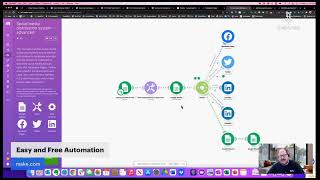
Shally Steckerl walks through Make.com, a free automation platform for recruiters. It connects LinkedIn, Slack, Google Sheets, Greenhouse, and dozens of other tools without coding. The free tier includes 1,000 operations monthly, with paid plans for heavier use.
Chapters
Hey everybody, welcome to Shally's Alley. It is Friday, March 11th at 1:03 PM. You got just me today, I don't have any guests. I just came off of SourceCon. SourceCon was a couple of days and I was really honored to be a participant in it. I'm not gonna, I'm not going to share any of the secrets. You can watch the recordings and catch all that on your own, but it was a pretty good event. One really interesting thing that I saw there is there were at least 14— I think 1,400 applicants— not applicants, 1,400 participants. That's the last number that I heard, 1,400 participants, and 78% of them, it was their first SourceCon. So that's a lot of new people joining, I don't know how long they've been in the industry, but joining the community and so on, or at least participating for the first time. That's quite a bit. That's a huge number. It was a fun event. Definitely had a great time and I think you should check it out. Anyway, that's my plug for the day. I'm not big on plugs. Today, I want to talk a little bit about Automation. Yeah, I know it's, it's a, it's a topic I covered a lot in the past, but honestly, you just can't automate enough, right? I mean, you can automate too much, but you can't automate enough, you know what I'm saying? There are lots of things that we do during the day that are tedious tasks that are time-consuming or boring or just generally, um, you don't want to do. Right? So, but you have to do them, you know, everything from tracking to things like copying and pasting, you know, and so on. In the past, I did a lot with Microsoft Power Automate, and I got a few people that, that said, hey, Shelly, that's all fine and dandy, but what if I am on a Mac? Or what if we use Google instead of Microsoft. Instead of Microsoft 365, we use Google Apps, for example. So I got some of that, questions like that, and I thought, you know, that's fair. Let me start investigating. And I did. I spent some time. As you probably already know, I don't like to talk about stuff that I'm not familiar with and that I haven't tested myself and that I know it works. So I'll be talking a little bit about this new kind of automation that you can, you know, DIY basically using a tool that you might be familiar with. It used to be called Integromat. It was formerly called Integromat, but it is now called Make, M-A-K-E. That's make.com. What I really like about this, first of all, number one is it's free. Now there are paid tiers. The free tier is kind of the starting tier, but there are paid tiers that have extra features. For example, for $9 a month, you can get more transactions and you can have access to API endpoints. Specific API endpoints. It also increases the number of operations per month. The basic free account already includes 1,000 operations. So think of adding something to a spreadsheet as that's one operation. Now if you're going to do something where you're going to add 1,000 things to a spreadsheet every month, then that's where you're going to need to go Pro. But if you're only adding 20 things to a spreadsheet, that's only 20 operations a month. So you actually can do a lot with the free version, it also includes over 1,000 apps, custom apps, unlimited users, and so on. So really, the, the reason to upgrade is if your operations are more than 1,000 or you need access to these API endpoints. And then there's a few other tiers after that. But what I'm telling you is that it is free to use the basic account. Again, that is make.com, M-A-K-E dot com. So That's why I really like it. I also like it not just because it's free, because it has so many different applications that are built in. You might be familiar with the old If This Then That. Well, this is like If This Then That, but the difference with this is that, um, with If This Then That, there's one if and one that. If I'm not sure if that makes sense, but like if something happens, then do something. Like if a message comes in, then forward it, right? With Integromat, now Make.com, there are multiple that's. You still have to have one trigger. That's the if. So the one trigger is when this happens, or if this happens, let's say an email comes in, then you can do other things. But the ability to create multiple workflows or chain workflows is built into Make.com with the free account. This is not something that you can do with If This Then That. If This Then That still has a free account, but it limits you to only a few apps and it doesn't have this other capability. So for example, with Integromat or Make.com, you can have something that is triggered like an RSS feed. A new post comes in the RSS, you can have that post distributed to LinkedIn and Facebook and Twitter and so on, or go into a spreadsheet or an Evernote and these things, I shouldn't say or. So it can do multiple things, it can go into a spreadsheet and then it can go to these other places, it can be translated into another language and then, you know, and so on, so multiple features like that. Somebody on LinkedIn commented that they are not very comfortable with AI because it takes away from the relationship building. So, uh, to that I say, John, I'm with you, but I'm not talking about AI. I'm talking about automation, not artificial intelligence. And in this case, it's basically— think of it as like the tedious things, you know, the same kind of automation that you already have in your house. There's a lot of things that you automate. Your garage door is automated. That means that it used to be, if you had a garage and it had a door, you would have to like lift it up and then push it down. Now we have a motor that lifts it up and puts it down. That's basically what I'm talking about here. It's little engines, little robots that are not intelligent, but they help us put something here, take something there, change something, etc. I'm going to give you a few examples so you know what I'm talking about. But I'm with you on the whole replacing relationships. That's not something I want to— I want to see machines replacing the relationship-building part of recruiting. I'm not sure that's going to go over pretty well. They're like, Hello, I am your recruiting robot. Can I tell you about my position that is open? Click here now, apply. Yeah, I'm not sure that's going to happen. I'm exaggerating a little bit, but so back to Integromat and why I absolutely love it. Once again, Make.com. I keep saying Integromat, but it's Make.com. Makes me think I probably should put that into the actual chat here. So let me go ahead and add that in the chat— or what I mean is in the captions. So it's make.com, and there it is. Okay, now I don't have to keep repeating it. There we go. So back to what I was trying to say about make.com. There are a number of built-in apps. That's apps that once you sign in, they are basically ready to go. These apps are things that allow you to manipulate CSVs, comma-delimited files, basically native to the application. RSS, reading and publishing RSS. JSON, if you process any JSON files. There's also built-in apps for Apple iOS, like push notifications. There is a phone number built-in app that allows you to manipulate phone numbers. There's a secure FTP if you need to upload files to somewhere, like wherever you wanna take a file from an attachment, perhaps in an email, and then put it in a folder for your ATS to absorb or inhale. That would be an SFTP. And then all kinds of webhooks. I'm not gonna list all 33. You can go to the website and figure it out. But these are the kinds of things that are of interest to me is being able to do things with CSVs, with RSSs, with iOS, etc. Then there's also families of apps. For example, there are LinkedIn, Twitter, and Facebook. With LinkedIn, you can do something like RSS to LinkedIn. With Twitter, you can do Twitter to LinkedIn, or you can do RSS to Twitter and LinkedIn. With Facebook, the same thing, and there are also Facebook ad campaigns you can actually do a Facebook campaign that converts into a LinkedIn lead. If you, for example, use LinkedIn Sales Navigator or LinkedIn Recruiter Lite. So that actually is pretty cool. Slack, if you're a Slack user, I am a big Slack user and you can do Slack to LinkedIn notifications. You can do, there's a lot of already built in. I don't know if you know about the notification, I mean, not the notifications, the automation that is already built into Slack. It's called workflows. For example, on one of my Slack channels, I have a daily poll that every morning at a certain time pops up and asks some questions to everybody on that channel for them to put in. It's kind of like our little daily check-in. It's mostly for fun and to keep us informed, and, you know, who's in today, who's out today, that kind of thing. But it's automated directly through Slack. Workflows. Well, with make.com, you can now use that and then connect it to something else that might not even be connected to Slack. For example, Slack to Gmail, um, Gmail to Slack, Slack to Airtable, and so on. Telegram, SMS messages, etc. There's also Evernote. Now you guys know how much of a big fan I am of Evernote. I mean Seriously, I'm probably still the only recruiter that is certified as an Evernote Certified Business Consultant. I don't know if they still have that program, but, um, so definitely a big fan of Evernote. What can you do with that? Same thing, you can post things to or take things out of Evernote. Can be the trigger, so when there's a new note, it can go somewhere, or, um, it can be the receiving end of that. So when something happens like RSS to Evernote, Trello— Trello— Trello to Evernote, or Evernote to Trello, for example, Facebook and Evernote, Slack and Evernote, Google Tasks and Evernote— the list is pretty large. Besides Evernote and Slack and LinkedIn and Twitter and Facebook, you can also do some automation with Zoom if you use Zoom meetings a lot. or likewise, if you use Google Meets, same thing, Zoom and Google Meets, they have both have built-in automation, such as generating Zoom links from a list of registrants or Zoom notifications in Slack or Slack notifications in Zoom, et cetera. Airtable to Zoom, Calendar to Zoom. Of course, the same thing applies to Google Meets. Talking about Google Meets, there is a family of Google apps as well. There are 33 Google apps. That are built in, um, or that can be integrated. That's, of course, Gmail and Google Drive. That makes sense. But also Google Forms. When forms are completed, it can trigger tasks just like I showed you with Microsoft Power Automate. The same thing where you can have a form that activates an email, a form that activates a row to a spreadsheet, a form that sends a Calendly request, for example. There's Google Calendar and Calendly also There's Google Meets, just like Zoom, Slides, Google Docs, Google Sheets. You can add rows to Google Sheets. You can query a Google Sheet and so on. There are 19 Microsoft 365 apps as well. As you can imagine, Google Sheets, there's also a Microsoft Excel. There is a Microsoft Docs. There's Outlook email essentially. And I mentioned Calendly. But here's where it starts to get interesting. Get this, Greenhouse. So there's actually 5 or 6 ATSs that are automated, uh, in, in Integromat— or sorry, Make.com. And I'm sure they're adding more, but Greenhouse is one of them. Interseller is another, uh, BambooHR and Zoho Recruit. And I forgot what the other one was, was it's already there. All the other ones that have webhooks can also be integrated, but these are ones that already have defined tasks in them. So if you use an ATS that I didn't just mention and that ATS supports webhooks, then You can do that, convert from form to CRM, form to ATS, etc. So I was pretty impressed by that. But you want to know what else I'm pretty impressed with? Swordfish. That's right. As a matter of fact, Swordfish is the reason I actually started looking into Integromat, because there is a Swordfish integration for Integromat, and I wanted to be able to enhance contacts with Swordfish. So Make.com has a built-in Swordfish connector. So you can do a few things with that. There's also HubSpot. If you use HubSpot, there's a lot of connections. I don't even know how many connections or, um, different kinds of HubSpot features there are. I think I— last time I checked, it was about 200 different templates or connectors. Now, just because they're a template already made doesn't mean you can't create your own. Meaning, if you go on to make.com and you look for, let's say, Gmail and HubSpot, it'll show you templates that other people have already created. But you can still create your own template even if one doesn't exist, if both of the apps are available in make.com. So if there's HubSpot and Evernote, that means you can make a HubSpot Evernote connection if one doesn't already exist. Uh, Dropbox, of course. Trello, I've already mentioned. Discord— those of you that have been trying to Automate Discord. This one's a tricky one to automate in other ways because, um, it's, it's a lot more complicated since you have to be logged into it and go to the right channel and so on. So I'm pretty impressed that you can do some automation, some basic Gmail to Discord, Discord to Gmail, Discord to spreadsheets, etc. Chatbots. We talked about programming chatbots before. Well, you can actually program chatbots directly in Make.com. For example, Mailchimp to chatbot can create a chat based on a subscription. Somebody subscribes to your Mailchimp form and kicks off the chatbot. That's pretty cool, right? You can do Chatfuel and Wix as well. These are, these are chatbots. There are dozens of SMS apps, texting apps. There's, there's actually probably more than a dozen. I was looking for a couple that I would recognize, and Twilio and RingCentral are both built in. Easy breezy. I know Twilio, I know RingCentral, not a problem. There's also one called Burst SMS, which you can actually send burst SMS from Google Sheets. You can automate sending SMS from Google Sheets. Imagine that. So you can have a form that enters somebody into a spreadsheet, and then that sends out an SMS. Or you can have some sort of workflow that if somebody meets a certain threshold of however many times they did something, then they get a message via SMS. Or they— after they get an email, if they reply to the email, then they get an SMS, etc. I mean, the sky's the limit. You can imagine so many different things. You can convert files, doc to PDF, etc. You can transcribe with online transcription services. So audio, basically audio to text, or essentially speech to text, basically is what I'm saying. I don't know if I found any text to speech. I didn't look for that, but I did look for speech to text and I found a few in there. So that's something else I look forward to playing with. And NLP, there's a lot of NLP. That's the text analysis, things like sentiment analysis, right? You can do sentiment analysis through a couple of the available services like Google definitely has one. So you can do sentiment analysis on Twitter tweets or use the Google Natural Language Processing engine to analyze tickets that are coming in on Zoho or to analyze applications that are coming in on Greenhouse or whatever. This is, this is all, you know, theoretical. I haven't actually done that because I have, I didn't know that this was a capability of Make.com until very recently. And what's the last thing? Oh, and there's a, there's actually a project management tool called ClickUp that is free. It's, it's also free forever. And it's one of those kind of all-in-one apps. It has collaboration docs, it has real-time chat, it has Kanban boards— think Trello, basically— it has time tracking, video recording, etc. So if you wanted sort of like a team collaboration app for a small group and you didn't want to buy something, ClickUp has a lot of features that are free. Combined with Make.com, which is free, you now have basically project management. And with that, you can connect with your ClickUp, you can connect to pretty much all these other things that I've been talking about. So that's a lot to process. And, uh, you know, I'm just— I'm gonna be working on these, playing around with them. The first one that I did is an email to Google Sheets, and the one that I'm working on right now— let me show you this. Actually, I'll share my screen real quick so you can see. I just started, so it's not finished, but I wanted to share with you so you knew what I was talking about here. Share screen, all screen. All right, so this is one of their, one of their, they call advanced templates. It's a template. I did not make this. This is a free template, and what it's doing is it is gathering rows from a sheet and then it is pushing those rows out to a variety of destinations. So this is the router, essentially, is basically not not a hardware router, but like a feature that's one of the built-in apps. So when it gets these, let's say, scheduled posts you have in your Google Sheet, a bunch of posts, it will then, as one is added, it will then push that post out to a Facebook page, a Twitter feed, or your Twitter channel, as well as LinkedIn, as a text post, and additional processing on, on Google Sheets. So this is the one that I've been working on most recently. You can see what I mean by the multi, you know, if, if then multi that's, that's what I'm talking about here. Imagine if instead of social media posts, these are other tasks that you normally would need to do, such as from a Google Sheet into Greenhouse, or from Greenhouse into a Google Sheet, or, you know, etc. I'm pretty sure you get the point there. So that is pretty much all I got for you today. Let's see if we have any— oh, we got a couple of participants there. Is Make classified as a low-code, no-code platform? Yes, exactly, it is a low-code. In fact, I, I don't think there's any code in any of the things that I looked at. You probably can modify the code if you want to, So it would be a no-code platform, um, but if you, you know, had some advanced things where you might need to modify the HTML or something like that, you could call that low-code. So absolutely there are other vendors such as Creatio. Yeah, so there's, there's Zapier, there's others out there. Some charge, some don't. What I like about Integromat is it's the variety and the free level is pretty powerful. So the, the The free tier has more than 1,000 connectors already, and it supports 1,000 triggers, or what they call operations, in one month. That's a lot, way more than this and that. I don't know how much the other ones do, but I'm kind of going down this road because I spent so much time with Microsoft Power Automate, and I didn't really give a lot of love to the Mac and Google users of the world. So I'm kind of going this route, investing in it. But yeah, there are definitely others out there. Yeah, future editions, definitely. That was another one I'm going to dive into. I, um, can show you the Google Sheets one right now, but it's a, it's a basic template. And what I need to do is, to be honest with you, right now the ones that I have are proprietary, as in like it's got company information in it, so I can't put that on the screen. What I'll do is I'll create a you know, clean version that does the same thing but is on my personal Gmail account. So there's no, um, you know, no proprietary information in there. And that's actually what I'm working on. So I'll be doing that with Google Sheets. You know, if you're, if you're watching this, post on the chat right, right below the video. Just post what kind of integrations you want. I mean, what apps, right? Um, just tell me the apps. If it's— let's see, we'll, we'll go over them again. It's Google Apps, so Docs, Excel, Google Sheets, Word documents, you know, that kind of thing. So we got documents and etc. LinkedIn automation, Twitter automation, Facebook automation, Slack, Evernote, iOS, Calendly. Did I tell you about that? Yeah, there's a Calendly automation. That's pretty cool. Greenhouse, Swordfish, HubSpot, Dropbox, Trello, Discord, all the SMS ones. Um, I've, I've got RingCentral and Twilio, so those are the two that I can test. But there are actually some free ones, so if you know of a free one that you're using, put that on there. So just vote under, under the video here. Go ahead, take a moment right now and type in which of these would you be interested in me kind of diving into and showing you in Make.com. Which category, and if you wanna get into specific details, that would be great too. But, you know, spreadsheets, documents, social media, calendaring, data enrichment, file transfer, file modification, whatever you wanna call it, you know, Dropbox and attachments, etc. SMS, natural language processing, I'm probably forgetting something. What are those? Go ahead and post and I'll take a look at it. So once again, that is make.com, and this is completely free, just like my podcast or broadcast or whatever you want to call this. If you want to come on the show and be side by side with me here and actually walk through one of these activities, mention that as well. I am more than happy to do live examples most of the time I, I just kind of run out of ideas on what to do. And most of the time I'm showing you something that I'm actually doing at work. So, um, if you're doing something at work, let's work on it together, right? Why not? So that's it for this edition of Shelly's Alley. Stay safe, everybody. I hope you are well, and we will see you next Friday with some more ideas and some deep diving into Make.com. Bye, everybody. Take care.
More from Shally



Scaling Talent at Hypergrowth: Leadership, AI, and Hiring Excellence with Cindy Nicola